Search Archive

Red Theme Download?

By JLEA · May 08, 2009in Hacks/Mods💬 131 posts👁️ 16,183 views
Page 5 of 6
Posted May 25, 2009 · 03:01 UTC#101
Hey guys, this red theme looks awesome. I have a F700BT that would look great with this theme. Can someone tell me the installation procedure and where I can download it. I am new to this, but I am very tech minded, so any help would be appreciated. Thanks

start reading the hacks thread

Posted May 31, 2009 · 13:15 UTC#102

hey just wanted to let whoever has not heard know that the red theme is officially done!!!! special thanks to superman for an amazing job. you can find the theme in his post called RED APPLE NAVI. again an unbelievable job by SUPERMAN check it out you, won't be disappointed!

Posted May 31, 2009 · 17:08 UTC#103
hey just wanted to let whoever has not heard know that the red theme is officially done!!!! special thanks to superman for an amazing job. you can find the theme in his post called RED APPLE NAVI. again an unbelievable job by SUPERMAN check it out you, won't be disappointed!


hahaha shes all excited about this. i know cause shes been PMing me about it while she was away on her trip and when she got back lol =p


yeah the link can be found here :http://avic411.com/forum/viewtopic.php?f=34&t=24440&p=165961#p165961


and basically its the image.res file some of you may have downloaded plus the navi settings, history, and favs... complete with puffy buttons and red boxes for GTImatt and CMH data.zips. Or even without GTI or CMH's.


if you try it out, let me know how you like it, and even post up pics.

Posted Jul 04, 2009 · 13:33 UTC#104

Looks like multiple links for download, which is the latest and greatest? please post link for download, thanks!

Posted Jul 04, 2009 · 14:05 UTC#105
Looks like multiple links for download, which is the latest and greatest? please post link for download, thanks!

Looks like his files have been taken down. You will have to ask him if he still has them somewhere.

Posted Jul 04, 2009 · 18:22 UTC#106
Looks like multiple links for download, which is the latest and greatest? please post link for download, thanks!

Looks like his files have been taken down. You will have to ask him if he still has them somewhere.


Anyone mind uploading their copy for download somewhere?


THANKS!

Posted Jul 05, 2009 · 02:32 UTC#107
Looks like multiple links for download, which is the latest and greatest? please post link for download, thanks!

Looks like his files have been taken down. You will have to ask him if he still has them somewhere.


Anyone mind uploading their copy for download somewhere?


THANKS!

I would, but I don't have it anymore. I couldn't get used to the red.

Posted Jul 05, 2009 · 13:58 UTC#108


Confuseed... what do the blog URL's you posted have to do with it? Do you have a download link?

Posted Jul 05, 2009 · 14:50 UTC#109

They don't - looks like that user has posted blog links for every post made on different topics.


(if you pull up all posts by that user)


Very useful stuff :D


~Ben

Posted Jul 05, 2009 · 17:36 UTC#110

Another user was kind enough to provide a download to the files for me. All is good!

Posted Jul 05, 2009 · 19:06 UTC#111

I started with a stock f90bt, updated successfully the image.res from the "fireworks + red" image posted here:

(viewtopic.php?f=34&t=24440)


That worked great.


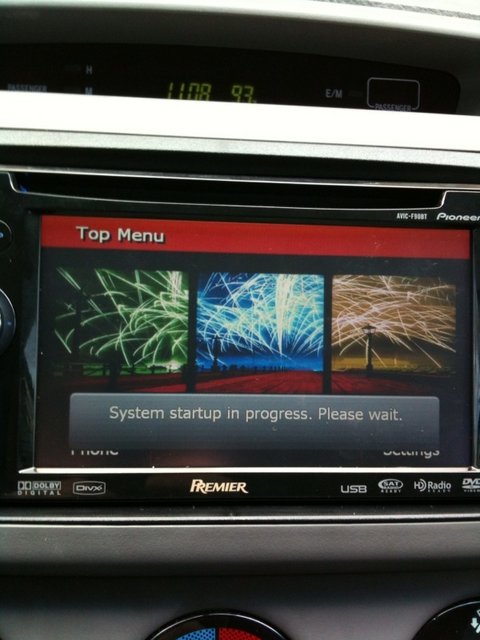
When I went to replace the data.zip from the "NAVI SETTINGS ONLY" data.zip (from the same link above) with the one on the avic at "myflashdrive/apl2/igo", the file copied over fine, but when I reboot, everything works fine until I reach the "System Startup in progress. Please wait" screen. It's just hangs there then reboots itself after a minute or so, then continues this loop.


I ended up loading the GTIMatt data.zip and it worked just fine. But as soon as I unzipped it and copy/replaced the graphics (.bmp images) with that from the "NAVI SETTINGS ONLY" data.zip, everything hangs again at the "System startup in progress. Please wait" screen after rebooting.


I went to download the specific "NAVI + GTI MATT" data.zip (from the same link above) to try my hand at that, and the link always gives me a java error and will not download (i've tried from 7 different computers with different browsers and operating systems, so I think it's a hosting problem). Also, it was mentioned this update needs a specific sys.txt document to get it running, but after searching for hours, I can't find it available anywhere.


Any ideas because I love how the "phase one" layout looks, and really want the red styled keyboard greatly, I just can't it to happen. What am I missing?


attached is the "hang up screen" i keep getting.

Mark.

post-35823-12872757857408_thumb.jpg

Posted Jul 05, 2009 · 20:20 UTC#112
I started with a stock f90bt, updated successfully the image.res from the "fireworks + red" image posted here:

(viewtopic.php?f=34&t=24440)


That worked great.


When I went to replace the data.zip from the "NAVI SETTINGS ONLY" data.zip (from the same link above) with the one on the avic at "myflashdrive/apl2/igo", the file copied over fine, but when I reboot, everything works fine until I reach the "System Startup in progress. Please wait" screen. It's just hangs there then reboots itself after a minute or so, then continues this loop.


I ended up loading the GTIMatt data.zip and it worked just fine. But as soon as I unzipped it and copy/replaced the graphics (.bmp images) with that from the "NAVI SETTINGS ONLY" data.zip, everything hangs again at the "System startup in progress. Please wait" screen after rebooting.


I went to download the specific "NAVI + GTI MATT" data.zip (from the same link above) to try my hand at that, and the link always gives me a java error and will not download (i've tried from 7 different computers with different browsers and operating systems, so I think it's a hosting problem). Also, it was mentioned this update needs a specific sys.txt document to get it running, but after searching for hours, I can't find it available anywhere.


Any ideas because I love how the "phase one" layout looks, and really want the red styled keyboard greatly, I just can't it to happen. What am I missing?


attached is the "hang up screen" i keep getting.

Mark.


it might be that the files are corrupted or you're not rezipping the data.zip properly, are you using 7zip?

Posted Jul 05, 2009 · 21:21 UTC#113
Another user was kind enough to provide a download to the files for me. All is good!


well, all WAS good.. Red install went well, then installed GTIMatt's Mods (http://www.avic411.com/forum/viewtopic.php?f=34&t=23003) and my AVIC reverted back to the prior install I had done of GUGA's theme. So, reinstalled GTIMatt's. Nav theme is back but no red.


Solution?

Posted Jul 05, 2009 · 21:25 UTC#114
Another user was kind enough to provide a download to the files for me. All is good!


well, all WAS good.. Red install went well, then installed GTIMatt's Mods (http://www.avic411.com/forum/viewtopic.php?f=34&t=23003) and my AVIC reverted back to the prior install I had done of GUGA's theme. So, reinstalled GTIMatt's. Nav theme is back but no red.


Solution?


AFAIK you have to change a couple of bmp's inside the data.zip

Posted Jul 05, 2009 · 21:48 UTC#115
Another user was kind enough to provide a download to the files for me. All is good!


well, all WAS good.. Red install went well, then installed GTIMatt's Mods (viewtopic.php?f=34&t=23003) and my AVIC reverted back to the prior install I had done of GUGA's theme. So, reinstalled GTIMatt's. Nav theme is back but no red.


Solution?


AFAIK you have to change a couple of bmp's inside the data.zip


OK, anyone know which ones in my current data.zip I should replace with ones from the Red theme?

Posted Jul 05, 2009 · 21:56 UTC#116
Another user was kind enough to provide a download to the files for me. All is good!


well, all WAS good.. Red install went well, then installed GTIMatt's Mods (http://www.avic411.com/forum/viewtopic.php?f=34&t=23003) and my AVIC reverted back to the prior install I had done of GUGA's theme. So, reinstalled GTIMatt's. Nav theme is back but no red.


Solution?


AFAIK you have to change a couple of bmp's inside the data.zip


OK, anyone know which ones in my current data.zip I should replace with ones from the Red theme?


the best way is to compare the red data.zip with whatever data.zip, try searching for a software called examdiffpro so that it would be easier for you to compare folders

Posted Jul 05, 2009 · 22:51 UTC#117
I started with a stock f90bt, updated successfully the image.res from the "fireworks + red" image posted here:

(viewtopic.php?f=34&t=24440)


That worked great.


When I went to replace the data.zip from the "NAVI SETTINGS ONLY" data.zip (from the same link above) with the one on the avic at "myflashdrive/apl2/igo", the file copied over fine, but when I reboot, everything works fine until I reach the "System Startup in progress. Please wait" screen. It's just hangs there then reboots itself after a minute or so, then continues this loop.


I ended up loading the GTIMatt data.zip and it worked just fine. But as soon as I unzipped it and copy/replaced the graphics (.bmp images) with that from the "NAVI SETTINGS ONLY" data.zip, everything hangs again at the "System startup in progress. Please wait" screen after rebooting.


I went to download the specific "NAVI + GTI MATT" data.zip (from the same link above) to try my hand at that, and the link always gives me a java error and will not download (i've tried from 7 different computers with different browsers and operating systems, so I think it's a hosting problem). Also, it was mentioned this update needs a specific sys.txt document to get it running, but after searching for hours, I can't find it available anywhere.


Any ideas because I love how the "phase one" layout looks, and really want the red styled keyboard greatly, I just can't it to happen. What am I missing?


attached is the "hang up screen" i keep getting.

Mark.
 

it might be that the files are corrupted or you're not rezipping the data.zip properly, are you using 7zip?


I did not try 7zip. I compressed the file into a zip using Mac OS X Leopard, then but right click-compressing the file with Windows XP. I'll try the 7Zip though right now.

Posted Jul 05, 2009 · 23:14 UTC#118
I started with a stock f90bt, updated successfully the image.res from the "fireworks + red" image posted here:

(viewtopic.php?f=34&t=24440)


That worked great.


When I went to replace the data.zip from the "NAVI SETTINGS ONLY" data.zip (from the same link above) with the one on the avic at "myflashdrive/apl2/igo", the file copied over fine, but when I reboot, everything works fine until I reach the "System Startup in progress. Please wait" screen. It's just hangs there then reboots itself after a minute or so, then continues this loop.


I ended up loading the GTIMatt data.zip and it worked just fine. But as soon as I unzipped it and copy/replaced the graphics (.bmp images) with that from the "NAVI SETTINGS ONLY" data.zip, everything hangs again at the "System startup in progress. Please wait" screen after rebooting.


I went to download the specific "NAVI + GTI MATT" data.zip (from the same link above) to try my hand at that, and the link always gives me a java error and will not download (i've tried from 7 different computers with different browsers and operating systems, so I think it's a hosting problem). Also, it was mentioned this update needs a specific sys.txt document to get it running, but after searching for hours, I can't find it available anywhere.


Any ideas because I love how the "phase one" layout looks, and really want the red styled keyboard greatly, I just can't it to happen. What am I missing?


attached is the "hang up screen" i keep getting.

Mark.


it might be that the files are corrupted or you're not rezipping the data.zip properly, are you using 7zip?


I did not try 7zip. I compressed the file into a zip using Mac OS X Leopard, then but right click-compressing the file with Windows XP. I'll try the 7Zip though right now.


That did the trick. Everything is perfect now. FINALLY! :)

Posted Jul 05, 2009 · 23:22 UTC#119
I started with a stock f90bt, updated successfully the image.res from the "fireworks + red" image posted here:

(viewtopic.php?f=34&t=24440)


That worked great.


When I went to replace the data.zip from the "NAVI SETTINGS ONLY" data.zip (from the same link above) with the one on the avic at "myflashdrive/apl2/igo", the file copied over fine, but when I reboot, everything works fine until I reach the "System Startup in progress. Please wait" screen. It's just hangs there then reboots itself after a minute or so, then continues this loop.


I ended up loading the GTIMatt data.zip and it worked just fine. But as soon as I unzipped it and copy/replaced the graphics (.bmp images) with that from the "NAVI SETTINGS ONLY" data.zip, everything hangs again at the "System startup in progress. Please wait" screen after rebooting.


I went to download the specific "NAVI + GTI MATT" data.zip (from the same link above) to try my hand at that, and the link always gives me a java error and will not download (i've tried from 7 different computers with different browsers and operating systems, so I think it's a hosting problem). Also, it was mentioned this update needs a specific sys.txt document to get it running, but after searching for hours, I can't find it available anywhere.


Any ideas because I love how the "phase one" layout looks, and really want the red styled keyboard greatly, I just can't it to happen. What am I missing?


attached is the "hang up screen" i keep getting.

Mark.


it might be that the files are corrupted or you're not rezipping the data.zip properly, are you using 7zip?


I did not try 7zip. I compressed the file into a zip using Mac OS X Leopard, then but right click-compressing the file with Windows XP. I'll try the 7Zip though right now.


That did the trick. Everything is perfect now. FINALLY! :)


glad you got it working

Posted Jul 06, 2009 · 18:26 UTC#120

Does anyone know what program/editor these people are using to "create" the image.res files? Because I want to swap out the fm, am icons on the red theme with another but the are stored within this file that I cannot break apart. Ideas?

Posted Jul 06, 2009 · 18:41 UTC#121
Does anyone know what program/editor these people are using to "create" the image.res files? Because I want to swap out the fm, am icons on the red theme with another but the are stored within this file that I cannot break apart. Ideas?


7zip

Posted Jul 06, 2009 · 19:21 UTC#122
Does anyone know what program/editor these people are using to "create" the image.res files? Because I want to swap out the fm, am icons on the red theme with another but the are stored within this file that I cannot break apart. Ideas?


7zip

My understanding was that 7zip was a compression program. I'm wanting to know what program these users are using to edit the file image.res (or al least be able to create one from scratch). If 7zip is able to do this, please let me know. If not, please let me know what will.

Posted Jul 06, 2009 · 19:43 UTC#123
Does anyone know what program/editor these people are using to "create" the image.res files? Because I want to swap out the fm, am icons on the red theme with another but the are stored within this file that I cannot break apart. Ideas?


7zip

My understanding was that 7zip was a compression program. I'm wanting to know what program these users are using to edit the file image.res (or al least be able to create one from scratch). If 7zip is able to do this, please let me know. If not, please let me know what will.

I believe most of them are using Photoshop.

Posted Jul 06, 2009 · 23:31 UTC#124
Does anyone know what program/editor these people are using to "create" the image.res files? Because I want to swap out the fm, am icons on the red theme with another but the are stored within this file that I cannot break apart. Ideas?


7zip

My understanding was that 7zip was a compression program. I'm wanting to know what program these users are using to edit the file image.res (or al least be able to create one from scratch). If 7zip is able to do this, please let me know. If not, please let me know what will.


for you to be able to edit the files inside image.res you have to extract it first, so 7zip for the bmps in image.res and photoshop or any image editor for the bmp's inside image.res

Posted Jul 07, 2009 · 02:36 UTC#125

Ok, the 7zip was a good suggestion. It allowed me to extract the Image.res file into it's subfolders. Now I am having issues finding a way to compress all the folders back into the ".res" file extention. Other posts have said to use 7zip on it leaving an extention of .7z, but after uploading that to the APL folder, the unit will not boot properly. I've tried changing the extention manually to .res, and that works a little, but it's causing my main screen to just have text.


If anyone has sucessfully uncompressed a .res file, edited the contents, and also re compressed it back with the extention ".res", please let me know what you are doing, programs used, and OS platform.


Thank you guys.

Page 5 of 6