Search Archive

HOW TO: 2.5'' Hard Drive Tutorial

By wiretap · May 08, 2009in Hacks/Mods💬 34 posts👁️ 14,701 views
Page 1 of 2
Posted May 08, 2009 · 16:08 UTC#1

I've seen a couple threads where people are struggling to get 2.5'' hard drives working. This short tutorial will hopefully get everyone's problems sorted out.


I have my 100GB 2.5'' drive working with my AVIC-F700BT. The drive is a 100GB Seagate 7200.1 in an aluminum generic 2.5'' SATA enclosure. Pioneer says it works with up to a 250GB drive, but I haven't tried anything larger than 100GB yet. Your experience may vary.
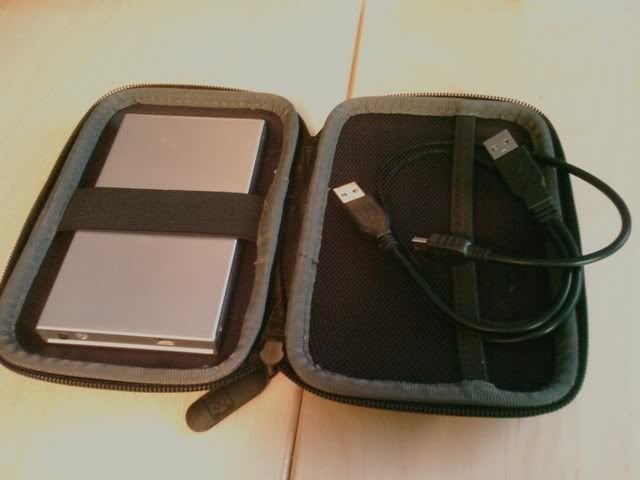
 

format_5.jpg


First what you'll want to do is get proper power to your drive since the AVIC only supplies <500mA over the single USB data cable. You can find the tutorial on how to power your drive here: viewtopic.php?f=34&t=24072


First I started out by booting into TEST MODE, aka Windows CE mode. If you don't know how to do that, start here: viewtopic.php?t=17542


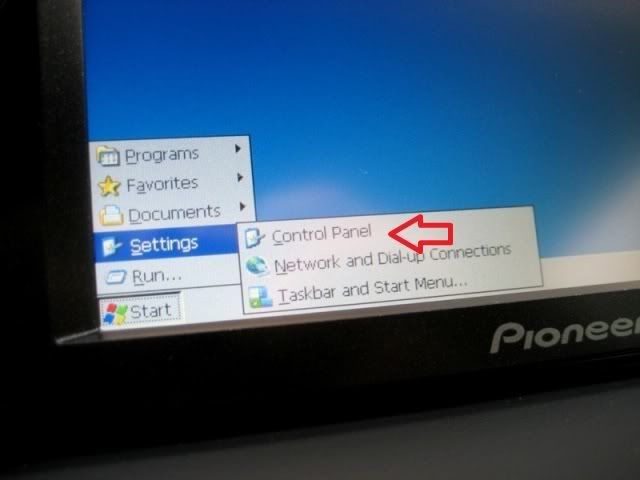
That brings us to Windows. Once it's done loading, plug in your 2.5'' hard drive and let it initialize. Then proceed by tapping the start menu.
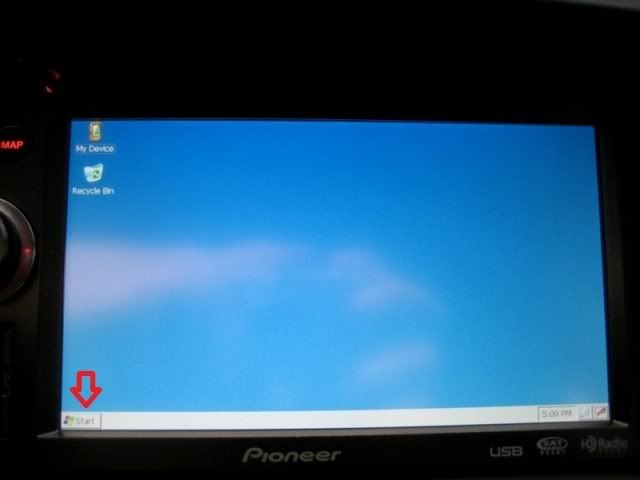
 

format_1.jpg


Go to Control Panel.


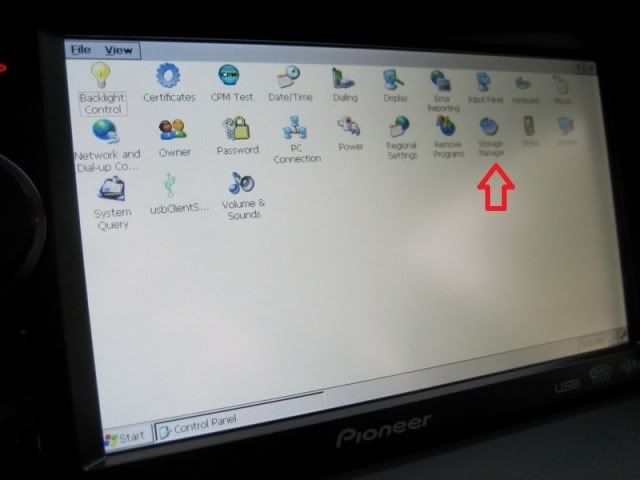
format_2.jpg


Go to the Storage Manager utility.


format_3.jpg


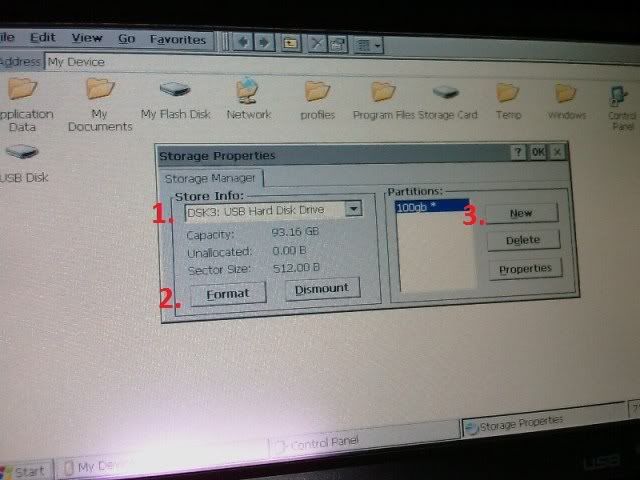
At this point, look at the picture below and follow the instructions:

1. Select your drive. It should be "DSK3: USB Hard Disk Drive", or something along those lines.

2. Hit the format button. It will then format your drive for FAT32 recognizable by Windows CE according to your hard drive volume size.

3. Make a partition.. I just called mine "100gb". You should then see the "USB Disk" pop up in the File Explorer.
 

format_4.jpg


When you're done, go ahead and shut down the unit and take your drive back to your computer to load it up with music and movies.


Now you can go back to your car and test it out. I'm still running into the problem where I can't get the drive to initialize from a cold boot. So, I have to plug it in after the AVIC unit boots up. When you plug in the drive, it may take 30 seconds or so to be recognized. I think it all depends on your folder count, because it has to index everything to the AVIC software.


Now your USB icon should light up on the sources menu, and music should start playing. Done!

Posted May 08, 2009 · 16:20 UTC#2

good job,

Posted May 13, 2009 · 00:29 UTC#3

Any idea on whether a hacked iPod operating system would run on one of these external hard drives?


IE Trick the unit into thinking it's looking at a large iPod... so albums art and such would show up in the nice, clean format that it does. As opposed to the lackluster view you get when looking at the listing on an SD card and such.

Posted May 13, 2009 · 01:37 UTC#4

An Ipod operating system runs on an Ipod processor. There's more to an ipod than just a hard drive with some firmware on it. The avic interfaces with the ipod's hardware that just isn't present in any hard drive.

Posted May 13, 2009 · 02:17 UTC#5

the hard drive not working from cold boot could be from lack of power on startup, a few days ago me and a buddy spent some time trying to get USB hard drives working on other brand named car stereos, most stereos dont seem to supply enough power through USB since 2.5" hard drives are self-powered, the solution


1) get a 12v to 5v USB adapter from ebay, the kind made for recharging your USB device such as a GPS.


2) get a USB Y-cable that usually come with 2.5" hard drives or cd/dvd-roms


Its just suggestions, might help with the HDD not working off a cold boot issue, both items can be hidden behind the dash. See attached photos.

Posted May 13, 2009 · 02:19 UTC#6

Oh to add we tried a 500GB Western Digital Passport 2.5" and it worked fine with the AVIC-F900BT.

Posted May 13, 2009 · 02:43 UTC#7
the hard drive not working from cold boot could be from lack of power on startup, a few days ago me and a buddy spent some time trying to get USB hard drives working on other brand named car stereos, most stereos dont seem to supply enough power through USB since 2.5" hard drives are self-powered, the solution


1) get a 12v to 5v USB adapter from ebay, the kind made for recharging your USB device such as a GPS.


2) get a USB Y-cable that usually come with 2.5" hard drives or cd/dvd-roms


Its just suggestions, might help with the HDD not working off a cold boot issue, both items can be hidden behind the dash. See attached photos.

No, it's not. I have mine properly powered. I made tutorial on how to do it here...

viewtopic.php?f=34&t=24072

Posted May 22, 2009 · 13:34 UTC#8

So if you use the USB for one of those charger units that has some USB and 12V outlets, and then you have your IPOD hooked up to the charger box, what will the AVIC recognize as the USB?


Will you be able to use the AVIC IPOD interface anymore since you're actually using the USB port to power up a charger unit? And then if you plug your hard drive into that unit as well and have two things hooked up, which one will it detect?

Posted May 22, 2009 · 20:06 UTC#9

Whatever device you want your AVIC to recognize, you hook up to the AVIC's USB cable. The box with USB/12v outlets is for powering devices only. No data passes through it. That's why you use a USB splitter cable.

Posted May 23, 2009 · 01:44 UTC#10

This is a great thing here what is a good brand for a hdd i want one a.s.a.p. thanks.

Posted May 24, 2009 · 14:22 UTC#11
Whatever device you want your AVIC to recognize, you hook up to the AVIC's USB cable. The box with USB/12v outlets is for powering devices only. No data passes through it. That's why you use a USB splitter cable.


Oh I see. In was confused on the setup. The USB box is only powered through the car. It doesn't actually connect to the AVIC unit.


For arguments sake, what would happen if I got a USB splittler like this:

http://www.amazon.com/Portable-Premium- ... 878&sr=1-2


Hooked it directly up to the AVIC unit, and then plugged in my IPOD and a memory stick with songs. Which one would it read?

Posted May 24, 2009 · 14:58 UTC#12

From what people have indicated that tried it, the AVIC doesn't work with USB hubs/splitters. It only recognizes one device at a time.

Posted Jun 05, 2009 · 18:55 UTC#13

so i just tried using my 250GB external western digital drive on my F900bt. it recognized the mp3's fine when there was only 1GB on there that i tested just to make sure it was in FAT32 and recognizable.


immediately after, i dropped another 100GB of music onto the drive and it didn't recognize it at all. The usb icon never lit up. i let it sit for 10 minutes and nothing.


ive seen some people have hit 40GB and havent been able to go passed it, someone else said they had about 17GB of music and 28GB of tv shows and it worked.


has anyone figured out if there is some hard cap on the F series that prevents you from using a full 250GB external hard drive to play music from?


i have all the files on the HDD sorted by artist/album/song.


any help here is definitely appreciated.

Posted Jun 05, 2009 · 19:04 UTC#14
so i just tried using my 250GB external western digital drive on my F900bt. it recognized the mp3's fine when there was only 1GB on there that i tested just to make sure it was in FAT32 and recognizable.


immediately after, i dropped another 100GB of music onto the drive and it didn't recognize it at all. The usb icon never lit up. i let it sit for 10 minutes and nothing.


ive seen some people have hit 40GB and havent been able to go passed it, someone else said they had about 17GB of music and 28GB of tv shows and it worked.


has anyone figured out if there is some hard cap on the F series that prevents you from using a full 250GB external hard drive to play music from?


i have all the files on the HDD sorted by artist/album/song.


any help here is definitely appreciated.


please stop spamming the forum

Posted Jun 05, 2009 · 19:25 UTC#15

just trying to get this answered as quickly as possible. not trying to spam. just did a search for hard drives, wanted to make sure i reached the audience that might have the answers.


but thanks for your help.

Posted Jun 05, 2009 · 19:32 UTC#16
just trying to get this answered as quickly as possible. not trying to spam. just did a search for hard drives, wanted to make sure i reached the audience that might have the answers.


but thanks for your help.

well this is a forum not a chat room so don't expect to get answers right away

Posted Jun 06, 2009 · 18:04 UTC#17

true lol. But the cold start problem has nothing to do with lack of power. I am happy for people that have theirs cold boot, but unfortunatly many of us who have that problem and respond to this forum have everything properly setup with the usb Y-cable and a usb cigerrit lighter power source. I think getting the avic os to format the hd was a nice touch but I doubt it might help in the problems that we currently have such as cold boot or larger then 40 gig and wont be recognized. Just wondering can you play anything on the ce like music and stuff or is it really bear bone.

Posted Jun 09, 2009 · 00:59 UTC#18
Oh to add we tried a 500GB Western Digital Passport 2.5" and it worked fine with the AVIC-F900BT.


I HAVE A SEAGATE 500GB N ITS NOT WORKN WIT MY F900BT

Posted Jun 10, 2009 · 13:06 UTC#19
Oh to add we tried a 500GB Western Digital Passport 2.5" and it worked fine with the AVIC-F900BT.


I HAVE A SEAGATE 500GB N ITS NOT WORKN WIT MY F900BT


have you tried only filling it with 40Gb of music and giving it a few minutes to be recognized by your head unit?

Posted Jul 02, 2009 · 12:06 UTC#20
Oh to add we tried a 500GB Western Digital Passport 2.5" and it worked fine with the AVIC-F900BT.


I have the same type of hard drive for my 90BT, I think I am running into the power issue most have described on here because I notived the HD was not spinning up even though the light came on.


My question is regarding the format. My WD Passport does not have the Fat16/32 file format...instead it has EXFAT. I was doing some research and I know that the Windows CE 6 will recognize EXFAT, but My Avic is Windows CE 5, and I couldn't find anything that tells me whether or not it will recognize that file system.

Posted Jul 02, 2009 · 20:28 UTC#21

I tried exFAT with my AVIC and it didn't work.

Posted Jul 10, 2009 · 20:54 UTC#22

use partition magic and format file sysytem fat32

Posted Dec 15, 2009 · 15:45 UTC#23

WD 2.5" Passport formatted to FAT32 works like a charm, just have to give it a couple minutes to read and organize the files in a certain way

Posted Dec 16, 2009 · 08:28 UTC#24

Hi mates,

I hope this can help you as much this forum has helped me. I have bought the Toshiba ( :roll: ) 1,8" Hard Disk Drive (30Gb) from DEALEXTREME and it´s working fine. No need to plug or unplug, it starts sooner than SD card, and no need more than a USB connection (no external energy needed). I bought the 30Gb one cos I didn´t want to risk with bigger size (60Gb is available too). I have many pendrives, but the same model in 8Gb works, and 16Gb one doesn´t. If there´s anyone who wants to try the bigger one, he can make it, on his own risk.

Posted Jun 20, 2010 · 04:51 UTC#25

Who does old thread revivals....


<----THIS GUY!!


So diegoapavi, how's that drive working out for you? Still going without issues? I searched on eBay for "1.8 hard drive" and came up with a million adapters and finally started seeing drives in the $10 range. I like that you mentioned that it doesn't require anything extra for power and starts up quicker than an SD card. Is the startup immediate like a CD, radio, etc or still slower than that? Also, at startup does it continue the music/video where it left off at last or does it have the same issue as the SD's and 2.5" external HDD's where it starts the music from the beginning? Thanks...just doing my homework before I make any additional purchases.

Page 1 of 2