Search Archive

Complete 3.0 Install Guide

By Retell · Jul 18, 2009in Hacks/Mods💬 968 posts👁️ 380,894 views
Page 30 of 39
Posted Mar 22, 2010 · 16:45 UTC#726

Brian the information is on page 48. Here it is again though.


ftp://www.turboss.com/

Found that in the problems and trouble shooting section for the 3.01 update. There is a login and password to get to download the information.

login: avicuser

pword: Avic411


3.02 is downloaded from the pioneer website.

Posted Mar 22, 2010 · 21:56 UTC#727

Thanks gwilli! I must have read right past that post. I read the 3.02 instal instructions on pioneers website and it said the 3.02 update would work with any 3.xxxx version. I skipped the 3.01 update and jumped straight to 3.02, worked like a charm.


I also tried moving the DATA folder from MYFLASHDRIVE/ over to MYFLASHDRIVE/APL2/IGO/ and the unit got all screwy. The beeps only worked with certain selections and the GPS wouldn't locate. I moved it back to MYFLASHDRIVE/ and everything is working perfectly.


-Brian

Posted Mar 23, 2010 · 02:58 UTC#728

i thought i completed this install perfectly fine.....however, at the end, when i must hold the reset and eject buttons simultaneously for 5 seconds ad then release....it still reboots in windows. ive tried reinstalling everything from scratch, and i get the same issue. ive read over 100 pages of the different tutorials, but i am not finding an answer to my problem. i am using the files from the post on page 40. i used one SD Card. hopefully someone can help me out. (ill gladly donate)


also, the first time i did this, i did not hear the pop in speakers or the disk drive reload (im using f900bt)...but i was able to move forward with the process so i didnt think anything of it. also, during my first attempt, i did not get the "replace all files, yes or no" box. however when i did it the second time, i did receive this.


UPDATE, i deleted everything in my flash disk, and pasted the new flashdisk from my storage card. now the system reboots, and keeps rebooting. my splash screen comes on for a little bit, then reboots....keeps doing it over and over again. :evil:

Posted Mar 23, 2010 · 03:31 UTC#729

I am a sucker and bought the 'official' update back in July/August and have been running 3.0 ever since. From what I gather 3.02 is downloaded from the X-series website but will work properly on my F90BT running the 'official' 3.0? Others are moving sequentially from 3.0 to 3.01 to 3.02, others have skipped the 3.01 - is this ok to do?


Thanks.

Posted Mar 23, 2010 · 14:28 UTC#730
i thought i completed this install perfectly fine.....however, at the end, when i must hold the reset and eject buttons simultaneously for 5 seconds ad then release....it still reboots in windows. ive tried reinstalling everything from scratch, and i get the same issue. ive read over 100 pages of the different tutorials, but i am not finding an answer to my problem. i am using the files from the post on page 40. i used one SD Card. hopefully someone can help me out. (ill gladly donate)


also, the first time i did this, i did not hear the pop in speakers or the disk drive reload (im using f900bt)...but i was able to move forward with the process so i didnt think anything of it. also, during my first attempt, i did not get the "replace all files, yes or no" box. however when i did it the second time, i did receive this.


UPDATE, i deleted everything in my flash disk, and pasted the new flashdisk from my storage card. now the system reboots, and keeps rebooting. my splash screen comes on for a little bit, then reboots....keeps doing it over and over again. :evil:


Remove the SD card at the end of the install. This is what causes it to go back into windows.


Regarding the update, retry the process again...it does this if it doesn't find the files in the appropriate spots or if the files are corrupted.

Posted Mar 23, 2010 · 18:24 UTC#731
i thought i completed this install perfectly fine.....however, at the end, when i must hold the reset and eject buttons simultaneously for 5 seconds ad then release....it still reboots in windows. ive tried reinstalling everything from scratch, and i get the same issue. ive read over 100 pages of the different tutorials, but i am not finding an answer to my problem. i am using the files from the post on page 40. i used one SD Card. hopefully someone can help me out. (ill gladly donate)


also, the first time i did this, i did not hear the pop in speakers or the disk drive reload (im using f900bt)...but i was able to move forward with the process so i didnt think anything of it. also, during my first attempt, i did not get the "replace all files, yes or no" box. however when i did it the second time, i did receive this.


UPDATE, i deleted everything in my flash disk, and pasted the new flashdisk from my storage card. now the system reboots, and keeps rebooting. my splash screen comes on for a little bit, then reboots....keeps doing it over and over again. :evil:


Remove the SD card at the end of the install. This is what causes it to go back into windows.


Regarding the update, retry the process again...it does this if it doesn't find the files in the appropriate spots or if the files are corrupted.


ok i will do everything from scratch, but remove the card at the end (before the reset). damn, i cant believe i missed that....or at least didnt think about it. ill come back and let you know if im successful.

Posted Mar 23, 2010 · 18:47 UTC#732

wow i feel like a dumb ass, went outside, snapped the card out, reset and BAM im up and running. thanks. pm me your paypal ill keep my word and donate a few bucks to you if youd like :mrgreen:

Posted Mar 23, 2010 · 22:01 UTC#733

I have an f700bt....


on the ftp site turboss, there are many different folders... Do I use the folder labeled 700bt, or do I use the x900 folder that says it has the update applied. Either way, do I just copy over my current flash disk (after making a backup)


Thank you for your help

Posted Mar 23, 2010 · 22:11 UTC#734
I am a sucker and bought the 'official' update back in July/August and have been running 3.0 ever since. From what I gather 3.02 is downloaded from the X-series website but will work properly on my F90BT running the 'official' 3.0? Others are moving sequentially from 3.0 to 3.01 to 3.02, others have skipped the 3.01 - is this ok to do?


Thanks.


I skipped 3.01 and have had no problems. If you read the update instructions on pioneer's site it says if the version is 3.01 or earlier/smaller then continue with the update.

Posted Mar 23, 2010 · 22:15 UTC#735

Does it matter if I used the 3.0 upgrade on this site, instead of the oem 3.0?

Posted Mar 23, 2010 · 22:27 UTC#736

I used the one here without problems.

Posted Mar 24, 2010 · 13:37 UTC#737
wow i feel like a dumb ass, went outside, snapped the card out, reset and BAM im up and running. thanks. pm me your paypal ill keep my word and donate a few bucks to you if youd like :mrgreen:


No worries. Glad to hear that your up and running again =D

Posted Mar 24, 2010 · 15:58 UTC#738

Hello all,


I'm using turboss's ftp download. In these instructions it says to copy the test mode folder, data folder, and the flash from the torrent. Is everything downloaded on turboss's ftp server the flash dump? I put everything on the card, after the wince upgrade, then it won't start up the test mode. Any ideas would be greatly appreciated!

Posted Mar 25, 2010 · 01:08 UTC#739

i finished upgrading to the 2.008 version, works fine. However, those updates were provided by Pioneer and work by just putting the SD card in and letting it run the update.


I reviewed the instructions for this 3.0 update over and over again as the last time I did it as I though I bricked my unit when i overwrote the "My Flash disk" files. Took me threedays to get back to where I started.


So a little cautious this time. I did a review of the diles in my 900's "My Flash Disk"" to the files that are going to be replaced with the x910bt.zip download from turboss.com. There are differences and I think this is what casued my problem last time.


here are the differences I noticed:

there are 3 additional files in the turboss.com DL that would be written to my unit... (Non-Vcard data file, openfileindex text file, and a volume video cd movie). However, if i wipe the files on my 900's "my flash disk" files, I will lose the following 9 folders/files that are currently on my system in the "My Flash disk" folder.... (.fseventsd folder, spotlightv100 folder, miticap folder, testmode folder, archer file, two(2) LPUE80PLT files, and two (2) WinCEimg files).


Does this sound right? I really hate to try this again to find out I'll be radio less again for several days while i go back to the beginning with 2.0 and work my up to 2.008 again.


can I get someone to confirm this is correct or incorrect?


Thanks,

Don

Posted Mar 25, 2010 · 01:22 UTC#740

The links in the 1st post don't seem to work.

Posted Mar 25, 2010 · 01:56 UTC#741

do a search for turboss.com and x910bt.zip, you'll find the the link in one of the posts

Posted Mar 25, 2010 · 02:20 UTC#742

cool thanks, they are good for the F700BT too?

Posted Mar 25, 2010 · 17:27 UTC#743
The links in the 1st post don't seem to work.


Seems I end up posting this page after page....


Look back through the last few pages and you will find some links I posted where I uploaded the files to megaupload.com


1500+ downloads and counting with no issues....

Posted Mar 25, 2010 · 18:10 UTC#745
Found them, Thanks. It would be nice if they were just fixed on the fist post then it would alleviate these problems. I do appreciate it though. :D


http://www.megaupload.com/?d=K0WJSCUR

http://www.megaupload.com/?d=XDPTH67G


I'm not the op, so I can't control that. However, in general it makes good practice to read through the entire thread to see what issues anyone else is encountering if any (So you can avoid them), or if links to files are broken they may be updated later on in the thread (So you can download them).

Posted Mar 25, 2010 · 18:14 UTC#746

I hear ya, I have read a ton of stuff in the last 2 days. Reading 50 pages can take a bit of time. Ultimately I bought an F700Bt used with no harnesses. I want to update it to the newest firmware and maps that I can, then look at possible mods. Do you know if the white plug harness is necassary? I seem to have the Navi and Music working but not sure about the Ipod yet. That harness is over 50 bucks and I wasn't sure what it was for.


Also, before I get too far into DLing, are these for US versions?

Posted Mar 25, 2010 · 19:09 UTC#747

I have been reading for weeks and figured i would try it today and this is all i have been doing all damn day idk whats going on... Everything loads fine then i got to restart it i get my splash screen then it goes black...Im trying a diff test mode now and i copied the contents not the folders...I saw a few other ppl say they dont have the dump files i have the folder but nothing in the folder is that how it is supposed to be or is my file corrupt? Any tips or ideas i really need to get this working

Posted Mar 25, 2010 · 21:51 UTC#748

NO, as far as I can tell you DO want something in the dump folder. Mine is now not starting past the startup screen because I copied over the dump file not knowing there was nothing in it. Now it just sticks at the startup. When I tried to use the wince update it gets to like 24% or more then the screen goes black, then it sits there.


At this point I am just trying to get mine back to where it was.

Posted Mar 26, 2010 · 00:03 UTC#749

Where do i get the files and why aren't they in there? Thanks I really need to get this going by tomm im going on a trip and gonna be pissed if i dont have a radio lol Thanks again

Posted Mar 26, 2010 · 00:08 UTC#750

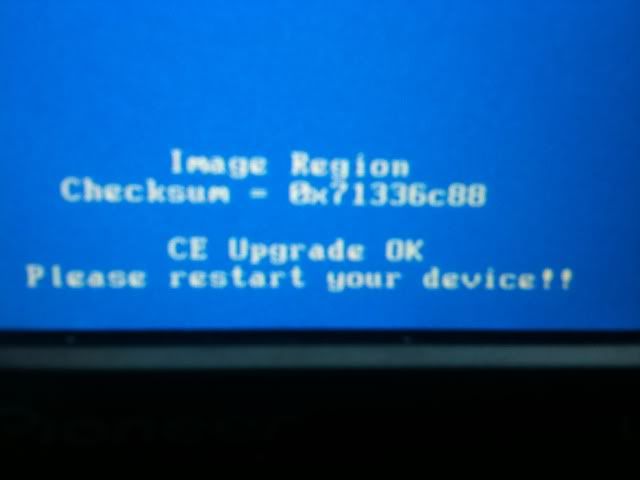
Mine loads everything 100% reads it, writes it, CE upgrade complete, restart,Splash Screen, Black Screen!!!


Now I cant even get in to test mode before it was going into test mode then i would do the reset and eject for 5 seconds then it would restart up splash screen then black.... Idk what to do

0785e6c9.jpg

Page 30 of 39