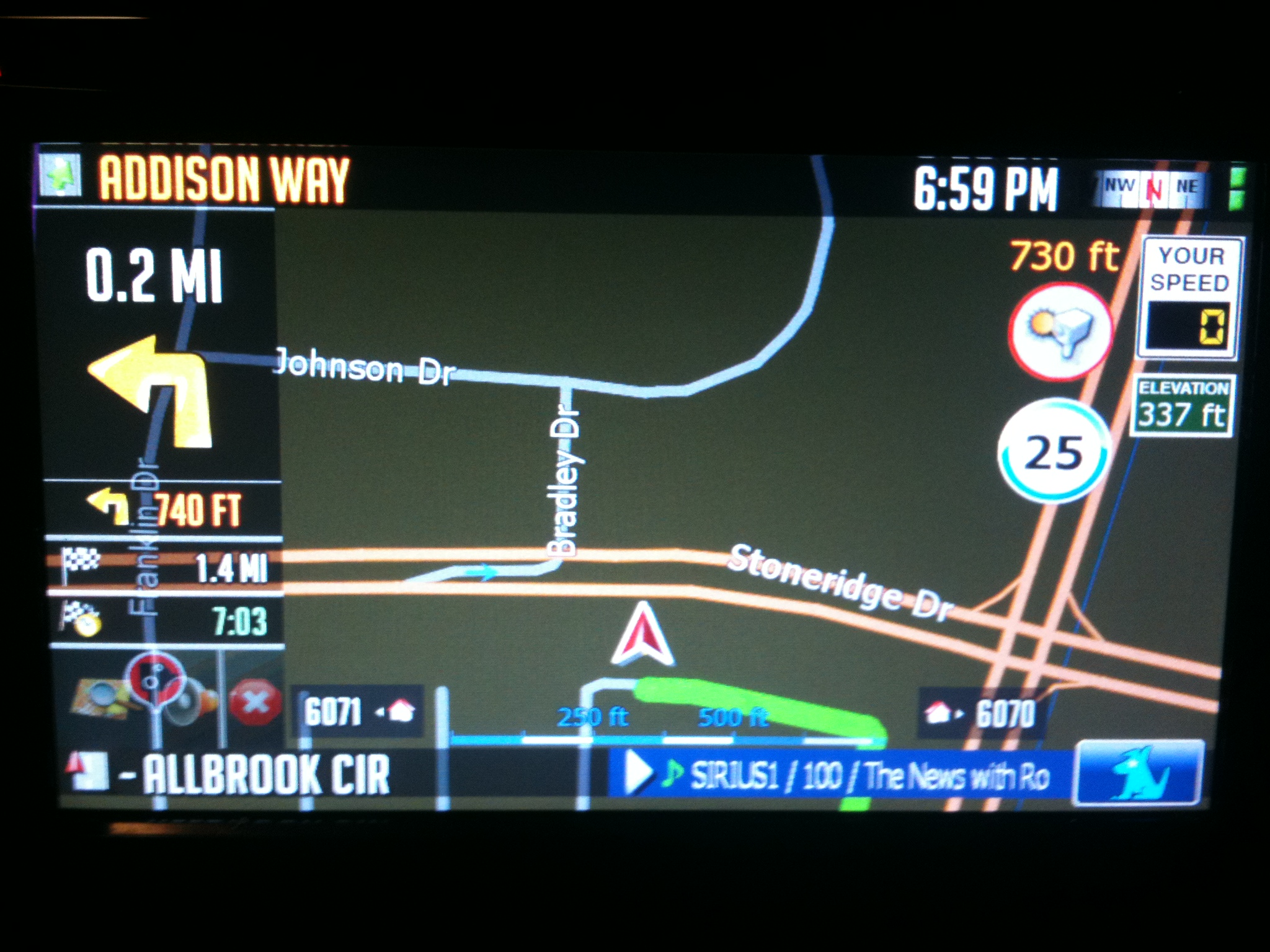
thank you diaftia for this mod and thank you guys for the help. i finally got it working last night and i have to say this looks beautiful. the navi looks much richer and more info. i have 1 more question
how do i switch back to 3d mode i was messing around with the settings and got it in 2d mode and now im stuck.
Diaftia's Hybrid mods V1 - UPDATED: 12/1/09 FINAL
thank you diaftia for this mod and thank you guys for the help. i finally got it working last night and i have to say this looks beautiful. the navi looks much richer and more info. i have 1 more questionhow do i switch back to 3d mode i was messing around with the settings and got it in 2d mode and now im stuck.
You are welcome. Glad you like it. Touch the compass in the top right corner.
Alex
Does this improve upon the ipod interface? the stock one seems kinda clunky
Could it be, that I only have to change the RGB colour into "laneinfo_signpost.ini"
Will try this tomorrow!
THIS is working!
But how do I change the signpost transparency??
Where can I change the colour of the guidancearrow in night view?
In day view it is blue, in night view it is just black and not good to see!!
I want to have it blue, too!
Could it be, that I only have to change the RGB colour into "laneinfo_signpost.ini"
Will try this tomorrow!
THIS is working!
But how do I change the signpost transparency??
In the image itself. You need to add in an alpha layer in photoshop or gimp or some other photo editor that supports alpha layers.
Where can I change the colour of the guidancearrow in night view?In day view it is blue, in night view it is just black and not good to see!!
I want to have it blue, too!
Pretty sure the arrow is enabled in the sys.txt but the color is reflected in the scheme.
Does this improve upon the ipod interface? the stock one seems kinda clunky
No the stock ipod face has not been cracked for change except to change the color and look of some of the images in some of the skins in other threads. They all have the same feel though.
11/5/09:
- 1. Made time to destination long format for easier reading.
2. Made next road text dual color, scrolling, bolder and shielded.
3. Made current road text dual color, scrolling, bolder and shielded.
4. Made header, footer and navigation info boxes transparent.
5. Made the map, mute and cancel route buttons transparent when in route to match the transparent backgrounds.
6. Search button in quick menu now goes straight to search and does a large scale search.
7. Dynamic volume now does not go to 100% when set over the min speed threshold.
8. Spoken Speed cam warning added.
9. Fixed map centering problem in 2D mode
10. Elevation in feet fix (file added in extra link below)
If you often travel at a higher altitudes and would like to have the elevation in feet past 5280 feet (so it doesnt say 1.1mile) use this ezrider.exe (this also includes the traditional hack as well as license file for extra maps)
http://www.mediafire.com/file/j2fgwjm5t ... vation.zip
Here are some day/night screen shots of the new transparent/opaque backgrounds.
Diaftia,
any chance you could update the newest file with the newest maps available? btw, you are AWESOME!
Diaftia,
any chance you could update the newest file with the newest maps available? btw, you are AWESOME!
Maps are independent of the mods. They are in the APl2/IGo/Content/Maps directory on your flash disk.
Just search around the board for some updated maps. There are links. Use the ezrider and license in my first post. You are looking at a 1.6GB download.
that would make the download huge. just update the maps yourself. its easy. he may also not want to bundle maps because technically you are supposed to buy them.
Diaftia,
any chance you could update the newest file with the newest maps available? btw, you are AWESOME!
did the elevation box get bigger? last time i had it showing tripple digit elevations weren't fitting inside the box.
The formatting is now proper. There is a max width setting on it so that it should not extend past the sign. If it doesn't look right please take a picture of it somehow and send it to me. I live at sea level so I am shooting in the dark. Should be right but I can't be 100% sure since it doesn't show elevation in simulation mode.
Hey Alex,
Thanks, things really look great.
On the elevation, yes, the 4 digit elevation fits in there a lot better now.
So, next... sometimes I go up I-70 to Eisenhower tunnel, and it's over 11,000 feet there... just kidding.
I did notice one thing on the transparent graphics for the mute and route cancel icons. They're not transparent for the first 10 seconds or so, then they turn transparent. And occasionally when pushing buttons, they'll turn not transparent again, then turn back again.
Could be other icons as well, but I noticed those.
Or maybe that's a feature.
Andy
good to hear. i won't get to see 4 digit elevations for another week. thanks for the great mod (paypal coming). i never did catch an answer, maybe i missed it though, what are the two green squares in the top right corner?
Hey Alex,
Thanks, things really look great.
On the elevation, yes, the 4 digit elevation fits in there a lot better now.
So, next... sometimes I go up I-70 to Eisenhower tunnel, and it's over 11,000 feet there... just kidding.
I did notice one thing on the transparent graphics for the mute and route cancel icons. They're not transparent for the first 10 seconds or so, then they turn transparent. And occasionally when pushing buttons, they'll turn not transparent again, then turn back again.
Could be other icons as well, but I noticed those.
Or maybe that's a feature.
Andy
The elevation should be good up to 20K feet if I remember correctly! It will be squeezed in there but it will fit! ![]()
They are part of the alpha down process. So when you click the map they will show. Then its about 5 seconds before they dim again. Its by design but should be when you touch the map.
good to hear. i won't get to see 4 digit elevations for another week. thanks for the great mod (paypal coming). i never did catch an answer, maybe i missed it though, what are the two green squares in the top right corner?
Thanks! I will let you know when it comes in.
Green squares are GPS signal indicators.
ah, that's nice on the elevation. I'll even have occasion to get over 13,000 once in a while.
Nice on the graphics, too.
Andy
ah, that's nice on the elevation. I'll even have occasion to get over 13,000 once in a while.
Nice on the graphics, too.
Andy
Yep, you just need to make sure you have the modded ezrider.exe in the first post.
good to hear. i won't get to see 4 digit elevations for another week. thanks for the great mod (paypal coming). i never did catch an answer, maybe i missed it though, what are the two green squares in the top right corner?
Thanks for the donation man! Always appreciated!
ah, that's nice on the elevation. I'll even have occasion to get over 13,000 once in a while.
Nice on the graphics, too.
Andy
Yep, you just need to make sure you have the modded ezrider.exe in the first post.
Yeah, I put that on when you directed me to that thread. I've got the new maps and everything and they all work great.
Andy
he beeet me. streyt up. pay zet myen hiz maneee. /paypal sent/ thanks again
Diaftia,
Great looking mod. Does it have an on screen trip computer?
Thanks,
Bryan
Diaftia,Great looking mod. Does it have an on screen trip computer?
Thanks,
Bryan
Not on screen. It has the full screen one with a few other speedo screens.