Please note - this is part of the Gurjon skin. if you already have it, there is no need to do this mod...
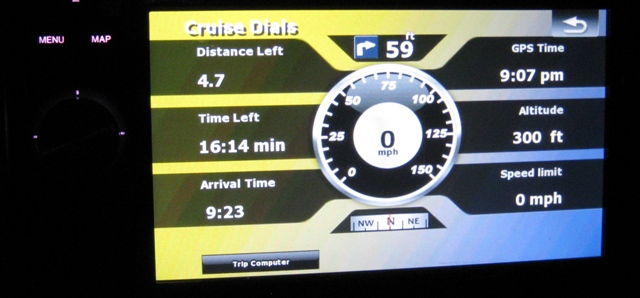
Attached contains the old data.zip that I posted plus the new ported navigation cruise display. This includes having a new state (common ui file) as well as switching to that state from whatever means you want.
Right now I have it set to switch when you press the clock, but steal whatever you want obviously.
You'll notice the top is the next turn, along w/ the different time/distance stats. it has a link to NSEW's trip computer work and a speedo in the center...
here is a screenshot:
And here is the data.zip.
EDIT: New Link: http://www.mediafire.com/download.php?lgnkttl1tzy
*********************************
(small background:
A lot of the images and layer logic was stolen from the Gurjon skin.
This one wasn't part of an extension, but instead a layer built into the navigation800_400 ui file. I decided to pull it out and make the layer it's own state that you can switch between/etc.
Instead of overwriting the images that came stock and affected other views. I gave the images a prefix of BDS_ to limit the impact that this view may have on others.
I did test it out a little and looks pretty good - feel free to give feedback. I have tested it recalculating routes and making sure the next turn blanks out and gets updated (if you turn off and the system redoes the route).
As always - I'm not responsible in any way, nor is this site for any damages you may cause in any way  ....)
....)
Just like the trip computer screen, this screen requires people to move over two ui files. One inside the 800_480/ui directory and the other in the common/ui directory.
Obviously the destinationdial.ui goes in the common/ui path and the destinationdial_800_480.ui goes in the 800_480/ui directory.
These new ui files need to be included in the main.ui file in the 800_480/ui/ directory as well. Just follow the convention/grouping you notice.
The way you switch to the screen is by doing a nextstate call, just like the trip computer. Right now - the navigation_800_480 in the data.zip included has it for the clock, but it's essentially:
onrelease='nextstate ST_DESTINATIONDIAL'
That means you need to change the navigate.ui file in the common/ui dir to have the following at the end of the ini portion of the script: st_NavigateMap
;**************************************************
; For popup
;**************************************************
;;may want to do IDT's example conditional here for different units...
		ATTACH_SPEEDOMETER sprSpeedRange "speedometer_range.ini"
	ATTACH_SPEEDOMETER sprSpeedometerPointer "speedometer.ini"
	ATTACH_LINEARCOMPASS sprLinearCompass "BDS_linear_compass.bmp" "navigation.car_heading"
;**************************************************
; END of for popup
;**************************************************
Though I don't think the needle is working yet, but the compas does.
There are 16 BDS_*.bmp files in the 800_480 directory that are needed as well.
The BDS_blank.bmp is used as the background so feel free to change that one however to much your unit.
That's a first pass of some info on it....
************************************
Thanks,
Ben
EDIT: if you want to change the background, just make the BDS_blank.bmp file whatever you want it to be...