Search Archive

IDT skin#2 v3.0 12/30/10 (download link updated)

By ill.die.trying · Oct 25, 2009in Completed Mods/Themes💬 442 posts👁️ 72,478 views
Page 1 of 18
Posted Oct 25, 2009 · 22:57 UTC#1

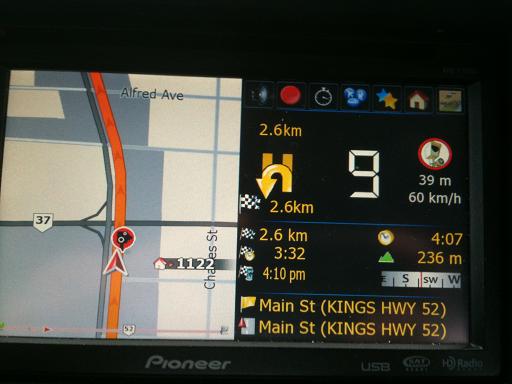
here's a new skin i created for the 3.0, this is pretty much like my first skin except for the navi screen part, almost all setting are the same (added/removed some) and almost all the shortcuts are still the same


Mar 02/10

-fixed planmode not properly going to location

-fixed signpost problem

-some other stuff

-phone shortcut on poi info screen


Feb 14/10

i have edited the files needed for the fuel consumption to be on gallons, the file is in the same download link for the skins


INSTRUCTIONS

this is assuming that your in testmode

1) go to MYFLASHDISKAPL2IGOExtensionFuelcalc and delete the contents,

2) copy the contents of the zip to that folder,

3) DELETE THE SAVE FILES, it's in My Flash DiskUSERUserDataiGosave, everything should be deleted


Feb 15/10

-fixed trip computer shortcut covering the next street name area,


Feb 12/10

-added phone shortcut on the main screen

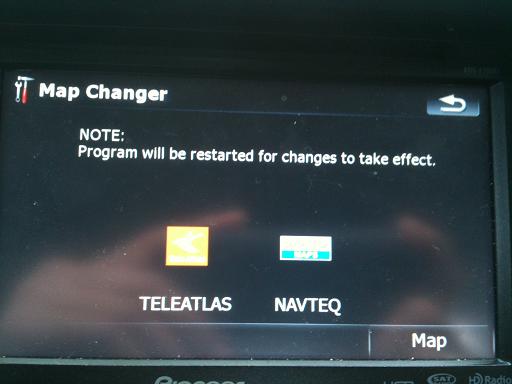
-added map changer option (extracted from GURJON half patch)

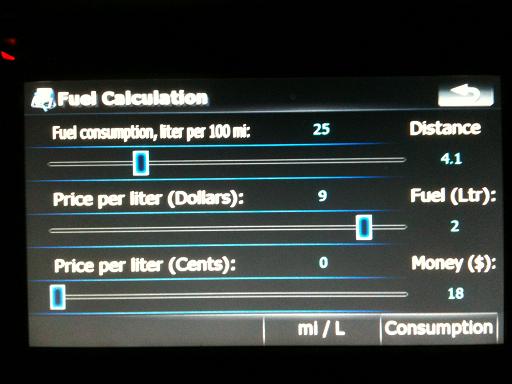
-added fuel calculation shortcut (only when navigating) (extracted from GURJON half patch)

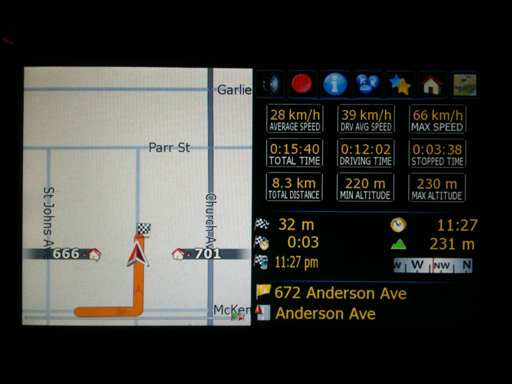
-created infoscreen, based on DIAFTA's split screen (only when navigating)

-includes shortcuts for POI, DELETE ROUTE, VOICE GUIDANCE MUTE, TRIPCOMPUTER and MAP

-onscreen trip computer can be accessed by pressing the time (with or without route)

-moved a couple stuffs around

-fixed speed camera switching when signpost is valid (thanks to DIAFTA)

-added welcome greeting (credits to N-S-E-W)

-to change the welcome greeting go to the audio folder in your DATA.zip and change the !welcome.ogg to your selected tone, be sure to have rename it as !welcome


oct 31/2009

-fixed speedlimit sign showing up twice

-fixed audible setting for cameras

-fixed speed camera mute alert icon not properly showing up

-fixed distance being covered by the compass

-fixed distance being covered by the second secondary direction icon


what's in it;

-screen off

-address shortcut button (onlongclick will go to history)

-poi shortcut button (onlongclick will go to poi search by location)

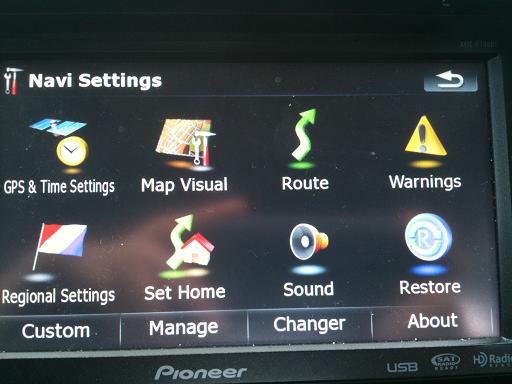
-navi setting button

-return home button

-route info button when with a route

-itenerary button when with a route

-navigation guidance mute button

-delete route button

-simulation controls

-speedcam

-speedcam warning display option (FULL or SIMPLE)

-speedcam spoken alert

-speedcam spoken alert volume slider

-beep warning distance

-speedcam mute/hide

-changed route function lay out

-MSN button for MSN users, TMC button for TMC users

-multi-route

-trip computer

-tripcomputer onscreen by pressing the current speed (with or without route)

-road blocking

-manage screen

-snap to road option

-building setting

-plan mode screen

-multidraw on long click of multiplan button

-included in the download is a bunch of schemes, i edited the scheme to have different colors for the multidraw screen including the edited stock pioneer schemes

-if you want different sky on your nav just replace sky.bmp on GFX/DAY and GFX/NIGHT on the data.zip

-UK style speedlimit sign (using the EU file)

-signpost on/off setting

-added a ROAD SIGN settings page for speedlimit sign, sign post, turn restriction etc

-software bypass

-return button on plan mode screen onlongclick will return to map screen

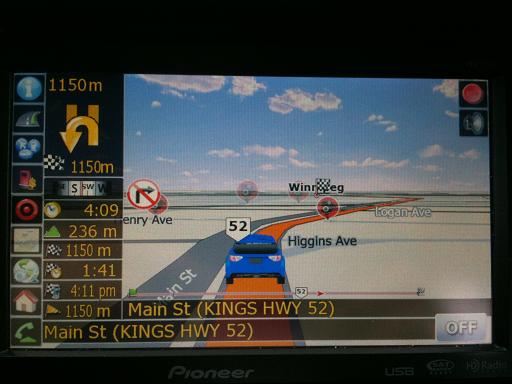
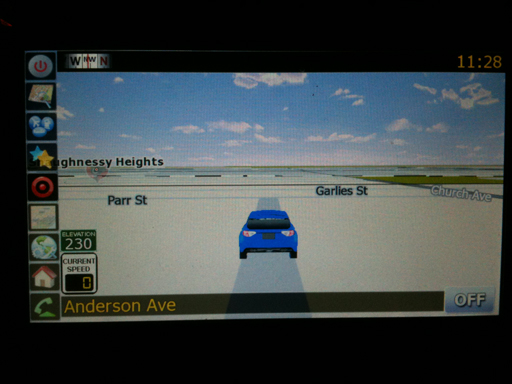
-current speed on map screen

-on/off setting for current speed

-elevation sign on map screen

-on/off setting for elevation sign

-added lane guidance option

-on/off setting for lane guidance

-reduced the size of the signpost

-more visible route information

-added 2 more boxes for the displayed info instead of pressing it to toggle (all infos controlled in the displayed info setting)

-navigation cruise page when compass area is pressed (onrelease=simple and onlongclick=advanced) extracted from gj skin

-added a custom setting button on the navi setting screen

-added a navigation text color setting (for the streetnames, next streetname, distance etc, also controls the time)

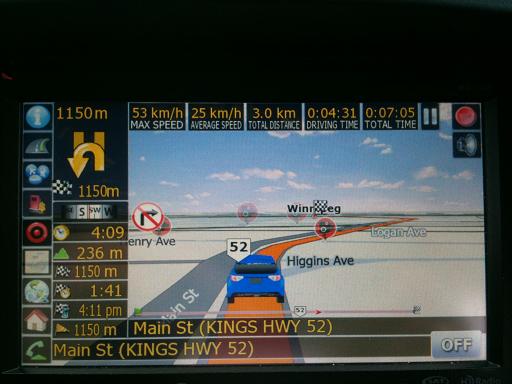
-navigation progress bar,

-on/off setting for navigation progress bar


i know there's more but i can't think of them right now


-currently this has the subaru impreza rally car as the default 3D car


to change the 3D arrow to a car model


download the 3DCars.rar file on the download link provided and extract it


and you have to edit the sys.txt


change the current values of this


3dcarsizemin=2500 
3dcarsizemax=5000 
3dcarsizemul=15000 


to this


3dcarsizemin=5000 
3dcarsizemax=8000 
3dcarsizemul=30000 


and add this part to the [3D] section


car_day=hot_rod_red.mdl  
car_night=hot_rod_red.mdl
ghost_day=hot_rod_red.mdl
ghost_night=hot_rod_red.mdl


you now have to transfer the desired carmodel and tex file to the gfx folder in the data.zip and change the names of the above code to your selected car model name, i haven't tested every car model out as i already like the hot_rod car, but it's just a trial and error thing


for speed camera

you have to search for speed camera text file for your area,


there are 2 versions of this mod, 1 for standard (regular, MSN and TMC) and 1 for alternate (regular, MSN and TMC)

the reason i created two for each is because of the unit setting varying from different locations (setting a speed camera), so if the first one doesn't work for you then use the one with the alternate at the end of the filename


INSTALLATION: Please read carefully

1) first off this is not an auto installer,

2) extract files and transfer all files to a freshly formatted SD card (for F500 users, you have to edit the device type part first to reflect the device type of the F500 before transfering it to the SD)

3) this already has testmode file so no need to add anything else

4) insert SD to unit,

5) boot up unit

***if this is your first time,PLEASE BACK UP YOUR FILES

6) copy DATA.ZIP, SYS.TXT,EXTENSION folder and DS-DIGI file to MYFLASHDISKAPL2IGO

7) go to MYFLASHDISKAPL2IGOCONTENT and create a new folder and name it as map_nt and copy basemap.fbl from map folder to map_nt folder, this is where you're going to place your navteq maps

8) to add a different scheme, add the contents of scheme folder to MYFLASHDISKAPL2IGOCONTENTSCHEME


**IT'S MANDATORY TO DELETE THE SAVE FILES, it's in My Flash DiskUSERUserDataiGosave, everything should be deleted


9) once done copying turn off the unit, remove sd card and then turn unit on,


for people who want to use custom branding.zip to delete kml.icon from data.zip (DATA.zipui_pioneericonspoikml.icon). (thanks to jezikk for pointing it out)


if you find any bugs please post em up so i could get it fixed

any comments, suggestions, requests are welcome, i will try my best to please everyone


any donations thru paypal are very much appreciated <!-- e --><a href="mailto:[email protected]">[email protected]</a><!-- e -->


DOWNLOAD LINK http://www.4shared.com/account/dir/8gU2eL5q/sharing.html?sId=SFq6GIOF8vMtDtea
post-26677-12872761178566_thumb.jpg

post-26677-12872761179139_thumb.jpg

post-26677-12872761179763_thumb.jpg

post-26677-12872761180284_thumb.jpg

post-26677-12872761180705_thumb.jpg

post-26677-12872761181157_thumb.jpg

post-26677-12872761245677_thumb.jpg

post-26677-12872761265677_thumb.jpg

Edited Dec 31, 2010 by ill.die.trying
Posted Oct 25, 2009 · 23:30 UTC#2

hi IDT, in this version the demo mode option is enable (TMC version) ?

Posted Oct 25, 2009 · 23:53 UTC#3
hi IDT, in this version the demo mode option is enable (TMC version) ?


yes, i think the bug that you brought up is still there, haven't had a chance to work on it yet but for sure i'll include it on the next update,


i've got a question though, as far as i know the use for the demo mode is for display purpose, not sure why your using it but if you're using it to do a simulation then i suggest you click the simulation or the flyover on the route info screen,

Posted Oct 26, 2009 · 00:59 UTC#4

IDT,


Great mod....You are amazing. One small bug that I found is in the custom settings menu. I get an error message and I think it is because it is trying to find the fade option and it is not there. It is not a biggy by any means, just thought you would want to know.


Regards,


M

Posted Oct 26, 2009 · 01:14 UTC#5
IDT,


Great mod....You are amazing. One small bug that I found is in the custom settings menu. I get an error message and I think it is because it is trying to find the fade option and it is not there. It is not a biggy by any means, just thought you would want to know.


Regards,


M


FIXED, link updated

Posted Oct 26, 2009 · 06:41 UTC#6

Hi IDT,


first of all thank you very much for the new version of your mod. Looks very nice. I like having the knobs on the left side.


Since you are a very responsible person and since I have a fall back solution, if the pioneer doesn't work, I'll test it this week. I will drive some 1.000 Miles in Germany.


Set-up:


AVICF-900BT European version

SW: 3.02 (regular update)

minor adjustments of the local settings in the sys.txt (attached it)

using the regular EU-Version of your mod (not the alternate)


so long


Hannes


P.S.: So far I recognized, the speedlimit sign is double when selected to show. Use a workaround and let speedlimit show where Time To Destination and so on is shown.

SYS.TXT

Posted Oct 26, 2009 · 09:15 UTC#7

Hi,


first impressions on a trip to Frankfurt a.M. (Germany).


Everything works fine besides the speedlimit-signs (double). 3D-buildings, TMC, Bluetooth, radar... all work well.


Everything is a little bit smaller now and the upper bar showing next waypoint is so far up, that I can hardly make out, what it is saying there. I am 6.4 feet tall driving a Japanese car, so my head is high and the unit is low, so I have a hard time figuring out, what it says in the upper part of the screen - excuse my English please... Not my day writing in English...


Thanks again for this great work! hmm, hardly dare to make a wish: It would be really awsome, if there was something on the screen, showing the TMC-status. My wife has a Clarion and I think it is very useful, to see, whether TMC is alive or not.


Greetings


Hannes

Posted Oct 26, 2009 · 09:45 UTC#8
hi IDT, in this version the demo mode option is enable (TMC version) ?


yes, i think the bug that you brought up is still there, haven't had a chance to work on it yet but for sure i'll include it on the next update,


i've got a question though, as far as i know the use for the demo mode is for display purpose, not sure why your using it but if you're using it to do a simulation then i suggest you click the simulation or the flyover on the route info screen,

I actually do like this but it is not possible to accelerate the simulation speed.

You still did great job

I have a question: this version of mod V3.0 is the successor of version 3.0Final "skin1? Will you continue to update the version 3.0Final "skin1" because I like the skin of this version here. In your new version I find there is too much information at once.

Posted Oct 26, 2009 · 13:06 UTC#9
hi IDT, in this version the demo mode option is enable (TMC version) ?


yes, i think the bug that you brought up is still there, haven't had a chance to work on it yet but for sure i'll include it on the next update,


i've got a question though, as far as i know the use for the demo mode is for display purpose, not sure why your using it but if you're using it to do a simulation then i suggest you click the simulation or the flyover on the route info screen,

I actually do like this but it is not possible to accelerate the simulation speed.

You still did great job

I have a question: this version of mod V3.0 is the successor of version 3.0Final "skin1? Will you continue to update the version 3.0Final "skin1" because I like the skin of this version here. In your new version I find there is too much information at once.


don't use the DEMO mode to simulate a route, use the FLYOVER or the SIMULATION, when you have a route clickt the route function shortcut and you'll see on the bottom the SIMULATE and the FLYOVER button

Posted Oct 26, 2009 · 13:11 UTC#10

ok I'll try like this

Thank's

Posted Oct 26, 2009 · 13:58 UTC#11

Hi Julius,

On the Eu version(not alternative)the speed limit signs are showing twice,one above the other.This happens on both the emulator and the avic.Thanks.

Posted Oct 26, 2009 · 14:21 UTC#12
Hi Julius,

On the Eu version(not alternative)the speed limit signs are showing twice,one above the other.This happens on both the emulator and the avic.Thanks.


FIXED, link updated

Posted Oct 26, 2009 · 14:52 UTC#13
Hi Julius,

On the Eu version(not alternative)the speed limit signs are showing twice,one above the other.This happens on both the emulator and the avic.Thanks.


FIXED, link updated


OK Julius,thank you.

Posted Oct 26, 2009 · 15:03 UTC#14

Hi Julius,

Can you do anything about the number not being in the middle of the roundabout symbol.ie the exit number that is inside the symbol of the roundabout(don't know what they are called in the states)I know you fixed this before in IDT skin 1.I know it's a bit trivial but it does spoil the otherwise excellent appearance.TIA.PS it appears to be i only in the next turn icon not the primary one. (the small one)

Posted Oct 26, 2009 · 15:06 UTC#15
Hi Julius,

Can you do anything about the number not being in the middle of the roundabout symbol.ie the exit number that is inside the symbol of the roundabout(don't know what they are called in the states)I know you fixed this before in IDT skin 1.I know it's a bit trivial but it does spoil the otherwise excellent appearance.TIA.PS it appears to be i only in the next turn icon not the primary one. (the small one)


ill take care of it,

Posted Oct 26, 2009 · 15:16 UTC#16
... In your new version I find there is too much information at once.


Hi Misterblue,


figuered out that you can reduce the amount of information on the screen by editing the screen settings in the visuals menu.


so long


hannes

Posted Oct 26, 2009 · 16:49 UTC#17

Nice mod. Julius! :D

Posted Oct 26, 2009 · 20:25 UTC#18

Hi Julius.Found another little glitch.When you are not routing ie just cruising,the numbers are offset in the speed limit sign.When navigating they are fine.I know you are a perfectionist!!

Posted Oct 26, 2009 · 20:56 UTC#19
Hi Julius.Found another little glitch.When you are not routing ie just cruising,the numbers are offset in the speed limit sign.When navigating they are fine.I know you are a perfectionist!!


thanks, i'll have it fixed,

Posted Oct 26, 2009 · 21:29 UTC#20

When I try to change another scheme than default pioneer scheme i get "failed to open file:ui_igo8/common/trackinglist.spr exiting application". I pasted your scheme too.

Posted Oct 26, 2009 · 21:36 UTC#21
When I try to change another scheme than default pioneer scheme i get "failed to open file:ui_igo8/common/trackinglist.spr exiting application". I pasted your scheme too.


did you erase the contents of your save folder? i think this has to do with the schemes from dpdurst so if you don't have ui_igo8 from his download then you'll get that error

Posted Oct 26, 2009 · 22:07 UTC#22

Ok. I got it but i don´t have sky´s anymore is it possible to get sky´s back with your new mod?

Posted Oct 26, 2009 · 23:43 UTC#23
Ok. I got it but i don´t have sky´s anymore is it possible to get sky´s back with your new mod?


if you're using the the schemes included in my mod it should have the sky, not sure why it's not showing up on yours, what scheme are you using,

Posted Oct 27, 2009 · 18:07 UTC#24

Hi,


drove a couple of Miles today and recognized a couple things - just cosmetic glitches:


1. If the next move in the upper bar is preceeded by a 4-digit number (1000 m), the compass covers the "1"


2. In the area showing distance after next turn, the arrow covers the first numer, if it has three digits (12,3 km) the "1" is covered by the yellow arrow


3. Pressing the TMC button or the route button and then returning to the navigation screen, the - don't know the correct expression, sorry - red dot with the red circle does not show. For it to show again I had to press Menu-button and the the Map-button.


4. First time after installing the 3.02-update it took long this morning to find the gps-signal - I improved the performance by setting the default location in SYS.TXT to a place in Germany, for Europeans it even helps a lot setting Northing AND Easting to "0.0". But the day befor I had to park in minus 6th floor, where there is no reception of anything. I have to admit, I can only guess why this is so... I don't know Windows very well... To be honest, I try to avoid it as much as I can.


Thanks IDT for this wonderful mod.

Posted Oct 27, 2009 · 21:13 UTC#25

Hey quick question.. probably stupid, but if you bought the 3.0 update and have the SD cards with it on it does that suffice as a back up. thanks for any help.. want to use this mod

Page 1 of 18