Search Archive

Bluetooth Fix

By LeonPhelps · Dec 04, 2006in Problems/Troubleshooting💬 228 posts👁️ 81,626 views
Page 5 of 10
Posted Dec 14, 2006 · 15:41 UTC#101

Mine just sat there when I inserted my disc. I rebooted my unit and then after bootup prompted me for proceeding with the update.


As for Mic Gain, there is no setting in the Z1. You'll need to adjust the bluetooth mic gain on your phone. Whether you can do this from your phone's config menus or with third party software depends on your phone. I have to use third party software and a usb cable to do the adjustment on my SLVR.
Posted Dec 14, 2006 · 17:56 UTC#102

The easiest way to burn an iso file with Nero is to right click on the file and select Burn to CD or Burn with Nero, something like that. Once you make that selection it will automatically set up the proper parameters for burning an iso. You don't have to worry about how to set it up.

Posted Dec 14, 2006 · 18:19 UTC#103
The easiest way to burn an iso file with Nero is to right click on the file and select Burn to CD or Burn with Nero, something like that. Once you make that selection it will automatically set up the proper parameters for burning an iso. You don't have to worry about how to set it up.


While that is true, that is what I did and it burned a disk (4 times on 2 different machines with 2 separate downloads from 2 different locations) with a bad file on it. What worked for me was setting up the cd project and burning the files. While this isn't what most people will need to do. Most people will do it your way. That didn't work for me the time or 2 I tried it and it's not working for the current guy we are trying to help, so we are giving alternative ways than just "burn iso with nero". But yes, most people will want to burn this iso just like you said.

Posted Dec 14, 2006 · 19:55 UTC#104

Thanks Ducatiboy. I was not aware that he had already tried that.

Posted Dec 14, 2006 · 20:31 UTC#105

I just got my Avic Z1 installed last night and of course I love it. I have a Oct 06 unit and I did have one person complain about Echo, so will try the cd tonight. The installers refused to ground my system so I could bypass it (the usual company liability speech) so I will install the update cd tonight and try to use Ducatiboy's bypass on Sat. Is this what is recommended? Update first, then rewire for bypass?


Thanks In Advance!

Posted Dec 14, 2006 · 20:46 UTC#106

you wont need ducatiboys bypass, you have an oct unit, on top of that the update negates that anyways. youll have to ground the two wires as described in other posts and on ducatiboys web site.

Posted Dec 14, 2006 · 21:06 UTC#107

kleenkut13, before the update or after the update, you will just need to ground 2 wires. The only difference between pre-update and post update is for units made in June 06 and before. You can ground the 2 wires before the update if you want to or after, what ever you want to do. You might want to try wiping out the phone and repairing it with lower volume on the headset, that helped mine before doing the cd update.

Posted Dec 15, 2006 · 05:16 UTC#108

Cool! Too busy to do it tonight. I will 2 wire ground and upgrade this weekend.

Posted Dec 15, 2006 · 05:34 UTC#109

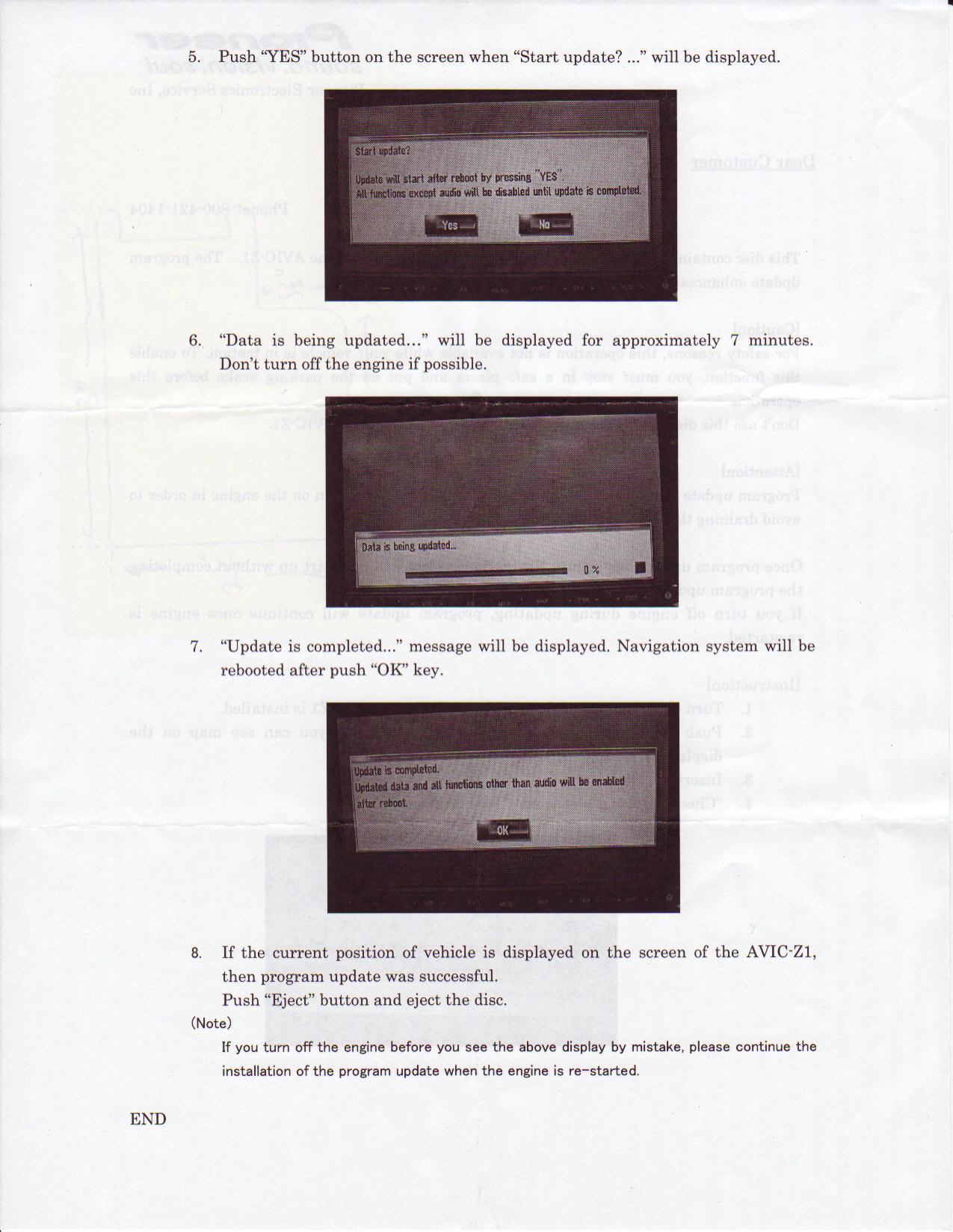
Great input from you all but I've been on the squeamish side because I don't have the time to mess around with this too much so I called Pioneer for a CD (800-421-1404). They very quickly said "Yes" and didn't even ask for my serial number, just my address. That was two days ago. It came today and I followed the instructions (attached in 2 JPEG's for two pages). High hopes were dashed by the update not working but I will keep at it. My issue with the Pioneer supplied CD is that I hit MAP, stick in CD, get the "checking disc.. please wait" and then a screen with "Start Update?" and a YES and NO button (only) comes up, both available. I hit YES and it breifly says checking disc and then displays the screen in step 5 of the instructions with "Start Update?" along with the other text in the screen shot of the instructions but the YES button is grayed out. I waited 20 minuyes the first time (got my car cleaned up) and it stayed there so I hit NO and it went back to the map. Tried the process again without the long wait and same thing so I'm calling Pioneer again tomorrow to continue the adventure.


Later,


Digxrayguy

post-2126-12872751372774_thumb.jpg

post-2126-12872751376253_thumb.jpg

Posted Dec 15, 2006 · 05:46 UTC#110

Another quick note, I just compared my Pioneer supplied CD to the DIR DucatiBoy posted and it's exactly the same. Just an FYI.


Digxrayguy

Posted Dec 15, 2006 · 07:33 UTC#111
Another quick note, I just compared my Pioneer supplied CD to the DIR DucatiBoy posted and it's exactly the same. Just an FYI.


Digxrayguy


:roll: Ahhh who posted ?????

Posted Dec 15, 2006 · 12:15 UTC#112
Another quick note, I just compared my Pioneer supplied CD to the DIR DucatiBoy posted and it's exactly the same. Just an FYI.


Digxrayguy


:roll: Ahhh who posted ?????


You did! You are the man. Sorry people are making me steal your thunder. LeonPhelps was the guy who posted the CD. Leon is the MAN!

Posted Dec 15, 2006 · 16:15 UTC#113

No lack of respect intended. Leon is the one who came up with it first - agreed. I was just referring to the DIR of Leon's post. Is that better? :D


Digxrayguy

Posted Dec 15, 2006 · 16:44 UTC#114
No lack of respect intended. Leon is the one who came up with it first - agreed. I was just referring to the DIR of Leon's post. Is that better? :D


Digxrayguy


True, you did say that. Leon and I both missed that. Sorry! Props all around! :)

Posted Dec 15, 2006 · 19:07 UTC#115

I dont really care guys. Im just having some fun. :lol:

Posted Dec 15, 2006 · 22:21 UTC#116

For those who can't get the update to work, even after following all the steps:


That was me. I tried everything - different media, different burn speeds, different programs (Nero and ISO Burner)... nothing seemed to work.


I ended up getting the update to work by doing a combination of things... so I'm not sure which of the things I did actually solved the problem.


1) I burned the data to a DVD-R

2) I used Roxio

3) I used a different computer (different brand of CD/DVD writer)


So, one or the combination of those solved my problem.


I have a September 2006 unit, and the 2-wire bypass still works, the Bluetooth echo is greatly reduced, and the Z1 is as good as ever.

Posted Dec 16, 2006 · 01:43 UTC#117

my money is on the dvd-r, I didnt even think of using a cd at the time of upgrading, guess I am glad I didnt.

Posted Dec 16, 2006 · 04:45 UTC#118

I just installed my 2 Wire Bypass and it's a awesome! The installers had it initially wired it the "proper" way and it sucked bad (locks). I rewired it myself following Duccatiboy's directions. :D I hated having to pull over and press my parking break everytime.


BLUETOOTH UPDATE:


I did a level 3 reset (to clear out phone) first then I just tried to update and my Avic Z1 and the unit said that this update is already installed. So I then lowered my Treo 650 listening volume and repaired phone. Sounds great. I guess it is safe to assume that the Oct-06 units have already been updated coming from the factory. I hope this info is helpful.


Kleenkut13

Posted Dec 18, 2006 · 13:46 UTC#119

The Software update is a "ISO" file. This is an image file that needs to be burned to either a CD or a DVD using any CD/DVD burning software that allows for ISO files.


I used "My DVD" software application to burn the files to a CD. That's right, a CD. Load the CD into the Z1 and hit the menu key, The Z1 will boot it up from there, follow the Z1's on-screen instructions. The Z1 will automatically shut down and restart by itself, then reset the unit one more time.

Posted Dec 19, 2006 · 04:15 UTC#120

LeonPhelps is the original files from a cd or dvd, pioneer sending dvd's? I will know in a couple days as I got pioneer to send me an original today. But thought it would be neat to know.

Posted Dec 20, 2006 · 00:26 UTC#121

I got my pioneer CD in the mail today. It is a CD and a silkscreened and burnt one at that. Not a mass produced CD like you see typically. Hence the green color of the CD on the written side. I also got the instructions that were posted here. It is identical to the ISO file posted.

Posted Dec 20, 2006 · 03:01 UTC#122

well thats good to know, pioneer is endorsing if you will this update off of cd.

Posted Dec 20, 2006 · 06:11 UTC#123

I got my CD in the mail too. I didnt request for the CD though. Looks like they automatically mailed it out to recent Z1 owners.


I haven't installed my Z1 yet because I'm waiting for my custom headunit being made.


CIMG0157.jpg

Posted Dec 20, 2006 · 07:02 UTC#124

I am assuming you registered your deck online?

Posted Dec 20, 2006 · 07:54 UTC#125

Roger That 8)

Page 5 of 10