Search Archive

Abb's Chrome NAV Mod V3.25 - Aug 30th '10

By abb1 · Jul 23, 2010in Completed Mods/Themes💬 571 posts👁️ 80,104 views
Page 20 of 23
Posted Oct 04, 2010 · 02:52 UTC#476

I did delete all user files but since I had just flashed 3.01 there was nothing there.


Okay, I'm going to try again tomorrow. Do I install the image.res file from Chrome 1.5 download? If so where? Maybe that is where I had trouble? I saw somewhere there is a 1.65 version but didn't see a download for it.


Thanks again for the help and I feel better about sending beer money now!

Posted Oct 04, 2010 · 03:22 UTC#477

Abb, I still want to know the transparency thing on the audio bar, or the bmp to remove. If I got it, I will limit the street name in width so I can have both on V2.75.


Thanks in advance!

You NEVER remove any files as this will prevent the system from booting or create error messages. You have to take the two files, 746_32K_OM-030_24b.bmp & 746_32K_OM-031_24b.bmp and make them totally transparent using alpha layers. An easier way to do this is to wait until I get this update up, and then use the image.res file that I will have in it with your 2.75 file. Just remember that you still have to cut the streetname width down to w=315


Sounds great Abb. Thanks for sharing :D .

Posted Oct 04, 2010 · 05:29 UTC#478

Abb, just installed your V3.23 AV Version. Things went well, although I had to nuke more of the east coast to fit in the GFX Folder. :D . However, I have some questions that came up during the install:


1) After step 9, you don't have a discuss the transfer of the second folder "put ALL CONTNETS IN 'MyFlashDisk-APL2-IGO" folder. I did as the folder name said. I copied the CECMD and ResInfo files in the MyFlashDisk root folder.


2) What do I do with the contents of the ChromeImage V1.5 folder? As noted above by SoCalPaul69, I could not figure out where to put this file. :?:


3) When I restarted the system things looked to be working. However, I was not able to get the Car Menu to work. The Menu came up, but none of the vehicles showed up. I am 99.8% sure that all of the bmps transfered (I'll check again in the morning). However, I did follow the instructions to the letter. Could it be a memory issue? Do I need to nuke more of the east coast. :(


Comments: I agree that the current AV bar does not look good with your scheme. However I like your proposed transparent bar and can't wait for your update. Also, I agree with 'motte' that the compass needs to stand out a little more.


Thanks again.

Posted Oct 04, 2010 · 07:45 UTC#479

jkdog,

1-CECMD and RESINFO should be in a folder called 'System' and that is supposed to be copied over into 'MyFlashDisk'

2-The Chromimage V1.5 should have a 'image.res' file once extracted. Place that into 'MyFlashDisk/APL' and say yes to overwrite

3-The car menu is fine. It is supposed to be blank until you hit the 'scan' button. Then it will scan all the vehicles in the folder and you will be able to choose them.

Posted Oct 04, 2010 · 16:47 UTC#480

Thanks Abb, made the changes this morning and the system looks great. I've been running it most of the day and it looks like I didn't screw anything up with the install. I had a couple of comments that you might like for your next update (note you made a great system, and these are just my thoughts)


First I noted that when I turned off the "your speed" sign from the display, the "MPH" label remains on the screen. I also noticed that, as with the Diaftia mods, during navigation I normally keep voice directions turned off, however after ending a phone call, the voice directions are back on.


I like having the elevation display on the screen, however, it is located in an odd spot. Just a thought, could this be moved up so that it located directly under the compass? While displaying the house numbers on the screen is a great display, I normally only need them if I am trying to find a location or while navigating. Is it possible to change the option for displaying house numbers to "yes/no/while navigation"?


On the AV screens,the function button has a great graphic but you can't see it because of the text. I'm not sure the text is really needed. Is it possible to modify the top information screen? The channel text is small, and I would like a larger clock.


Anyway, I was very disappointed with the original Pioneer system, and your mod makes this look modern. Thanks, again

Posted Oct 05, 2010 · 04:13 UTC#481
How do u add a location as a favorite spot?

Go to 'Route/ Plan/ Curser/ Add to favorites'


I had a hard time with this today. Is there a way to make this simpler? After selection of a destination, can the program just ask if this should be added to favorites? In the original system program after selecting a destination there was an intermidiate split screen showing the point and address. At this point you could "navigate to the point", "save it to favorites", etc. I thought this was a good setup.


Another option, a long press on "Distance to Destination" on the Main Screen while navigating could ask if the destination should be added to the Favorite list. Just some thoughts.

Posted Oct 05, 2010 · 22:35 UTC#482

First I noted that when I turned off the "your speed" sign from the display, the "MPH" label remains on the screen. I also noticed that, as with the Diaftia mods, during navigation I normally keep voice directions turned off, however after ending a phone call, the voice directions are back on.

Yes, I know that. The turning off your speed sign was from Diaftias mod prior when nobody wanted that big clunky speed sign covering the screen. That is why I have made it as a text, so that it would look better. I was going to remove that option, but nobody (until now ) has ever bothered to turn it off, so I wasn't to worried about it. The reason that there the unit sign remanes is that it went under a seperate script as I had to make the units smaller than the numbers and this was the only way to do that

I like having the elevation display on the screen, however, it is located in an odd spot. Just a thought, could this be moved up so that it located directly under the compass? While displaying the house numbers on the screen is a great display, I normally only need them if I am trying to find a location or while navigating. Is it possible to change the option for displaying house numbers to "yes/no/while navigation"?.

I cant put it directly below the compass because the current speed is there. If I put the elevation up and the speed below, then the speed would be drowned out by the streets and not be as visible

On the AV screens,the function button has a great graphic but you can't see it because of the text. I'm not sure the text is really needed. Is it possible to modify the top information screen? The channel text is small, and I would like a larger clock.

I am not to sure which AV screen you mean. If you are talking about the Main/AV part of the Avic, then that is not possible as the code is locked in and the only thing that can be changed is the actual bmp's.

Posted Oct 05, 2010 · 22:37 UTC#483
How do u add a location as a favorite spot?

Go to 'Route/ Plan/ Curser/ Add to favorites'


I had a hard time with this today. Is there a way to make this simpler? After selection of a destination, can the program just ask if this should be added to favorites? In the original system program after selecting a destination there was an intermidiate split screen showing the point and address. At this point you could "navigate to the point", "save it to favorites", etc. I thought this was a good setup.


Another option, a long press on "Distance to Destination" on the Main Screen while navigating could ask if the destination should be added to the Favorite list. Just some thoughts.

I am glad that you mentioned this as it was bugging me as well. I will make a shortcut in the 'Route Menu' to make it easier to add a favorite

Posted Oct 06, 2010 · 00:32 UTC#484

Hey guys, is this better? Remember, please give me feedback as that is what makes me post these updates

post-32106-12872763335708_thumb.jpg

Posted Oct 06, 2010 · 06:58 UTC#485
Hey guys, is this better? Remember, please give me feedback as that is what makes me post these updates


The add to Favorites is great.


I have not tried you mod yet, still using Diaftia's and loving it. Your mod looks great so I may have to give it a try. I was hoping Diaftia's 3.0 would be released but still waiting.


I don't get on the forum very often but do make a point to check in occasionally.


Is the VR working on the Nav screen or is this still a problem? I rarely use it because too often it made mistakes and I don't want to call the wrong person, but I am just wondering.


Thanks for all your fine work abb1.

Posted Oct 06, 2010 · 07:46 UTC#486

The add to Favorites is great.


I have not tried you mod yet, still using Diaftia's and loving it. Your mod looks great so I may have to give it a try. I was hoping Diaftia's 3.0 would be released but still waiting.


I don't get on the forum very often but do make a point to check in occasionally.


Is the VR working on the Nav screen or is this still a problem? I rarely use it because too often it made mistakes and I don't want to call the wrong person, but I am just wondering.


Thanks for all your fine work abb1.

I don't think that Diaftias 3.0 will ever be released, unfortunately, plus, I don't think that it will have much more than mine already has, and I have a few more goodies in my next release which I am putting into testing mode now. These new modifications are a definate improvement over my current release.

Posted Oct 06, 2010 · 08:13 UTC#487

Abb.As always I am really looking forward to your next release,seems an age ago since the last one.Realise you have other things in your life than making the Avic better for the rest of us :D .I am sure you know how much your efforts are appreciated on here.Are you going to give us a sneak preview of what to expect.......how about the possibility of running Tom tom???

Posted Oct 06, 2010 · 16:21 UTC#488

Nah, tom-tom works, but I had a problem loading the maps, or maybe I just had bad maps, I don't know. I am trying some other things, but unfortunately, everything requires testing and that part is tough when you are working 60 hrs/wk out of town :(

Posted Oct 07, 2010 · 02:31 UTC#489

Nice mod Abb

I need some help how can i add or delite speed / red camera

Thanks

Posted Oct 07, 2010 · 04:45 UTC#490

I don't think that Diaftias 3.0 will ever be released, unfortunately, plus, I don't think that it will have much more than mine already has, and I have a few more goodies in my next release which I am putting into testing mode now. These new modifications are a definate improvement over my current release.


That is excellent news. Thank you very much.


And yes, that "Add to favorites" is perfect. In fact, it will be fav one for many of us.


Thanks.

Posted Oct 07, 2010 · 05:32 UTC#491
Nice mod Abb

I need some help how can i add or delite speed / red camera

Thanks


You can add a camera by pressing the speed limit icon when you are in a new camera location.You can delete a camera using the cursor menu.Put your cursor onto the camera icon and press the red cursor icon.You then get options to alter camera type etc and also to delete the camera.

Posted Oct 07, 2010 · 13:25 UTC#492

I found it great using it vor a few weeks.


One Thing I`m missing Is ist possible to get direct acess to "TMC" from the navigation screen.


And There`s no Mazda-5 in the 3D cars ;-)

Posted Oct 07, 2010 · 14:31 UTC#493

Hey Abb, here's one for you. I was driving my wife's Altima yesterday and she has steering wheel controls. She has a source button which works. it changes from FM/AM/CD/Ipod/SAT etc. with one button press. Can that functionality be added to the map screen somehow? it is a bit of a pain to change sources. I would love to have that in my Mustang.

Posted Oct 07, 2010 · 16:24 UTC#494
Hey Abb, here's one for you. I was driving my wife's Altima yesterday and she has steering wheel controls. She has a source button which works. it changes from FM/AM/CD/Ipod/SAT etc. with one button press. Can that functionality be added to the map screen somehow? it is a bit of a pain to change sources. I would love to have that in my Mustang.

That would be easy to do if I can get into the UI of the main/Av section, but unfortunately that is not possible right now :(

Posted Oct 07, 2010 · 18:15 UTC#495

Abb, the 'Add to Favorite' button on the route menu looks like a good idea. I am not really familar with the Route Menu since I haven't used it much. I normally pick a Destination from the main screen and then I just follow the directions. But I have been trying different items while driving to/from work. The other day I tried the Plan Menu and this seemed to work for finding destinations. It would be nice if a "Add to Favorite" was added to that map screen. Maybe you are not planning to navigate to this location immediately and just want it added for future use.


By the way, I noticed that the screens you post on line have a dark (or nighttime) background, I would recommend viewing them with a daytime background also, because sometimes the menus options blend into the background.

Posted Oct 07, 2010 · 18:35 UTC#496

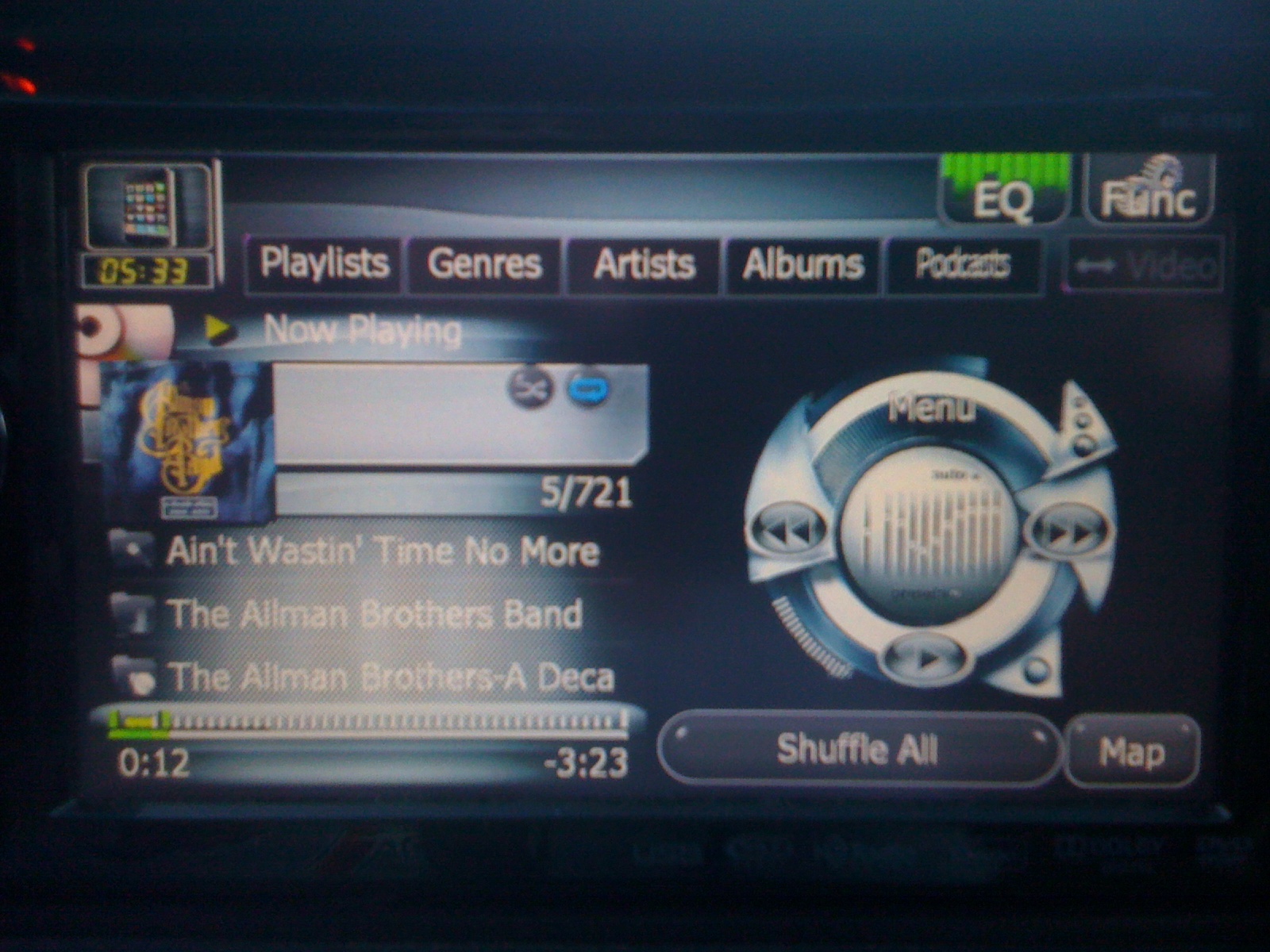
Abb, don't know if you were the one to modify the iPod screen, but the colors are not working with the text. Sorry about the quality of the photo, but you can see below that the ablum/song information is white text on a whitish background. Also, can the large graphic on the right be changed? I think a larger version of the album artwork would look better here. Can't the ablum artwork be shown here and the other information shown elsewhere? Finally at the top right hand side of the screen you seen the Equalizer button and the Function button. These are on all the AV pages and I don't know if this is hard coded or something that can be changed. Graphics are great, but the text interferes with the graphic. I think the graphics are good enough and the text is redundant. :D


post-46796-12872763336813_thumb.jpg

Posted Oct 07, 2010 · 23:52 UTC#497

First I noted that when I turned off the "your speed" sign from the display, the "MPH" label remains on the screen. I also noticed that, as with the Diaftia mods, during navigation I normally keep voice directions turned off, however after ending a phone call, the voice directions are back on.

Yes, I know that. The turning off your speed sign was from Diaftias mod prior when nobody wanted that big clunky speed sign covering the screen. That is why I have made it as a text, so that it would look better. I was going to remove that option, but nobody (until now ) has ever bothered to turn it off, so I wasn't to worried about it. The reason that there the unit sign remanes is that it went under a seperate script as I had to make the units smaller than the numbers and this was the only way to do that


Understand. Funny thing was I didn't really see the need for a sign showing the speed your driving. You are in a car with a speedometer. However, I figured it was more for programming, since people are programming/testing in their house and don't have a speedometer it needs to be displayed on the screen. Anyway, it would be nice not to have the labels.

Posted Oct 08, 2010 · 00:20 UTC#498

Is the VR working on the Nav screen or is this still a problem? I rarely use it because too often it made mistakes and I don't want to call the wrong person, but I am just wondering.


I'm sorry that this might be off topic a little, but wanted to clarify the VR issue and my use of it under Chrome NAV.


There has been a lot of discussion on the VR. I use VR a lot on my system for calling people, not for iPod and song selection. For the most part it works. It worked better with the original Pioneer programming. When I addd Diaftia's mod, the VR started to have some problems.


With the original system and all modifications after, VR would always ask me to repeat a name. However, either it would learn what I wanted or I would pronounce the name better and it would reconize what I was saying. About 40% or less of the time I will have to cancel dialing due to a wrong name; "Ray" and "Jay" would be difficult at times. When I loaded Diaftia's mod, I had a few issues after pressing the center of the volume button. There were times where the system just ignored the fact that I wanted to use VR (other times the station would change). Most of the time, it was just a delay issue. I would have to wait about 10 seconds before the system would "wake up" and respond. Once Chrome was added, it "seems" to have gotten a little worst. There is a significate pause in response from the system, and about 50% of the time the system ignors me. VR worked about the same as before. But I am persistant and continue to push the button. I agree with an earlier post that this is probably a memory/resource issue. However, I am still attempting to find a common occurance.


I have not tried to dial any POI yet. I don't trust the numbers provided. In fact, I haven't done much with POIs yet.

Posted Oct 08, 2010 · 01:07 UTC#499
Abb, the 'Add to Favorite' button on the route menu looks like a good idea. I am not really familar with the Route Menu since I haven't used it much.

The 'Route Menu' is the menu that you would pick after you have chosen a destination. It gives you the opportunity to save the route, use multi route to check out different options of the final destination, gives you a fuel calculator so that you can find out how much fuel it will cost you to get to your destination, as well as gives you the opoortunity to simulate your route so that you can visually inspect it before actually travelling it. This is great for going into unchartered territory that is unfamiliar, and now you can add the route to your favorites as well. This mod has an incredible amount of options, that you really should explore.

Posted Oct 08, 2010 · 02:16 UTC#500
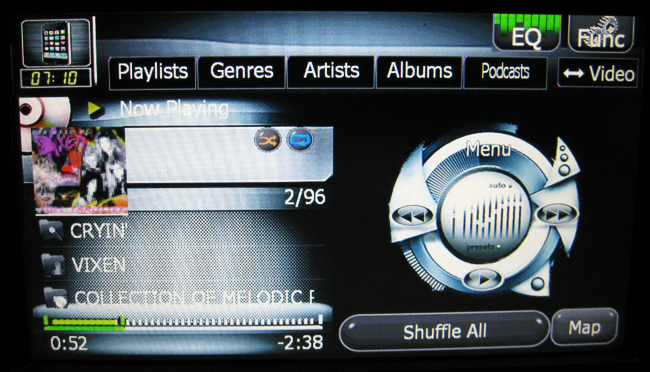
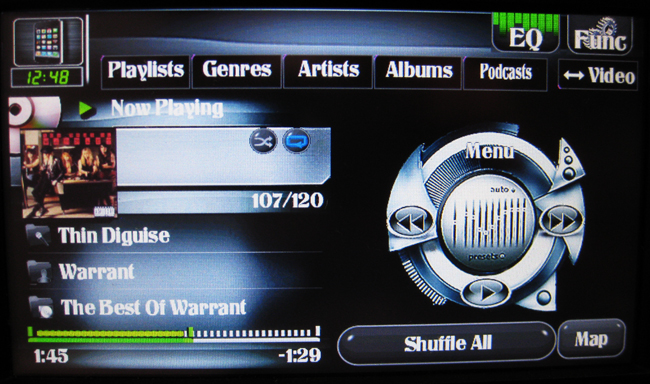
Abb, don't know if you were the one to modify the iPod screen, but the colors are not working with the text. Sorry about the quality of the photo, but you can see below that the ablum/song information is white text on a whitish background. Also, can the large graphic on the right be changed? I think a larger version of the album artwork would look better here. Can't the ablum artwork be shown here and the other information shown elsewhere? Finally at the top right hand side of the screen you seen the Equalizer button and the Function button. These are on all the AV pages and I don't know if this is hard coded or something that can be changed. Graphics are great, but the text interferes with the graphic. I think the graphics are good enough and the text is redundant. :D


post-32106-1287276334089_thumb.jpg

post-32106-12872763342035_thumb.jpg

post-32106-12872763342574_thumb.jpg

post-32106-12872763343295_thumb.jpg

Page 20 of 23