Search Archive

Abb's Chrome NAV Mod V3.25 - Aug 30th '10

By abb1 · Jul 23, 2010in Completed Mods/Themes💬 571 posts👁️ 80,104 views
Page 21 of 23
Posted Oct 08, 2010 · 02:41 UTC#501

Is the VR working on the Nav screen or is this still a problem? I rarely use it because too often it made mistakes and I don't want to call the wrong person, but I am just wondering.


I'm sorry that this might be off topic a little, but wanted to clarify the VR issue and my use of it under Chrome NAV.


There has been a lot of discussion on the VR. I use VR a lot on my system for calling people, not for iPod and song selection. For the most part it works. It worked better with the original Pioneer programming. When I addd Diaftia's mod, the VR started to have some problems.


With the original system and all modifications after, VR would always ask me to repeat a name. However, either it would learn what I wanted or I would pronounce the name better and it would reconize what I was saying. About 40% or less of the time I will have to cancel dialing due to a wrong name; "Ray" and "Jay" would be difficult at times. When I loaded Diaftia's mod, I had a few issues after pressing the center of the volume button. There were times where the system just ignored the fact that I wanted to use VR (other times the station would change). Most of the time, it was just a delay issue. I would have to wait about 10 seconds before the system would "wake up" and respond. Once Chrome was added, it "seems" to have gotten a little worst. There is a significate pause in response from the system, and about 50% of the time the system ignors me. VR worked about the same as before. But I am persistant and continue to push the button. I agree with an earlier post that this is probably a memory/resource issue. However, I am still attempting to find a common occurance.


I have not tried to dial any POI yet. I don't trust the numbers provided. In fact, I haven't done much with POIs yet.


Thanks for the response. I had read through the whole thread and some had reported that VR did not work at all, that is why I asked. Your info is good to know. As I stated I rarely use it because I would say something like Call Paul and it would want to call Mom. I have no problem talking to my mom but not when I am trying to call Paul.


Anyway, thanks again.

Posted Oct 08, 2010 · 12:18 UTC#502

I'm OK with the new colors on the IPOD screen, but they are sometimes hard to read.


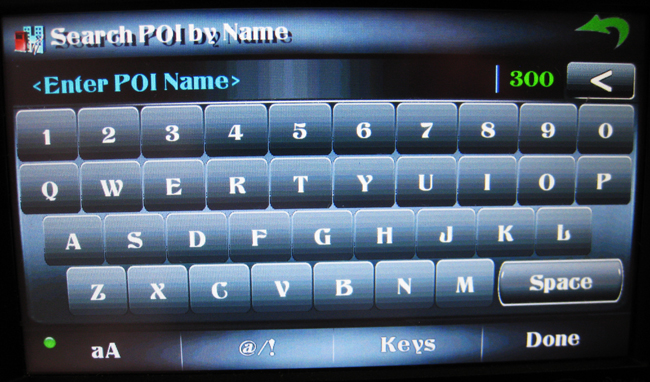
The one that does bug me that I use daily though is the POI search screen with the keyboard. It's pretty hard to see the text you have typed on that one with the new theme and the white fade across the center, but I deal because the rest of the mod is so awesome. If there is a way to turn off the fade just for that page, I'd be forever grateful.

Posted Oct 08, 2010 · 16:30 UTC#503

Love it too. Abb but, like the others have stated, the white text is hard to see. Especially in my Toy pickup where the unit is already facing a few degrees down :( How about a different color font for us "challenged" folks?
Thanx!


Bud

Posted Oct 08, 2010 · 16:56 UTC#504
Love it too. Abb but, like the others have stated, the white text is hard to see. Especially in my Toy pickup where the unit is already facing a few degrees down :( How about a different color font for us "challenged" folks?

Thanx!


Bud

The text color cannot be changed as it is in the UI of the AV section which we do not have access to. The only thing that can be changed other than the NAV section is the images, not the text or image locations. Look again at the ipod image as I have made a slight adjustment

Posted Oct 08, 2010 · 17:03 UTC#505

All these changes will be in a new mod when it is completed as an 'all in one' with the new AV/MAIN' section and the NAV mod with the new features and slightly better graphics. This will all be in one download with instructions on folder location for the files.

Posted Oct 08, 2010 · 17:11 UTC#506
I'm OK with the new colors on the IPOD screen, but they are sometimes hard to read.


The one that does bug me that I use daily though is the POI search screen with the keyboard. It's pretty hard to see the text you have typed on that one with the new theme and the white fade across the center, but I deal because the rest of the mod is so awesome. If there is a way to turn off the fade just for that page, I'd be forever grateful.

I have made the white fade darker for the next release, so that should help

post-32106-1287276334427_thumb.jpg

Posted Oct 08, 2010 · 23:47 UTC#507

Abb, I like the Key Board revision. I'm not sure I had any issues before, but this looks good. Regarding the iPod screen, the revision looks good also. However, I have an idea but not sure if its possible. I'm not sure how I will do it, but I was going to try an mock something up this weekend. Maybe you will like. Otherwise love your stuff.


Two items: the first is with the physical Map button on the face of the deck. If you are in the Main Menu or the Route Menu, the Map button doesn't work. You need to use the green arrow, which sometimes takes you back one menu screen at a time but other times takes you all the way back to the Map. (Is that clear? :? ) I could give an example, but I will have to go down to the car and write down the steps. My question is, can you program it so that the physical Map button always brings up the Map Screen?


Second item. I don't want to start up an old issue between you and Chuck88 8) , but unless I'm using the Nav system to find a destination, I leave the system so that you can see the skyline (basicly your standard set up). However, when I am navigating to a destination I will sometimes turn on the smartzoom to provide more information while driving through the City where there are numerous ramps and street. I like how it will give more of a overhead view. So, my thought was; :?: Can you change the selection for smart zoom to On/While Navigating/Off instead of just On or Off? As I posted earlier, I think this would be great with the house addresses also since normally that information isn't needed unless your looking for a particular destination.


Thanks,

Posted Oct 09, 2010 · 01:51 UTC#508
I have made the white fade darker for the next release, so that should help


That looks awesome thank you. :D

Posted Oct 09, 2010 · 04:02 UTC#509

Two items: the first is with the physical Map button on the face of the deck. If you are in the Main Menu or the Route Menu, the Map button doesn't work. You need to use the green arrow, which sometimes takes you back one menu screen at a time but other times takes you all the way back to the Map. (Is that clear? :? ) I could give an example, but I will have to go down to the car and write down the steps. My question is, can you program it so that the physical Map button always brings up the Map Screen?

No, you cannot do that. The reason that the map button does not work is because it is already on map. The menus are just layers over the original map

Second item. I don't want to start up an old issue between you and Chuck88 8) , but unless I'm using the Nav system to find a destination, I leave the system so that you can see the skyline (basicly your standard set up). However, when I am navigating to a destination I will sometimes turn on the smartzoom to provide more information while driving through the City where there are numerous ramps and street. I like how it will give more of a overhead view. So, my thought was; :?: Can you change the selection for smart zoom to On/While Navigating/Off instead of just On or Off? As I posted earlier, I think this would be great with the house addresses also since normally that information isn't needed unless your looking for a particular destination.


Thanks,

Sorry, like I told Chuck, I dont support smartzoom and never will because I dont use it, and I dont like it. Feel free to alter the smartzoom settings any way you feel fit. I tried playing around with it and no matter what the outcome, I didn't like it. Try using my 2.75 mod. It is not nearly as feature rich as this one, but Chuck seems to like the smartzoom in it.

Posted Oct 09, 2010 · 04:06 UTC#510
I have made the white fade darker for the next release, so that should help


That looks awesome thank you. :D

No problem, any recomendations that are do-able are always appreciated, because some of the functions I dont always use that often, so I dont realize the need for improvement.

Posted Oct 11, 2010 · 22:09 UTC#511

Hey Abb I love what you have here, I noticed though that it doesn't save the "Show AV Info" option. Is there a way to make this happen?


Also, I see a little square in front of some of my road names. Is this normal?

Posted Oct 11, 2010 · 23:12 UTC#512
Hey Abb I love what you have here, I noticed though that it doesn't save the "Show AV Info" option. Is there a way to make this happen?


Also, I see a little square in front of some of my road names. Is this normal?

Wow, after nearly three days, finally a post in this forum :roll: .

What do you mean by 'save the "Show AV Info" ' ? There are a couple of downloads, one is the AV, which has the AV always show unless you push the button to hide it and there is the NON-AV, which has it permanently hidden unless you push the button to show it.

Can you post a pic with the squares? I think that this is normal if the streetname is larger than the width, but I have to see to make sure.

Posted Oct 12, 2010 · 00:45 UTC#513

No I mean if I have the AV info on the screen with a map up, I have to keep going back and getting it to show it again. EG, when you are on the map, and you have avinfo enabled you can see either USB or FM or something. This disappears from time to time.


Also, 4shared doesn't seem to be working. Can you post it somewhere else?

Posted Oct 12, 2010 · 07:48 UTC#514
No I mean if I have the AV info on the screen with a map up, I have to keep going back and getting it to show it again. EG, when you are on the map, and you have avinfo enabled you can see either USB or FM or something. This disappears from time to time.

This happens when you have the NonAV version and click to have AV enabled. It is only meant to show it temporarly not permanent. If you want permanent, download the AV version. You can always choose to hide it if you dont want it. This again is only temporary though as it is a 'HIDE' button, not a dissapear button.


Also, 4shared doesn't seem to be working. Can you post it somewhere else?

4Shared is working fine. I just tried it

Posted Oct 12, 2010 · 14:31 UTC#515

Correct--I grabbed the wrong one.


4Shared seemed to have some issues last night. They're fixed now.


Last thing...I'd like to copy some of the POI listings from my SD card to the internal flash. Where do I copy these to?

Posted Oct 12, 2010 · 16:05 UTC#516


Last thing...I'd like to copy some of the POI listings from my SD card to the internal flash. Where do I copy these to?

myFlashDisk/APL2/igo/content/POI

Posted Oct 14, 2010 · 13:36 UTC#517

Where does the theme file go? It's named Image.res

Posted Oct 14, 2010 · 14:19 UTC#518
Where does the theme file go? It's named Image.res

It goes in 'MyFlashDisk/APL', just say yes to overwrite

Posted Oct 14, 2010 · 16:34 UTC#519
Hey guys, is this better? Remember, please give me feedback as that is what makes me post these updates


I had been waiting on this one.. is it available? I have been checking for this, not seeing any mention that you released it.


Thanks.

Posted Oct 14, 2010 · 17:33 UTC#520
Hey guys, is this better? Remember, please give me feedback as that is what makes me post these updates


I had been waiting on this one.. is it available? I have been checking for this, not seeing any mention that you released it.


Thanks.

No, I haven't released it yet. It is complete, it is just a matter of finding the time to upload the files and post it. This is the most work as pictures have to be taken (at night only), descriptions, instructions posted, as well as files uploaded on 4-shared which takes a while because I just have a freebie membership. My time is also very limited with the job that I have and I put it to question on whether it is worthwhile putting this up due to the lack of interest. so far there is not much feedback :(. I have already sent the V4.0 to one member for evaluation. I will see on his comments and on the comments that I get on this forum

Posted Oct 14, 2010 · 21:30 UTC#521

Abb!


I am very much looking forward to your new release. I know it is a lot of work designing, programming, testing, correcting and testing over and over again. As far as uploading goes, pictures are always nice, but they are not essential. If always start out by making a full backup and if I don't like the new one, well in goes the old one.


What you are doing is very much appreciated.


Thanks

Posted Oct 15, 2010 · 00:36 UTC#522

Thanks for the response on my question. I also love this mod, just getting used to it. I'm kind of sad there is already an update coming. I just updated. =P

Posted Oct 15, 2010 · 01:41 UTC#523
Thanks for the response on my question. I also love this mod, just getting used to it. I'm kind of sad there is already an update coming. I just updated. =P

The new one is a lot better :). Updating is easy, all you have to do is just overwrite ALL the files and just say 'yes' to overwrite and then just delete the user data.

Posted Oct 15, 2010 · 04:34 UTC#524

I'm really looking forward to the new update so don't think there aren't people waiting for it.


I really do have beer money coming to you but my PayPal account is on hold for another 2 days because someone who bought something from me filed a complaint and I have to wait for the money to be transferred to account.


Paul

Posted Oct 15, 2010 · 12:55 UTC#525

Anyone know how to get the tripmeter thing to work? Also, what does record from the map menu do? The log thing in the settings, is that to long where you drove, or just what you gps and it directs you on the unit?

Page 21 of 23