Search Archive

Map accuracy - lagging behind

By ADE · Aug 07, 2010in Problems/Troubleshooting💬 41 posts👁️ 7,635 views
Page 1 of 2
Posted Aug 07, 2010 · 04:34 UTC#1

Hi new to the board and Pioneer. I recently installed a X920BT and the when using the map screen the indicator (red triangle) is inaccurately displayed on the map. When I pull up to an intersection, it shows me on the map not quite at the intersection. When I turn, it looks like I'm turning into someone's front yard and then the map clicks and I on the street again. When traveling, I'm usually past a street or overpass before it shows on the map. I also noticed that sometimes it doesnt even show the surrounding street names. I moved the GPS antenna the roof of the vehicle about a week ago hoping this would fix the problem. The connection shows ok and all 3 bars are lit up. I've seen 10-11 sats next to the red satilite. My VSS wire is also hooked up and its getting good pulses.


What is going on? Has anyone else experienced this and how did you fix it?


I love the unit and man is this frustrating! :|


Thanks in advance for your help.


TonySS

Posted Aug 09, 2010 · 20:49 UTC#2

any suggestions?

Posted Aug 09, 2010 · 20:51 UTC#3

The lag is normal on these units and there is nothing you can do about it.

Posted Aug 10, 2010 · 10:23 UTC#4

"Normal" just doesnt seem right. I've had several "OEM" in-dash systems in the past and none exhibited this problem. When talking with Pioneer, they never mentioned its normal. I'll try a total reset this week and see if it works, if not, I'll just send it back for warranty service.

Posted Aug 13, 2010 · 02:00 UTC#5

Does anyone know what the orange and yellow satellites mean? Should there be any number next to the yellow satellite? When driving, I sometimes will see the number between 10-12 next to the red satellite and some 1 next to the yellow satellite. Usually its 0 next to the yellow satellite.


I wonder if this is my problem.


Thanks

Posted Aug 17, 2010 · 16:30 UTC#6

I'm curious, do any of your satellites ever show up green?


Joe

Posted Aug 19, 2010 · 01:46 UTC#7

no green satelites on the x920bt

Posted Aug 28, 2010 · 23:18 UTC#8

I think I read somewhere that the red satellites are used for position determination and the yellow satellites are not.

Posted Aug 29, 2010 · 01:14 UTC#9

Thanks I read the same thing in the manual but a pioneer tech told me the opposite. I'm still trying to figure out my problem, the gps antenna was just replaced and the tech now wants me to disconnect the vss wire. Something the manual says should be hooked up for better accuracy. I'm about ready to sell and move on.

Posted Aug 29, 2010 · 22:42 UTC#10

This is odd indeed. On my AVIC-X910BT after I reset the device and go to my GPS map, I can see that all of the satellites are red. After time, some turn to yellow, and after more time, most turn green. I thought this meant that the AVIC is receiving the GPS signal from the satellites shown, only the confidence in the signal isn't optimum for that particular satellite (red or yellow status). When the satellite turns green, the confidence is high. Sometimes, when a satellite is about to go out of range, the confidence level never reaches green. The colors - red, yellow, green - make this seem intuitive.


It sounds like the 920BT acts differently?...


If my suspicions about the confidence level in the signal (mind you confidence level is not based purely on signal strength) are true, then let me ask you something: do you normally park your vehicle under a structure (garage/parking garage, et cetera)? I believe the AVIC maintains it's GPS track while the unit is turned off (but it still has access to the "hot" 12 VDC line) so that it won't take as long to get an acquisition on your correct position when you get back in the vehicle. It only has to re-initiate a connection to the GPS satellites when you reset the unit or your vehicle loses power. However, an overhead structure could interfere with it's ability to maintain track. Getting an accurate GPS fix on your location is an inherently long process (relatively speaking of course) and not the fault of your AVIC unit - GPS is NOT instant on when there has been no prior tracking.


Does anybody else have some experience with this that could offer insight?


By the way, it doesn't make sense to me for you to disconnect your VSS signal with the problem you're having.


Joe

Posted Aug 30, 2010 · 02:02 UTC#11
This is odd indeed. On my AVIC-X910BT after I reset the device and go to my GPS map, I can see that all of the satellites are red. After time, some turn to yellow, and after more time, most turn green. I thought this meant that the AVIC is receiving the GPS signal from the satellites shown, only the confidence in the signal isn't optimum for that particular satellite (red or yellow status). When the satellite turns green, the confidence is high. Sometimes, when a satellite is about to go out of range, the confidence level never reaches green. The colors - red, yellow, green - make this seem intuitive.


It sounds like the 920BT acts differently?...

yes, the x920 is not related to the F and early x series units at all, the software including the GPS was a ground up rewrite.


I can attest when I had my x920 the GPS lagged and took a bit to catch up to where I was, and what street I was on, the issue never happened on my f-series

Posted Sep 01, 2010 · 15:32 UTC#12

Thanks for the information. I'm checking to see what I need to do to send it back for warranty repair. Gotta get a reciept. any help?

Posted Sep 03, 2010 · 04:36 UTC#13

Not sure why people put the GPS in the AVIC-X920BT down so much. I wasn't real happy with it at first, but after a few tweaks, I think it works pretty well. It shows all the street names, announces turns with the street name and seems pretty accurate on short trips, I haven't taken any long trips with it yet. When I first got it, I noticed when parked at home the position of the arrow on the map was a little off, but after I adjusted it, it seems pretty good now. It still announces you have arrived at your destination maybe a hair to early, but not bad. I had (and still have) a portable Garmin Nuvi before this I really liked, but like the Pioneer GPS, so far, and it's built in, always ready to go. :)

Posted Sep 03, 2010 · 10:35 UTC#14

Funtimeguy


How did you adjust it? I love the unit, I just want to fix this problem. My position is always off and sometimes street names dOnt show at all.


Any help is appreciated.


Thanks,


Tony


Not sure why people put the GPS in the AVIC-X920BT down so much. I wasn't real happy with it at first, but after a few tweaks, I think it works pretty well. It shows all the street names, announces turns with the street name and seems pretty accurate on short trips, I haven't taken any long trips with it yet. When I first got it, I noticed when parked at home the position of the arrow on the map was a little off, but after I adjusted it, it seems pretty good now. It still announces you have arrived at your destination maybe a hair to early, but not bad. I had (and still have) a portable Garmin Nuvi before this I really liked, but like the Pioneer GPS, so far, and it's built in, always ready to go. :)
Posted Sep 03, 2010 · 17:50 UTC#15
Funtimeguy


How did you adjust it? I love the unit, I just want to fix this problem. My position is always off and sometimes street names dOnt show at all.


Any help is appreciated.


Thanks,


Tony


Not sure why people put the GPS in the AVIC-X920BT down so much. I wasn't real happy with it at first, but after a few tweaks, I think it works pretty well. It shows all the street names, announces turns with the street name and seems pretty accurate on short trips, I haven't taken any long trips with it yet. When I first got it, I noticed when parked at home the position of the arrow on the map was a little off, but after I adjusted it, it seems pretty good now. It still announces you have arrived at your destination maybe a hair to early, but not bad. I had (and still have) a portable Garmin Nuvi before this I really liked, but like the Pioneer GPS, so far, and it's built in, always ready to go. :)


how far off is "always off"? Do you have the VSS cable connected? Where's your GPS antenna located?

Posted Sep 03, 2010 · 20:42 UTC#16

Off about 1/2 block, sometimes it's blocks off. The vss is connected. The gps antenna is on the roof of the vehicle and reads exceptional reception. I can post pics of this stuff when I get home.

Posted Sep 03, 2010 · 23:00 UTC#17
Off about 1/2 block, sometimes it's blocks off. The vss is connected. The gps antenna is on the roof of the vehicle and reads exceptional reception. I can post pics of this stuff when I get home.


geez - blocks off? What have I got myself into LOL - hopefully they fixed whatever's wrong in yours, but it sounds like its an inferior product and Pioneer doesn't want to admit it. I figure the blowout price I just got at Amazon (sub $400) has something to do with that

Posted Sep 04, 2010 · 00:08 UTC#18

To get the street names to show up I use the 2D mode and then change the view from the default 0.1 mi. to 0.25 and now it shows a lot more street names. To adjust your location go to Home, then Settings, then Navi Setting, then Modify Current Location, then use your finger to move the map to where you want the arrow to be and hit OK.

Posted Sep 04, 2010 · 00:30 UTC#19

Thanks for this information. I've done this atleast a dozen times. I do get a little more street names but when I change locations it never stays.


To get the street names to show up I use the 2D mode and then change the view from the default 0.1 mi. to 0.25 and now it shows a lot more street names. To adjust your location go to Home, then Settings, then Navi Setting, then Modify Current Location, then use your finger to move the map to where you want the arrow to be and hit OK.
Posted Sep 04, 2010 · 00:33 UTC#20

You should be fine! My problem seems to be a one off. I haven't ran across anyone one else with this problem. If I could find this unit for less than $400, I would by it again!


Good luck with yours.


Tony


Off about 1/2 block, sometimes it's blocks off. The vss is connected. The gps antenna is on the roof of the vehicle and reads exceptional reception. I can post pics of this stuff when I get home.


geez - blocks off? What have I got myself into LOL - hopefully they fixed whatever's wrong in yours, but it sounds like its an inferior product and Pioneer doesn't want to admit it. I figure the blowout price I just got at Amazon (sub $400) has something to do with that

Posted Sep 04, 2010 · 00:47 UTC#21
You should be fine! My problem seems to be a one off. I haven't ran across anyone one else with this problem. If I could find this unit for less than $400, I would by it again!


Good luck with yours.


Tony


hehe - I'm sure we'll be discussing more in the weeks to come :)

Posted Sep 04, 2010 · 01:22 UTC#22

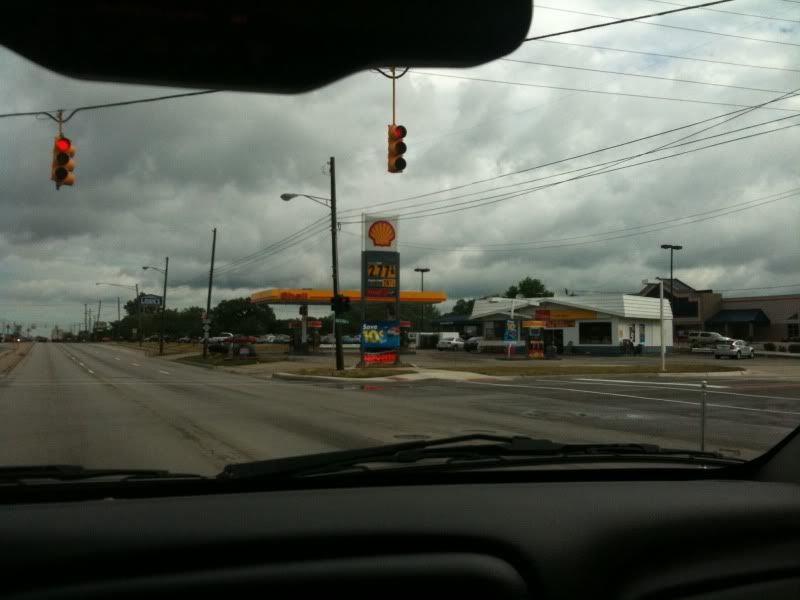
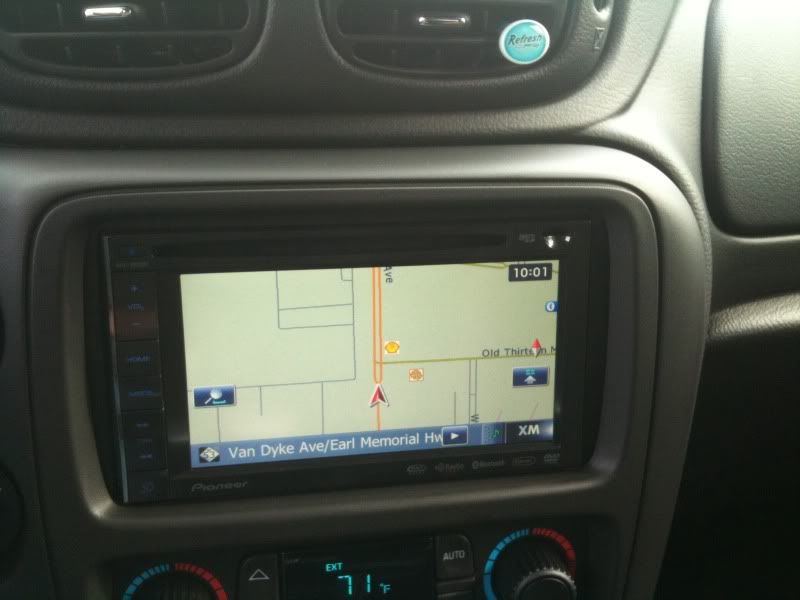
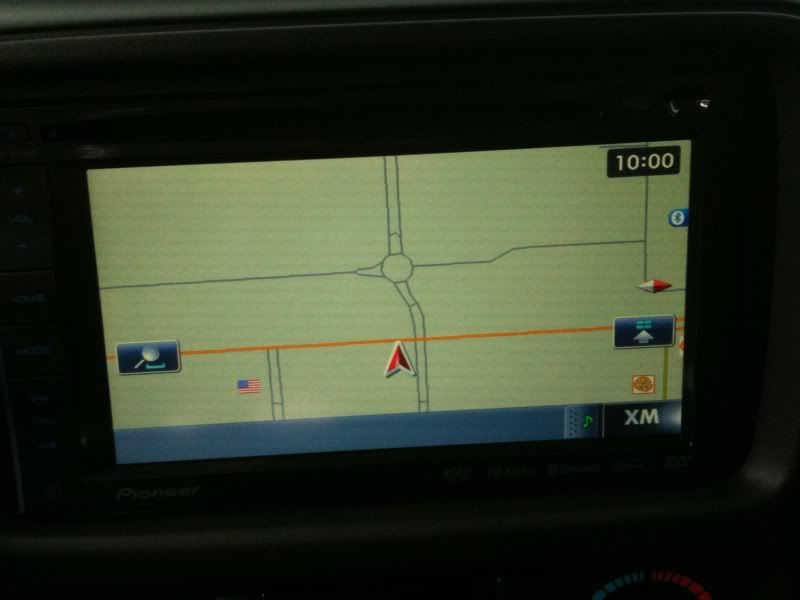
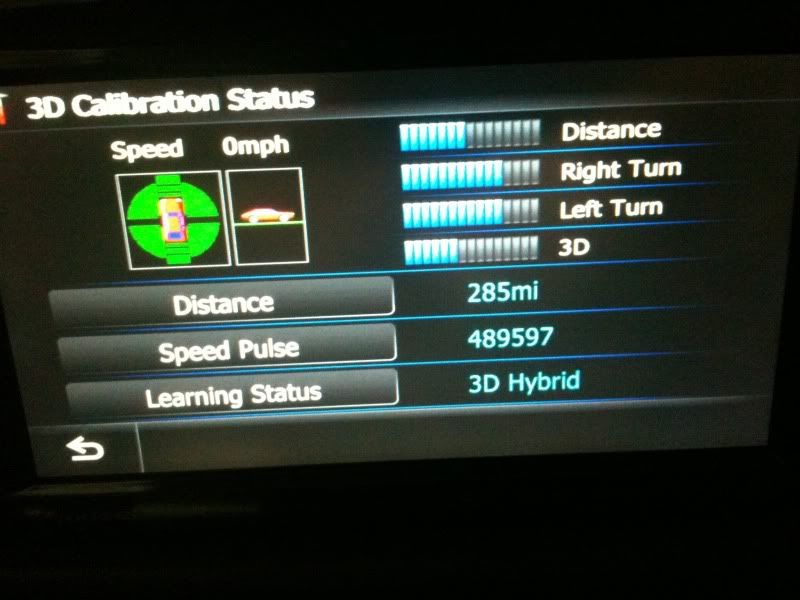
Here are a few images from today. Is this what you guys see too? Is this normal?


My vehicle physically at an intersection

d4854f6d.jpg


Here is the display of me at the intersection (See how far back it is)

789e2352.jpg


Here is my displayed location after turning and traveling down this road (It doesnt even show me on the road. I traveled down this whole road to the location you see here. I made a right turn onto the orange road. I was surprised to see the apex of the triangle at the intersection as it should be)

d9745201.jpg


Here is the calibration status screen (notice that the distance and 3D meters are not as far along as the turn meters. I havent seen neither of these past 7 or 8 lines. I have reset this a dozen times or more)

d18b5b11.jpg

Posted Sep 04, 2010 · 03:17 UTC#23

At the calibration screen on mine the learning status is set on Simple Hybrid instead of 3D Hybrid. I'm not sure what the difference is.

Posted Sep 04, 2010 · 03:37 UTC#24
Off about 1/2 block, sometimes it's blocks off. The vss is connected. The gps antenna is on the roof of the vehicle and reads exceptional reception. I can post pics of this stuff when I get home.


Wait a second - your screen says XM - so I take it your X920 is receiving signals from two sets of satellites for both GPS and XM. It would be interesting to disconnect the XM and see if the problem remained. Maybe there's a software glitch there - anyone else with XM? What happens when the antenna is inside the car?


But still, the Pioneer guy may be on to something - aka there's something amiss with the VSS hookup; a short, a loose wire, the wrong signal (how are you getting the VSS feed - is it digital or analog?)

Posted Sep 04, 2010 · 03:59 UTC#25

I have XM. Both the antennas are on the dash. One on the right side and one on the left side. I had my X920BT professionally installed, so not sure which antenna is which. :?

Page 1 of 2