Search Archive

Chuck88's Mod v3.4b with Pioneer FW 4.0 and Primo 2.0 - Updated 2013-04-13

By Chuck88 · Nov 09, 2010in Completed Mods/Themes💬 851 posts👁️ 212,464 views
Page 18 of 35
Posted Jul 08, 2011 · 04:56 UTC#426

I have a F90 that supports it, but the MSN Direct around here has been turned off at whatever radio station provided it. Last time it updated was back in March. Suck.


Yeah that sucks! :blink: Looks like this is no longer supported in North America ... :angry:


So is there anyone still using the MSN Direct at this time? Or I can simply remove it from the mod? :unsure:


Raise your hand if you want to have MSN Direct on upcoming update!

Edited Jul 08, 2011 by Chuck88
Posted Jul 08, 2011 · 05:40 UTC#427

Steps for the "out of memory":

Case 1. Usually when the system automatically run the map i got the error

Case 2. When I press the button MAP on the device "too quickly", let say under 5-10 sec after the dialog "system loading" disappear.

Case 3. When I have a long route with a Via point or then I get multidraw on that route

Case 4. During the navigation, e.g. when it turn from the the rear camera vie to map

Case 5. Sometimes It happends when the GPS not jet get the position


The crash.txt I will send you later today.


After I get the out of memory I cannot use the map software, so I can't execute the Custom script, or any other thing related to IGO. I can't even open Navi Setting. I can only turn off and on the engine to restart avic or go to System Setting -> Service (Debug) -> Show explorer -> navigate to APL2 -> Extensions and execute the Restart.exe from there. However, during the drive it's not a good idea to do this steps. That's why I asked how to add option directly to this screen in Debug menu.


Can you provide steps to recreate the "out of memory" problem? You can also provide me the crash.txt but to be honest, I never look into it before (never got problem).


For your second question, you can try to execute the Custom script under the "Application Menu 1" (on map popup menu), and the shortcut to the RESET will be created and accessible from the WinCE Start Menu.

Posted Jul 08, 2011 · 13:23 UTC#428

Hummm, I printed this out and will check that with my AVIC X710BT. BTW, what is your device?


Please bring up the System Resource Monitor (the 4th icon under the Application Menu 1) and go to the Resource Tab, and please report the free RAM and Flash memories usage.


On my device X710BT:


Case 1: Using Carver's Hack, I always run automatically into the map at startup since one year: never see error (I use the Steath Mode - blank screen at startup, this is an option under Custom Menu). I will try not using Steath Mode.

Case 2: Is this happening all the time? I believe that I did that sometime but never see the problem ... it might be Window CE is multitasking something ....

Case 3: Hummmm ... can you sent me a route with GPS positions or street names and via points with this problem?

Case 4: I tried the rear view camera to see my bikes attached to a rack during my trip last Monday and no problem ... and I will try that again ...

Case 5: Can't get GPS position at startup? It happens sometime to me but NEVER got a Windows error message. This is a Windows/GPS device sync problem and sometime it requires you to reboot AVIC to get GPS back ... very rare though!


Which scenario happens all the time? I mean everytime? This will help me troubleshoot if there is a problem.


Please your people, anyone experienced this problem at lease once already? With a Windows memory error? With close to 1000 downloads since my first version, I expect :evil: at lease 20 or 30 feedbacks on this issue and whether YES or NO. Please please report back.

Edited Jul 08, 2011 by Chuck88
Posted Jul 08, 2011 · 18:10 UTC#429

My unit is F910BT (European version)

System Resource Monitor:

Memory:

- Program 82MB used 120MB free

- Storage 350kB 131MB free

Flash: 270MB free 1,52GB used

AVIC_crash.txt contain some errors from just a few hours. I can send you the whole file from about 2 weeks, but its size is ~20MB.


Case 1: most common error; very often unit stay on the main screen (doesn't switch to map). I use the map view (not the Stealth mode)

Case 2: directly connected with case 1; 60-70% of time when I quickly press the map button I got the error.

Case 3: I can sent, but You would need EU maps the get this route. Generally the route was about 1600km with 7-8 via point and was using maps from 5 countries. I get this error just 2 times, but not often I'm driving that long distances (holiday trip).

Case 4: Happens rarely, only when in navigation I got it.

Case 5: It happens when on the morning I start my car in the garage and GPS need 40-60s to get the signal lock, if during that time i set destination and want to start guidance I get the error. Not always that happens.


Do you have any idea how to add restart to the debug menu ?


Hummm, I printed this out and will check that with my AVIC X710BT. BTW, what is your device?


Please bring up the System Resource Monitor (the 4th icon under the Application Menu 1) and go to the Resource Tab, and please report the free RAM and Flash memories usage.


On my device X710BT:


Case 1: Using Carver's Hack, I always run automatically into the map at startup since one year: never see error (I use the Steath Mode - blank screen at startup, this is an option under Custom Menu). I will try not using Steath Mode.

Case 2: Is this happening all the time? I believe that I did that sometime but never see the problem ... it might be Window CE is multitasking something ....

Case 3: Hummmm ... can you sent me a route with GPS positions or street names and via points with this problem?

Case 4: I tried the rear view camera to see my bikes attached to a rack during my trip last Monday and no problem ... and I will try that again ...

Case 5: Can't get GPS position at startup? It happens sometime to me but NEVER got a Windows error message. This is a Windows/GPS device sync problem and sometime it requires you to reboot AVIC to get GPS back ... very rare though!


Which scenario happens all the time? I mean everytime? This will help me troubleshoot if there is a problem.


Please your people, anyone experienced this problem at lease once already? With a Windows memory error? With close to 1000 downloads since my first version, I expect :evil: at lease 20 or 30 feedbacks on this issue and whether YES or NO. Please please report back.

AVIC_crash.txt

Edited Jul 08, 2011 by jezikk
Posted Jul 08, 2011 · 20:42 UTC#430

I don't think that free memory is the issue, as it has more than 100 MB on every crash.


I tried many scenrios today without seeing error, but my plots were only a few 100 KM within Canada, not 1600 KM across many countries. After reading your post, I'm not going to describe my tests. Instead, I think it is possible that the problem is relied on the EzRider.exe, which was the cause for your crashes. I think that it is possible that the buggy EzRider.exe when combining with map from your area, can reveal potential flaws within EzRider.exe.


I would suggest:


1) Try to see if there is any forum member from your area and ask him to do the same test in order to isolate whether it is your setup (AVIC) or else.


2) Try to install another mod base on diaftia's, his own v3.6 or abb1's v4.0 or v5.0, then try doing the same thing to see how AVIC react.


I will see if there are members to report the same issue with my mod later. Hope there will be people to report whether YES or NO.


Good luck!

Edited Jul 09, 2011 by Chuck88
Posted Jul 09, 2011 · 04:59 UTC#431

Ok, thx for Your help, what I'm planing to do is:

1. restore old ezrider.exe i see what happened

2. restore ABB's mod where everything was OK

3. Maybe I'll try new file from firmware 4.0


Do You have any idea how to modify the SystemSetting.exe -> DEBUG MODE in System Information tabs, to add there an restart options ?

Edited Jul 09, 2011 by jezikk
Posted Jul 09, 2011 · 17:34 UTC#432

Ok, thx for Your help, what I'm planing to do is:

1. restore old ezrider.exe i see what happened

2. restore ABB's mod where everything was OK

3. Maybe I'll try new file from firmware 4.0


Do You have any idea how to modify the SystemSetting.exe -> DEBUG MODE in System Information tabs, to add there an restart options ?


Sorry I forgot your last question ... No I don't know how to do that, Carver has implemented the DEBUG MODE inside the EXE file.


BTW, before switching to Abb's mod, you can try to get ride of Carver's hack (4 or 5 files including some DLL et EXE) in the APL folder and see whether that fixes the problem. It is possible!

Posted Jul 13, 2011 · 16:28 UTC#433

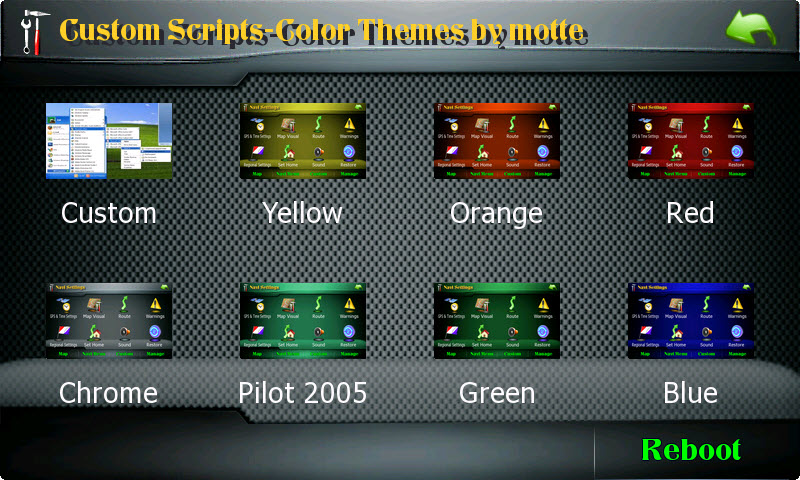
With thanks to motte, I am considering also include interface colors changer in my next update.


motte-s-color-the...election-2ac5f6f.jpg

Posted Jul 13, 2011 · 19:13 UTC#434

Sorry I forgot your last question ... No I don't know how to do that, Carver has implemented the DEBUG MODE inside the EXE file.


I found that in the debug mode -> process explorer there is a reboot option on the tab.


Also, I found the problem is not necessarily connected with the memory, I manage to check how much memory system have when I got the "out of memory" box, it has ~60MB of RAM. When I reverted back to ABB'ys mod completely (also the .exe files) everything is ok. When I get some free time I'll check the exe files.

Posted Jul 13, 2011 · 21:05 UTC#435

I found that in the debug mode -> process explorer there is a reboot option on the tab.


Also, I found the problem is not necessarily connected with the memory, I manage to check how much memory system have when I got the "out of memory" box, it has ~60MB of RAM. When I reverted back to ABB'ys mod completely (also the .exe files) everything is ok. When I get some free time I'll check the exe files.


Please keep me posted with your findings. I included the altitude-hacked EzRider.exe in my last release instead of the original one, so far I don't have any problem.


Weired and nobody else reports it. But if you have this problem then it might be really one.


Thanks!

Posted Jul 13, 2011 · 22:03 UTC#436

With thanks to motte, I am considering also include interface colors changer in my next update.


motte-s-color-the...election-2ac5f6f.jpg


These themes would be an excellent update. I didn't like the checkered theme currently too much.

Posted Jul 13, 2011 · 22:15 UTC#437

Well those themes are still checkered but with different colors ... :mrgreen:


Hope that you will like them.

Edited Jul 13, 2011 by Chuck88
Posted Jul 14, 2011 · 06:56 UTC#438

Wooo I will get an new Update...

Posted Jul 14, 2011 · 08:53 UTC#439

bonjour motte


SUPER.......

Posted Jul 15, 2011 · 06:25 UTC#440

Hi Chuck,love the new colour options.Are you anywhere near sharing them with your fans?

Posted Jul 15, 2011 · 13:23 UTC#441

Hi Chuck,love the new colour options.Are you anywhere near sharing them with your fans?


Still around ovalball? <_<


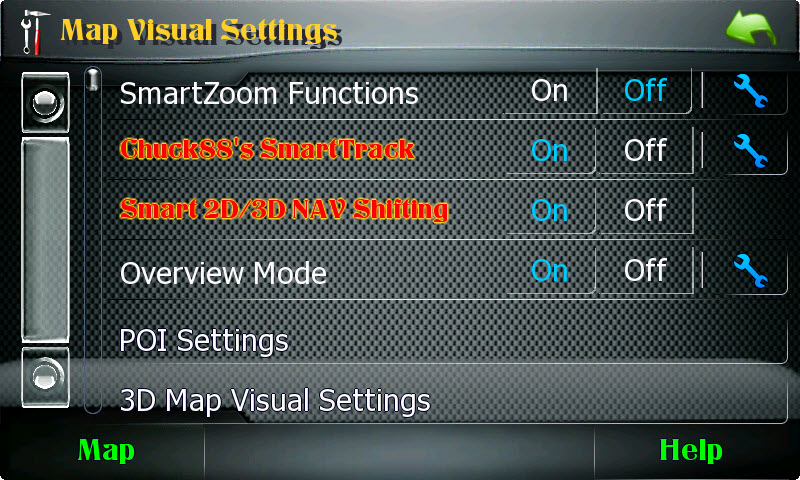
Yeah it was dead ready since two weeks or so, and I make a trip with it during my vacation. Beside the interface color changer, in the new version, all you have to do to benefit from both SmartTrack in 2D and SmartZoom in 3D during navigation is to enable one single option. Below is the description found in the HELP file:


Turning ON the "Smart 2D/3D NAV Shifting" select the best of both worlds - SmartTrack for 2D mode and SmartZoom for 3D mode during navigation! Regardless the SmartZoom settings, it is automatically enabled in 3D mode and reverted back to disabled in 2D. If only SmartZoom is desired, then the "Smart 2D/3D NAV Shifting" feature must be turned OFF before switching SmartZoom back to ON (P.S.: SmartZoom could remain ON upon reboot if power to AVIC was cut-off during navigation in 3D).


With the new option, just configure SmartTrack and SmartZoom as below to enjoy fully its potential:


map-visual-settin...arttrack-2ad5343.jpg


I will upload that soon!

Edited Jul 15, 2011 by Chuck88
Posted Jul 15, 2011 · 15:20 UTC#442

v3.3 released and posted!


Enjoy! :cool:

Posted Jul 15, 2011 · 16:55 UTC#443

Hi Chuck.Been working away just lately but manage to view the forum when I can.Things are so quiet on here just lately and I know you have been very busy too.Great that I can get my fix now you have uploaded 3,3 so that is tonight sorted out!As always many thanks for sharing your work and keeping things ticking over on here.

Posted Jul 16, 2011 · 01:18 UTC#444

Just added your mod but when I placed the 3D cars in the appropriate folder and run the system I do not see any cars listed when I enter the car changer program. Any suggestions on were I may have went wrong?

Posted Jul 16, 2011 · 03:31 UTC#445

Just added your mod but when I placed the 3D cars in the appropriate folder and run the system I do not see any cars listed when I enter the car changer program. Any suggestions on were I may have went wrong?


Have you pressed the init button when you first ran the 3 D cars.The unit will then reboot.When it restarts you can then run scan.The cars will then be there.

Posted Jul 18, 2011 · 12:33 UTC#446

Have you pressed the init button when you first ran the 3 D cars.The unit will then reboot.When it restarts you can then run scan.The cars will then be there.


Worked just like you said it would. I appreciate the help.

Posted Jul 19, 2011 · 22:57 UTC#447

v3.3 is awesome! Great work, as usual, Chuck. The gps button, "continue" doesn't seem to add the second route if you already entered the first destination. Everything works up until you press the "continue" button on the bottom left. Otherwise, it works flawlessly.

Posted Jul 20, 2011 · 01:21 UTC#448

Kluong6,


You add a second destination using "Add Via", not "Continue".


Under the "Planning Pad", I intentionally send the user to the "Destination Menu" when the "Continue" button is pressed, in order to let the user pick another address, or POI, or favorite, after the first destination was set.


So the procedure is that first you have to set your final destination (the route will be computed), then pick up another point as VIA (Add Via), and then another one if wished. You can pick another one by directly setting the cursor on the current map or go back to the "Destination Menu" by taping the "Continue" button (pick another address, favorite, POI, history etc etc). The sequence of routes can be manually set or automatically optimized afterward under the Route Menu->Edit Route (i.e, you can easily change the final destination here, which implies that you can set ANY destination as FINAL destination initially, then change the routing sequence afterward, very flexible).


That was the best method that I've found so far, so hope that you will get used to it.


Chuck.

Edited Jul 20, 2011 by Chuck88
Posted Jul 21, 2011 · 03:18 UTC#449

Kluong6,


You add a second destination using "Add Via", not "Continue".


Under the "Planning Pad", I intentionally send the user to the "Destination Menu" when the "Continue" button is pressed, in order to let the user pick another address, or POI, or favorite, after the first destination was set.


So the procedure is that first you have to set your final destination (the route will be computed), then pick up another point as VIA (Add Via), and then another one if wished. You can pick another one by directly setting the cursor on the current map or go back to the "Destination Menu" by taping the "Continue" button (pick another address, favorite, POI, history etc etc). The sequence of routes can be manually set or automatically optimized afterward under the Route Menu->Edit Route (i.e, you can easily change the final destination here, which implies that you can set ANY destination as FINAL destination initially, then change the routing sequence afterward, very flexible).


That was the best method that I've found so far, so hope that you will get used to it.


Chuck.


Duh, thanks for the clarification Chuck. Good stuff. That makes sense how you have it set up.

Posted Jul 21, 2011 · 18:34 UTC#450

Under the "Planning Pad", there are also other bonus features not known to average users, such as saving presets of the map level by long-pressing the button. You first set the desired map viewing level, than open the popup menu by pressing the map level button, then long-press on the desired button to confirm and save the current level for subsequent uses.

Page 18 of 35