what tool are you using for edit registry?I'm trying to do something with registry...
Posted May 15, 2011 · 14:47 UTC#201
what tool are you using for edit registry?I'm trying to do something with registry...
what tool are you using for edit registry?
Just MortScript  example in attachment, just edit .mscr as you wish.
There are some Strings and DWords in it.
Run RegModify.exe script to modify it, then you can check if its modified via RegEdit.exe.
None of reg editors worked for me to change values or import .reg files.
Only MortScript 
Good news!
I finally managed to extract all files from bin, and the executables are working.
The tool I found to work was dumpromx. All you have to do is use dumpromx instead of dumprom (the command line arguments are the same). The rest of the steps are the same. dumpromx can also be used to change files in the bin aparently, but I haven't gotten to that just yet.
Good news!
I finally managed to extract all files from bin, and the executables are working.
The tool I found to work was dumpromx. All you have to do is use dumpromx instead of dumprom (the command line arguments are the same). The rest of the steps are the same. dumpromx can also be used to change files in the bin aparently, but I haven't gotten to that just yet.
Yheeaaa,, great job man!
i search for dumpromx and found that http://avic411.com/index.php?/topic/31170-modify-base-os/
did u try run the bin into MS device emulator???
i will try later!
Ok everyone lets slow down a minute with the comments back and forth with each other. Always remember that what is written cant always be interpreted as it would be verbally. Also Condi, Abb is probably one of the most valuable members on this forum and would likely be an asset to you. Abb1 is the biggest developer of hacks and mods of the F/X series units on this forum and I believe could share great knowledge at some point once the efforts here progress and I personally directed him/her to this thread in the first few days of your accomplishments. And Abb, the GPS software in the Z series is some in house garbage that Pioneer likely developed themselves and leaves a lot to be desired. Always remember that sometimes baby steps are needed before the marathon is accomplished. Even you have said you would get a Z if it could be hacked. Lets all work together here and see where this goes. These units are crippled in so many ways and are begging to be opened up to run with their true potential and working together is the way to do it.
Couldn't get it to work in device emulator, but I'm probably missing something. But I have a few ideas so I will keep on digging
Good news!
I finally managed to extract all files from bin, and the executables are working.
The tool I found to work was dumpromx. All you have to do is use dumpromx instead of dumprom (the command line arguments are the same). The rest of the steps are the same. dumpromx can also be used to change files in the bin aparently, but I haven't gotten to that just yet.
GREAT NEWS! We've got a new starting point! It gives us many new possibilites, that is the thing, that we were waiting for last few days
Ok everyone lets slow down a minute with the comments back and forth with each other. Always remember that what is written cant always be interpreted as it would be verbally. Also Condi, Abb is probably one of the most valuable members on this forum and would likely be an asset to you. Abb1 is the biggest developer of hacks and mods of the F/X series units on this forum and I believe could share great knowledge at some point once the efforts here progress and I personally directed him/her to this thread in the first few days of your accomplishments. And Abb, the GPS software in the Z series is some in house garbage that Pioneer likely developed themselves and leaves a lot to be desired. Always remember that sometimes baby steps are needed before the marathon is accomplished. Even you have said you would get a Z if it could be hacked. Lets all work together here and see where this goes. These units are crippled in so many ways and are begging to be opened up to run with their true potential and working together is the way to do it.
I'm sorry guys, I had bad day, and Abb1 - I overinterpreted your words! We are in the same team
Found some romtools with 'dumpromx' version 1.07 (till now we had 1.06), and also 'dumpromy'? (for repack?). It might be usefull, for extract, modify/replace, repack.
Also example .bat files with commands are in it.
Are you by chance on a Mac when you create the folder? What permissions are on that folder?
The only time it won't let me copy/paste, is if I'm trying to copy a system file from one directory of the Avic, to another.... But if I copy it first to a SD card, I'm then able to copy it back to a system directory...
Can you copy and paste any other random file to and from? Have you tried to just copy a single file?
Allot of this is still new to me, so forgive me for my questions... Just figure the more we know the better...
On WIndows 7, PC. No permissions, all open and not write protected. I simply can not copy any file from the AVIC to the SD card. Going to try to use a smaller card 2G, if this doesn't work then I give up!
On WIndows 7, PC. No permissions, all open and not write protected. I simply can not copy any file from the AVIC to the SD card. Going to try to use a smaller card 2G, if this doesn't work then I give up!
Simple question: do you have the little "lock" switch that's on most SD card set to the "on" position?
Simple question: do you have the little "lock" switch that's on most SD card set to the "on" position?
MicroSD has no lock.
There is clear register from F900BT:
avic_f900_v322_default_reg.rar
There is register from one of updates for F10:
and registry files from X930 exstracted from EU090PLT.prg:
EU090PLT_reg.rar (thanks to Carver!)
More usefull Tools to Windows Ce Such as process killer and more others
i didnt try yeath!
check this http://www.xs4all.nl/~itsme/projects/xda/tools.html
these are:
pps - dumps active wince processes
pdblist - dumps wince databases
pdel - delete wince file
pdir - list wince directory
pmkdir - create wince directory
pget - copy file from wince
pkill - kill wince process
preboot - reboot wince device
ppostmsg - send/post windows msgs to wince windows
pmemdump - copy memory block from wince
psetmem - set RAM memory location in your device
pmemmap - list available memory blocks on wince
pput - copy file to wince
pregutl - manipulate the wince registry
prun - run program in wince
dump - hexdump local file.
pdebug - capture debugoutput of processes
pdocread - raw read from disk-on-chip in your device
pdocwrite - raw write from disk-on-chip in your device
psdread - raw read from sd card in your device
psdwrite - raw write to the sd card in your device
pnewbmp - write new bootsplash bitmap to rom
pnewbootloader - replace your bootloader
prapi - interface to wince provisioning config api
psynctime - sync time with pc.
NOTE: sdread, sdwrite, postmsg, memdump, setmem and regutl are similar tools, but operate on your pc, instead of a remote device.
.... experimental stuff:
pgsmdump - attempt at memory dumper for gsm.
pget2 - attempt at improvement of pget
tlbdump - dumps virtual to physical memory mapping
riltest - dumps all kinds of info from the phone via ril
pcmon - attempt to talk 'rsupgrade'-protocol
testpi - tool to find out what handles are open on your PPC
tsttffs - tool to experiment with the trueffs API
All Files Pack link
MicroSD has no lock.
Like others have mentioned... start a new thread...
Let's try to figure this one out... so far you're the only one, but it would be great to know why....
That is... if you're willing to stick in there till we get a hold of what's going on...
Thanks
ok, so after reading through this thread, it seems like you can use the 'HACKMODE' to upgrade the z120bt to z130bt?
Here is my question:
I upgraded my z110 unit to the z120 software. If I were to want to upgrade to z130 from where I am now, would I just use the Condi HACKMODE: download all 3 versions of the file and 'upgrade' it accordingly, then just plug it into my unit & go through the motions?
Well no one can answer that for sure until the 130 upgrade is released but at this point anything is possible.
There is clear register from F900BT:
avic_f900_v322_default_reg.rar
There is register from one of updates for F10:
and registry files from X930 exstracted from EU090PLT.prg:
EU090PLT_reg.rar (thanks to Carver!)
Thanks friend, thats what I need to compare/analyze/modify
One question - which one of that units are hackable (with available gps port, windows ce working etc.)?
Hmm... maaaaany more entries in F900BT registry related to GPS:
[HKEY_LOCAL_MACHINE\Drivers\BuiltIn\GPS]
"AdcRange"="2.5"
"AdcBitNum"=dword:0000000c
"AccZNoiseLevel"="0.01"
"AccYNoiseLevel"="0.01"
"AccXNoiseLevel"="0.01"
"AccZScaleThre"="0.0701"
"AccYScaleThre"="0.0701"
"AccXScaleThre"="0.0701"
"AccZScale"="0.6"
"AccYScale"="0.6"
"AccXScale"="0.6"
"AccZZeroOffsetThre"="0.1860"
"AccYZeroOffsetThre"="0.1571"
"AccXZeroOffsetThre"="0.1571"
"AccZZeroOffset"="1.5"
"AccYZeroOffset"="1.5"
"AccXZeroOffset"="1.5"
"GyroZNoiseLevel"="720.0"
"GyroYNoiseLevel"="720.0"
"GyroXNoiseLevel"="720.0"
"GyroZScaleThre"="0.1269"
"GyroYScaleThre"="0.1269"
"GyroXScaleThre"="0.1269"
"GyroZScale"="2.5"
"GyroYScale"="2.5"
"GyroXScale"="2.5"
"GyroZZeroOffsetThre"="0.022"
"GyroYZeroOffsetThre"="0.022"
"GyroXZeroOffsetThre"="0.022"
"GyroZZeroOffset"="1.35"
"GyroYZeroOffset"="1.35"
"GyroXZeroOffset"="1.35"
"MisalignDriftRate"="0.00167"
"InitMisalignYawStd"="5.0"
"InitMisalignPitchStd"="5.0"
"InitMisalignRollStd"="5.0"
"InitMisalignYaw"="0.0"
"InitMisalignPitch"="0.0"
"InitMisalignRoll"="0.0"
"MisalignEstimationMask"=dword:00000002
"MisalignChangeDetectionMask"=dword:00000000
"OdoScaleDriftRate"="0.00003"
"InitOdoScaleStd"="0.0"
"InitOdoScale"="0.0"
"OdoVelStd"="0.1"
"OdoDirectionType"=dword:00000001
"OdoEnable"=dword:00000001
"NonHoloVelStd"="0.1"
"NonHoloEnable"=dword:00000001
"ZuptYawStd"="1.0"
"ZuptVelStd"="0.01"
"ZuptEnable"=dword:00000001
"GpsVelStdScaleUp"="1.0"
"GpsPosStdScaleUp"="1.0"
"AccZVelocityRandWalk"="0.11"
"AccYVelocityRandWalk"="0.11"
"AccXVelocityRandWalk"="0.11"
"AccScaleCorrTime"="3600.0"
"AccZScaleInstability"="0.005"
"AccYScaleInstability"="0.005"
"AccXScaleInstability"="0.005"
"AccBiasCorrTime"="3600.0"
"AccZBiasInstability"="0.05"
"AccYBiasInstability"="0.05"
"AccXBiasInstability"="0.05"
"GyroZAngularRandWalk"="3.0"
"GyroYAngularRandWalk"="6.0"
"GyroXAngularRandWalk"="6.0"
"GyroScaleCorrTime"="3600.0"
"GryoZScaleInstability"="0.005"
"GryoYScaleInstability"="0.0"
"GryoXScaleInstability"="0.0"
"GyroBiasCorrTime"="3600.0"
"GryoZBiasInstability"="100.0"
"GryoYBiasInstability"="0.0"
"GryoXBiasInstability"="0.0"
"DR_CALIBRATION_FILEPATH"="/My Flash Disk/Calibration.bin"
"DR_PROCESS_RATE"="5.0"
"DR_SAMPLE_RATE"="100.0"
"DR_MODEL"=dword:00000002
"DR_OUTPUT_DEBUGFILE"=dword:00000000
"DR_OUTPUT_SEL"=dword:00000000
"DR_TIME_OUT_WITH_ODOMETER"=dword:00000000
"DR_TIME_OUT"=dword:0000012c
"DR_ENABLE"=dword:00000001
"SynEphAvailable"=dword:00000000
"GPSEnableSpgod"=dword:00000000
"IClass"="{A32942B7-920C-486b-B0E6-92A702A99B35}"
"MC_EveryStartUpdateTime"=dword:00000001
"MC_ColdStartUIApp"="\\Windows\\ColdStartUI.exe"
"MC_StartupPlugin"="\\ResidentFlash\\StartupPlugin.dll"
"MC_EnableGpsAutoRun"=dword:00000001
"SMLongSniffNM"=dword:00001c20
"SMSleepTime_S2NM"=dword:00000708
"SMRunTimeout_S2NM"=dword:00000001
"SMSleepTimeNM"=dword:00000258
"SMRunTimeoutNM"=dword:00000001
"SMNightEtime"=dword:00000006
"SMNightStime"=dword:00000016
"SMNightModeEnable"=dword:00000001
"SMS3CON"=dword:00000048
"SMS2CON"=dword:00000012
"SMLongSniff"=dword:00001c20
"SMSleepTime_S2"=dword:00000258
"SMRunTimeout_S2"=dword:00000001
"SMSleepTime"=dword:00000258
"SMRunTimeout"=dword:00000001
"SMEnable"=dword:00000000
"SJ_EPH_FW_N"=dword:00000258
"SJ_EPH_FW"=dword:00000258
"SJ_EPH_FAIR"=dword:00001c20
"SJ_EPH_GOOD"=dword:00001c20
"SJRunTimeout"=dword:000000f0
"SJSleepTime"=dword:00000258
"SJEnable"=dword:00000000
"BackgroundLogFolder"="SDMMC"
"BackgroundLogDataEnable"=dword:00000000
"FrozenQCEnable"=dword:00000001
"HalfPpmTcxo"=dword:00000001
"TimeoutStoreParam"=dword:0000012c
"SpgodPrioritySJ"=dword:000000ff
"UseInertial"=dword:00000000
"EhFrozenLon"=dword:0003619f
"EhFrozenLat"=dword:0001001e
"FrozenLon"=dword:00000000
"FrozenLat"=dword:00000000
"Order"=dword:00000002
"Index"=dword:00000007
"Dll"="GPS.Dll"
"ParamFolder"="My Flash Disk"
"Prefix"="COM"
Its the most similar GPS registry from this registry pack Five last values almost the same as on my F30. I will try to add that registry to my F30 and test with gps port..
ok, so after reading through this thread, it seems like you can use the 'HACKMODE' to upgrade the z120bt to z130bt?
Here is my question:
I upgraded my z110 unit to the z120 software. If I were to want to upgrade to z130 from where I am now, would I just use the Condi HACKMODE: download all 3 versions of the file and 'upgrade' it accordingly, then just plug it into my unit & go through the motions?
Hmm.. You could try to replace your units software, without installing hackmode. You can run pioneers testmode, make backup of your USER/PRG0 & PRG1, get copy of PRG0 from z130 unit, delete PRG0 from your unit and copy z130's PRG0 Its only an idea, theory, I can't say if it works or not. You can test it. Of course at your own risk
-----edit:
I attach GPS registry from F900bt - correctly formated in MortScript - ready to be writed/modified - if somebody want to try make something with it
I run CEProcessV into my unit and into emulator and compared the results. We can see service.exe isn´t running in the unit, while it runs into the emulator. Using this same prgram I killed the process of explorer.exe of the emulator and tried to kill service.exe, the latter didn´t happen. The emulator started to work as the unit, the links wouldn´t open. I also edited a shortcut to explorer.exe and when the file isn´t available there´s an error message. So I assume
explorer.exe exisits in our unit, the only problem is that it doesn´t start. As for service.exe I will try to copy it from the emulator to SD card and run it into the unit.
Does anybody know where this file is and how can I copy it, because I can only see some folders and files. How can I show all files?
Condi, I would like you to make service.exe start into your script Maybe that´s the reason why IGo isn´t working.
I run CEProcessV into my unit and into emulator and compared the results. We can see service.exe isn´t running in the unit, while it runs into the emulator. Using this same prgram I killed the process of explorer.exe of the emulator and tried to kill service.exe, the latter didn´t happen. The emulator started to work as the unit, the links wouldn´t open. I also edited a shortcut to explorer.exe and when the file isn´t available there´s an error message. So I assume
explorer.exe exisits in our unit, the only problem is that it doesn´t start. As for service.exe I will try to copy it from the emulator to SD card and run it into the unit.
Does anybody know where this file is and how can I copy it, because I can only see some folders and files. How can I show all files?
Condi, I would like you to make service.exe start into your script Maybe that´s the reason why IGo isn´t working.
I think its not related to services..
http://msdn.microsoft.com/en-us/library/ms884674.aspx
http://msdn.microsoft.com/en-us/library/aa450223.aspx
maybe Im wrong?
F900BT hackable and it runs IGo as official navigation software.One question - which one of that units are hackable (with available gps port, windows ce working etc.)?
I think its not related to services..
http://msdn.microsoft.com/en-us/library/ms884674.aspx
http://msdn.microsoft.com/en-us/library/aa450223.aspx
maybe Im wrong?
did u try something? i could found services.exe to try into avic
i read the 2 links, if i understand correctly services.exe have a link with devices functions, maybe its make the middle betwen this things ( hardware devices , drivers , software )Some software dont need this (can direct call devices) ,but some need.
if im wrong, im sorry , but my english is so fu*k bad !! heheheheh
Can u Add this to registry( Look in Picture)
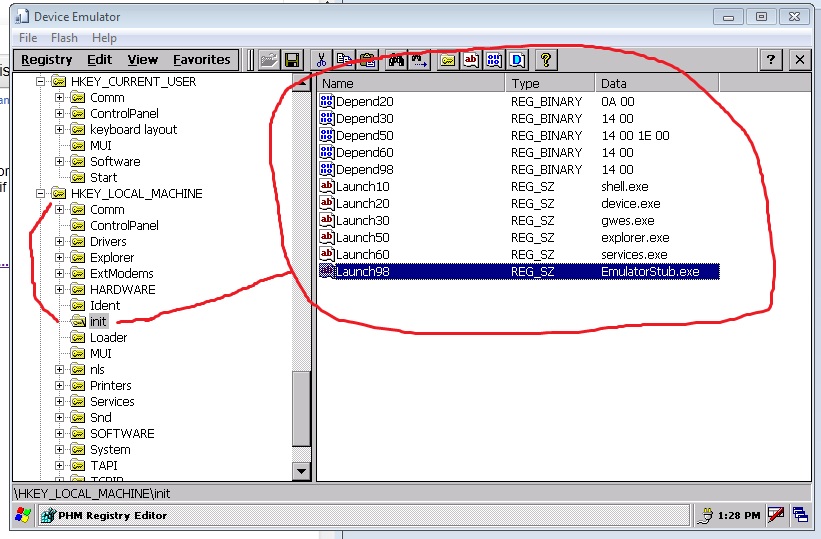
F900BT hackable and it runs IGo as official navigation software.
Did I correctly noticed that F900BT is based on WinCE 4.2 (not 5.0?)
did u try something? i could found services.exe to try into avic
i read the 2 links, if i understand correctly services.exe have a link with devices functions, maybe its make the middle betwen this things ( hardware devices , drivers , software )Some software dont need this (can direct call devices) ,but some need.
if im wrong, im sorry , but my english is so fu*k bad !! heheheheh
Can u Add this to registry( Look in Picture)
Yes we can add registry to init section, but it would work if registry would stay after reboot. 'init' is already used when you have your unit on, it would 'take' changes after reboot, but registry is resetting. Your english is not so bad, my english is also not 'correct' in many places
Today I tried to point other main dll's like coredll an ceshell, in explorer.exe, to get it work. One step futher - windows explorer shows now oeminfo-version of windows ce on the desktop (related to that dlls) one step to working wince! Digging..
Did I correctly noticed that F900BT is based on WinCE 4.2 (not 5.0?)
Yes we can add registry to init section, but it would work if registry would stay after reboot. 'init' is already used when you have your unit on, it would 'take' changes after reboot, but registry is resetting. Your english is not so bad, my english is also not 'correct' in many places
Today I tried to point other main dll's like coredll an ceshell, in explorer.exe, to get it work. One step futher - windows explorer shows now oeminfo-version of windows ce on the desktop
Nice,
if i get a registry backup of a fully working windows can u overwrite our registry on the fly?i tried put .reg and run into my device and no luck,
i tried run GPSMC.EXE from dump of my z120 into emulator, in debug windows i see the system try find gps on com 7 .
i tried too o lot of Process killer and task managers to kill pioneer´s Shit , but no luck too
i open testmode.exe into Ida pro disassembler and see lot of references to process NEventWatcher. a procedure check for NEventWatcher running. i wanna kill NEventWatcher and see what this do!
MicroSD has no lock.
I'm currently trying to use a Sandisk 8GB micro sd card in an SD card adapter, it does have a lock but I've made sure it is not locked. I have a 2GB card and same issue. I will try to reformat the card and reload Condi's Hackmode on to it. Will try this later today.
Like others have mentioned... start a new thread...
Let's try to figure this one out... so far you're the only one, but it would be great to know why....
That is... if you're willing to stick in there till we get a hold of what's going on...
Thanks
I'll stick it out, and start a new thread as suggested. tested the SD card with service mode. Z120 failed to write to SD cards each time. This will have to wait.