nobody has any ideas?
how does the headunit check for grounding?
every time it is booting up, I get a message stating that the ground isn't connected properly. Can that be the cause of my issues?
nobody has any ideas?
how does the headunit check for grounding?
every time it is booting up, I get a message stating that the ground isn't connected properly. Can that be the cause of my issues?
nobody has any ideas?
how does the headunit check for grounding?
every time it is booting up, I get a message stating that the ground isn't connected properly. Can that be the cause of my issues?
Well it wouldn't boot-up if it wasn't grounded. So the message must be complaining about the PB connection (which is a path to ground) or in your case, the bypass. So:
0. But make sure your black wire is connected to a good ground. Goes without saying.
1. Make sure your light green PB wire is grounded.
2. Your moved yellow/black mute wire also needs to be grounded.
3. You can use the same pound point for 0,1,2.
4. Go to Settings/ Navi Settings/Connection Status (see pg 150 in User Manual). If done correctly, the Parking Brake will always say "On". If it doesn't - go to step 1.
5. If all that is correct and you still get the message - or you can't access numerous menu functions - like searching for a POI, then either your power harness or your HU is defective. Most likely is that the moved mute wire is not fully seated in the connector. This would be indicated if Settings/ Navi Settings/Connection Status always says "Off" or intermittently changes from "On" to "Off".
One more thing: make sure you used the right instructions for the Z130. The harness is slightly different. See the video above - although it is hard to see. Here's another
If you can't get it working, pull the whole thing out and bench-test it. Get a 12VDC source and connect the red and yellow wires to +12v, the black, light green, and yellow/black wires to - (ground). The HU will boot. Then go to Settings/ Navi Settings/Connection Status. See if Parking Brake says "On". If it doesn't, start checking the harness. Use a multi-meter. Connect the meter's + probe to the (ungrounded) mute wire. Touch the - probe to ground. Check for DC voltage. If OK, do the same thing with the PB wire.
thank you very much Ron.
We'll give it a try, and I will report back.
Ron, i'm a wee perplexed here..
Checked the status of the parking brake - it is listed as ON all the time.
here is the message I get
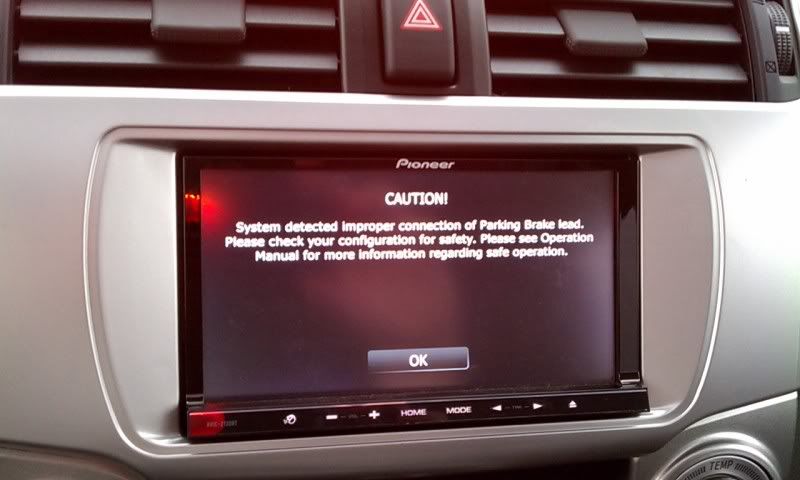
Ron, i'm a wee perplexed here..
Checked the status of the parking brake - it is listed as ON all the time.
I've never seen that screen before.
I don't really understand how the HU bypass works internally (HU). But I would guess that the logic inside the HU to detect whether the PB is set is more complicated than just testing whether the PB wire is grounded. Otherwise it would easily be defeated by just grounding the PB wire. I also don't know what grounding that moved wire does that allows the PB to be bypassed. Looking at the installation instructions (the normal PB installation, I'd guess it has to do with a change in the potential between when the PB switch is open and closed. And thatthe PB bypass hack somehow fools this logic.
But the bypass works. And it is a simple mod. Not many things that can go wrong. So, my best guess is that there is a problem with the moved mute wire in the connector. I really can't add anything that I haven't already said. Verify that the moved wire is in the correct pin location. Verify it is seated. Make sure that the PB and Mute wire are grounded. The fact that the Settings say Parking Brake is "On" indicates that at least one of those wires is grounded.
Sorry I can't help more.
Ron, in no way am I arguing or thinking you are not being helpful. Sorry, if I gave you that impression.
I just wanted to show the exact message instead of posting approximated error message.
thank you!
Ron, in no way am I arguing or thinking you are not being helpful. Sorry, if I gave you that impression.
I just wanted to show the exact message instead of posting approximated error message.
thank you!
Not a problem, I was just saying I'd never seen it before. My HU was bypassed from day 1, so I didn't know what it said when it wasn't happy. I'm glad you posted the pic which shows the complete message, because I didn't know what message you were referring to.
That mesage means the bypass is not correct. Most likely means the pin in the moved wire is not making contact. If you can't get it to work, then I recommend just hooking up the PB as usual (in the manual) and living with the annoyance of having to stop and set the PB to use many of the features. At least that is an improvement over what you've got now.
if i press ok, error goes away, and HU starts acting as if it was installed right. like you said, it is an annoyance. I'll get together with Dan (above poster), and we'll check it out.
He had an idea of getting rid of the pin, and just sticking the bare wire down the path, to ensure that it makes the contact. I suspect that I may have damaged the pin when I was pulling it out of the harness.
if i press ok, error goes away, and HU starts acting as if it was installed right. like you said, it is an annoyance. I'll get together with Dan (above poster), and we'll check it out.
He had an idea of getting rid of the pin, and just sticking the bare wire down the path, to ensure that it makes the contact. I suspect that I may have damaged the pin when I was pulling it out of the harness.
I get the same screen on my Z110BT. The parking brake is shown as "ON" on the settings page. The system operates as though the hack was properly and completely done. Strangely enough, after power has been removed from the system, I don't get the error message until the second time I turn on the system.
Bill
I get the same screen on my Z110BT. The parking brake is shown as "ON" on the settings page. The system operates as though the hack was properly and completely done. Strangely enough, after power has been removed from the system, I don't get the error message until the second time I turn on the system.
Bill
Same here. I have no problem playing a video while moving and the connection status says PB is on. I can search POI's on the Nav - but I can't enter an address while moving. I had a shop install the system and said they understood the bypass but i'm wondering if they move the pin to the left instead of up. If they did that would it give it partial bypass functionality? I also recently did the update from Pioneer. Never checked the system prior to the update - but wondering if they changed something. Only thing I can't do while moving is enter the address.
Same here. I have no problem playing a video while moving and the connection status says PB is on. I can search POI's on the Nav - but I can't enter an address while moving. I had a shop install the system and said they understood the bypass but i'm wondering if they move the pin to the left instead of up. If they did that would it give it partial bypass functionality? I also recently did the update from Pioneer. Never checked the system prior to the update - but wondering if they changed something. Only thing I can't do while moving is enter the address.
So you have a 130? The previous poster had a 110. While it's possible Pioneer could defeat the bypass with a software patch, I doubt they did. And certainly they
didn't on the 110 - no recent patch/updates have been released.
I'll ask someone more famliiar with the un-patched behavior to jump in here. Like I said a few posts earlier, mine was bypassed from day zero, so I have no insight into the behaviour. I just thought it locked you out of all those "dangerous" functions all the time. It makes no sense to me to occasionally give you a pass. Maybe the moved wire is loose?
So you have a 130? The previous poster had a 110. While it's possible Pioneer could defeat the bypass with a software patch, I doubt they did. And certainly they
didn't on the 110 - no recent patch/updates have been released.
I'll ask someone more famliiar with the un-patched behavior to jump in here. Like I said a few posts earlier, mine was bypassed from day zero, so I have no insight into the behaviour. I just thought it locked you out of all those "dangerous" functions all the time. It makes no sense to me to occasionally give you a pass. Maybe the moved wire is loose?
Yup - 130. It was just installed so I doubt it's loose - everything else works fine - like the DVD player while in motion. Only item that is grayed is the Address button. Found that out yesterday when we went to use the nav. If I had favorites saved I could access those. I could also access the POI's while in motion. Stereo was installed two weeks ago and I've only driven the car a couple times since so I've not really checked anything. The shop that installed it was familiar with Pioneers and said they understood how to do the bypass - but then again - if the 130 is different - they might not have installed it correctly for the 130 - I don't know for sure. I'm going to call them and ask them tomorrow when they are open. I just don't understand how the bypass can work only "part way".
^^
pretty much situation here.. though, I haven't even checked the DVD playback. that was the last feature I cared about. Will check it this weekend.
sorry for no updates, guys, been super busy.
i was having the same problem, i found out that the mute pin wasn't all the way pushed into the socket.
well, we finally got to the unit last night.
Initial thoughts were correct - pin was in all the way, however, the wire wasn't. corrected the wire situation, and unit is now working at desired.
I just purchased the Avic Z130bt unit and want to perform the bypass for this unit. However I have one question, will this bypass prevent any usage of the GPS navigation tracking?
just purchased the z130bt and would like to do the bypass but would to use the toggle switch method, i know the vss and ebrake need to be grounded right?
just purchased the z130bt and would like to do the bypass but would to use the toggle switch method, i know the vss and ebrake need to be grounded right?
What toggle switch method? No, VSS is not involved. AFAIK, the only successful bypass of the Z1x0-BT has been as documented here and on YouTube.
BTW, you don't have to use the Mute wire (especially if you need "Mute"), but it is hard to find compatible connectors that fit in the harness. As an alternative, someone could (and has in the past) bought a second harness to harvest more wires, Sell them here and you might make a small profit. Even if it only offset part of the cost, it would be a relatively cheap solution. Others would love not having to figure out how to remove their mute wire without damaging the connector or wire. Win-Win.
sorry i was confused when i posted the vss. So the ebrake needs to be grounded right?
as for the toggle switch method, i'd like to have the use of a toggle switch to turn the bypass on and off.
do i follow the mute wire relocation and be able to add a toggle switch in between?
Just an SPST switch on the moved mute wire would lock-out all those functions even when the parking brake is set. You'd have to install the BP sensor in the "factory" manor to enable the functions via PB when the mute wire is OFF. But when in bypass mode, the PB wire would need to be grounded.
I think this would work: Do the bypass (moving the Mute wire) and connect it to ground. On the PB wire install a SPDT switch - one output running to ground, and the other to the normal PB installation at the parking brake switch.
However, I'm not sure what the affect of having the Mute wire grounded would be during the normal "non-bypass" operation. You might need that Mute-to-ground switched too. In that case a DPDT switch would be needed. Very simple, actually.
P1 (PB) switches between Normal (factory) and ground
P2 (Mute) switches between open and ground
ok so last night i powered up the HU on my bench and ran a switch from the PB to ground, and i didnt move the mute wire.
the screen plays as soon as the switch is on and goes off with a warning display with the switch off. So i'am i
missing something here? why does the mute have to be moved?
OK, good test. Now put the whole thing in your front seat and try driving about 30mph for a few minutes. Switch your toggle either on or off, try watching a movie.
I wish it was that simple. And to tell the truth, I have no idea how the bypass (added wire in the unused pin/socket) works. It just does.
Oh, and I mention again (mainly for those who just tuned-in) that there is nothing special about the Mute wire. It is just usually not used, so it is available as an extra wire in the harness that is handy for use in the bypass pin position.
ok thanks for the help,
Also, what I did to test my bypass connection was measure the resistance from the chassis of the radio (ie: ground) to the PIN inside the plug socket on the radio (the pin that the mute wire would now be connecting to.) If I recall correctly it measured something like 20.9 K Ohms. I then plugged in my "updated" plug, and tested the resistance from the radio chassis to the mute wire that was supposed to connect to that same PIN, and found that the resistance was exactly the same (this told me there was good contact).
I wiggled the wire around a bit to simulate what happens when you stuff it all inside the dashboard, and still had no problems. I've never had a problem with the bypass yet, but it was just done a week ago. Many short drives (<30 minutes), and never had any warnings aside from the default navigation warning you get when you first turn on the unit.