Search Archive

x920bt firmware and map upgrade to CNSD-210FM for free?

By Starseed99 · Dec 26, 2011in Hacks/Mods💬 103 posts👁️ 65,422 views
Page 1 of 5
Posted Dec 26, 2011 · 19:00 UTC#1

Hi All,


First off i must say I love this site and have been using for years, ever since I first bought my Z1, I've followed upgrade instructions switching hds, map upgrades the works... Even my f900bt had all the upgrades thanks to the fx3.1 patch and the mods.... So I really have to say you guys in this domaine are amazing...


But alas my last two avics are gone now (stolen :?) and I now have a brand new slightly used demo of a x920bt, cost $400 at bestbuy as an open box...


So here is the story so far installed the unit into my car from previous Z1 install, and I've done the bypass parking/mute move and grounded them... Unit works perfect with all functions enabled, so I then installed the new firmware to 2.03 from pioneer all works perfect...


So now ofcourse I'd like the new maps 2011 and 3.0 firmware from the CNSD-210FM and would like for free as everything I've ever done from here has been :mrgreen:


So I'm reading everything I can and it seems you can upgrade the eu models by flashing a special upgrade to version 2.04 and then downloading the EU update and applying it with no password...


Has anyone state side tried this with their x models?


I'm thinking what would work is to start with firmware 2.03 and upgrade again using the modified version to 2.04 using the StefanSki 2.004 crack


http://avic411.com/index.php?app=core&module=attach&section=attach&attach_id=14745


Then downloading the map update pack for US models from here


http://thepiratebay.org/torrent/6696707/PIONEER_AVIC_CNSD-210FM_US_CAN_UPDATE


Has anyone tried this at all, Im a little hesitant since its kinda combining a EU crack and a US crack together and like always I know things can brick but hey testing is a fun thing to do....


Anyone try this? Or something similar, would be nice to have everything updated and new
Posted Dec 27, 2011 · 16:29 UTC#2

Did you try it?

Posted Dec 27, 2011 · 22:27 UTC#3

But alas my last two avics are gone now (stolen :?) and I now have a brand new slightly used demo of a x920bt, cost $400 at bestbuy as an open box...


Sounds like you live in a bad part of town. Also, didn't realize Best Buy was still selling any Pioneer models of this...thought they stopped a couple of years ago. Hmm....interesting. Sure it was an "open" box and not a "stolen" box?

Posted Dec 28, 2011 · 00:16 UTC#4

HI Johnny, yeah I do live in a bad part of town and thanks for the concern, and yes a bestbuy did have this as an in store demo for a year and half and never sold it, very interesting isn't it... So yes I'm sure it is an open box and I even purchased a 2 year extended garantee from them as it was a demo... So hopefully that answers your questions...


Back to the subject at hand, I'm guessing no one has tried this? Guess I'll try it out tonight and I'll let everyone know how it goes

Posted Dec 28, 2011 · 14:36 UTC#5

Ok so I confirm this works and the unit is updated with no problems, I wanted to wait till I drove 50 kms before posting that it works just in case...


The procedure is quite easy, download the crack above and the official 2.03 update from pioneer, overwrite the two files in the official update and put that on a SD card and the system will update to version 2.04


Next once that is done, take the SD1 dir from the update file and put that on a SD (needs to be bigger then 2gig) insert SD like normal and the system will ask a few questions say yes/ok to all and once you are presented with a question for the password type the following on screen PASSWORDPASSWORD and hit ok. Should take about 22min to update and restart...


Now take the SD2 directory from update and put on the sd and insert that go into the bluetooth settings and then firmware update to start that update it will goto 3.22


So everyone can now enjoy new maps and firmware 3.01 as per the above files...


I've only tested this on the x920bt and have no idea what it will do to other units

Edited Dec 28, 2011 by Starseed99
Posted Dec 29, 2011 · 01:36 UTC#6

Ok so I confirm this works and the unit is updated with no problems, I wanted to wait till I drove 50 kms before posting that it works just in case...


The procedure is quite easy, download the crack above and the official 2.03 update from pioneer, overwrite the two files in the official update and put that on a SD card and the system will update to version 2.04


Next once that is done, take the SD1 dir from the update file and put that on a SD (needs to be bigger then 2gig) insert SD like normal and the system will ask a few questions say yes/ok to all and once you are presented with a question for the password type the following on screen PASSWORDPASSWORD and hit ok. Should take about 22min to update and restart...


Now take the SD2 directory from update and put on the sd and insert that go into the bluetooth settings and then firmware update to start that update it will goto 3.22


So everyone can now enjoy new maps and firmware 3.01 as per the above files...


I've only tested this on the x920bt and have no idea what it will do to other units


I have a x920bt as well so maybe I will try this out. So the maps in the torrent are definitely USA/Canada maps and not Europe, etc.? I just don't want to update it and be stuck with some foreign countries maps lol.


Also, is the unit really getting updated to 2.04 or is it just making it show as being updated to 2.04 so it will accept the new map pack update?


Thank you.

Edited Dec 29, 2011 by MaStA
Posted Dec 29, 2011 · 19:08 UTC#7

HI MaSta, yes to confirm the maps are for US/CAN from the link above, and when you update to 2.04 it only updates one or two files so you can update to 3.01 and new maps

Posted Dec 29, 2011 · 21:56 UTC#8

I'm not sure what I'm doing wrong here. I've done the Stefanski crack and that seems to have loaded without a problem. I've downloaded the CNSD-210FM torrent and extracted the .rar file to my SD card. Everything is in a directort called SD1 which is on the root directory. Nothing happens when I insert the SD card. I've tried turning the car off and restarting with the SD card in the slot and I've tried inserting it during startup and I've tried inserting it after startup. Nothing happens.


I've also tried moving the SD1 folder into an AVICZ110 folder on the SD. Same thing. Any ideas?

Posted Dec 29, 2011 · 22:35 UTC#9

Put everything from the SD1 directory to the root of the sd card and it will work

Posted Dec 29, 2011 · 23:26 UTC#10

Awesome! Thank you very much for testing this out and letting us know it works. My friend mailed me a 16GB micro SD card yesterday so once I get it I will update and post back some hopefully positive results.


Thanks again!

Posted Dec 30, 2011 · 16:04 UTC#11

Yup! That did the trick! It's working perfectly and completely updated now. Thank you!

Posted Jan 04, 2012 · 01:53 UTC#12

I did all the updates today. I will say that when I used the 2.03 update with the modified files and went to system information after updating it, it said the version number was 2.00000, not 2.03. I went ahead and did the SD1 and SD2 updates and the version number now says 3.00000 and not 3.01. I wonder why this is...everything seems to have updated and seems to be working fine (haven't drove yet). Am I checking in the correct place for the version number...?


Thanks!

Edited Jan 04, 2012 by MaStA
Posted Jan 04, 2012 · 14:14 UTC#13

I did all the updates today. I will say that when I used the 2.03 update with the modified files and went to system information after updating it, it said the version number was 2.00000, not 2.03. I went ahead and did the SD1 and SD2 updates and the version number now says 3.00000 and not 3.01. I wonder why this is...everything seems to have updated and seems to be working fine (haven't drove yet). Am I checking in the correct place for the version number...?


Thanks!


On the screen that gives you your software version, you have to press and hold your finger in the top right hand corner and the specific version comes up. There is no button to press and it may take a number of tries to hit the sweet spot.

Posted Jan 04, 2012 · 23:10 UTC#14


On the screen that gives you your software version, you have to press and hold your finger in the top right hand corner and the specific version comes up. There is no button to press and it may take a number of tries to hit the sweet spot.


So on the system information screen where I see the 3.0000 number and some alpha numeric ID is where I touch and hold in the top right corner to get something else to pop up? I tried and it didn't work for me.


Does yours say 3.0000 on the system information screen as well? Either way I think it updated fine since everything seems to be functioning properly...


Thanks!

Posted Jan 04, 2012 · 23:52 UTC#15


So on the system information screen where I see the 3.0000 number and some alpha numeric ID is where I touch and hold in the top right corner to get something else to pop up? I tried and it didn't work for me.


Does yours say 3.0000 on the system information screen as well? Either way I think it updated fine since everything seems to be functioning properly...


Thanks!


That's the place, but like I said, it took a while before I found the right spot. Anyway, sounds like you've got it working regardless.

Posted Jan 06, 2012 · 23:50 UTC#16

I  a problem.  I'm already updated to 2.003 and I tried the hack and I get an update fail.  I transferred the two files from StefanSki 2.004 crack to the Pioneer original update.  Any idea too what I can do?  I tried the factory reset and that did nothing but reset my settings.  Any help or ideas to this problem?  Thanks!

Posted Jan 08, 2012 · 22:59 UTC#17

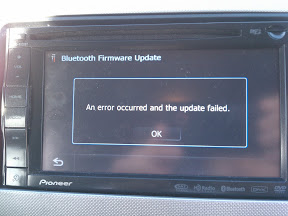
Followed the instructions here and everything went smoothly until I tried to update the bluetooth firmware. I tried to update it several times, and each time I got "An error occured and the update failed" message.


Prior to trying these updates (while on the factory firmware), my bluetooth stopped working. It would no longer connect to my phone, and the settings menu for the bluetooth was also unresponsive. I was hoping that performing these updates might clear the problem.


Is it correct to assume that the bluetooth in my head unit is dead?


Edit:


Here is a picture I took of the error message when trying to update the bluetooth.


IMG_20120108_143801.jpg

Edited Jan 08, 2012 by sdheda
Posted Jan 09, 2012 · 04:23 UTC#18

Followed the instructions here and everything went smoothly until I tried to update the bluetooth firmware. I tried to update it several times, and each time I got "An error occured and the update failed" message.


Prior to trying these updates (while on the factory firmware), my bluetooth stopped working. It would no longer connect to my phone, and the settings menu for the bluetooth was also unresponsive. I was hoping that performing these updates might clear the problem.


Is it correct to assume that the bluetooth in my head unit is dead?


Edit:


Here is a picture I took of the error message when trying to update the bluetooth.


Hmm...that is weird. I will say the bluetooth update took much longer than I thought it would considering its small file size. I thought my unit froze up or something, but I kept waiting and it eventually finished.


I tried the bluetooth when I first got it for talking to people through the mic, but they said there was a lot of background noise so I stopped using it for that. I wonder if any of those kind of issues have been improved.


Hopefully someone can help you out with your issue.

Posted Jan 09, 2012 · 06:42 UTC#19

hey guys,


i followed the instructions and when i'm trying to install SD1, it stops at 36% and an error pops saying "wrong SD card. please insert the correct one." anybody have a solution to this problem? i've tried reformatting the sd card and copying the files onto it to see if it'll work but still no luck.

Edited Jan 09, 2012 by thearcticdragon
Posted Jan 09, 2012 · 14:40 UTC#20

I a problem. I'm already updated to 2.003 and I tried the hack and I get an update fail. I transferred the two files from StefanSki 2.004 crack to the Pioneer original update. Any idea too what I can do? I tried the factory reset and that did nothing but reset my settings. Any help or ideas to this problem? Thanks!


im having this same problem

Posted Jan 09, 2012 · 21:53 UTC#21

Anyone have a link or anything to a guide for doing this? I downloaded the CNSD-210FM file from TPB, but am unsure what exactly to do from here. Thanks

Posted Jan 11, 2012 · 01:15 UTC#22

I just looked at the Z120 section and there are guys with the same problem with not being able to update past 2.03 also.  I tried reformatting my card and even a different card and still not luck.  One thing I have noticed is that when replacing the 2 files, from the Z120 section the Renewal files one guy said should be in the folder.  And I looked closer and there is no such file just the EU file.  And I got the firmware from Pioneers site.  Now could we do this upgrade with the x930BT firmware?  Has anybody thought of this?

Posted Jan 11, 2012 · 17:47 UTC#23

Hi, so for the people having trouble with the update to 2.04, I'll explain a little better, download the pioneer 2.03 update and extract it and you'll have a directory called AVICZ110, next download the patch from the link and extract that and you will have two files


EU090APL.VER - this goes in the main folder of AVICZ110 and must overwrite the orginal file

RenewalIFLib.dll - this file goes into the APL folder inside the AVICZ110 directory and overwrite the orginal file


now put the AVICZ110 directory and a freshly formatted Micro SD and insert it...


The update will start automatically


As for the guy stuck at 36% of the CNSD-210FM update I think you should redownload the torrent and try again sounds like you have a corrupt or missing file...


And again I haven't tried this on anything but a x920bt, if you have a 930 I have no clue if any of this works

Posted Jan 16, 2012 · 21:31 UTC#24

Thanks a million Starseed. Im updating now. and on mine to see the detailed 2.0003 application version i had to go to system version and press and hold in the top left corner on the wrench icon to bring upp all the info. Top right wouldnt work for me.

Edited Jan 16, 2012 by Boxdgm
Posted Jan 17, 2012 · 05:17 UTC#25

Big thanks for the post. Worked great for me. Much faster interface.

Page 1 of 5