UPDATE: Confirmed for X930BT running 4.0010 Z140 firmware (unconfirmed on pure X940BT).
Background: I am using the reverse camera as a video input for some digital gauges I've managed to get working via a long string of hacks. I originally had the video driving the AV2 input on the X930BT, but I realized that I am not able to listen to music and display the (video-only) gauges, so I decided to try using the input for the reverse camera since it is just an overlay on top of whatever source is driving the sound, and then use an external switch to toggle the 'reverse / gauge' mode.
Well, all went according to plan until I realized the X930BT unit overlays a text CAUTION message which is useless and annoying for my digital gauge display. Enter this hack.
Thanks to Ralpharn to pointing me to the right files in the X930BT filesystem.
Here is my version of a digital-gauge display on the X930BT, maintaining normal AV operation.

Removing the ‘CAUTION: SCREEN IMAGE MAY BE REVERSED’ message:
Thanks to:
condiczek, sebastian32, and Ralpharn, and the creator of WinHex
Head units and other electronics that have international markets will usually store text strings in separate files on a filesystem in order to look up different text-strings from different languages for the same message prompt. The idea is to find the English text string that drives the text for the backup camera CAUTION overlay, and replace the characters in that message with spaces.
Getting your original files:
- Enter Testmode, copy contents of your X930BT/X940BT USER directory to your SD and back this up on your computer
- Read the directions from Condi’s thread FYI, but all you're using is his compressed package (I used v1.4) during this procedure to enable Test Mode and gain access to the file system
[*]Copy the contents of the compressed file in Condi’s thread to the root of your SD CARD (need TESTMODE.KEY on the root of the SD)
[*]Insert your SD CARD into the X930BT and turn it on, it should boot into Test Mode (IF NOT, STOP HERE AND REFERENCE CONDI’S THREAD)
[*]Navigate to File Maintenance
[*]Copy the USER directory to your SD to back it up (need to enter the USER directory, select all, copy, navigate to you SD, paste)
[*]Turn off X930BT, remove SD card, copy USER contents from SD card to safe location on your computer (DON’T EVER LOSE THESE FILES, THIS IS THE ONLY ‘STOCK’ IMAGE YOU HAVE!)
[*]From your backup of your USER directory, determine if the file PRG.FLG exists in the USER\ directory. The presence of this file indicates your system uses the USER\PRG1 directory instead of the USER\PRG0 (these can be considered backups of each other). In any below references to USER\PRG0, use instead USER\PRG1.
- navigate to USER\PRG0\Apl\LANGDATA\StringData\, verify there exists the following two files:
USER\PRG0\Apl\LANGDATA\StringData\EUGBENG.LNGUSER\PRG0\Apl\LANGDATA\StringData\UCUSENU.LNGPerforming the mod:
- navigate to USER\PRG0\Apl\LANGDATA\StringData\, verify there exists the following two files:
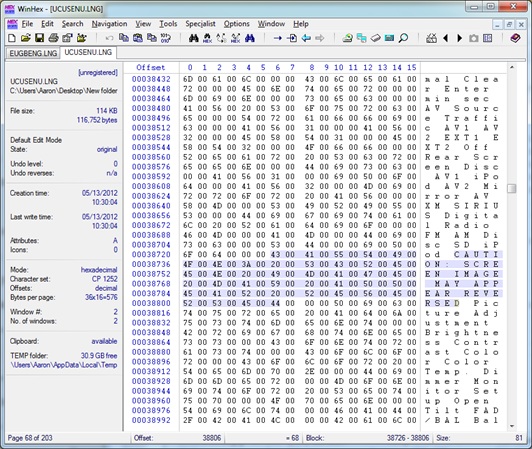
- Open these two files listed above in WinHex. Search for the ASCII code for CAU by pressing Ctrl+Alt+X (or Search, Find Hex Values). There will be two instances of the string we want to ‘space out’ per file. Text string: CAUTION: SCREEN IMAGE MAY APPEAR REVERSED
- See before:

- And after:

- Here are the hex blocks (the specific bytes you're looking for so you can do a ‘search and replace’:
[*]Save these modified files somewhere on your SD CARD you can reference later
[*]Go back to your X930BT, enter the SD CARD, and turn on the unit (SD should still contain TESTMODE.KEY and should boot into Test Mode).
[*]Enter File Maintenance
[*]Navigate to USER\PRG0\Apl\LANGDATA\StringData\ and delete EUGBENG.LNG and UCUSENU.LNG (must delete, will copy identical (but hacked) files from SD CARD)
[*]Navigate to your SD card and copy the 'hacked' EUGBENG.LNG and UCUSENU.LNG to USER\PRG0\Apl\LANGDATA\StringData\ (NAVIGATE, SELECT, COPY, NAVIGATE, PASTE)
Voila. No more CAUTION message overlaid on your screen.
Assumptions:
I'm assuming these files are different for each unit, and thus you need to use WinHex to modify your own versions of the file. In case these are just generic files, I have attached my 'hacked' versions of the LNG files which would allow you to skip step 3. We can disprove my assumption and thus skip step three permanently if someone sends me their LNG files to compare.
Download:
Below - password is avic411


HEX BLOCK for which you’re looking: 430041005500540049004F004E003A002000530043005200450045004E00200049004D0041004700450020004D004100590020004100500050004500410052002000520045005600450052005300450044
HEX BLOCK you want to replace it with:
200020002000200020002000200020002000200020002000200020002000200020002000200020002000200020002000200020002000200020002000200020002000200020002000200020002000200020

