Search Archive

Upgrading a X920/X930 to X940 Instructions

By kelkin · Sep 26, 2012in Hacks/Mods💬 194 posts👁️ 81,296 views
Page 1 of 8
Posted Sep 26, 2012 · 14:01 UTC#1

I wanted to upgrade my x920 to the x940 firmware but I’ve never used testmode or hackmode before so I read up on it around the forum, pieced together all the information from various posts in different forums and figured I’d make an easier single post on how to do it. You’ll want two micro sd cards, it’s much easier this way.. I used a 1gb and an 8gb. (I recycled the 8gb one which came with my 2011 map update that I paid for from Pioneer). If you are going to recycle an old map update microsd, back up the contents to your PC first! You’re probably going to need a file from it like I did. Hopefully this makes it easier for people to perform the upgrade and you won't have to jump around to tons of posts extracting just the info you need.


Here are the steps I did.

  1. I backed up the contents of my 2011 map update microSD to my PC then formatted the card.
     
     
  2. Download the Z140 firmware update here: https://docs.google....wVDg/edit?pli=1
     
     
  3. Extract the contents onto a large MicroSD card (I used an 8gb card)
  4. Download Condi’s RenewallFLip-AutoReplacer here:
    http://avic411.com/i...o-replacer-v10/
  5. Enter Testmode on your x920/930 by starting the unit up and pressing HOME and Rev/Fwd Rev/Fwd Rev/Fwd. (You might have to Fwd/Rev Fwd/Rev Fwd/Rev, I forget which one worked).. You’ll know it works when the screen turns black. Use the interface to copy the \USER\PRG0\APL\RenewalIFLib.dll to your SMALL EMPTY microSD card. (BE CAREFUL here, read up on how to use testmode if you aren’t familiar with it since you CAN hose your system up if you do the wrong thing here..)
  6. Copy the RenewallFLip.dll to your PC. Use a hex editor to change the offset at 1C30 from 05 00 A0 E1 to 00 00 A0 E3. If you have a prog1 folder copy the file from prog0 anyway!
  7. Save the edited version of RenewallFLib.dll to the SMALL microSD card. Extract the autoreplacer files to the small microSD card as well.
  8. Place the small microSD card into your unit and start it up. It should perform it’s magic and tell you it’s complete. If you get a red screen with an error you did something wrong.
  9. Turn the unit off, place the large microSD card in and turn the unit back on.. The unit should boot up the upgrade program and ask you to enter a 16 digit key, type any 16 digits in.
     
    NOTE: If your unit does not boot up into upgrade mode, you need to copy the cardinfo file from an old mapupgrade and overwrite the one that’s on the root of the LARGE microSD card. I had to do this for my unit to recognize the upgrade. You’ll want to have the car running for this part as this takes 30-40 minutes to perform. It will install the x940BT firmware.

These are the steps I performed to upgrade my unit, it was very easy for me. The various links I referred to in order to understand what I was doing are below. I’m a tech and programmer as a hobby so using a hex editor and figuring out the testmode interface was a snap for me, if you aren’t comfortable using (or never have used) a hex editor.. don’t even try this.


http://avic411.com/i...10fmuc-upgrade/
http://avic411.com/i...-v11-fixed-ver/

https://docs.google....wVDg/edit?pli=1

Edited Sep 26, 2012 by kelkin
Posted Sep 26, 2012 · 14:06 UTC#2

I should note a few of the things I noticed right off the bat which are improvements from the X930 firmware:


1. FINALLY when looking up POIs it lists the city each one is in.. Previously if I looked up Starbucks, it would list 50 of them and tell me distance but I'd have to click on each one to see where it was which was a PITA.. Now the list contains the city so you can just narrow in on the one you want

2. Advanced app mode for iPhone

3. New Maps


I haven't had much time to play with the unit to see what other improvements there are.. But listing the city each POI is in was HUGE and that should have been a feature all along, it's ridiculous that it wasn't there before.

Posted Sep 26, 2012 · 14:41 UTC#3

If this really does work, how bout some photos and some easier explanation on how to do it.

Posted Sep 26, 2012 · 15:00 UTC#4

If this really does work, how bout some photos and some easier explanation on how to do it.

What do you want photos of? And what do you mean by easier? These are the steps required, it doesn't get any easier than this other than me saying step by step what key to press, and if you need that.. you shouldn't even be attempting this.

-Keith

Posted Sep 26, 2012 · 15:54 UTC#5

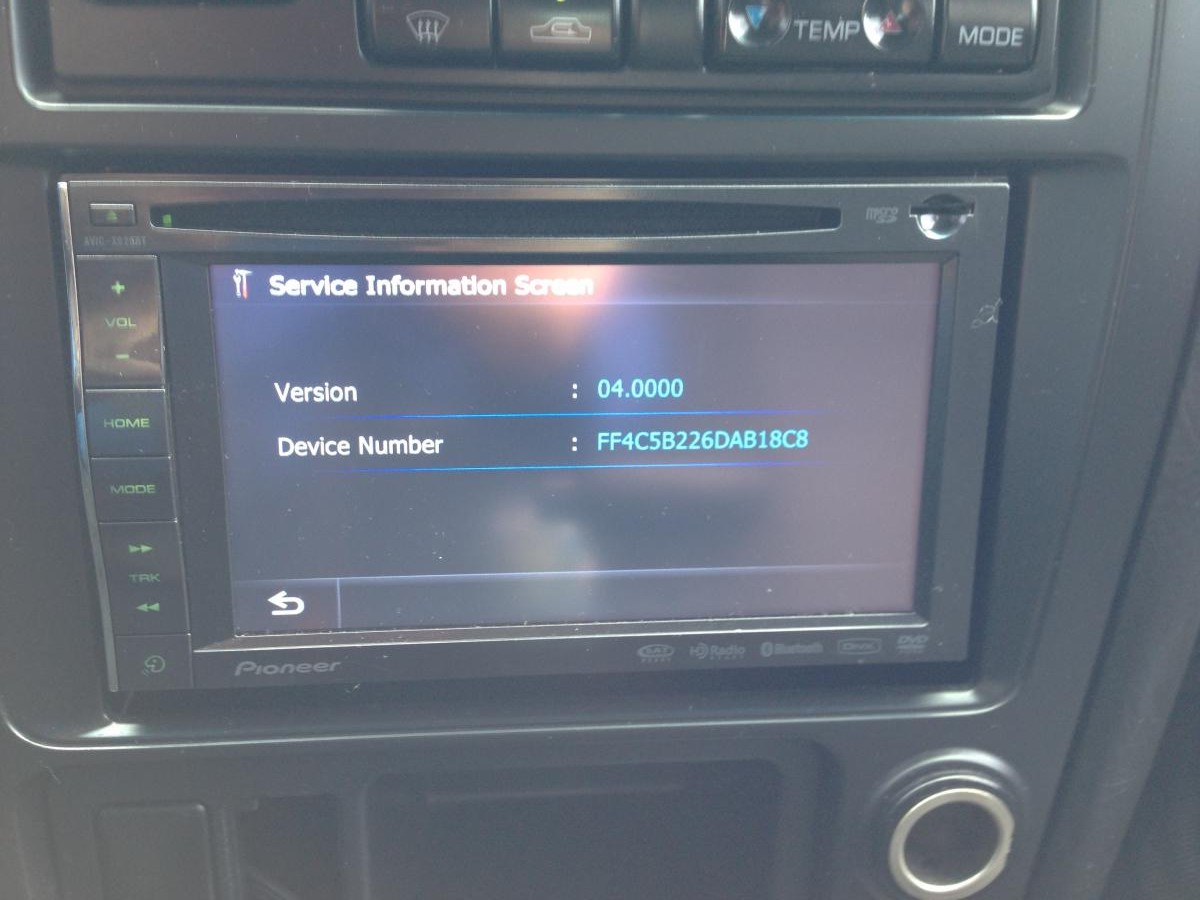
Here are two pics supporting my upgrade.

post-21991-0-15266100-1348679316_thumb.jpg

post-21991-0-62795700-1348679703_thumb.jpg

Edited Sep 26, 2012 by kelkin
Posted Sep 27, 2012 · 04:58 UTC#6

Did that upgrade to the navtech software?

Posted Sep 27, 2012 · 17:40 UTC#7

Here are two pics supporting my upgrade.

did you lose any of the voice recognition features, or any other x920 options when upgrading to the x940 software?

Posted Sep 27, 2012 · 21:41 UTC#8

I had to check since I didn't before but it winds up that I can no longer use voice control for navigation, it only accepts commands for making calls and music. Normally I'd be upset but since voice response never could understand anything I said I gave up on it and never used it anyway.

Posted Sep 28, 2012 · 02:05 UTC#9

I had to check since I didn't before but it winds up that I can no longer use voice control for navigation, it only accepts commands for making calls and music. Normally I'd be upset but since voice response never could understand anything I said I gave up on it and never used it anyway.

interesting...odd that just one aspect would be effected. I wonder if a stock x940 can perform VR with nav?

Posted Sep 28, 2012 · 14:29 UTC#10

I'm pretty sure they stopped supporting VR with Nav on the stock x930bt, however I retained my VR with Nav when I performed my upgrade to the 930 firmware. This time I didn't retain it, however my upgrade method wasn't exactly conventional.

Posted Sep 28, 2012 · 15:07 UTC#11

Interesting about the VR. I'm actually trying to un-cripple VR on x930bt and similar. I think it can be done because there are several places in the code where they are checking certain device types and not initializing voice functions. I was able to get it partially working - the only problem I'm having is that the VR menu and prompt works - it just doesnt recognize anything that I say.


Also, looking at some older CNSD-210FM vs CNSD-310FM updates, I see some extra voice files that are missing in the new update from NDATA/VBT like POILIST0.DB (for poi vr?) and AEGrammars.vba ?


I copied in some from CNSD-210FM, but didnt seem to help.


I see that there may be two slightly different versions of this upgrade, one for z130/x930 -> 40, and another one for previous versions (z110,z120, x920). I wonder if these differences have to do with VR functionality.

Edited Sep 28, 2012 by pionara
Posted Sep 28, 2012 · 15:59 UTC#12

Interesting about the VR. I'm actually trying to un-cripple VR on x930bt and similar. I think it can be done because there are several places in the code where they are checking certain device types and not initializing voice functions. I was able to get it partially working - the only problem I'm having is that the VR menu and prompt works - it just doesnt recognize anything that I say.


Also, looking at some older CNSD-210FM vs CNSD-310FM updates, I see some extra voice files that are missing in the new update from NDATA/VBT like POILIST0.DB (for poi vr?) and AEGrammars.vba ?


I copied in some from CNSD-210FM, but didnt seem to help.


I see that there may be two slightly different versions of this upgrade, one for z130/x930 -> 40, and another one for previous versions (z110,z120, x920). I wonder if these differences have to do with VR functionality.


that would be good to know, as I quite like the option of VR with NAV on my 920. Having the proper upgrade package would be good. Which one is for the x920?

Posted Sep 28, 2012 · 16:21 UTC#13

look on the pioneer site? they redirect you to navteq website, and then there seems to be a slightly different version for older units.

I suspect they are almost identical, however one person noted that they accidentally ordered the wrong one for their older unit, and it didnt install. They had to return it for the right version.


I suspect this also has to do with why people are needing slightly different versions of CARDINFO.CIF to get the unofficial upgrade to work.


As far as I know the unofficial upgrade (sheka) is from a z130/x930 upgrade, and may have something to do with why VR wont work on older units after this upgrade? This is all pure speculation though, as I would only know for sure if somebody was nice enough to provide us with a dump of the sd card for the 110/120/920 upgrade to 140/940.


I could quickly tell what the difference is, and if there is anything left out.

Edited Sep 28, 2012 by pionara
Posted Sep 28, 2012 · 18:00 UTC#14

ok, the Pioneer phone guy claims my 920 will be upgraded to firmware 4.0, I will lose VR with nav, and that Bluetooth with Android will NOT give me Pandora screens on the Pioneer's screen when updating with this software:


http://www.pioneerelectronics.com/PUSA/Car/Accessories/Map-Upgrades/NAVTEQ+2012+Map+Upgrade+for+AVIC-Z110BT,+AVIC-Z120BT,+and+AVIC-X920BT


he also claimed that my 920 would essentially be a 940.


I guess the real question is...how much better is it to have Navtek maps, and real-time traffic updates (after adding the antenna)?

Posted Sep 28, 2012 · 18:20 UTC#15

and does anyone who owns a x920 know if you LOSE the Eco-driving screens with the update? yeah yeah - everyone thinks it's stupid...but my wife and I actually have quite a bit of fun with it. Hope that remains

Posted Sep 28, 2012 · 18:38 UTC#16

I'm pretty sure they stopped supporting VR with Nav on the stock x930bt, however I retained my VR with Nav when I performed my upgrade to the 930 firmware. This time I didn't retain it, however my upgrade method wasn't exactly conventional.


ah, so you only updated as far as a 930? The Pioneer guy also told me that if I updated to the 940 software, I would lose voice recognition for EVERYTHING, not just NAV.

Posted Sep 28, 2012 · 19:09 UTC#17

ah, so you only updated as far as a 930? The Pioneer guy also told me that if I updated to the 940 software, I would lose voice recognition for EVERYTHING, not just NAV.

No, that was a typo.. I upgraded to the nav940 firmware. And no, I still have voice response for playing music.. But again I never use it because the voice response never works more than 10% of the time.. It's a gimmick to me.. I can't rely on it so I don't use it.. it's more frustrating than anything.

-Keith

Posted Sep 28, 2012 · 23:04 UTC#18

No, that was a typo.. I upgraded to the nav940 firmware. And no, I still have voice response for playing music.. But again I never use it because the voice response never works more than 10% of the time.. It's a gimmick to me.. I can't rely on it so I don't use it.. it's more frustrating than anything.

-Keith


sigh...why am I not surprised that Pioneer gives you a different answer with every phone call....is it possible you have SOME form of VR due to the source of your installation software?

Posted Sep 30, 2012 · 00:03 UTC#19

i keep trying to update and it says my password is wrong. at 1c30 i also dont have that string, but i do at 13c0. heres a screen shot.


1c30.jpg


i tried changing 00 60 a0 e1 to 00 00 a0 e3, but that didnt help the password process. idk if thats what this part of the hack is supposed to help, but i tried. anyone have any idea's?

Posted Sep 30, 2012 · 01:19 UTC#20

LDForget, then you must have a different (older?) version of RenewalIFLib.dll

1. what unit do you have

2. what version is it. (Have you updated to latest available firmware from pioneer's website)?

Posted Sep 30, 2012 · 01:52 UTC#21

its a x920bt on 2.0000. it is indeed a older version. looking through the update folders i found the new version of it and transfered it to a sd card. not sure if i want to use that to update though. are the updates on pioneers website free?


::EDIT::


nevermind, i found the update on the pioneer website. i already had it downloaded and didnt realise it because the file is called z110. ill try applying that update first. thanks.

Edited Sep 30, 2012 by LDForget
Posted Sep 30, 2012 · 02:10 UTC#22

well...i updated to 2.003...and now the 1c30 line is


0F E0 A0 E1 1C F0 93 E5 B0 20 9F E5 00 00 A0 E3


still not right...


::EDIT::


ITS WORKING!!!


All i did was search for the string i needed to change (05 00 A0 E1) and i found it at 1120 or something. changed it to 00 00 a0 e3 and uploaded it to my deck. i put it in both prg1 and prg0. i slapped the z140 update in there, input random letters/numbers for the password and it started updating!


Thanks for the help.

Edited Sep 30, 2012 by LDForget
Posted Sep 30, 2012 · 19:54 UTC#23

Thank You, this worked great on my X920BT!

Posted Oct 01, 2012 · 16:01 UTC#24

I have the x930bt and i'd like to try your procedure. I never did a map update so I dont have the " cardinfo file" you speak of. Will this prevent me from updating?

Posted Oct 02, 2012 · 00:25 UTC#25

I'm not doing this if ill loose the ability to have the nav system say where to turn and street names. Been reading reports of people saying that it doesn't work and others saying it still works?

Edited Oct 02, 2012 by ma_ttcald
Page 1 of 8