Hey guys, did the link for the Z140 firmware go down?? google docs says that it doesn't exsist!!! Also I'm going to look around but has any one done this on a mac?? as far as hex edit and such? thanks
Posted Nov 05, 2012 · 14:11 UTC#126
Hey guys, did the link for the Z140 firmware go down?? google docs says that it doesn't exsist!!! Also I'm going to look around but has any one done this on a mac?? as far as hex edit and such? thanks
Look through this entire thread or the referenced threads from original post. There may be some alternate links or torrents.
Yes you can do it on Mac. You can use a program called 0xED
Hey thanks for the quick reply, I did find a torrent on another thread linked to this, and I DL'd HexEdit and got it done, I am just waiting on the Torrent, which seems to be a little slow this morning, Thanks again....
Quick question if your still online, Once I unzip the auto replacer files, do I just put the individual files and the RenewallFLib.dll (that I corrected) on the Root of the card, or should the replacer files be in the RenewalIFLib-AUTO-REPLACER v1.2 folder on the root, I am assuming it is the former of the two options!
Thanks again!! I am glad you guys are able to share these amazing threads!
i would recommend asking questions on the autoreplacer thread, but from what I know, i think the readme explains it.
i believe you should have TESTMODE.KEY, ScriptExec.ini, and your "fixed" RenewalIFLib.dll (matching same version as currently running version on your unit) all on root of SD card.
Thanks everyone!! It installed on my X930 without a problem at all!!! it just took me a few times to realize I never unpacked the .rar file, lolol!!!
i found a super simple method to update. I updated my original post.. need some folks that havent updated yet to test and let me know if it works without hacks, dlls, password, testmode, etc etc
see here and let me know:
http://avic411.com/index.php?/topic/35230-2012-uscan-maps-cnsd-310fmuc-upgrade/
I updated my AVIC-X920BT to the new firmware/maps using the simple method described by Pionara in the link within the previuos comment.
I substitued verinfo.dat and also cardinfo file as suggested by Pionara,
(I had updated my AVIC-X920BT earlier this year with 2011 update CNSD-210FM).
The update worked, even though I ran the update 3 times for 30 minutes each time, as every time I answered "yes" to the question if I wanted to update.
I guess having little kids does not help focus 
After It ran the 3rd 30 minute cycle I answered no to update.
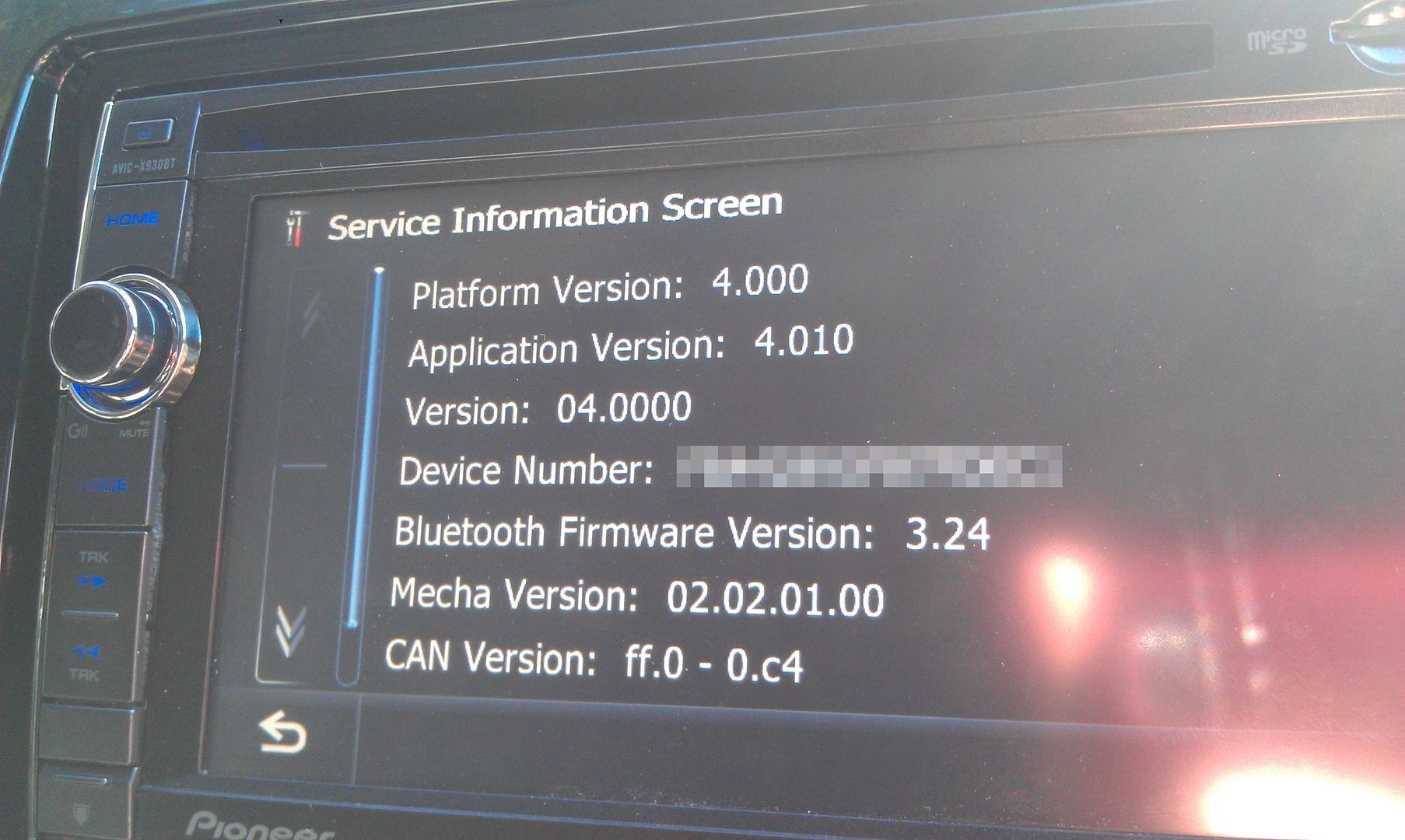
I then did manual Bloothooth update to 3.0.24. System now shows 4.0.1
So here is the question.
I don't see any AHA or Pandora app shortcut on my Pioneer screen. By reading the comments I think I should but I don't.
I have Android Motorola Atrix 2 paired with Pioneer. I can stream music to Pioneer and can make calls.
But I see no AHA radio as well as Pandora. I have AHA and Pandora installed on my phone.
Any ideas what could be wrong? Or it works as expected?
Thanks
The update worked, even though I ran the update 3 times for 30 minutes each time, as every time I answered "yes" to the question if I wanted to update.
....
I don't see any AHA or Pandora app shortcut on my Pioneer screen. By reading the comments I think I should but I don't.
I have Android Motorola Atrix 2 paired with Pioneer. I can stream music to Pioneer and can make calls.
But I see no AHA radio as well as Pandora. I have AHA and Pandora installed on my phone.
Interesting. I wonder if others are seeing this as well. Under the hood, the encrypted VERINFO.DAT contains the version and a few other fields, one of them is "DiscType" which is perhaps the criticality or importance of the update. All of the regular updates use "NORMAL" disctype, but I made the "special" VERINFO.DAT of "URGENT" disctype. This seems to allow install without password  . Perhaps the side effect is that it keeps wanting to update over and over? or maybe something else. Would like to hear if this is happening to others using this special VERINFO.DAT.
WRT to pandora and android, there are other threads covering that, but have you tried this: in settings, a/v settings?, change appmode? to from wired (iphone/ipod) to bluetooth(android) ?
Interesting. I wonder if others are seeing this as well. Under the hood, the encrypted VERINFO.DAT contains the version and a few other fields, one of them is "DiscType" which is perhaps the criticality or importance of the update. All of the regular updates use "NORMAL" disctype, but I made the "special" VERINFO.DAT of "URGENT" disctype. This seems to allow install without password
WRT to pandora and android, there are other threads covering that, but have you tried this: in settings, a/v settings?, change appmode? to from wired (iphone/ipod) to bluetooth(android) ?
After the 1st update my unit rebooted, it then it found the inserted SD card in the slot, so I guess it suggested the update to which I answered "yes"... and that happened several times (after each reboot).
BTW I was able to get Pandora and AHA working. My appmode was set erroneosly set to wired rather than bluetooth. Thanks for the tip, and off course for all the hard work you have done to make this update happen.
X930BT here. Mostly everything here worked for me except your auto replacer script- no matter what it wouldn't automatically replace the RenewalIFLib in the folders, so I had to manually delete the old ones in prg0 and prg1 and copy my modified one over manually in Test Mode. No problem, but just wanted to let you know I couldn't get your auto replacer to run. Any idea why it wouldn't have?
After that, finally the map update accepted any password and did the update! Thanks a bunch!!
Can't wait to see if the other guys get the VR working on the X930BT....
x920bt update successfull and easy. Thank you guys so much! The only thing i am noticing is that Pandora and Aha are a little buggy when it comes to connecting to the bluetooth. It keeps saying " bluetooth connection is disconnected. Press connect to reconnect". When I press connect sometimes it connects and sometimes it doesn't connect and gives me the same response. Anyone else have similar issues?
Thanks again, this is a great mod!
x920bt update successfull and easy. Thank you guys so much! The only thing i am noticing is that Pandora and Aha are a little buggy when it comes to connecting to the bluetooth. It keeps saying " bluetooth connection is disconnected. Press connect to reconnect". When I press connect sometimes it connects and sometimes it doesn't connect and gives me the same response. Anyone else have similar issues?
Thanks again, this is a great mod!
That happens to me all the time. My phone connects and I can take calls, but I cannot connect to through the pandora link. I just figured it had something to do with my phone.
pandora via bluetooth only works with android as far as I know, and you have to change appmode from wired (only for IOS device) to bluetooth (only for android) in a/v settings menus.
You can use basic bluetooth audio streaming from any compatible bluetooth device that supports a2dp, but only appmode over bluetooth works on android i believe. WOuld like to hear if anyone with android can confirm this.
So, just to be 100% clear, doing this will basically turn my X930BT into an X940BT, and will gain native Android connectivity and functions? I don't have an iDevice, and I don't plan on getting one ANY time soon; I like my rooted Android too much  But I use Slacker Radio a lot (I pay the extra $ each month for an upgraded account) and it would be freeking AWESOME if I could use Slacker stations via Aha on the unit connected to my phone!
no one? if this give my 930 Aha Android access then I'd like to get this done this week.
no one? if this give my 930 Aha Android access then I'd like to get this done this week.
Yes, this will upgrade your X930 to X940. The main "upgrade" will be the newer map. As for the rest of your questions, why don't you try it and let us know. Worse comes to worse, you got newer maps.
Yes, this will upgrade your X930 to X940. The main "upgrade" will be the newer map. As for the rest of your questions, why don't you try it and let us know. Worse comes to worse, you got newer maps.
Well I had that assumption too, but wasn't 100% sure if the maps were going to be updated as well. To tell you the truth, I don't use the Nav a whole lot, but that's a bonus, lol. I know I read about VR not working right; again, no issue with that, that's something else I don't use 
Read through this thread once quickly, so I'm about to read through it one more time and get everything in line before I dive in; the LAST thing I want to do is brick this unit; I just put it in and as it is being a 930, it's a BAJILLION times more awesome than D3 it replaced
Upgraded my 920bt to 940bt with the super easy method. Very smooth and easy process. Only question, bluetooth firmware showing 3.1.1 and the update button is not lit up to press to update. Sd card was still installed. Everyrhing working correctly just want most recent updates. Also still on 4.0.0. Is there anything else i can do.
Only question, bluetooth firmware showing 3.1.1 and the update button is not lit up to press to update. ... Also still on 4.0.0. Is there anything else i can do.
1. make sure you turn bluetooth on in the bluetooth settings menu
2. application version 4.010, "version" (platform) = 4.000. Press and hold top left corner in Service Info screen to get complete details.
Man I really want to try to do this but I'm def not good at this kind of stuff :-/ I can install them but modding them is tough to me. I've tried to apply the update for the firmware on my 920 and gave up when I couldn't figure it out
dude it's ridiculously easy, just takes time to download the update and install it to the unit; the process itself is EXTREMELY simple now though!
yes, modding with a hex editor is little more difficult, but as long as you follow the instructions posted here in the forms it really isn't all that difficult. I've never messed with a hex editor before, but after some reading I was able to removed the "caution: screen may be reversed" text from my backup camera AND bypass the navigation caution nag screen; was actually more simple than it looked!
Thanks to guys like pionara, all these mods are getting easier and easier
I guess my biggest issue is getting all the stuff on the card right. I could prob figure out the editor stuff but its getting the format right.
I upgraded my X930BT to the X940BT software using this thread. I have an Android Galaxy Nexus.
Am I supposed to be able to get Pandora and Aha Radio to sync between my Nexus and the head unit via bluetooth so they show up on the head unit display? Because no matter what I try, it doesn't work at all.
It always stops at the head unit message of "Look at your smartphone screen when safe to do so" but nothing ever happens and the apps continue only on the phone screen.
I sync bluetooth calls and audio just fine.
Help?
I upgraded my X930BT to the X940BT software using this thread. I have an Android Galaxy Nexus.
Am I supposed to be able to get Pandora and Aha Radio to sync between my Nexus and the head unit via bluetooth so they show up on the head unit display? Because no matter what I try, it doesn't work at all.
It always stops at the head unit message of "Look at your smartphone screen when safe to do so" but nothing ever happens and the apps continue only on the phone screen.
I sync bluetooth calls and audio just fine.
Help?
When you updated, did you also update the bluetooth to 3.24? I forgot to do that and could never get pandora to sync with my phone. I updated the bluetooth and all is well now.