Search Archive
📌 Pinned

Custom Background Gallery

By JasonH · Feb 26, 2006in Custom Backgrounds💬 1,296 posts👁️ 1,344,268 views
Page 7 of 52
Posted Sep 04, 2006 · 04:21 UTC#151

Alright here goes.

I just finished getting most of my backgrounds for the Z1 uploaded.

Note, not all are safe for work. I'm still young, so some of the pictures are still dirty, hope you don't mind.

Then, without further adieu, just head to this link to check out the backgrounds I have made.

AVIC-Z1 Backgrounds

There are 408 I believe, so take your time.

-Litos
Posted Sep 04, 2006 · 17:58 UTC#152
Here is my first custom background... More to come soon...
Attached Files (1)
Ford Burst.jpg
Ford Burst.jpg
Posted Sep 05, 2006 · 01:22 UTC#153
I love the "diamond plate" background... very nice.
Posted Sep 05, 2006 · 05:17 UTC#154
Here are the ones I've been actually using on my Z1.

-Litos
Attached Files (3)
zzz_dj_machismo_1.jpg
zzz_dj_machismo_2.jpg
zzz_dj_machismo_3.jpg
Posted Sep 05, 2006 · 05:55 UTC#155
Here are my latest variations.

Let me know which one you all like the best.

I apologize for any annoyances.

-Litos
Attached Files (5)
zzz_dj_machismo_4.jpg
zzz_dj_machismo_5.jpg
zzz_dj_machismo_6.jpg
zzz_dj_machismo_7.jpg
zzz_dj_machismo_8.jpg
Posted Sep 05, 2006 · 11:36 UTC#156
DJ Machismo said:
Here are my latest variations.

Let me know which one you all like the best.

I apologize for any annoyances.

-Litos
I like the batteries not included one. The car bomb one.... er... ah... not really feeling that one.... kinda reminds me of the Bin-ladden peeps if you know what I mean :lol: .
j/k they all look great
Posted Sep 05, 2006 · 13:11 UTC#157
Ha ha ha, well thats our Irish Car Bomb chant around here that we do every time we take one. So I just had to include it :)

-Litos
Posted Sep 06, 2006 · 01:46 UTC#158
Ok guys, I could really use some help.

I've spent the past hour and a half on Photoshop trying to figure this out, and I just can't seem to get it.

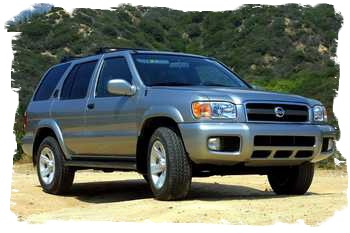
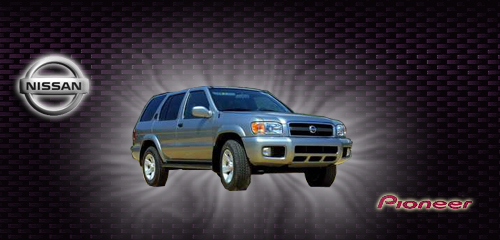
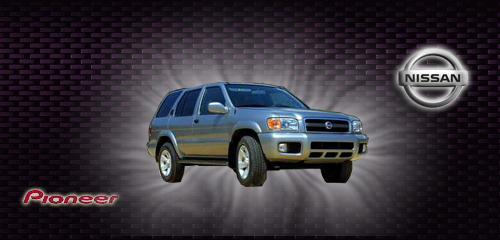
1) I want a screen with the carbon background seen below, with the Nissan logo in the upper right hand corner and the word Pioneer on the lower left hand corner, with a Pathfinder in the middle. All the images are below, but I just can't seem to do it.

2) The other screen I want is the steel background with the Nissan logo in the center with the words "Navigation Loading..." in silver or black below the logo.


I would really appreciate it if someone could put those together for me.

Thanks in advance!
Attached Files (5)
STEEL.jpg
STEEL.jpg
229371.jpg
229371.jpg
images2.jpg
images2.jpg
images.jpg
images.jpg
CARBON.jpg
CARBON.jpg
Posted Sep 06, 2006 · 02:48 UTC#159
Here is One of them..
Attached Files (1)
Nissan Loading.jpg
Nissan Loading.jpg
Posted Sep 06, 2006 · 02:50 UTC#160
Sorry Here is the right bg...
Attached Files (1)
Nissan Loading2.jpg
Nissan Loading2.jpg
Posted Sep 06, 2006 · 03:07 UTC#161
Very Basic Hope its what you wanted...
Attached Files (2)
pathfinder.jpg
pathfinder.jpg
pathfinder.jpg
pathfinder.jpg
Posted Sep 06, 2006 · 03:16 UTC#163
Thank you so much gman.


If you don't mind, could you do me just one more favor?

Can you post a pic of the carbon background with the Nissan logo in the upper right hand corner without the white shine around the truck in the middle? I'm not sure which one I'll like better. I would greatly appreciate it.

Thanks.
Posted Sep 06, 2006 · 03:29 UTC#164
unfortunately i closed photoshop without saving the .psd file so i cant edit it. I put the burst behind the image because it was a rough cut cause of the low res image. so to hide the imperfections i created that effect.
Posted Sep 06, 2006 · 03:31 UTC#165
Here is my crappy attempt. I am trying to learn how to use this program too.
Attached Files (1)
my try copy.jpg
my try copy.jpg
Posted Sep 06, 2006 · 03:40 UTC#166
Thanks for all your time guys, especially gman.


One more thing, I couldn't figure out where to put the loading image on the disc for the D2. Does anyone know where to put it?


I actually was able to figure out how to edit one of gman's loading screens to change the Nissan logo to the one ducatiboy posted.
Attached Files (1)
STEEL.jpg
STEEL.jpg
Posted Sep 06, 2006 · 03:45 UTC#167
Nice job... For the load up screen change the BGOPEN2.jpg image to yours and rename it BGOPEN2.jpg

Have you seen a fix for the color distortion when you use your own images in the d2?
Posted Sep 08, 2006 · 00:14 UTC#168
I know it looks cheesy, but I am still a Photoshop newbie. This is what I currently use as my boot screen.
Attached Files (1)
BGOPEN.JPG
BGOPEN.JPG
Posted Sep 08, 2006 · 01:39 UTC#169
PaisanNYC, I don't think it looks cheesy. Clean, simple, logos... I like it.
Posted Sep 08, 2006 · 22:56 UTC#170
Anything for the 996 Turbo??
Posted Sep 08, 2006 · 23:12 UTC#171
Okay;

I hate to be one of those people that nag responders for answers after they post their question, but this is driving me crazy that I can't figure this out and I could really, REALLY use your help.


Please check out my question here:

http://www.avic411.com/forum/viewtopic.php?t=1775

If you made your background for the D2 and burnt it on a SL DVD you should know the answer.

Thanks again, and sorry for being a pain.
Posted Sep 11, 2006 · 18:05 UTC#173
must mean a Porsche 911 Turbo (also known as a 996 Turbo).
Posted Sep 13, 2006 · 18:38 UTC#174
Hi I was wondering if anyone has and Lexus Is300 backgrounds?
Posted Sep 15, 2006 · 04:29 UTC#175
Could you please make something for an M3. Very simplistic, maybe with the m3 logo over CF. Thanks!
Page 7 of 52