Who can send to me an old image, made before bluetooth update?
Posted Apr 19, 2007 · 20:21 UTC#151
Who can send to me an old image, made before bluetooth update?
Hey guys. Ya i was just confirming what i read in another post about the hard drvies being locked even before first boot. Also, Hyperite i didnt have time to get my new IDE adapter today, im going to get up early tomorrow and pick one up. hopefully ill have a full image for you tomorrow night.
Have any of you shop owners tried to get a flash module from an AVIC-HD3BT to see if it work on the Z2.
Have any of you shop owners tried to get a flash module from an AVIC-HD3BT to see if it work on the Z2.
AVIC-HD3BT it's Z1 made for russian market. It is not available for US market. I am sure the difference only is software on the HDD.
Hi
fist of all, the AVIC-HD3BT is not only for the russian market, it for the europien market.
I just installed a AVIC-HD3BT today,
It is bought in Denmark.
I have grounded the "parking brake" whire.
All works, I can see DVD movies when driving, even enter new address to the navigation.
So I guess AVIC-HD3BT is quite easy to bypass
Hope the info is for any use
Rgs.
providers
Im an installer for a major pioneer distributor... at a sales meeting 2 weeks ago i spoke with a higher up pioneer sales rep that currently has his personal z2 being worked on by a pioneer tech trying to come up with a usable bypass.... as soon as he has it it will be posted... he said it should be coming soon
That really points to software as suggested above. Z1 early to Z1 late or patch updated was software, and now US Z2 to European “Z2†must be software. What would most likely be a good exploration would be comparing the software from a AVIC-Z2 to the AVIC-HD3BT. It might no be an easy SW hack but, it might easily point to the US bypass. Being from the hardware side with some old C programming, the easy (and seems like the way Pioneer did it) way would use the 4 open and E-Brake as inputs and read them in a register. It somewhat sounds like the light flashing bypass, on the early models) was a lucky bug and it was fixed with the Bluetooth update to use a real bypass. Just some thoughts.
Just another idea I am throwing out here. For the N2, the european and japanese versions had a little jumper installed on the points that we all had to solder. Maybe inside the Z2, there is something they are doing for the international models. Maybe two solder points, maybe a switch like the N3, who knows? Just an idea since it seems the HD3BT just needs to see ground on the brake wire and they are so similar
Sounds like good news. The European unit is easy to fix.
Obviously, this goes into one of two categories.
1. Hardware (Soldering a jumper as mentioned before)
2. Software (A region encoding settting is different on the hard drive)
These are fairly easy to compare.
Is it possible to order a replacement hard drive for the European market?
whtcrxghst, do you have access to a Z2 to take look if a jumper sets the region?
What I find disturbing about this is that it appers you have to void the warranty in order to do the hack this time around.
Secondly, why is it that you still need a hack for the European version? You should either need one, or not, but why both, and why are the hacks different?
Thats the best thing for Pioneer that the hack would void the warranty. Think about it. No liability to them you have voided the system and "modified it completely." Brilliant.
So i'm pretty sure that is the same as the back door bypass, but when I installed my z2 I pulled all the wires out of the harness except pwr acc grd pwr ant and I think thats it, I grounded the parking switch immeditly on a switch, and never hooked up a speed sense, and didnt hook up the reverse wire and as long as I start up my car with the switch off I can switch it at anytime to watch dvd or nav functions, I've started the vehicle with the switch on and it gives me the parking error, but never once since I pulled my unit out of the box did I have to go though any resetting or programming...... so I dunno what happend but this guy is pretty happy
**New to the board, waiting for my Z2 to show up in the mail...**
That would work for someone who doesn't have a backup camera, but use in tunnels would also be a problem, the speedsense wire is important to keep updated directions while out of sight of the satellite... I know it has the gyro, but having not used the system before does the gyro do that much for guidance positioning while no speedsense wire is connected?
i am also waiting for my z2 to come in the mail. so is there a way to bypass the z2 im confused.
i am also waiting for my z2 to come in the mail. so is there a way to bypass the z2 im confused.
not reliably
hey all, I have a Z2 image from a unit that has been installed for about 3 months. If you want a copy, PM me and I can give you my FTP, or if you have one I can upload to, let me know. I can also burn it to DVD-DL and mail them out. I have cable internet, but it is wireless so its not super fast with my past experiences with my FTP server.
hey all. i think i might have made a huge discovery in this Z2 bypass problem. I disassambled the AV.EXE file under SDATA\PRGO\APL. i found a few lines that state some "statechangebypkbstatus" and a bunch of others. there is also one that states "drivingstatusbyinterlockchangedevent" Im gonna mess around with these and see what happens. maybe we just need to take a line out somewhere!! check out the screenshot i attatched. i need to buy the software so i can copy lines of code.
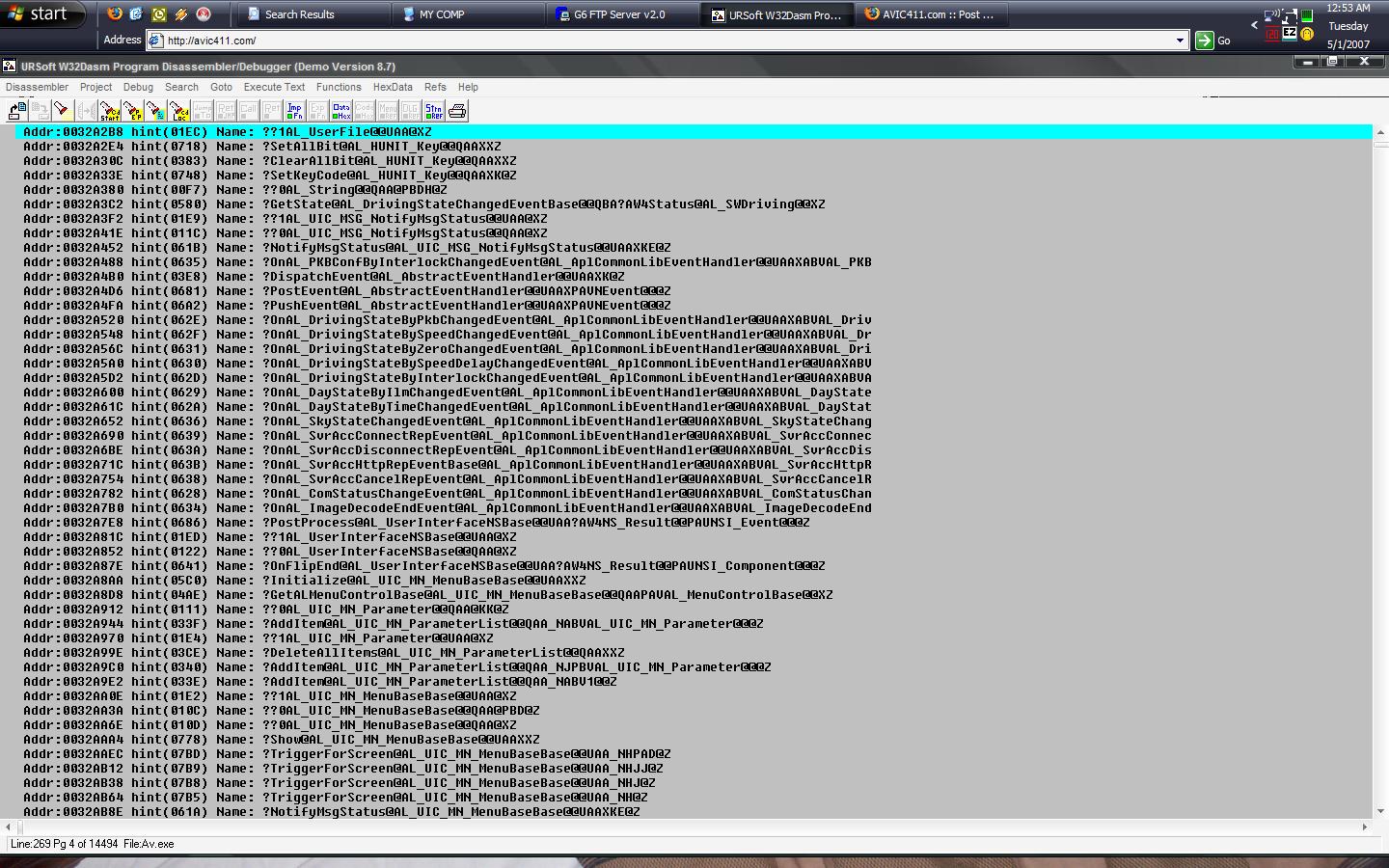
Nice job ltl2007!
ltl2007, I foung the same structure in some of the files but I was using .txt to open them and when I removed the lines or tried to change them and save the file the program wouldn't boot. However it appears that you are using a program debugger maybe that will save the changes with better results... you may want to also look into the HMIManager.EXE you will find similar codes. GOOD LUCK!
I think the bypass is handled by a dll file. The dll holds code for functions. I think the exe is just calling those functions. You may want to look into those dll files.
about the dll, i found a file, i forget what the name is. Im currently at work. It has a bunch of lines that say ??DOACTION then the same as the attatched file i posted earlier. I will try to get some more code up tonight, maybe as a text file so everybody can look at it. Maybe thats our bypass answer right there. My brother in law is a senior programmer for a medical firm, im going to talk to him today about helping out.
Hey I'm all in! After >350 miles mine failed. Now it's repeatedly failing at a faster rate. It compares the parking brake with the GPS or other evidence of motion then cuts out. Let's crack this thing once and for all!
hey itl2007 i have been working on those same lines i found that if you delete those lines off the z2 when the z2 boots it says unknown application and it stays on the black screen then i tried to replace those lines whith the z1 in the same file same number line and it did the same but if you compare the 2 files from the z1 to the z2 and you will notice that the statechangebypkbstatus and all the other lines you were looking at are in the z1 file aswell just in a different line this is what i have noticed i worked hard on the bypass for about a month then i got tired of playing with it and no result the closest to the bypass i got was being able to all the functions while driving but the street name on the nav disappeared i hope this helps you abit i also did a bunch of other stuff if i can help you in any way feel free to pm me
titos, thanks for the info. every bit helps a lot. i have another couple lines that might interest not just me and you, but maybe everybody out there might have some idea. ive attatched a jpg file. the file is aplcommonlib.dll in the SDATA/PRGO/APL folder. im still workin on a way to save it as a txt. i dont know what language this is in, but there are a lot of IF's in there, which remind me of the old QBASIC days.

what file are you looking at in the prgo folder
it says in my last post. the filename is in the title of the app.