Search Archive

ok i got my hd to read now what?

By jake · Jun 07, 2006in Hacks/Mods💬 255 posts👁️ 68,580 views
Page 6 of 11
Posted Jun 13, 2006 · 03:20 UTC#126
Hey look I made a typo!

User image
Posted Jun 13, 2006 · 03:25 UTC#127
Nice Staeg there!

How did you go about doing that? Is there any way to modify what the button does, or just it's name?
Posted Jun 13, 2006 · 03:39 UTC#128
JasonH said:
Nice Staeg there!

How did you go about doing that? Is there any way to modify what the button does, or just it's name?


I Just edited the text in one of the .exe files to see what would happen. Still in the testing phase but from what I'm finding some of the buttons make calls to alternate files located in the embedded file system or at least .dll calls. We can't get into the embedded system YET, but I'm thinking since they appear to be path statements perhaps I can redirect one to the hard drive. I'm looking for an application that will run under this processor but really don't know where to look. Back to google.
I think it's a Renesas SH7770 or similar. With a compiled application for this processor I can try to insert and redirect a call to it as another test.
I'm not a hacker and I'm a very poor programmer so I'm flying rather blind.
Somthing I did notice is one of the main files: hmimanager.exe is the same name on my old Acura TL nav. Coincidence?

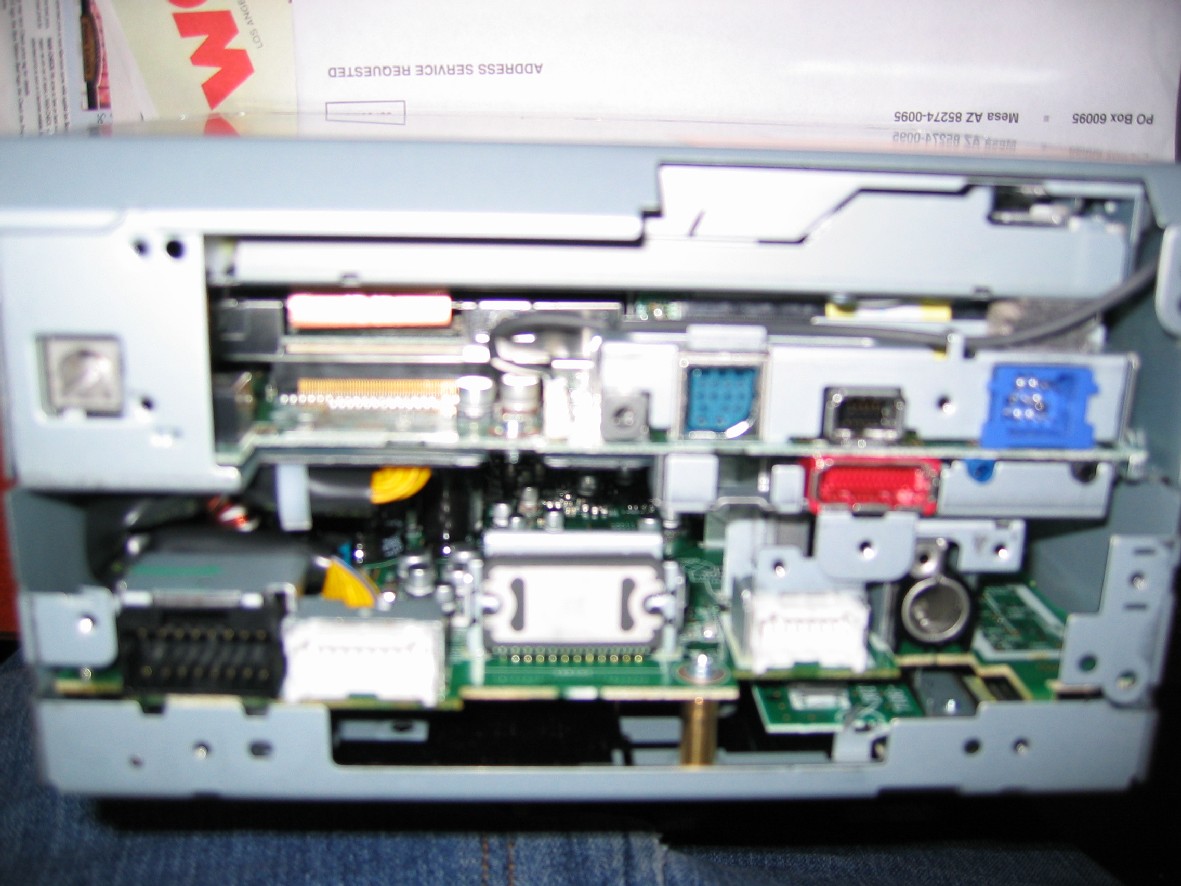
Here is a pic of the inside of the unit. All the closer pics were much more blurry. I didn't seperate the boards, just poked around inside.
Attached Files (1)
inside.jpg
inside.jpg
Posted Jun 14, 2006 · 00:04 UTC#130
It's interesting to note that the model number mentioned in the previous post is "AVIC-ZH900MD", and I'm willing to guess there is a 99% chance this is a MD player. The same Sony MD format that the unit uses to encode the audio files.
Posted Jun 15, 2006 · 14:23 UTC#131
I posted this comment in the other thread and thought I would copy it here. Other than this...I will try and stay out of your guy's way and just STHU and listen....

Ok...first thing I need to say is for the most part, you guys are WAAAAY over my head with your abilities...so please keep that in mind before you roast my butt!! LOL

My first question is...aren't you saying that if you load mp3's onto a DVD or CD the Z1 will play them? If so, isn't there software already on the Z1 you can utilize? Maybe some sort of path needs to be written in that software to direct it to the hard drive instead of the disc.

Next question...doesn't an ipod play mp3's? (seriously...I have never owned one and I don't know for sure...but I swear my son told me that's what his uses) If so...and you can get an ipod adapter for the Z1, wouldn't it be easier to just add some sort of hard drive and run it through the ipod adapter? I realize it would take more than just a hard drive, but would it take that much more? You could figure out a way to easily remove it or use a laptop, etc to load it, etc.

Please...I know I'm pretty clueless about what you're trying to do here...so please go easy on me. I see the benefits of being able to work with the factory drive compared to adding one...but if that won't work...maybe something like this would.
Posted Jun 15, 2006 · 19:04 UTC#132
03Aviator said:
I posted this comment in the other thread and thought I would copy it here. Other than this...I will try and stay out of your guy's way and just STHU and listen....

Ok...first thing I need to say is for the most part, you guys are WAAAAY over my head with your abilities...so please keep that in mind before you roast my butt!! LOL

My first question is...aren't you saying that if you load mp3's onto a DVD or CD the Z1 will play them? If so, isn't there software already on the Z1 you can utilize? Maybe some sort of path needs to be written in that software to direct it to the hard drive instead of the disc.

Next question...doesn't an ipod play mp3's? (seriously...I have never owned one and I don't know for sure...but I swear my son told me that's what his uses) If so...and you can get an ipod adapter for the Z1, wouldn't it be easier to just add some sort of hard drive and run it through the ipod adapter? I realize it would take more than just a hard drive, but would it take that much more? You could figure out a way to easily remove it or use a laptop, etc to load it, etc.

Please...I know I'm pretty clueless about what you're trying to do here...so please go easy on me. I see the benefits of being able to work with the factory drive compared to adding one...but if that won't work...maybe something like this would.


I'll answer with flame off. :lol:

load mp3 on cd and play yes. The software/firmware for this is built into the CD interface and not displayed as a stand alone application. If we could redirect a call to it for this then yes it does exist. Problem is there is no easy way for the normal user to copy the mp3's to the unit and when done getting the player to use what is has to play the mp3's doesn't happen on it's own.

IPOD play mp3, don't know, don't have one. Assuming it does we don't want to add another device to the system. We already bought a nav unit with a HDD. If I wanted to do this anyway I'd just add an external system of some sort to this unit. It has plenty of additional inputs to solve this in that way. The IPOD adapter is a convience item for IPOD users.

The goal here is to use what Pioneer sold us to easily load our music onto it and to increase the space we have for this storage. I've increased the space and can load the files but have not got it to play them yet.
The options for playing we've thought of:
Create our own AT3 files that the Z1 can read
Add another application that can play MP3's

What I know this unit can do is copy the file from a data CD to the unit. This is proved by uploading your own background images and so Pioneer can send out updates to the unit when needed.
The OS is a windows based os - probably CE5.0 automotive.
We can write applications for it but the primary OS is loaded in the memory of the Z1 and not the HDD.
I cannot yet access the memory on the Z1 so I cannot add programs to its windows CE.
There are 5 programs that get called from the HDD by the Z1. Using one of these 5 I think we can load a shell that in turn loads an MP3 player and also loads the original application. Might be tricky but possible.
Better would be to gain access to the memory in the Z1 and change the original player to support MP3 and figure out the command needed on the data CD to tell the Z1 to copy the mp3 files to the HDD on the unit.

This is for fun in my opinion. Adding storage is a piece of cake if you want to spend $40 to open it and buy a larger HDD. Easiest is to image the drive before you ever turn the unit on and save the $40.
We can always spend days burning our mp3's to cd's and letting the unit slowly rip them to the hdd.

On the more than just mp3 loading idea think of this:
It has bluetooth.
It has Windows CE
Windows CE has a web browser.
My cell phone has web services and bluetooth.
Change the bluetooth profile in the Z1 to support the modem standard.
Surf the web live on the Z1.
Instant carputer in a nice small package.
Perhaps one of the ports on this unit (Ipod port perhaps?) is just a USB with a different connector. Seems likely since it is running Windows, fewer drivers to create for Pioneer. This opens up the unit to supporting other devices. 802.11b or g comes to mind. Now I can sync my home PC or laptop with my Z1 wirelessly. Now that would be an easy way to copy the mp3's.
This unit has quite a few possibilities.

I hope this stimulates a few brains better than mine to look at this.....

:D
Posted Jun 15, 2006 · 19:15 UTC#133
Change the bluetooth profile in the Z1 to support the modem standard.
Surf the web live on the Z1.


This opens up the unit to supporting other devices. 802.11b or g comes to mind. Now I can sync my home PC or laptop with my Z1 wirelessly. Now that would be an easy way to copy the mp3's.


two awesome things I hope for!
Posted Jun 15, 2006 · 20:19 UTC#134
gerard143 said:
Change the bluetooth profile in the Z1 to support the modem standard.
Surf the web live on the Z1.


This opens up the unit to supporting other devices. 802.11b or g comes to mind. Now I can sync my home PC or laptop with my Z1 wirelessly. Now that would be an easy way to copy the mp3's.


two awesome things I hope for!


Let me add one I forgot.
Change the XM and TV (if you are using them) to a more PVR style with pausing of live broadcast and recording to HDD.

Now we are getting off topic. "What would it be nice if the Z1 could do" special request thread. Now if only we had a way to make it a to do list instead of a wish list.....
Posted Jun 16, 2006 · 06:48 UTC#135
haha the ideas are getting out of control, let's keep it real short term for now, have you tried loading the files into harger HDD and put it back into the nav unit? It may work or it may not (or maybe you already did it I just missed)
Posted Jun 16, 2006 · 11:42 UTC#136
Thanks for the clarification PF. You definitely seem to know what you're doing and I've very impressed...even if you do drive a Corvette!! LOL (I drive an 04 Cobra) Actually, the new C6 is nothing short of sex on wheels. Gorgeous cars.

I showed all this to my son. He's a developer and a data miner and has done his share of hacking in the past with such things as an X Box, Tivo, etc etc. He had some interesting ideas and I asked him to join the forum and add his .02 to the mix.
Posted Jun 16, 2006 · 17:08 UTC#137
Anonymous said:
haha the ideas are getting out of control, let's keep it real short term for now, have you tried loading the files into harger HDD and put it back into the nav unit? It may work or it may not (or maybe you already did it I just missed)


Yeah you missed it. Been there, done that, it worked.
Posted Jun 16, 2006 · 17:09 UTC#138
03Aviator said:
Thanks for the clarification PF. You definitely seem to know what you're doing and I've very impressed...even if you do drive a Corvette!! LOL (I drive an 04 Cobra) Actually, the new C6 is nothing short of sex on wheels. Gorgeous cars.

I showed all this to my son. He's a developer and a data miner and has done his share of hacking in the past with such things as an X Box, Tivo, etc etc. He had some interesting ideas and I asked him to join the forum and add his .02 to the mix.


Good, fresh ideas from a hacker type are what we need. Somebody that can code a hook in an existing .exe or better, dissassemble one would be great.

03Aviator: Not to add any salt, did you see the R & T comparing the C6 (not Z06) with the 07 Cobra? :lol:
Posted Jun 16, 2006 · 18:54 UTC#139
Isn't ATA locking done on the controller? You could swap the controller of a different drive onto the pioneer HD to "unlock" it, rip the data, and then put the non-lockable controller back onto the target drive.

Saves $40, but requires some delicate fingers.
Posted Jun 16, 2006 · 21:05 UTC#140
Hyperite said:
Isn't ATA locking done on the controller? You could swap the controller of a different drive onto the pioneer HD to "unlock" it, rip the data, and then put the non-lockable controller back onto the target drive.

Saves $40, but requires some delicate fingers.


From what i've read two schools of thought. One is yes that will work the other says, no it is spread across the platters. These are very new drives (automotive line, not laptop) and would have the newest version of the protection if both the above are true.

Try it if you can get a second identical drive and let us know what happens?
Posted Jun 16, 2006 · 23:21 UTC#141
Pulp_Fiction said:
Hyperite said:
Isn't ATA locking done on the controller? You could swap the controller of a different drive onto the pioneer HD to "unlock" it, rip the data, and then put the non-lockable controller back onto the target drive.

Saves $40, but requires some delicate fingers.


From what i've read two schools of thought. One is yes that will work the other says, no it is spread across the platters. These are very new drives (automotive line, not laptop) and would have the newest version of the protection if both the above are true.

Try it if you can get a second identical drive and let us know what happens?

I'm looking into it, I want to do some more research before I tear into this thing (ie- talk to pioneer engineers ;-) )
Posted Jun 17, 2006 · 01:31 UTC#142
Hyperite said:
Pulp_Fiction said:
Hyperite said:
Isn't ATA locking done on the controller? You could swap the controller of a different drive onto the pioneer HD to "unlock" it, rip the data, and then put the non-lockable controller back onto the target drive.

Saves $40, but requires some delicate fingers.


From what i've read two schools of thought. One is yes that will work the other says, no it is spread across the platters. These are very new drives (automotive line, not laptop) and would have the newest version of the protection if both the above are true.

Try it if you can get a second identical drive and let us know what happens?

I'm looking into it, I want to do some more research before I tear into this thing (ie- talk to pioneer engineers ;-) )


ie- talk to pioneer engineers: nobody has tried this. good luck......
Posted Jun 17, 2006 · 13:12 UTC#143
Pulp_Fiction said:

03Aviator: Not to add any salt, did you see the R & T comparing the C6 (not Z06) with the 07 Cobra? :lol:


Yea...I saw. Pitiful. On the other hand, Evan Smith (who can drive) of MM & FF went 12.25 at a buck seventeen in one. That's getting close to Z06 territory. And that was on factory tires with a crapply 2.1 60 ft time. Shoot...my 04 with nothing more than a few simple bolt ons and a tune went 11.88 at 117 at 1000 feet. That IS Z06 territory and makes it a driver's race. Watch out for the new Shelby when it hits the street...it may be heavy, but it still has an underrated 500 hp and that's nothing to sneeze at.
Posted Jun 17, 2006 · 13:15 UTC#144
Pulp_Fiction said:
These are very new drives (automotive line, not laptop)


I think most people don't realize this and in fact believe it's a laptop drive. That's good to know PF. Is the larger drive you used a laptop drive or one of the new automotive drives?
Posted Jun 17, 2006 · 18:04 UTC#145
03Aviator said:
Pulp_Fiction said:
These are very new drives (automotive line, not laptop)


I think most people don't realize this and in fact believe it's a laptop drive. That's good to know PF. Is the larger drive you used a laptop drive or one of the new automotive drives?


No I didn't use the automotive drives. The regular laptop drives work fine they just might not last as long when exposed to the vibrations.
If somebody was going to try to change the controller then they would need the same drive I assume.
Posted Jun 17, 2006 · 20:15 UTC#146
Pulp_Fiction said:
03Aviator said:
Pulp_Fiction said:
These are very new drives (automotive line, not laptop)


I think most people don't realize this and in fact believe it's a laptop drive. That's good to know PF. Is the larger drive you used a laptop drive or one of the new automotive drives?


No I didn't use the automotive drives. The regular laptop drives work fine they just might not last as long when exposed to the vibrations.
If somebody was going to try to change the controller then they would need the same drive I assume.

Just looked on the Toshiba site about how these drives work... it's stored on the platters too :( Replacing controller cards wouldn't work.
Posted Jun 20, 2006 · 18:57 UTC#147
I can confirm that the locking is not done in the circuit board. I tried swapping the controlers on two (identical) old drives I had and it didn't work. One was locked of course.
Posted Jun 20, 2006 · 22:51 UTC#148
How do I get to the drive to take it out before powering it on?
Posted Jun 21, 2006 · 02:38 UTC#149
haha that's a good point, cuz the screen is motor driven.
Posted Jun 21, 2006 · 17:24 UTC#150
ultima said:
haha that's a good point, cuz the screen is motor driven.


Very good and obvious point. The starter of this post was the one that claimed to first be able to see the folder structure and would be the one to ask. There may be a manual release on the screen that he used to open it first.

A wild guess would be that the Z1 doesn't try to send the drive LOCK command until it is powering down and if you powered it up, opened the screen and then removed all power instead of shutting it down it might not ever send the initial lock command. I have no desire to lock another drive just to test this. I found out that using the USER password you can change/set both the USER and MASTER passwords and I'm concerned this is what pioneers does. To find out I would need to risk another drive or get a logic analyzer. Neither of which sound good to me.
Page 6 of 11