Search Archive

Successful Increase of Music Storage Space

By mikek · May 26, 2007in Hacks/Mods💬 26 posts👁️ 8,052 views
Page 1 of 2
Posted May 26, 2007 · 20:34 UTC#1

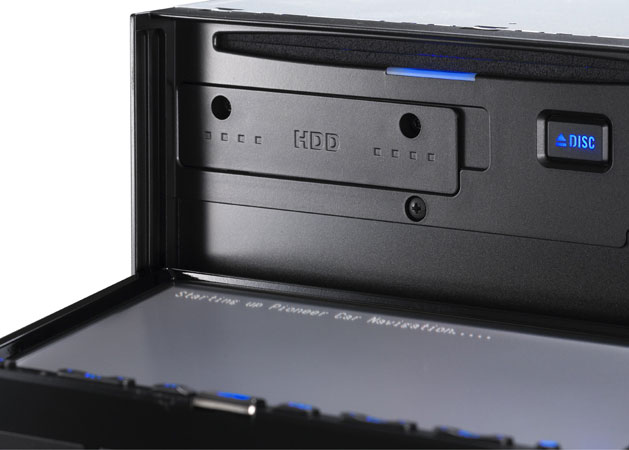
I upgraded my HDD to the 40GB toshiba 4032 that HenryJ recommended. Everything works fine so far.


I used the extra 10GB to increase the music partition from 10GB to 20GB.


Worked out great because I had the HDD full with 0% left after I loaded about 200 CDs. After upgrading the HDD shows 50% left!


I want to thank all the contributors to this forum.

Posted May 27, 2007 · 16:18 UTC#2

cool, how about some instructions so that everyone can easily see it in one thread.

Posted May 27, 2007 · 17:00 UTC#3
cool, how about some instructions so that everyone can easily see it in one thread.


After you image the 40 gig HDD with your 30 gig HDD you need to use software like PartitionMagic to adjust the 40 gig HDD partition sizes. This will allow you to expand the music store partition using the remaining 10 gig available space. My only doubt would be the limited amount of folders that Pioneer supplies in the music partition, that may limit the amount of titles recorded but if you have many large file size titles this extra capacity should allow more storage. 8)


This is a link from my earlier post that gives the info on the 40 gig HDD.


http://www.avic411.com/forum/viewtopic. ... c&start=30


HenryJ

Posted May 27, 2007 · 17:45 UTC#4

what RPM is the HD

Posted May 27, 2007 · 17:52 UTC#5
what RPM is the HD


A little faster and seems to respond a little faster too. 5400RPMs


HenryJ

Posted May 27, 2007 · 18:00 UTC#6

whats the RPM on original drive ?

Posted May 27, 2007 · 18:09 UTC#7

A little slower 4200RPM :roll:


HenryJ

Posted May 27, 2007 · 18:27 UTC#8

A little more 4032GAX info for Mazdaspeed 8)


I chose this particular HDD because it is a Toshiba and because it is widely used in the portable DATA storage units that you would connect to USB ports. That tells me that the movement / vibration and environmental issues may have little effect on it's performance.


below are the Tech. Specs.


HenryJ


General

Device Type: Hard drive - internal


Width: 7 cm


Depth: 10 cm


Height: 9.5 mm


Weight: 0.1 kg


Compatibility: PC


Hard drive

Form Factor: 2.5" x 1/8H


Capacity: 40 GB


Interface Type: ATA-100


Connector: 44 PIN IDC


Buffer Size: 8 MB


Performance

Drive Transfer Rate: 100 MBps (external) / 55.7 MBps (internal)


Seek Time: 12 ms (average) / 22 ms (max)


Track-to-Track Seek Time: 2 ms


Spindle Speed: 5400 rpm


Reliability

MTBF: 300,000 hour(s)


Non-Recoverable Errors: 1 per 10^13


Seek Errors: 1 per 10^6

Manufacturer's product description

Toshiba's line of hard disk drives delivers the right product to meet the needs of the portable PC and non PC market. Built with the performance and reliability characteristics that have made the company a world-renowned leader in the hard drive industry, Toshiba's line of hard disk drives supports fast data transfer rates and seek times while delivering the right product for both PC and non PC markets.

Expansion / connectivity

Interfaces: 1 x ATA-100 - 44 PIN IDC


Compatible Bays: 1 x internal - 2.5" x 1/8H


Environmental parameters

Sound Emission: 28 dB


Min Operating Temperature: 5 °C


Max Operating Temperature: 55 °C


Vibration Tolerance: 1 g @ 5-500 Hz (operating) / 5 g @ 15-500 Hz (non-operating)


Sound Emission: 25 dB


HenryJ

Posted May 27, 2007 · 21:19 UTC#9

sweet not to get my self a faster drive :D

getting sick of slow start up

Posted May 28, 2007 · 00:53 UTC#10

I just used the instructions that are in the other threads. And the only thing extra is changing the partitions.


I also used windows XP to change the partitions.


I ended up backing up my original drive to a normal HDD and from that HDD I ghosted over to my new HDD for my Z1.


It would be easier if you have 2 laptop to ide adaptors, but I only have one.


It looks like there is 1000 CD folders in the music partition. The manual says you can load 400 albums and 400 artists. I'll see what happens when I get to those limitations.

Posted May 28, 2007 · 15:51 UTC#11

Looks like there are 1000 places for Artists, albums and playlists.


I can also see where I already have 371 artists and 231 albums and 231 playlists.


I am pretty sure you can go past the 400 per the manual.


Looks like you can probably move the files around, but I am not too interested in that.

Posted May 30, 2007 · 00:20 UTC#12

so increasing the size will give you more space to only put music? and you mentioned z1 , isnt this for z2?

Posted May 30, 2007 · 02:03 UTC#13
so increasing the size will give you more space to only put music? and you mentioned z1 , isnt this for z2?


Should work the same for Z1 and Z2.

Posted Jul 15, 2007 · 17:41 UTC#14

Albums and artists are indeed limited to 400.


Once you get to the limit you can still rip more CDs, but the Artist won't be listed.


Haven't got to 400 albums, but I think it will erase your first album.

Posted Jul 16, 2007 · 08:54 UTC#15

Ahh... I was checking this one out to get even more space. But now it looks like that much extra space will be useless.


MobileMax Ultra ATA 80-GB Hard Drive

Posted Jul 16, 2007 · 14:34 UTC#16

40 gigs blows. Don't mean to offend, but do you know of any bigger drive made by the same company and can take a beating? Going through all that just for 10 gigs doesn't really sound worthwhile.

Posted Jul 16, 2007 · 15:57 UTC#17

It' not going to matter too much, you have 10 gigs of space now, and that would add another 10 gigs, but you can only have 1000 albums, and I think you get to over half of that with 10 gigs, and another 10 would reach the limit of the Z1/Z2's software max. It's not like you can stick in 100 gigs and just load it up with albums.

Posted Jul 16, 2007 · 17:10 UTC#18

Is it 1000 albums or 400? I see folders for 1000 albums, but doesn't the manual say it can only store 400 albums.


I know it said that for artists and it turned out to be true.


I ripped about 300 albums and used about 15GB.


If 1000 albums is the limit then 50GB of music storge might be feasible.

Posted Jul 16, 2007 · 21:39 UTC#19

I don't remember the exact number, I thought it was 1000. Whatever it was, someone said they got to about 60% of what was possible and it was 10 gigs. But this is from memory, I could be mistaken on the exact number.

Posted Jul 30, 2007 · 11:35 UTC#20

Limiting the number of Artist and albums is one of those items that makes Pioneer look bad. Not letting their consumers have upgrade options is too obvious a marketing tactic.

This is just another one that would be great when/if someone creates a way to modify.

Posted Jul 30, 2007 · 16:33 UTC#21

I woul;d think the main benefit of this (at least for me) would not be the extra HD space for music, but the potential of getting a faster drive. Has anyone been able to quanitfy any performance gains from doing this?

Posted Jul 30, 2007 · 16:41 UTC#22

I tried imaging my 30gb onto the 40gb drive mentioned above and it states the drive cannot be used in my Z2. I used Acronis under Windows Vista 64. Could the Z2 or Acronis be the more likely problem. I increased the MSV partition out to about 20 gb. Thanks.

Posted Jul 30, 2007 · 16:44 UTC#23

I noticed faster boot times using a toshiba MK4032GAX

Posted Aug 06, 2007 · 22:22 UTC#24
40 gigs blows. Don't mean to offend, but do you know of any bigger drive made by the same company and can take a beating? Going through all that just for 10 gigs doesn't really sound worthwhile.


According to their web page Toshiba makes 4 Automotive Hard Disk Drives. Look at their table at the bottom of their page.


Toshiba's Automotive Hard Disk Drives


Toshiba's MK4036GACE Specifications


MobileMax Ultra ATA 80-GB Hard Drive Specifications


The only other one I have found that makes a much larger is Seagate/Maxtor. The 80 GB Maxtor has about he same durability specs as the Toshiba. Shock is a little better but temp is not as good. But as stated before, these are limited by the software for now.


I almost wonder if Pioneer is going to put out an upgrade for the Z1/Z2 that includes a larger HDD and software updates to use it. Why else would they make the HDD accessible, instead of making it sealed in the unit? Make it more serviceable, maybe? I am guessing/hoping they are waiting for these drives to improve in size, ~100 maybe 150GB. They probably think “Who would pay $300 for 10 GB extra space. But 100 GB will sell.†I don’t know just hoping I guess.

Posted Sep 01, 2007 · 23:29 UTC#25

Anyone concerned about going to all the effort for only 10GB why don't you go form 30GB to 60GB with the Toshiba MK6034GAX

Page 1 of 2