Search Archive
📌 Pinned

Z1, Z2, and Z3 HDD FAQ

By Pulp_Fiction · Jun 26, 2006in Hacks/Mods💬 99 posts👁️ 102,528 views
Page 2 of 4
Posted Nov 01, 2007 · 15:44 UTC#26
Torx bit is a T8.
Posted Nov 01, 2007 · 16:13 UTC#27
nyskinsfan said:
Torx bit is a T8.
Hey thanks, I must have every other size torx bit. but that one.
Posted Nov 21, 2007 · 18:25 UTC#28
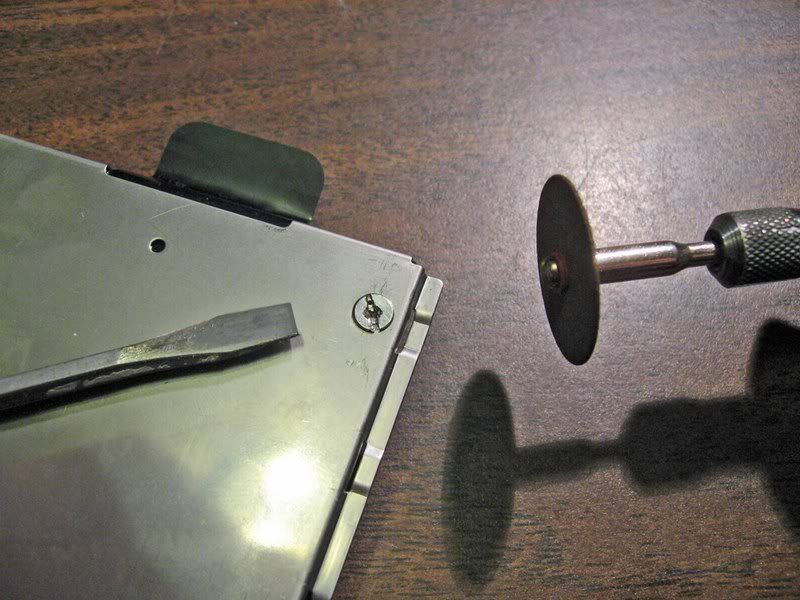
'Had the same problem removing the screws that hold the HDD to the mounting plate that others have reported.
Here is a quick way to overcome:
Grind a slot into the screw head with a dremel tool and immediately, while the screw is still hot, use a good fit flat screwdiver and the sucker will come out without effort. :) :idea:

User image

Add to FAQ at the top of this thread. :?:
Posted Nov 21, 2007 · 19:28 UTC#29
I had to do the very same thing.... It is VERY important to have the right size philips bit....As the HDD mounting screws are butter...
Posted Nov 21, 2007 · 22:32 UTC#30
Passat 05 said:
'Had the same problem removing the screws that hold the HDD to the mounting plate that others have reported.
Here is a quick way to overcome:
Grind a slot into the screw head with a dremel tool and immediately, while the screw is still hot, use a good fit flat screwdiver and the succer will come out without effort. :) :idea:

Add to FAQ at the top of this thread. :?:

Damn, why didn't I think of that instead of drilling these screws out.
The plate came off but the rest of the screws are still in the HDD. :cry:
Posted Dec 20, 2007 · 21:56 UTC#31
Thought I'd add what I learned about the process as I have only seen the methods I've mentioned a couple times and not listed in the main faq page.

I used the 80gb Toshiba Drive as Newegg was out of 60gb and sent the 80gb instead. To unlock the drive I took out the drive from Dell Latitude D810 laptop and put it in, and used the Magic ISO 2.0 bootable cd with MHDD. Using MHDD I disabled the security features. Once this was accomplished, I used a usb 2.0 2.5" hd enclosure to connect to my desktop pc (which had the z2bypassed iso) and used Acronis True Image to restore the drive. I disabled the copyright overlays by renaming the files, and placed a few additional bitmaps on the drive. So far everything is working fine.

I tried to use up the free space for the Music MSV partition but didn't have luck using Acronis Disk Director. When I try to resize or expand it won't let me increase the size past the image's 9gb initial sizing. I tried some trickery with swapping locations with the last one so that the MSV partition was adjacent to the drive's free space, and then increasing it, which worked in Acronis, but the AVIC-Z1 of mine wouldn't read the hd. I simply restore the image again and just left the partition sizing alone to verify everything else was working, which it did.

The key things I wanted to stress since I don't see them mentioned enough are:
-Used laptop with bootable Magic ISO + MHDD CD to permanently unlock my HD
-Used USB 2.0 HD adaptor to restore the z2bypassed image
Posted Jan 08, 2008 · 05:32 UTC#32
So, if i follow your method i will be saving the $42 to unlocked the hard drive right?
What i mean is, if i buy a new hard drive i don't have to pay the license to unlocked the new hard drive, right?
Thank you
Zeek
Posted Jan 08, 2008 · 18:39 UTC#33
zeeker78 said:
So, if i follow your method i will be saving the $42 to unlocked the hard drive right?
What i mean is, if i buy a new hard drive i don't have to pay the license to unlocked the new hard drive, right?
Thank you
Zeek


Well it's not my method as I learned it from a handful of posts interspersed amongst threads on this topic here on avic411.com :)

This method means you don't have to go through the annoying process of hooking up a new drive as an IDE drive on a desktop pc if you have a laptop laying around. However it might not work on all laptops, as I only know it works on the one I own. I wonder though if my problems with expanding the MSV partition are because I am using a usb enclosure. I don't need the extra disk space seeing as I barely encode CDs to the drive but it would be nice to use what I paid for with the new drive. Allegedly I still got an increase in speed though I personally can't tell any difference (and I defragged the partitions too). I was only after the map upgrades really.
Posted Jan 09, 2008 · 20:23 UTC#34
tsiawd666 said:
Thought I'd add what I learned about the process as I have only seen the methods I've mentioned a couple times and not listed in the main faq page.

I used the 80gb Toshiba Drive as Newegg was out of 60gb and sent the 80gb instead. To unlock the drive I took out the drive from Dell Latitude D810 laptop and put it in, and used the Magic ISO 2.0 bootable cd with MHDD. Using MHDD I disabled the security features. Once this was accomplished, I used a usb 2.0 2.5" hd enclosure to connect to my desktop pc (which had the z2bypassed iso) and used Acronis True Image to restore the drive. I disabled the copyright overlays by renaming the files, and placed a few additional bitmaps on the drive. So far everything is working fine.

I tried to use up the free space for the Music MSV partition but didn't have luck using Acronis Disk Director. When I try to resize or expand it won't let me increase the size past the image's 9gb initial sizing. I tried some trickery with swapping locations with the last one so that the MSV partition was adjacent to the drive's free space, and then increasing it, which worked in Acronis, but the AVIC-Z1 of mine wouldn't read the hd. I simply restore the image again and just left the partition sizing alone to verify everything else was working, which it did.

The key things I wanted to stress since I don't see them mentioned enough are:
-Used laptop with bootable Magic ISO + MHDD CD to permanently unlock my HD
-Used USB 2.0 HD adaptor to restore the z2bypassed image


I just did the Laptop method and works perfect.
I have one more question thought.
What is the copyright overlays? Do i have to do this?
Thanks a lot
Posted Jan 09, 2008 · 20:46 UTC#35
It's the Pioneer's/TeleNav text/image that blocks the top and bottom of your splash screen when it boots up...

You don't have to rename them...but I would...Just looks better IMO
Posted Jan 16, 2008 · 20:38 UTC#36
I have noticed NewEgg quit carrying the 60 GB drives mentioned. What drives are being used that work well and do not exhibit the dreaded reboot issue? BTW I am looking at the Toshiba MK8032GAX 80GB 5400 RPM 8MB Cache ATA-6 on the NewEgg site.
Posted Jan 30, 2008 · 17:44 UTC#37
Something I wanted to share. This morning my Z1 upgraded to Z2, with MK6034GAX harddrive, the unit showed a message that it "Could not use HDD". The temp this morning was about 15-20 below 0 in Wisconsin.

Moral of the story is this drive doesn't handle the cold as well as the stock. I know this is pointed out in the specs of the two, just wanted to confirm.

Anyway, it worked fine after a few minutes with the heater on.
Posted Jan 30, 2008 · 23:23 UTC#38
chrisb009 said:
I have noticed NewEgg quit carrying the 60 GB drives mentioned. What drives are being used that work well and do not exhibit the dreaded reboot issue? BTW I am looking at the Toshiba MK8032GAX 80GB 5400 RPM 8MB Cache ATA-6 on the NewEgg site.


It would work too
Posted May 03, 2008 · 20:45 UTC#39
Just an FYI on unlocking the original Toshiba HDD...with an older computer, especially older Dell systems. I searched for solutions here and noticed a few other users had similar problems as outlined below but no one had a working solution.

I purchased a new 40GB HDD for my Z1 and had no trouble putting the Z3 image on it using the instructions provided here.

My troubles were with imaging the original HDD. I could not get the unlocking software to see the drive. I tried hooking it up with the IDE adapter on the Secondary IDE channel as master (nothing else on the line). I tried it on the Primary Channel in line with the system drive, changed the system drive to secondary channel...etc.

No combination would work. Either the unlocking software wouldn't recognize the drive or it would see the drive, but it would give an error saying the drive was inaccessible.

As a last ditch effort I tried Dell's website and looked for a bios update. The last bios update for my system was in 2002 and I already had it installed. BUT, I noticed there was an update for the ATA/IDE controller that I didn't have. I installed it, put the drive on the secondary channel (with nothing else) and in worked.
Posted May 05, 2008 · 09:50 UTC#40
Hello all,

I tried to unlock my Z1 HD and put the Z3 image in. When I used the HDD Unlock Wizard to unlock it, it is telling me that it is unlocked, but I am unable to see the drive. I am using a P4C800-E Deluxe mobo with RAID configuration. I'm not sure if RAID has anything to do with it not detecting the drive properly. Someone else on this thread had a suggestion to use MHDD first to remove the security settings on the drive, then unlock it. Does this make any difference? I will give it a try later, but if any of you professionals have other ideas for me to try, please let me know. Thanks in advance.
Posted May 05, 2008 · 12:28 UTC#41
You cannot disable the security on a locked drive
Posted May 05, 2008 · 20:49 UTC#42
Yeah, I tried it and it didn't work. I got 6 other PCs but all of them are running Vista and they are also setup in RAID 0 Array. My next step attempt is to try to install XP in a regular single HD setup and see if that works. Does anyone have any other suggestions that I can try? Thanks.
Posted May 06, 2008 · 10:34 UTC#43
Okay, finally got my Z1 stock HD to unlock. I had to use my work's Dell machine running Win2K to do it. It's not that easy, either. For some reason, the system will not boot when the drive is installed. I had to boot the machine and install the drive after it is on. Basically, hot swap it. I thought I was going to fry the drive but it's all good. Just thought I would give my 2 cents to someone who might be having the same problem. Thanks.
Posted May 09, 2008 · 12:47 UTC#44
deleted due to double post... sorry
Posted May 09, 2008 · 12:47 UTC#45
Crap, crap, crap. I know better! Anyway, I got impatient and got sick of waiting until I could go buy a new drive. I decided to take the plung and unlock the stock drive. I didn't need the data, so I went ahead and used the wizard.

The unlock wizard seemed to work flawlessly. Everything was fine and it said it was successful after it was done. I downloaded the magicboot v.2 and tried to disable the security. I can't get it to "see" the drive! So, I boot all the way back up... still can't see the drive! So, I pop it in my USB adapter (Sh!ts and giggles) still no partitions, but I can see it in the device manager. :evil:

What gives? Anyone else run into this. I have tried it on 3 diferent computers varying in age and motherboard chip sets. I'm in the sa diego area close to Miramar. Anyone close enough and want to take a look? Just wondering. I think I might try usiung the CD rom Magic boot this evening. Maybe the USB floppy drive I have doesn't work with this procedure. :?:
Posted May 09, 2008 · 12:49 UTC#46
I don't know why that double posted, but feel free to delete the second post if you can Mr Moderator!
Posted May 22, 2008 · 08:55 UTC#47
gmschiller said:
Crap, crap, crap. I know better! Anyway, I got impatient and got sick of waiting until I could go buy a new drive. I decided to take the plung and unlock the stock drive. I didn't need the data, so I went ahead and used the wizard.

The unlock wizard seemed to work flawlessly. Everything was fine and it said it was successful after it was done. I downloaded the magicboot v.2 and tried to disable the security. I can't get it to "see" the drive! So, I boot all the way back up... still can't see the drive! So, I pop it in my USB adapter (Sh!ts and giggles) still no partitions, but I can see it in the device manager. :evil:

What gives? Anyone else run into this. I have tried it on 3 diferent computers varying in age and motherboard chip sets. I'm in the sa diego area close to Miramar. Anyone close enough and want to take a look? Just wondering. I think I might try usiung the CD rom Magic boot this evening. Maybe the USB floppy drive I have doesn't work with this procedure. :?:


Hey, I live in Carlsbad, fairly/somewhat close to you.

Anyways, your problem COULD be that your drive doesn't have a drive letter. Try right clicking My Computer, and click Manage. Then go to the Disk Management snap-in, and find your drive in there (if it shows up in Device Manager, it'll show up here). Assign a drive letter to the drive. You should be able to see/access the drive in My Computer now.

If you need more help, PM me.
Posted May 22, 2008 · 15:47 UTC#48
MSV PARTITION

Bill Gates has introduced what is now Microsoft Server Virtualization (MSV).
MSV allows multiple virtualized server operating systems to run concurrently on single-server hardware. The interesting part is that MSV also supports non-Microsoft operating systems, such as Linux (AIX is IBM’s flavor of UNIX, more on this in a minute).
This has the ability to add peripheral devices and to allocate system memory to the virtual operating systems in real time. This is for the input devices added USB, IP Bus system etc…, for Pioneer.
Translation into layman’s terms:
Microsoft Server Virtualization is what is running the partition of MSV working with the LDATA Partition via AIX. This is the basic operating system to run the services necessary in the head unit. Since the MSV is the OS, it utilizes this partition for storage of files such as MP3 files, etc…and files them accordingly like a computer with Windows would do .

LDATA PARTITION
Kernel Services for UNIX
ldata stands for "local data". The ldata facility supports data localization by allowing kernel subsystems and extensions to create and use ldata pools. The element size plus the initial and maximum number of elements to be contained in the pool is specified while creating the pool. The number of elements in the pool can be dynamically increased up to the maximum. Within the sub-pool the elements are contained such that they are cache-aligned and multiples of cache-line size to promote cache friendliness. Also, the elements in each sub-pool are backed by physical memory local to its corresponding SRAD. Allocation of a storage element is satisfied from the per-SRAD sub-pool on which the caller is located and where the storage element is to be predominately accessed. Deallocation of a storage element returns the element to its associated per-SRAD sub-pool.
Services are provided to allow kernel subsystems and extensions to create, destroy, grow the ldata pools. There are a couple of advantages of using ldata kernel services over raw xmallocs:
Since the memory allocated by ldata kernel services are backed by local node memory, it is faster to read and write the ldata region on that node.
ldata elements can be allocated from the interrupt environment. xmalloc kernel service cannot be called from the interrupt environment. Of course, there is an upper limit on a given ldata pool -- the maximum number of elements asked at ldata creation time.

Translation into layman’s terms:
This partition is written UNIX, as is the SDATA Partition. IBM has written the code in their UNIX called AIX. This code is becoming archaic and not too many people are trained to use it.
This partition is to add and delete files (storage)and has a maximum size already specified in the code. The reason for this is the need for fast read and write speeds
In this code there is a maximum size the partition can be and can not be changed via any partition program. You can change the partition to any size you want but when it is larger than what is written in the AIX code it will fail to read or write and crashes the drive.
The new size would have to be rewritten into the AIX code as this is where to set any new parameters on the partition size.


SDATA PARTITION and USER PARTITION
Note that SDATA is not a character referencing format: it is a form of allowing the system to insert *any* data when and where the SDATA entity is referenced. Notably, this could be a complete character sequence, or even different data for each reference to the same SDATA entity.

Translation into layman’s terms:
IMO this is probably the structure of the system where the instructions or code are stored for the other partitions. Not quite sure on what this partition is for but since this and the USER PARTITION are of the same size this would be my guess.

2 MB UNPARTITIONED (not partitioned)
This is just space that maybe used for the MBR or any other file for the HDD itself. Just like if you installed Win XP there is usually and 8 MB of Unpartitioned space on an install to any HDD.

So from what I have researched about these partitions, unless you or someone you know who understands AIX can get into the code to rewrite it, these partition may be stuck at this size. I believe the reason the storage partition is only 10 Gig would be for read / write / access speed. Could be wrong but TMO.

IMO the reason Toshiba HDD were selected is because they are durable and can handle a lot of abuse. We use Panasonic Toughbook Laptops strictly with these drives in all of our vehicles and the fail rate is very low. Makes my job much easier when there is little down time and low maintenance.

Hope this helps somewhat.
Posted May 22, 2008 · 18:17 UTC#49
PPDdawgg-

Great information. I can vouch for the drive crashing if you try to increase the size of the music partition. I bought a 60GB Toshiba drive, and tried to increase the music partition. The unit functioned okay, until I started to add CDs to the music library. After I added two CDs worth of music, the system went into a rebooting loop.

I pulled the drive, and re-imaged it, this time, leaving the partition sizes alone. I have been able to add six CDs worth of music with no performance issues.
Posted May 22, 2008 · 23:50 UTC#50
CaptainInsaneO said:


Hey, I live in Carlsbad, fairly/somewhat close to you.

Anyways, your problem COULD be that your drive doesn't have a drive letter. Try right clicking My Computer, and click Manage. Then go to the Disk Management snap-in, and find your drive in there (if it shows up in Device Manager, it'll show up here). Assign a drive letter to the drive. You should be able to see/access the drive in My Computer now.

If you need more help, PM me.


Thank you for the response. I was able to figure it out with a tip from Big-Focker. What I did was loaded acronis and searched for new drives. although it did not show in "my computer" it was present in acronis as a valid drive. I simply chose to add the drive to the computer and from that point on it was a cake walk. The only drawback I had was the missing step tin the security disable procedure where I had to type mhhd or something like that to bring up the menus for the later steps. once I figured that out I was good to go. Installed the Image and Sheila was alive again. I'm still going to upgrade the drive to make it a little faster, but that can wait a bit. I'd sure love to crack this music conversion issue, but I'm not smart enough for that one.
Page 2 of 4