12 hours ago, asd255 said:speedcam for France can be activated
Bonjour, merci pour le lien, peux tu me dire comment activer les radars pour la France ?
Hello, thank you for the link, can you tell me how to activate the speed cameras for France ?
12 hours ago, asd255 said:speedcam for France can be activated
Bonjour, merci pour le lien, peux tu me dire comment activer les radars pour la France ?
Hello, thank you for the link, can you tell me how to activate the speed cameras for France ?
@asd255
Can we edit the sys.txt file, and add the [HVA] section to authorize speed cameras in France
Path:DATA/data/com.navngo.igo.javaclient/sys.txt
ex:
[hva]
hva_countries=""
Peut-on éditer le fichier sys.txt, et rajouter la section [HVA] pour autoriser les radars en France
yes
it's good, I added these lines in the sys.txt and everything is ok
voila c'est bon, j'ai rajouté ces lignes dans le sys.txt et tout est ok
[hva]
hva_countries = ""
[speedcam.disabled_countries]
_FRA = x, x, x, x, x, x, x
_SUI = x, x, x, x, x, x, x
[speedcam.disabled_countries]
_FRA=1,2,3,4,5,11,7
_SUI=1,2,3,4,5,11,7
try
but i edit data.zip
but there is a problem with replacing it
I would like to make a backup of my Pioneer.. an avic.img what should I do this with? I have InternalSDCardBackup, but the Pioneer does not start in testmode with the one I have.
Je voudrais faire une sauvegarde de mon Pioneer .. une avic.img
je dois faire ça avec quoi ?
j'ai InternalSDCardBackup, mais le Pioneer ne démarre pas sur le testmode avec celui que j'ai.
I would like to make a backup of my Pioneer.. an avic.img what should I do this with? I have InternalSDCardBackup, but the Pioneer does not start in testmode with the one I have.
Je voudrais faire une sauvegarde de mon Pioneer .. une avic.img
je dois faire ça avec quoi ?
j'ai InternalSDCardBackup, mais le Pioneer ne demarre pas sur le testmode avec celui que j'ai.
On 12/19/2015 at 10:11 PM, asd255 said:UART Connect(change bsp, android consol)
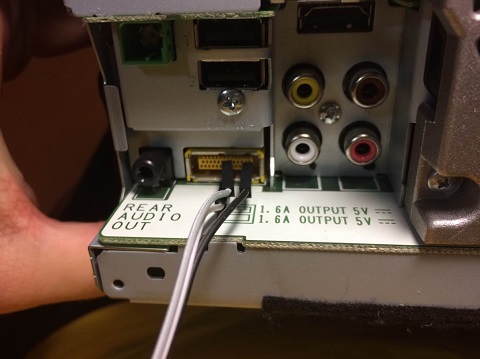
You can buy compatible USB-UART adapter ex. PL2303
Just connect three wires (GND, TX, RX) from adapter to your head unit and you will get access to bootloader console where you can change BSP settings to restore boot process.
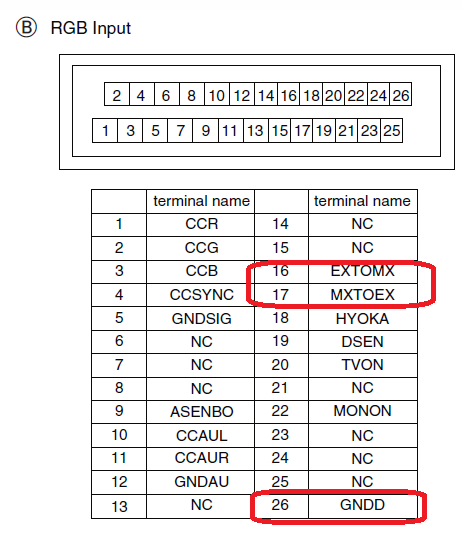
TX - to EXTOMX (16)
RX - to MXTOEX (17)
GND - GND (26)
Use the PuTTY terminal to connect to the console
115200 8N1you have a few seconds at the beginning that would press any button to enter the command.
you have 20 seconds to enter commands
U-Boot 2009.08 (Jan 06 2014 - 16:32:44)
CPU: Freescale i.MX6 family TO1.1 at 792 MHz
Thermal sensor with ratio = 174
Temperature: 25 C, calibration data 0x54e4a27d
mx6q pll1: 792MHz
mx6q pll2: 528MHz
mx6q pll3: 480MHz
mx6q pll8: 50MHz
ipg clock : 66000000Hz
ipg per clock : 66000000Hz
uart clock : 80000000Hz
cspi clock : 60000000Hz
ahb clock : 132000000Hz
axi clock : 198000000Hz
emi_slow clock: 99000000Hz
ddr clock : 396000000Hz
usdhc1 clock : 198000000Hz
usdhc2 clock : 198000000Hz
usdhc3 clock : 198000000Hz
usdhc4 clock : 198000000Hz
nfc clock : 24000000Hz
Board: i.MX6DL/Solo-JUPITER: unknown-board Board: 0x61011 [POR ]
Boot Device: NOR
I2C: ready
DRAM: 1 GB
Flash: 8 MB
MMC: FSL_USDHC: 0,FSL_USDHC: 1,FSL_USDHC: 2
Using default environmentIn: serial
Out: serial
Err: serial
***** display DDR calibration result *****
***************************************
Display result(register) of WriteLevelingMMDC registers updated from WriteLeveling
MPWLDECTRL0 (0x021b080c) = 0x002E0037
MPWLDECTRL1 (0x021b0810) = 0x00150017
***************************************
Display result(register) of DDR calibrationMMDC registers updated from calibration
Read DQS Gating calibration
MPDGCTRL0 PHY0 (0x021b083c) = 0x421B0215
MPDGCTRL1 PHY0 (0x021b0840) = 0x015F0167Read calibration
MPRDDLCTL PHY0 (0x021b0848) = 0x44494848Write calibration
MPWRDLCTL PHY0 (0x021b0850) = 0x3F3F3F37
***************************************
Net: got MAC address from IIM: 00:00:00:00:00:00
FEC0 [PRIME]
BSP A is valid
BSP B is valid
imx6 core num: 1
BSP A is valid
BSP B is valid
main loop boot env = 0
Hit any key to stop autoboot: 0
MX6SDL JUPITER KT 4.2.2 U-Boot > <INTERRUPT>
MX6SDL JUPITER KT 4.2.2 U-Boot >sdfsdf
List command: help
MX6SDL JUPITER KT 4.2.2 U-Boot > help
? - alias for 'help'
autoscr - DEPRECATED - use "source" command instead
base - print or set address offset
bdinfo - print Board Info structure
bmp - manipulate BMP image data
boot - boot default, i.e., run 'bootcmd'
bootd - boot default, i.e., run 'bootcmd'
booti - booti - boot android bootimg from memorybootm - boot application image from memory
bootp - boot image via network using BOOTP/TFTP protocol
bsp - get bsp info, or set bsp infoclear_bootf- clear Warp!! bootflag
clk - Clock sub system
cls - clear screen
cmp - memory compare
coninfo - print console devices and information
cp - memory copy
crc32 - checksum calculation
dhcp - boot image via network using DHCP/TFTP protocol
download_mode- download_mode - enter i.MX serial/usb download mode
echo - echo args to console
erase - erase FLASH memory
ext2load- load binary file from a Ext2 filesystem
ext2ls - list files in a directory (default /)
fatinfo - print information about filesystem
fatload - load binary file from a dos filesystem
fatls - list files in a directory (default /)
flinfo - print FLASH memory information
go - start application at address 'addr'
help - print online help
i2c - I2C sub-system
iminfo - print header information for application image
imxotp - One-Time Programable sub-system
imxtract- extract a part of a multi-image
itest - return true/false on integer compare
loadb - load binary file over serial line (kermit mode)
loads - load S-Record file over serial line
loady - load binary file over serial line (ymodem mode)
loop - infinite loop on address range
md - memory display
memchk - memory check
mii - MII utility commands
mm - memory modify (auto-incrementing address)
mmc - MMC sub system
mmcinfo - display MMC info
model - get model info, or set model info.mtest - simple RAM read/write test
mw - memory write (fill)
nfs - boot image via network using NFS protocol
nm - memory modify (constant address)
ping - send ICMP ECHO_REQUEST to network host
printenv- print environment variables
protect - enable or disable FLASH write protection
rarpboot- boot image via network using RARP/TFTP protocol
regul - Regulator sub system
reset - Perform RESET of the CPU
run - run commands in an environment variable
setenv - set environment variables
sf - SPI flash sub-system
sleep - delay execution for some time
source - run script from memory
sspi - SPI utility commands
tftpboot- boot image via network using TFTP protocol
version - print monitor version
warp - Warp!! bootasfasfsa
help bsp
MX6SDL JUPITER KT 4.2.2 U-Boot > help bsp
bsp - get bsp info, or set bsp info
Usage:
bsp Usage:
bsp init - init bsp information to init value
bsp get - get bsp information from nor flash
bsp passwd <passwd> - set sd card password (16bytes)
bsp set <item> <value> - set bsp information to nor flash
item
-m: set boot mode
value
0: Normal
1: Recovery
2: EasyRecovery(CopyDevice)
3: Re-EasyRecovery
-l: set launch mode flag
value
0: APL
1: TestMode.apk
2: Slave TestMode
3: Boot Error
-t: set TestMode Sub Mode
value
0: Tech Mode
1: Serv Mode
2: TestMode_A.key
-b: set bootimage active side flag
value
0: Side A
1: Side B
-r: set recoveryimage active side flag
value
0: Side A
1: Side B
-d: set debug on/off switch
value
0: OFF
1: ON
-u: set usb otg switch
value
0: Host
1: Device
-c: set memchk flag
value
0: No
1: Yes
-w: set warp boot active side flag
value
0: Side A
1: Side B
-s: set boot sub mode flag
value
0: Normal
1: Catch snapshot
2: Warp
-f: set update flag
value
0: Recovery-Update
1: uboot update
2: boot.img update
3: recovery.img update
4: system.img update
5: opening data update
6: UI update
7: All image update
8: TESTMODE_N.KEY
9: easyrecovery copy
10: easyrecovery copy&verify
11: password key copy&verify
12: easyrecovery mode change
-sf: set update sub flag
value
0: SD Card
1: USB1
2: USB2
-uif: set ui update flag
value
0: non-updating
1: updatingMX6SDL JUPITER KT 4.2.2 U-Boot >
BSP get
MX6SDL JUPITER KT 4.2.2 U-Boot > bsp get
BSP A is valid
BSP B is valid
## A Side BSP Information:
Magic Number :0xa55a5aa5(a55a5aa5:Valid, other:Invalid)
Boot Mode :0x00000000(0:Normal,
1:Recovery,
2:EasyRecovery,
3:Re-EasyRecovery,
default:Normal)
Launch Mode :0x00000000(0:APL,
1:TestMode.apk,
2:Slave TestMode,
3:Boot Error,
default:APL)
TestMode Sub-Mode :0x00000000(0:TextMode_A.key, 1:Serv Mode, 2:Tech Mode, default: Tech Mode)
Bootimage Side :0x00000000(0:Side A, 1:Side B, default: Side A)
Recoveryimage Side :0x00000000(0:Side A, 1:Side B, default: Side A)
Debug Switch :0x00000002(0:OFF, 1:ON, default: OFF)
Usb OTG Switch :0x00000000(0:Host, 1:Device, default: Host)
Memchk flag :0x00000000(0:No, 1:Yes, default: No)
Warp boot :0x00000000(0:Side A, 1:Side B, default: Side A)
Boot Sub-Mode :0x00000002(0:Normal, 1:Catch snapshot, 2:Warp, default: Normal)
Update flag :0x0000000c(0:Recovery-Update,
1:uboot update,
2:boot.img update,
3:recovery.img update,
4:system.img update,
5:opening data update,
6:UI update,
7:All image update,
8:TESTMODE_N.KEY,
9:easyrecovery copy,
a:easyrecovery copy&verify,
b:password key copy&verify,
c:easyrecovery mode change,
default:Recovery-Update)
Update sub-flag :0x00000001(0:SD Card, 1:USB1, 2:USB2 default: SD Card)
UI Update flag :0x00000000(0:non-updating, 1:updating, default:non-updating)
Reserved1 flag :0xffffffff(default:0xFFFFFFFF)
Reserved2 flag :0xffffffff(default:0xFFFFFFFF)
## B Side BSP Information:
Magic Number :0xa55a5aa5(a55a5aa5:Valid, other:Invalid)
Boot Mode :0x00000000(0:Normal,
1:Recovery,
2:EasyRecovery,
3:Re-EasyRecovery,
default:Normal)
Launch Mode :0x00000000(0:APL,
1:TestMode.apk,
2:Slave TestMode,
3:Boot Error,
default:APL)
TestMode Sub-Mode :0x00000000(0:TextMode_A.key, 1:Serv Mode, 2:Tech Mode, default: Tech Mode)
Bootimage Side :0x00000000(0:Side A, 1:Side B, default: Side A)
Recoveryimage Side :0x00000000(0:Side A, 1:Side B, default: Side A)
Debug Switch :0x00000002(0:OFF, 1:ON, default: OFF)
Usb OTG Switch :0x00000000(0:Host, 1:Device, default: Host)
Memchk flag :0x00000000(0:No, 1:Yes, default: No)
Warp boot :0x00000000(0:Side A, 1:Side B, default: Side A)
Boot Sub-Mode :0x00000002(0:Normal, 1:Catch snapshot, 2:Warp, default: Normal)
Update flag :0x0000000c(0:Recovery-Update,
1:uboot update,
2:boot.img update,
3:recovery.img update,
4:system.img update,
5:opening data update,
6:UI update,
7:All image update,
8:TESTMODE_N.KEY,
9:easyrecovery copy,
a:easyrecovery copy&verify,
b:password key copy&verify,
c:easyrecovery mode change,
default:Recovery-Update)
Update sub-flag :0x00000001(0:SD Card, 1:USB1, 2:USB2, default: SD Card)
UI Update flag :0x00000000(0:non-updating, 1:updating, default:non-updating)
Reserved1 flag :0xffffffff(default:0xFFFFFFFF)
Reserved2 flag :0xffffffff(default:0xFFFFFFFF)
MX6SDL JUPITER KT 4.2.2 U-Boot >
If you have an error while updating the firmware.
Replacing the SD card will not solve the problem.
You need to change the boot from Recovery to Normal
set boot mode "normal"bsp set -m 0
if you used "Catch snapshot" from Debug Menu - cyclic reboots
set boot sub mode flag "normal"bsp set -s 0
......
Hello, i have tried to connect with UART to my PC (F960BT) and it opens an blank window, i insert the right speed and nothing happens, do i need to connect the headunit to some kind of power to boot it up in order to get in the bootloader with UART ?
Yes
Ik zou graag mijn f980dab willen patchen, wat kan ik hiervoor gebruiken. Ik kan het niet goed vinden op de vertaalde fora, ik zoek al 2 maanden iedere dag. Graag wat hulp
Wow, and wow again. Reading back it seems like one or two really clever developers knew their stuff discovered the holy grail and made great strides.
But here in the future (2023), It's like the clever scientists back then discovered the true meaning of life, shouted out a few instructions for a while and then left the rest of the human race to fend for itself without a manual.
As much as I appreciated all the hard work, commitment and support from these clever people in keeping my unit working and updated, sadly I couldnt keep up with the understanding and conflicting procedures and files needed with even basic stuff like testmode, so like many I just gave up with pioneer long before this discovery and jumped to a better integrating / fitting / looking android unit, that I still use today. Maybe I wasn't alone ?
As I posted elsewhere I was shocked recently to see the decline in pioneer units. No question that even with the flaws and faults and same unchanged box fit, the hardware and quality was good despite win ce. But now for all but a very few models they now mostly depend on a connected phone for abilities and function.
Trying to repair a couple of several year old units for a friend, (2014) I've found that without working links to needed files anymore or any kind of simple framework or information to follow still, there is little hope. judging by all the number of un replied posts over the last few years many must feel the same way.
The sad thing is, there seems to be a resurgence in these 'older' better quality navigation units as people shun the expensive rubbish peddled as 'car play ready' or whatever and look to buy and possibly one day mod them too.
I just hope the clever programmers, hackers and coders who left us so long ago might one day return to take pity and re-educate us. 
Thank you all for this hughe resource with information.
I just finished updating a Avic f980bt-c machine with the 2022 maps. And some extras.
Some issues i experienced and want to share.
I updated the firmware to latest version from the official website. 8.08
After that i tried to update the maps with the copy script method..
Did not work unable to write filesystem read only.
mnt/udisk/script.sh[8]: cat: <stdout>: Read-only file system
I tried to create an hacked SD card no password. this was not working for me somehowe.
Next step was to downgrade the firmware... You can just change the number in the URL for the pioneer website. So i was able to get the 8.04 version.
After installing this version i am able to do all the copy work to the device.
Now getting back the 8.08 version on there again.
Just to share. Might help some persons..
Can someone reupload the patches for x000, x100 and x200?
Thanks.
What patch?
My unit refuses to enter normal boot mode. Only works in Warp mode. In normal mode, it shows password error...
"Jupiter MMC init failed, set password failed"
...and freeze in the Pioneer logo.
I must be removing the sd card incorrectly.
I do it using the testmode_N key. Or with the testmode_A, selecting the "mode change" option on the 7th page of the test mode menu.
WARP - This is normal mode!
hello
i want to update the maps on Avic f70dab
i prepared the USB Stick, i can enter the test mode , i followed the steps but i cannot copy the files. the device is ready within a second. no data transfer. 100% complete message shows up instantly. last update 2019 worked, but none since then.
any idea?
On 3/9/2023 at 9:43 PM, cleverdicky said:Wow, and wow again. Reading back it seems like one or two really clever developers knew their stuff discovered the holy grail and made great strides.
But here in the future (2023), It's like the clever scientists back then discovered the true meaning of life, shouted out a few instructions for a while and then left the rest of the human race to fend for itself without a manual.
As much as I appreciated all the hard work, commitment and support from these clever people in keeping my unit working and updated, sadly I couldnt keep up with the understanding and conflicting procedures and files needed with even basic stuff like testmode, so like many I just gave up with pioneer long before this discovery and jumped to a better integrating / fitting / looking android unit, that I still use today. Maybe I wasn't alone ?
As I posted elsewhere I was shocked recently to see the decline in pioneer units. No question that even with the flaws and faults and same unchanged box fit, the hardware and quality was good despite win ce. But now for all but a very few models they now mostly depend on a connected phone for abilities and function.
Trying to repair a couple of several year old units for a friend, (2014) I've found that without working links to needed files anymore or any kind of simple framework or information to follow still, there is little hope. judging by all the number of un replied posts over the last few years many must feel the same way.
The sad thing is, there seems to be a resurgence in these 'older' better quality navigation units as people shun the expensive rubbish peddled as 'car play ready' or whatever and look to buy and possibly one day mod them too.
I just hope the clever programmers, hackers and coders who left us so long ago might one day return to take pity and re-educate us.
This !
Exactly what I mean.
It would be really nice if one skilled developer could make some kind of an app or website with all files, scripts, apps and instructions that are needed to keep those devices up and running or resurecting if failed already.
And explain it with words simple enough that people that are handy with computers and stuff but are not programmers could understand it and make it work. I know that servers, hostings etc costs money, so access to all the knowledge and database could be behind some few dollars paywall.
On 1/28/2023 at 3:50 PM, iLexinho said:Hello, i have tried to connect with UART to my PC (F960BT) and it opens an blank window. i insert the right speed and nothing happens, do i need to connect the headunit to some kind of power to boot it up in order to get in the bootloader with UART ?
It's possible that the headunit needs power to boot up fully and access the bootloader via UART. Try connecting it to power and then retrying the UART connection. Ensure the baud rate matches and check for any hardware or wiring issues.
.jpg.5357a3bec327d35450d9cd19caee5fc3.jpg)