Search Archive

AVIC Development Mod - Device Backup

By bass_rock · Aug 10, 2015in NEX Series💬 56 posts👁️ 49,778 views
Page 1 of 3
Posted Aug 10, 2015 · 23:33 UTC#1

Introduction


With the Introduction of the AVIC Development Mod (http://avic411.com/index.php?/topic/81468-the-avic-development-mod/). We would like to encourage you to backup your AVIC Internal SD Card and its NOR Flash.  Lets also keep all backup links and discussion here 


NEVER ENTER COPY DEVICE MODE, YOU WILL BRICK YOUR DEVICE!


The following will show you how to do that:


1. Backup your current BSP and Nor Flash.


A. Download the attached NORFlashBackup.zip
B. Extract the contents to a FAT32 or NTFS USB Stick.
C. Insert the USB Stick to USB Port 1 on the device.
D. Follow the "Copy Script Mode" steps. On http://avic411.com/index.php?/topic/81468-the-avic-development-mod/
E. Grab the USB Stick and save off the mtd0_backup1 -3 files. (Should your device ever brick, these can be used with a JTAG to fully restore your NOR flash or to find out your default BSP Settings)


2. Backup your Internal SD Card (Skip to 3 if you have an unlocked image you want to use)

A. Download the attached InternalSDCardBackup.zip
B. Extract the contents to a NTFS (IMPORTANT as FAT32 can not store files bigger than 4GB) USB Stick (You can also use a SD Card on the external SD Card if you edit the script). ALSO: The USB Stick must be bigger then your internal SD Card, to store the image. Known sizes are: 4000 - 4GB, 5000-7000 - 8GB, 8000 - 16GB. THIS IS A CURRENT GUESS. To be safe, use a USB Stick larger than 16GB.
C. Insert the USB Stick to USB Port 1 on the device.
D. Follow the "Copy Script Mode" steps.  http://avic411.com/index.php?/topic/81468-the-avic-development-mod/


(NOTE: This can take a long time depeneding on your device's intenral SD Card size. It can also timeout, Pressing the Vol - while this is running every 15 min seems to keep it from turning off.) It took us 45 min to copy the 4GB card on the 4000 NEX copying to USB1. It took ~40 minutes for a 16GB internal card and 64GB external SD Card (copyscript copying data to external SD, instead of the USB) with 1MB block size (bs=1048576 parameter). For someone else it took ~80 minutes for a 16GB SD Card copying to USB.


E. Grab the USB Stick and save off the AVIC.img file to your computer. This is the full Unlocked SD Card Image of your device.

NORFlashBackup.zip

InternalSDCardBackup.zip

Edited Jun 14, 2016 by bass_rock
Posted Aug 12, 2015 · 05:36 UTC#2

NOR Backup and SD Card backup worked. NOR backup completed instantly to USB1.


Backing up to /sdcard/ for the SDcard backup took about 30 minutes. Pressed the volume minus button a handful of times. 


After putting the SD Card back into my computer, however, windows gave the error  "found errors on this drive. to prevent data loss, repair this drive now." After scanning the drive, it said no errors were found. Maybe I ejected it wrong from my machine initially, or the linux NTFS drivers on the next are causing weirdness. 


I copied the avic.img over . Despite the windows error message, the file looks fine. it is 16,130,244,608 bytes (15.0 GB). I may try one more time and see if I still get that error. 


Posted Aug 12, 2015 · 11:04 UTC#3

For 16GB cards I saw two sizes of backup image:

16 130 244 608 bytes

16 138 633 216 bytes

Difference is exactly 8 megabytes. I think this is due to the peculiarities of the sd card itself.


If you want to check contents of this backup image:


If you have access to *nix system, you can call fdisk -l ./avic.img to show partition information in this image and then mount partitions manually by mount + mount offset parameter. Also, you can use easy to use utility kpartx to mount this backup image and view files.


As for Windows - at least FAR Manager is able to view and extract whole partitions from this image. This partitions is ext4-filesystems, so then you will need to extract data from ext4-partitions. You can google for ImgExtractor or something another to do this.

Posted Aug 13, 2015 · 16:12 UTC#4

kpartx -l AVIC.img gives me no output.


fdisk -l   AVIC.img gives me 

              Device Boot      Start         End      Blocks   Id  System
/wordlists/AVIC.img1         1050624     1071103       10240   83  Linux
/wordlists/AVIC.img2         1071104     1091583       10240   83  Linux
/wordlists/AVIC.img3         1091584     3573759     1241088    5  Extended
/wordlists/AVIC.img4         3573760    30197759    13312000   83  Linux
/wordlists/AVIC.img5         1091585     1153023       30719+  83  Linux
/wordlists/AVIC.img6         1153025     1214463       30719+  83  Linux
/wordlists/AVIC.img7         1214465     2263039      524287+  83  Linux
/wordlists/AVIC.img8         2263041     2525183      131071+  83  Linux
/wordlists/AVIC.img9         2525185     3573759      524287+  83  Linux

and partedx  AVIC.img gives me

# 1:   1050624-  1071103 (    20480 sectors,     10 MB)
# 2:   1071104-  1091583 (    20480 sectors,     10 MB)
# 3:   1091584-  3573759 (  2482176 sectors,   1270 MB)
# 4:   3573760- 30197759 ( 26624000 sectors,  13631 MB)
# 5:   1091585-  1153023 (    61439 sectors,     31 MB)
# 6:   1153025-  1214463 (    61439 sectors,     31 MB)
# 7:   1214465-  2263039 (  1048575 sectors,    536 MB)
# 8:   2263041-  2525183 (   262143 sectors,    134 MB)
# 9:   2525185-  3573759 (  1048575 sectors,    536 MB)

The only partition I can mount is # 4,  with 


Logical partiations of 3 seem to mount fine from the ones I have tried

mount -o loop,offset=1829765120  AVIC.img /mnt/avic4
mount -o loop,offset=621806080  AVIC.img /mnt/avic7
mount -o loop,offset=1292894720 AVIC.img /mnt/avic9


EDIT:Doh! was trying tou mount Extended partition directly, so the below error is expected. partitions 1-2 also error out. guessing this aren't ext4, some kind of bootloader? I'll re-read the first post and the github page to make sure I understand the structure correctly. 
 

the rest of them error out.  just 1-3 error out  For example trying to mount #3 I get:


mount -o loop,offset=558891008 -t ext4 AVIC.img /mnt/avic3
mount: wrong fs type, bad option, bad superblock on /dev/loop1,
       missing codepage or helper program, or other error
       In some cases useful info is found in syslog - try       dmesg | tail  or so 


Are you able to mount the other partitions? Or is 4 the only valid one. 

Edited Aug 13, 2015 by e0x70i
Posted Aug 13, 2015 · 17:05 UTC#5

This my F960BT backup (16GB, file size is 16 138 633 216 bytes):

#fdisk -l fullsd.test

Disk fullsd.test: 15 GiB, 16138633216 bytes, 31520768 sectors
Units: sectors of 1 * 512 = 512 bytes
Sector size (logical/physical): 512 bytes / 512 bytes
I/O size (minimum/optimal): 512 bytes / 512 bytes
Disklabel type: dos
Disk identifier: 0x00000000

Device       Boot   Start      End  Sectors  Size Id Type
fullsd.test1      1050624  1071103    20480   10M 83 Linux
fullsd.test2      1071104  1091583    20480   10M 83 Linux
fullsd.test3      1091584  3573759  2482176  1,2G  5 Extended
fullsd.test4      3573760 30197759 26624000 12,7G 83 Linux
fullsd.test5      1091585  1153023    61439   30M 83 Linux
fullsd.test6      1153025  1214463    61439   30M 83 Linux
fullsd.test7      1214465  2263039  1048575  512M 83 Linux
fullsd.test8      2263041  2525183   262143  128M 83 Linux
fullsd.test9      2525185  3573759  1048575  512M 83 Linux

Partition table entries are not in disk order.

kpartx output, please check command parameters (-av):

#partx -av fullsd.test
add map loop0p1 (252:4): 0 20480 linear /dev/loop0 1050624
add map loop0p2 (252:5): 0 20480 linear /dev/loop0 1071104
add map loop0p3 (252:6): 0 2 linear /dev/loop0 1091584
add map loop0p4 (252:7): 0 26624000 linear /dev/loop0 3573760
add map loop0p5 : 0 61439 linear /dev/loop0 1091585
add map loop0p6 : 0 61439 linear /dev/loop0 1153025
add map loop0p7 : 0 1048575 linear /dev/loop0 1214465
add map loop0p8 : 0 262143 linear /dev/loop0 2263041
add map loop0p9 : 0 1048575 linear /dev/loop0 2525185

Mounted partitions can be found in /media/username folder:

/dev/mapper/loop0p9           480M   14M  441M   4% /media/username/DATA
/dev/mapper/loop0p7           496M  333M  154M  69% /media/username/very-long-guid
/dev/mapper/loop0p4            13G  4,1G  8,4G  33% /media/username/very-long-guid1
/dev/mapper/loop0p8           120M  1,6M  113M   2% /media/username/CACHE

And my system is:

#uname -a
Linux Xubuntu 3.19.0-23-generic #24-Ubuntu SMP Tue Jul 7 18:52:55 UTC 2015 x86_64 x86_64 x86_64 GNU/Linux

loop0p9 - android data partition

loop0p7 - system partition

loop0p4 - extdata partition (iGo navigation maps and so on)

loop0p8 - empty cache partition

Posted Aug 13, 2015 · 17:15 UTC#6

Thanks, 


Sorry just made a ton of edits to my first post!


Just tried out kpartx with your flags, nifty. 


It didn't automatically mount the drives it set up for me, but I just had to mount manually and it worked fine:

mount /dev/mapper/loop3p7 /mnt/avic7
Posted Aug 13, 2015 · 18:07 UTC#7

partitions 1-2 also error out. guessing this aren't ext4, some kind of bootloader? I'll re-read the first post and the github page to make sure I understand the structure correctly.


Partitions with size 10MB and 30MB is two sides (side A and side B) of normal boot and two sides (A/B) of recovery boot. This partitions is starting with "ANDROID!" and can be extracted with special software too. Normal boot partition is almost empty, recovery boot partition contains testmode files.


Also, mtd2 nor flash backup contains fifth boot partition with EasyRecovery boot. This EasyRecovery is called then system cannot boot properly from SD Card.

Edited Aug 13, 2015 by WhatIsBSP
Posted Aug 13, 2015 · 22:17 UTC#8


Partitions with size 10MB and 30MB is two sides (side A and side B) of normal boot and two sides (A/B) of recovery boot. This partitions is starting with "ANDROID!" and can be extracted with special software too. Normal boot partition is almost empty, recovery boot partition contains testmode files.


Also, mtd2 nor flash backup contains fifth boot partition with EasyRecovery boot. This EasyRecovery is called then system cannot boot properly from SD Card.


Ah, thanks! So it looks just like normal android /boot and /recovery partitions.


Any gotchas with checksums on /boot when I modify the partition on the SD card directly? Or is that a problem only when updating from the PRG file? Either way, I'll avoid making changes to boot since it looks like no-one has found out a way to package modifications to boot.img in a PRG update file yet. 

Posted Aug 13, 2015 · 22:25 UTC#9

Ah, thanks! So it looks just like normal android /boot and /recovery partitions.


Any gotchas with checksums on /boot when I modify the partition on the SD card directly? Or is that a problem only when updating from the PRG file? Either way, I'll avoid making changes to boot since it looks like no-one has found out a way to package modifications to boot.img in a PRG update file yet. 


You can modify the boot partition by dd'ing it to a separate image and then running mkboot on it. That will create a folder where you can edit the boot init scripts and such. Then run mkboot again to create a new image that you just dd back.


As far as modifying and packaging the images. We can repackage images, and create updates for them, we just haven't created any nifty tools to do it. But if you have scripting knowledge, you can see the script here: https://github.com/bassrock/AVIC-NEX


That unpacks an update file, allows for you to make changes and then repacks it into a PRG. The only issue is the SNAPSHOT, but new post shortly on a new menu we found that recreates the snapshot.

Posted Aug 13, 2015 · 22:49 UTC#10

You can modify the boot partition by dd'ing it to a separate image and then running mkboot on it. That will create a folder where you can edit the boot init scripts and such. Then run mkboot again to create a new image that you just dd back.


As far as modifying and packaging the images. We can repackage images, and create updates for them, we just haven't created any nifty tools to do it. But if you have scripting knowledge, you can see the script here: https://github.com/bassrock/AVIC-NEX


That unpacks an update file, allows for you to make changes and then repacks it into a PRG. The only issue is the SNAPSHOT, but new post shortly on a new menu we found that recreates the snapshot.


I took a look at your script earlier, awesome stuff! Was going to mess with it later tonight to try and pull a 8100 image from the update file. 


The main question I had was related to this comment 


Any modifications made to the BOOT.img kernel/prg cause the deck to not boot. There is a checksum that we have not yet figured out on the Boot partiton.


Is modifying boot still a hurdle? have you guys modified boot on the sdcard directly without issue? 

Posted Aug 13, 2015 · 22:51 UTC#11

I took a look at your script earlier, awesome stuff! Was going to mess with it later tonight to try and pull a 8100 image from the update file. 


The main question I had was related to this comment 


Is modifying boot still a hurdle? have you guys modified boot on the sdcard directly without issue? 


Ah. Yes. With warp turned off, you can modify the boot partition accordingly. Where is this comment so I can adjust it?

Posted Aug 13, 2015 · 23:00 UTC#12

https://github.com/bassrock/AVIC-NEX#update-file-modification


Advice is specific to update files so you probably don't need to edit :). But if we want to create a custom rom and package it up for people to update, could modifying boot.img still be an issue? 

Posted Aug 13, 2015 · 23:04 UTC#13

https://github.com/bassrock/AVIC-NEX#update-file-modification


Advice is specific to update files so you probably don't need to edit :). But if we want to create a custom rom and package it up for people to update, could modifying boot.img still be an issue? 


I don't believe so because we would also be creating a new snapshot. But we will cross that bridge when we have a rom to package ;)

Posted Aug 28, 2015 · 23:45 UTC#14

Hi,


I need some help how to unpack the AVIC.img to a SD-Card.All attempts were without success. Is there any little tool to unpack the image to a SD-Card?


thanks in advance

Posted Aug 29, 2015 · 21:14 UTC#15

I'm having problems getting my unit to recognize a NTFS USB drive for Internal SD Card backup but it recognizes a FAT32 USB no problem, anyone have any recommendations? I've tried formatting using Tuxera NTFS on my mac and I've tried using a windows VM. Neither time was it recognized after being formatted. the same USB drives work on FAT32, so i know it's not a hardware issue.

Posted Sep 06, 2015 · 19:52 UTC#16

Hi,


I need some help how to unpack the AVIC.img to a SD-Card.All attempts were without success. Is there any little tool to unpack the image to a SD-Card?


thanks in advance


You can use tools from this page, if you using windows. If you use *nix system - just use dd tool. https://help.ubuntu.com/community/Installation/FromImgFiles


I'm having problems getting my unit to recognize a NTFS USB drive for Internal SD Card backup but it recognizes a FAT32 USB no problem, anyone have any recommendations? I've tried formatting using Tuxera NTFS on my mac and I've tried using a windows VM. Neither time was it recognized after being formatted. the same USB drives work on FAT32, so i know it's not a hardware issue.


I just used two cards for backup. First card is microSD card (64GB SDXC, NTFS formatted in windows) - for backup image. Second is 2GB USB stick formatted using FAT32 with testmode key and copy script.

Posted Nov 29, 2015 · 03:09 UTC#17

I'm having the same issues with NTFS formatted cards not being recognized.


I just used two cards for backup. First card is microSD card (64GB SDXC, NTFS formatted in windows) - for backup image. Second is 2GB USB stick formatted using FAT32 with testmode key and copy script.


Can you elaborate on the two card method?  I tried booting a 4GB FAT32 in USB2 with a 64G NTFS in USB1, but the script refuses to run.  I also tried booting with the 4G in USB1, then just swapping in the 64G before pressing the home button the final time.  No luck.


I also have a 64G SD card, but I can't seem to get the script modifications right.  I tried "/sdcard/~", as indicated by e0x70i.  I also tried "/mnt/sdcard/~", "/mnt/external_sd/~" and a few other flavors, all with no luck.


I'm working on a 4100NEX.


Thanks for any help you can offer.

Posted Nov 30, 2015 · 11:32 UTC#18

I'm having the same issues with NTFS formatted cards not being recognized.


Device in USB1 connector should be FAT32-formatted and should contain testmode key and copy_script.sh script. Device for backup file should be NTFS-formatted due to inability to write >2GB files into FAT32-formatted storage. Device for backup can be inserted into USB2 or SD card slot.


For SD card use following path in copy_script file:

dd bs=1048576 if=/dev/block/mmcblk0 of=/mnt/sdcard/full_backup_image.img

For USB2 flash use following path in copy_script file:

dd bs=1048576 if=/dev/block/mmcblk0 of=/mnt/udisk1/full_backup_image.img

/mnt/sdcard/ - SD card

/mnt/udisk/ - USB1

/mnt/udisk1/ - USB2

Posted Nov 30, 2015 · 17:14 UTC#19

Thank you for the clear directions.  I attempted both methods, and both behave the same way.  In the progress indicator, I see one dot, then two dots, then "100%" after about 1 second.  Way too fast for the backup to have actually occurred, so I must be doing something else wrong.


I managed to backup the BSP/NOR Flash just fine.  It's just the internal SD that's giving me grief here.


Is it possible that the 4100NEX is different?  Or is there another step I need to perform before I can back up the internal SD?  I see mention of unlocking the SD in a couple posts...  Do I need to do that first?

Posted Nov 30, 2015 · 19:14 UTC#20

Please provide your current config (where is flash storage located and storage formatting) and provide contents of copy_script.sh (it will be great, if you can attach file "as is", not copy-paste into topic post contents)

Posted Dec 01, 2015 · 06:07 UTC#21

I think I've obtained success, but it wasn't without several iterations.  Forgive the long post, but I'm hoping the information will help the project.


Details:

1) I was unable to get my unit to write to the sdcard (/mnt/sdcard) or USB2 (/mnt/udisk1), regardless of whether they were formatted as FAT32 or NTFS.  I was only able to get it to write to USB1 (/mnt/udisk).

2) My unit appears to only boot to FAT32 partitions.  NTFS does not seem to work.  This was covered in the directions, but I tried it anyway.

3) Here's the detail that'll probably rattle someone:  The order of the parameters passed to dd seems to matter. 


To clarify detail #3:

This command, obtained from the original script (downloaded from post #1), works, taking about 12 minutes to write a 3.9G file to USB1 (Windows reports 3,931,136 KB to be exact):

dd if=/dev/block/mmcblk0 of=/mnt/udisk/AVIC.img bs=1048576

But this command (order derived from post #18) does not work (it just reports "100%" after about 1 second without writing anything to the drive):

dd bs=1048576 if=/dev/block/mmcblk0 of=/mnt/udisk/AVIC.img

Note that the only difference is the location of the "bs=" parameter.  It seems like a bug in the dd implementation, but maybe I just don't understand dd. 


Anyway, because my drive was formatted as FAT32, I wanted to make sure I wasn't missing part of the image, so I rewrote the script to only pull 2G chunks at a time:

dd if=/dev/block/mmcblk0 of=/mnt/udisk/AVIC.pt1 bs=1048576 skip=0M count=2000M
dd if=/dev/block/mmcblk0 of=/mnt/udisk/AVIC.pt2 bs=1048576 skip=2000M count=2000M
dd if=/dev/block/mmcblk0 of=/mnt/udisk/AVIC.pt3 bs=1048576 skip=4000M count=2000M
dd if=/dev/block/mmcblk0 of=/mnt/udisk/AVIC.pt4 bs=1048576 skip=6000M count=2000M

After execution, ~.pt1 contained 2,048,000 KB, ~.pt2 contained 1,883,136 KB, ~.pt3 was empty (0 file length) and ~.pt4 had about 1.9G in it, though the HU spontaneously rebooted before reporting "100%", so I suspect dd was reading from someplace it wasn't supposed to and caused the device to panic.  Noting that ~.pt1 + ~.pt2 is exactly the same length as the original 3.9G image, I'm guessing that's the size of the SD image for this device, so I didn't bother pursuing things further.


Another note: I tried to modify the script to use split instead ("dd if=/dev/block/mmcblk0 bs=1048576 | split -d -b 2000M - /mnt/udisk/AVIC.pt"), but the unit doesn't seem to like "split".  After chewing on the command for a minute or so, it reports "100%" without writing anything to the disk.


I've attached pics of my unit's version information in the hopes it'll help make sense of this information.  Let me know if you'd like me to provide any other info that I've missed.  Thanks again for your patience and help.


post-134002-0-95063100-1448949000_thumb.jpgpost-134002-0-31121500-1448949023_thumb.jpg

Posted Jan 29, 2016 · 19:41 UTC#22

Hi, guys. I would ask you question about restore device from backup image. After i made some experiment with my avic-f960bt and i broke it. I tried to restore it by backup script, i just reverse the  "dd" command(dd bs=1048576 if=/mnt/udisk1/fullsd.img of=/dev/block/mmcblk0), but nothing's happened. Now, the device  shows a text "bla-bla-bla, go to the service center". is there any specific  features of restoring process? Thanks in advance and sorry for my bad english))

Posted Jan 29, 2016 · 19:52 UTC#23

Hi, guys. I would ask you question about restore device from backup image. After i made some experiment with my avic-f960bt and i broke it. I tried to restore it by backup script, i just reverse the  "dd" command(dd bs=1048576 if=/mnt/udisk1/fullsd.img of=/dev/block/mmcblk0), but nothing's happened. Now, the device  shows a text "bla-bla-bla, go to the service center". is there any specific  features of restoring process? Thanks in advance and sorry for my bad english))

Try to write image directly into usb stick (using win32diskimager or dd command from *nix based systems), then insert this usb stick into your device and start Copy Device mode (using Copy Device menu item in testmode or corresponding testmode_n.key).


If this method isn't working for you - use "mode change" testmode_n.key to remove password from internal sd card, then insert this internal sd card into cardreader and write backup image directly into this card.


P.S. нормальный у Ñ‚ÐµÐ±Ñ Ð°Ð½Ð³Ð»Ð¸Ð¹Ñкий, у некоторых хуже :))

Edited Jan 29, 2016 by WhatIsWhatIsWhatIsWhat
Posted Feb 01, 2016 · 20:49 UTC#24

Big thanks for answer. Finally, i repaired my avic. It was a few things which interrupt my success. 1st - i was made sd image without disabled WARP mode(i used for recovery dd on Linux Mint desktop). 2nd - TestmodeN key - i thought about it after reading site https://github.com/bassrock/AVIC-NEX/(isuccessfully made code/decode keys, and found that testmodeA key has name XXTECHNICALXX ) but after a lot of  unsuccessful attempts to recover avic with testmodeA key i had a fear to try this key. Now i took a image from other avic and  "make it alive". Now it is all working


P. S. По поводу английÑкого: за что купил - за то и продаю))

Posted Jun 02, 2016 · 09:00 UTC#25

Hi,

can someone make me a Copy_Script.sh to restore my NOR flash backup?


I don't know linux and I want to restore those 3 files from another unit. 


Thanks in advance.


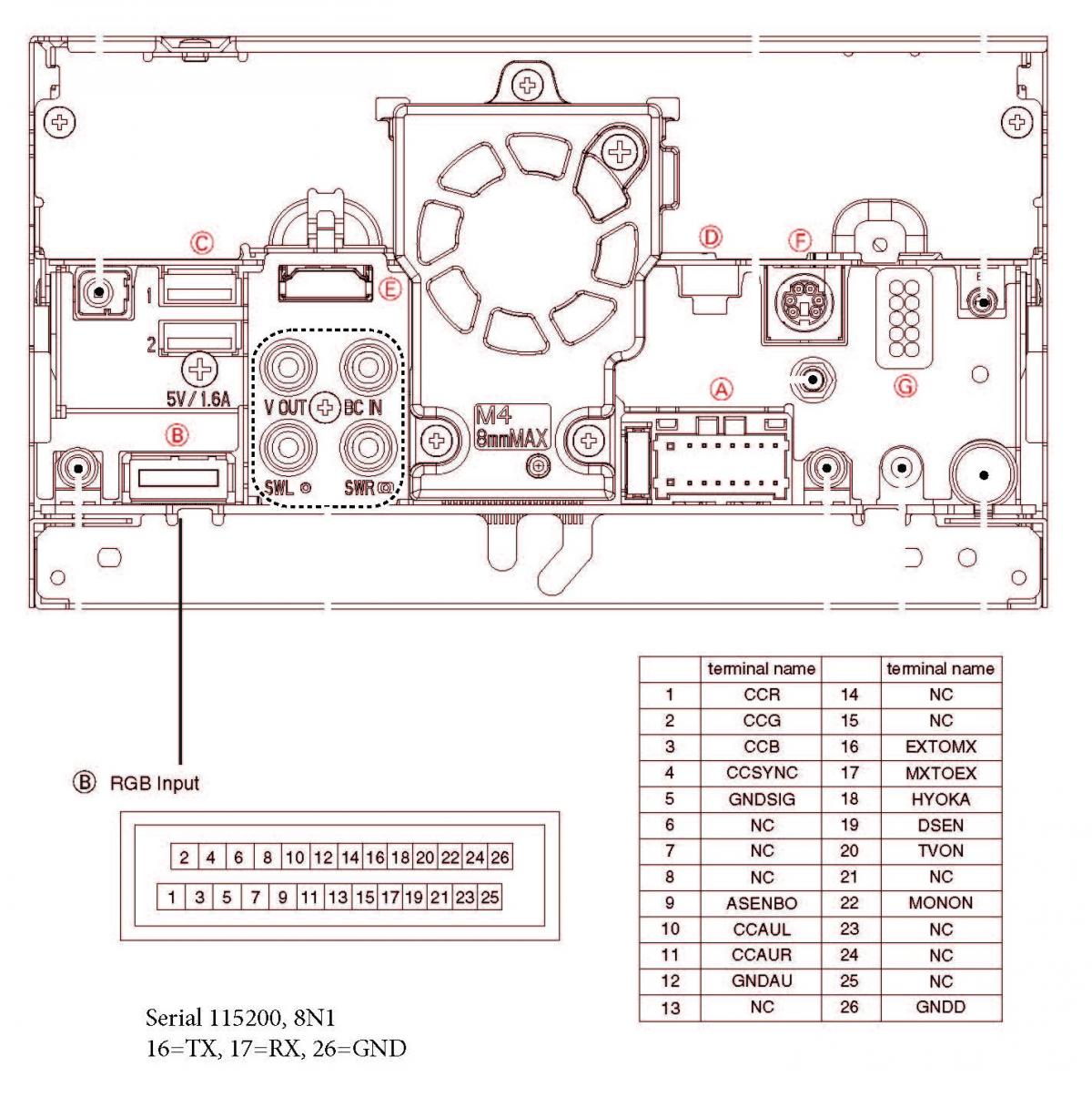
UPDATE: looks like my NOR was corrupted. Tried to run ModeChange with Testemode_n.key in order to unlock card and now is in reboot loop and nothing is working. So I need a tutorial on how to connect on UART and restore NOR. I have a NOR backup from another identical unit.


UPDATE2: found the UART connection.


post-113803-0-69071100-1464948773_thumb.jpg

Edited Jun 03, 2016 by WhiteAndBlue
Page 1 of 3