Search Archive
📌 Pinned

AVIC Development Mod - Developer Debug Menu

By bass_rock · Aug 13, 2015in NEX Series💬 55 posts👁️ 109,892 views
Page 1 of 3
Posted Aug 13, 2015 · 22:56 UTC#1

Introduction


Following The AVIC Development Mod, we would like to introduce a new Debug menu that was discovered by examining the Av.apk. This mode seems to be one of the developer menus that Pioneer themselves used to develop the software.  It seems to be compatible with all decks that The AVIC Development Mod is compatible with.


This menu includes but is not limited to:

  • USB OTG Switching (We have yet to see this truly working)
  • Boot Mode Changes (No need for bsp flashing)
  • Stock Android Developer Settings Menu
  • Sensor Debugging
  • Logcat Log Levels
  • Component Logging
  • Creating the WARP Snapshot
  • Creating the UserData Snapshot
  • Saving off the device database
  • Saving off logs
  • Displaying CPU usage imanformation


How To:


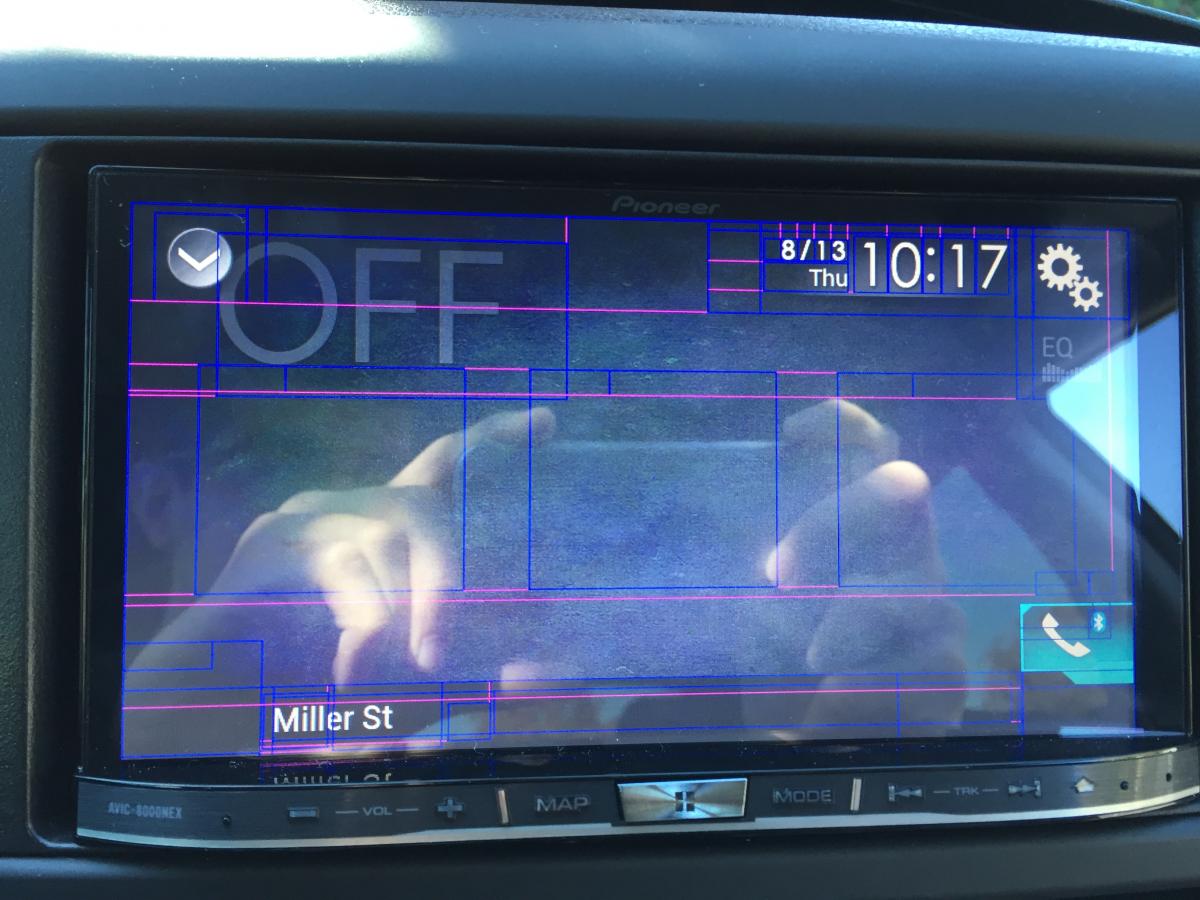
  1. ​Select Off in the Source Settings
  2. There are 3 invisible buttons on this screen. See the image below for a picture of the screen, with the Layout Guides Enabled.   
  3. post-116652-0-04089100-1439505621_thumb.jpg
  4. There are 3 boxes in the center screen those are the invisible buttons, for reference we will designate them buttons 1-3 left to right.
  5. Enter the following sequence on the buttons: Button 3, Button 1, Button 3,  Button 1, LONG press Button 2.   The first 4 presses should be normal button presses, not long presses.
  6. When done correctly you will receive a password prompt. Enter DEVELOPDBG ON There are 2 other passwords but they have just a subset of the options that this one has.
  7. Click Ok.
  8. You will be taken back to the Off screen. Press and hold Button 2.
  9. You should now be in the development menu.
 

Sequence How To: https://youtu.be/kK4mQTn6HSs


Menu Options:   http://youtu.be/F5cOwyQj1N8


FAQs


What is this mode?

A: It seems to be a developer mode that Pioneer uses at the factory.


Why use this over Testmode or the BSP?

A: This mode is safer to use as it is built into the device instead of having to flash your BSP, where something could go wrong.  This is also easier to access as it does require specific files on your USB Key. However this does have limitations as it does not have all of the modes that Testmode has.


What is Needed


With the discovery of this mode, it is clear that there is a way to get ADB access with OTG and the developer settings found here.  Especially since it seems this is the mode that Pioneer has used to aid in the development of the NEX.


Sadly every combination of cables and modes we have tried as not worked as of yet. If you find a combination that gets you ADB or have an idea. Please drop it in the thread.

Edited Aug 14, 2015 by bass_rock
Posted Aug 14, 2015 · 04:19 UTC#2

Working on 4100 ! Correct the button, its 3 -1 - 3 -1 - 2 long press, like the video. Since im on my holidays, i will borrow my laptop from the job to test the ADB. 


I have a longer list menu than the one on the BassRock video and i have this setting for the ADB.


IMG_0053.jpg

Posted Aug 14, 2015 · 04:20 UTC#3

Working on 4100 ! Correct the button, its 3 -1 - 3 -1 - 2 long press, like the video. Since im on my holidays, i will borrow my laptop from the job to test the ADB. 


I have a longer list menu than the one on the BassRock video and i have this setting for the ADB.


IMG_0053.jpg


WOW that is very interesting that you have those options!


Also I fixed the button sequence sorry about that!

Edited Aug 14, 2015 by bass_rock
Posted Aug 14, 2015 · 05:22 UTC#4

Just checked on my unit, 8000nex 1.10, I don't have the ADB options. 


Let us know if adb works! Maybe it will be possible to to just swap out the 8000 av.apk with the 8100 av.apk.

Posted Aug 14, 2015 · 09:49 UTC#5

Just to confirm, this also works on the SPH-DA120 :D

Posted Aug 14, 2015 · 15:25 UTC#6

This is great, hopefully a easy way comes out for removal of the nag screen on my Australian AVH-X8750BT (think its a NEX 4000 or 4100)

Posted Aug 14, 2015 · 17:03 UTC#7

Here is a video of the debug menu of the 4100.


http://youtu.be/0QEXKVgWzdU

Posted Aug 14, 2015 · 21:22 UTC#8

have been exploring the 8100 /system partition extracted from the PRG using the methods in AVIC.sh. 


It looks like the av.apk debug mode  indeed has a ton more stuff than that of the x000 series av.apk. Also in both x000 and x100 series the debug menu makes system changes by calling methods in framework/framework2.jar's DebugModeServiceProxy class. These methods are just wrappers for native JNI functions, however.  


Unfortunately, we can't just drop the x100 series av.apk in since it at the very least relies on the DebugModeServiceProxy functionality in framework/framework2.jar. We will have to transplant both the app and framework folders into the x000 series. 


Has anyone already tried  replacing the x000 app and framework folders with the x100 app and framework folders? 

Edited Aug 14, 2015 by e0x70i
Posted Sep 15, 2015 · 02:04 UTC#9

Wow ... It's really fantastic to see developments on these units!


I'm not sure I can contribute anything, but I can't begin to imagine how awesome it would be to have a custom launcher and all Google apps available.


(I'm actually a .NET developer with some experience with C and a little Java, but I've never debugged Java and don't know much about Android.  I'm tempted to fool around with my 8000-NEX but I just don't think I'd get very far...) :(

Edited Sep 15, 2015 by sofakng
Posted Dec 15, 2015 · 06:40 UTC#10

Love to be able to get rid of the startup warning on my Aussie AVIC F70 DAB 

Posted Aug 01, 2016 · 23:30 UTC#13

Probably already know this but it confirming that it works on the 5100. Still new at this.

Posted Sep 17, 2016 · 04:51 UTC#14

AVH-4200NEX confirm the menu. Seems to be some interesting options inside this one. I'll grab screenshots eventually

Posted Dec 23, 2016 · 14:37 UTC#15

Using this, can we boot bypassing the WARP hibernate thing and do a normal boot? I want to change some things in /etc and would need a standard boot to test...

Posted Dec 23, 2016 · 16:35 UTC#16

Yes you can. Just note that we don't have an easy way to recreate the warp snapshot with your changes so you will always have to boot with it off for your modifications to work

Posted Dec 24, 2016 · 01:33 UTC#17

Thanks I want to try enabling Android Auto on a 5200NEX

Posted Jan 27, 2017 · 00:11 UTC#18

Maybe getting adb is just a matter of finding the right USB - Ethernet dongle:


In system/bin are (amongst other files)

adb

ADBonNet.sh


last one containing


echo "$1"
 
if [ "on" = "$1" ];then
ifconfig eth0 192.168.0.100
setprop service.adb.tcp.port 5555 
stop adbd 
start adbd 
echo "ADB on NET : on"
elif [ "off" = "$1" ];then
setprop service.adb.tcp.port -1
stop adbd 
ifconfig eth0 down
start adbd 
echo "ADB on NET : off"
fi
 
#while off :
#PC adb disconnect & adb usb
Posted Jan 27, 2017 · 07:42 UTC#19


Maybe getting adb is just a matter of finding the right USB - Ethernet dongle:


ADB is already available both for USB and WiFi/Ethernet.

Posted Jan 27, 2017 · 15:57 UTC#20

ADB is already available both for USB and WiFi/Ethernet.

I missed that, ADB is just what I need! How do I get ADB (without wifi - my 7100 doesn't have wifi)? Please point me in the right direction. 

Edited Jan 27, 2017 by Abalta
Posted Feb 01, 2017 · 07:50 UTC#21

Work on AVIC-F77DAB.

Posted Feb 08, 2017 · 20:39 UTC#22
  • Creating the WARP Snapshot
  • Creating the UserData Snapshot


Has this been tested by someone? especially to create the warp snapshot? This is working?

Posted Feb 09, 2017 · 00:51 UTC#23

no

Posted Feb 13, 2017 · 05:37 UTC#24

I got ADB debug over USB working perfectly first go, from what I'm reading others are having issues?


* Enable debug menu

* Change USB mode to 'device', headunit reboots

* Enable debug menu

* Enable 'ADB on usb' option

* lsusb on a Linux machine connected to it using a standard USB male<>male cable shows a device as a Nexus 7 in debug mode

* 'adb shell' gives you a shell

Posted Apr 21, 2017 · 20:56 UTC#25

Does anyone here have a link to the SD Card IMG file for the "AVIC5000NEX"? I am in desperate need to have a radio again. 


Thanks.

Page 1 of 3