Search Archive
📌 Pinned

AVIC Development Mod - Developer Debug Menu

By bass_rock · Aug 13, 2015in NEX Series💬 55 posts👁️ 109,892 views
Page 2 of 3
Posted Jun 06, 2017 · 00:39 UTC#26

I got ADB debug over USB working perfectly first go, from what I'm reading others are having issues?


* Enable debug menu

* Change USB mode to 'device', headunit reboots

* Enable debug menu

* Enable 'ADB on usb' option

* lsusb on a Linux machine connected to it using a standard USB male<>male cable shows a device as a Nexus 7 in debug mode

* 'adb shell' gives you a shell

This procedure works for NEX8100 as well

Posted Jun 18, 2017 · 03:13 UTC#27

or just use the console uart, where adb is always available without playing with the debug menu (which disables the iphone link when you switch to device mode)

Posted Aug 27, 2017 · 16:13 UTC#28

The DEVELOPDBG ON password no longer works.


Is there a new password for the latest firmware?

Posted Aug 28, 2017 · 12:01 UTC#29

Hello
Here are the menus of my Avic F980BT
I can not see the content, while the PC recognizes the avic in Android
I put pictures of all the menus

I tried with Windows 10 and Linux but the same .. it sees android But I do not have access


The normal menu


post-145203-0-76424800-1503921265_thumb.jpgpost-145203-0-43181000-1503921271_thumb.jpgpost-145203-0-15521400-1503921277_thumb.jpgpost-145203-0-34239200-1503921282_thumb.jpgpost-145203-0-05880500-1503921287_thumb.jpgpost-145203-0-40261000-1503921292_thumb.jpgpost-145203-0-36122900-1503921297_thumb.jpgpost-145203-0-77877000-1503921302_thumb.jpgpost-145203-0-02866100-1503921308_thumb.jpg


The developer menu


post-145203-0-01621100-1503921491_thumb.jpgpost-145203-0-15559800-1503921496_thumb.jpgpost-145203-0-89084000-1503921500_thumb.jpgpost-145203-0-47178000-1503921505_thumb.jpgpost-145203-0-07123000-1503921510_thumb.jpgpost-145203-0-07339900-1503921515_thumb.jpg


The PC linux and Windows 10


post-145203-0-39446100-1503921621_thumb.jpgpost-145203-0-03569500-1503921629_thumb.jpgpost-145203-0-27868700-1503921636_thumb.jpgpost-145203-0-55662100-1503921641_thumb.jpgpost-145203-0-64498200-1503921646_thumb.jpg

Posted Sep 10, 2017 · 20:12 UTC#30

what is the new password for the debug menu?

Posted Oct 01, 2017 · 17:00 UTC#31

Anyone have the new debug menu password? the 


DEVELOPDBG ON no longer works. 


also the testmode file no longer works after newest update so i can unlock my testing SD card. 


BTW this was all done on a SPH-DA120

Posted Oct 29, 2017 · 16:58 UTC#32

Tried this on a new 8200NEX (FW 1.07) and the menu is now password locked. Can it be shared Pl. ?


Thanks

Posted Dec 14, 2017 · 03:04 UTC#33

Can i use this method to remove password from pioneer avh-4100nex?

Posted Jun 15, 2018 · 22:03 UTC#34

I bought a Pioneer AVH-X3600BHS a few years ago with the hopes of the AppRadio function being awesome.  I bought the necessary add-ons, but it has never worked.  I've scoured the internet and found the topic on this site.  I am admittedly completely ignorant to how the process works.  Will following the steps replace my OS and GUI?  Will the radio function, DVD player, and backup camera still work?  Will I need different hardware to attach my Samsung Galaxy S8?  I'm completely lost.

I've scoured YouTube for a walkthrough of this, but have struck out.  I'm typically someone people ask for tech advice, but this is way over my head without help from people with better understanding on this stuff.  This site appears to be full of such people.  Please help. 

Posted Jul 30, 2018 · 20:22 UTC#36

is the technical manual the same for the f77 ?

Posted Nov 01, 2018 · 05:47 UTC#37

doesn't work, could it be cause my avh-4200nex is with most recent firmware?

Posted Nov 22, 2018 · 06:45 UTC#38
On 8/27/2017 at 9:13 AM, lightning413 said:

The DEVELOPDBG ON password no longer works.


Is there a new password for the latest firmware?

Were you able to get the new password? I'm looking for this too. :/

Posted Nov 29, 2018 · 09:47 UTC#39
On 14/8/2015 at 12:56 AM, bass_rock said:

Introduction


Following The AVIC Development Mod, we would like to introduce a new Debug menu that was discovered by examining the Av.apk. This mode seems to be one of the developer menus that Pioneer themselves used to develop the software.  It seems to be compatible with all decks that The AVIC Development Mod is compatible with.


This menu includes but is not limited to:

  • USB OTG Switching (We have yet to see this truly working)
  • Boot Mode Changes (No need for bsp flashing)
  • Stock Android Developer Settings Menu
  • Sensor Debugging
  • Logcat Log Levels
  • Component Logging
  • Creating the WARP Snapshot
  • Creating the UserData Snapshot
  • Saving off the device database
  • Saving off logs
  • Displaying CPU usage imanformation


How To:


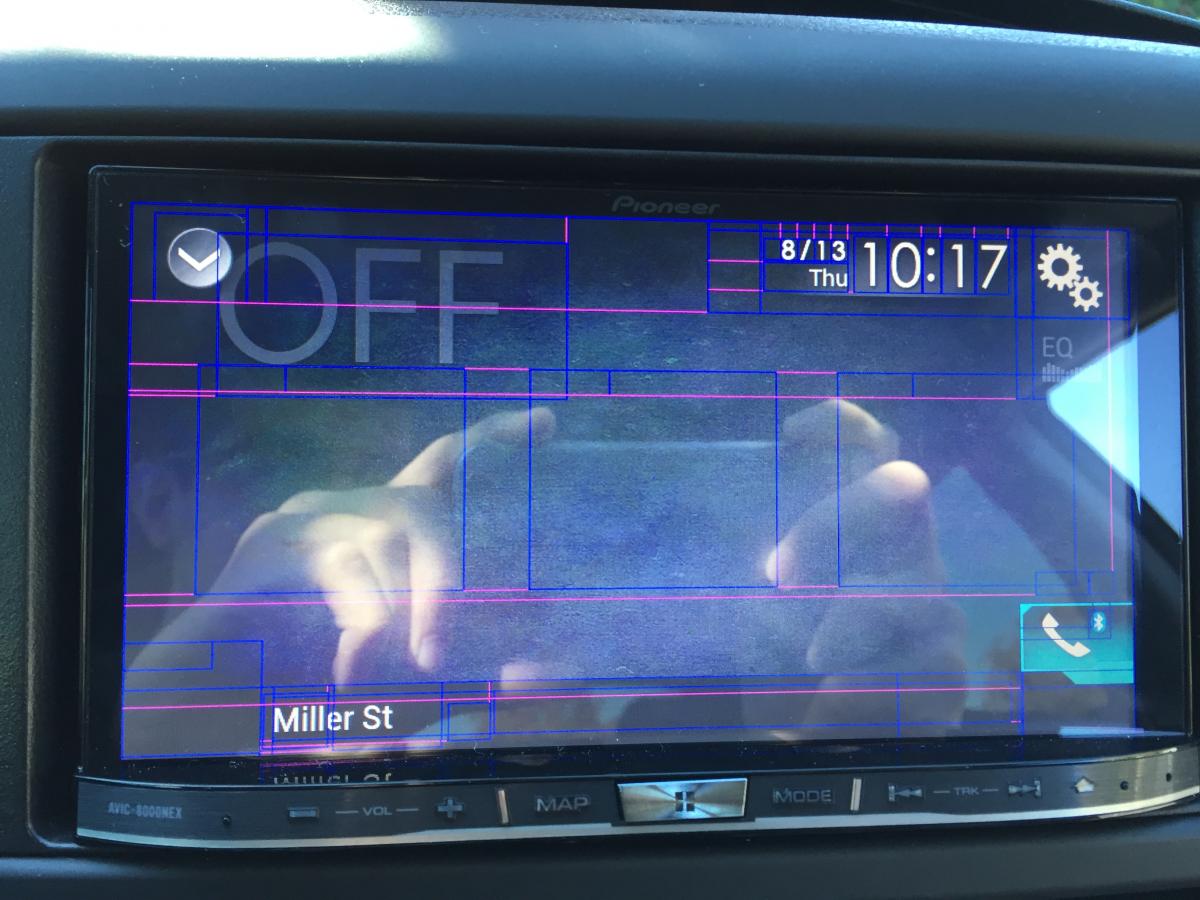
  1. ​Select Off in the Source Settings
  2. There are 3 invisible buttons on this screen. See the image below for a picture of the screen, with the Layout Guides Enabled.   
  3. post-116652-0-04089100-1439505621_thumb.jpg
  4. There are 3 boxes in the center screen those are the invisible buttons, for reference we will designate them buttons 1-3 left to right.
  5. Enter the following sequence on the buttons: Button 3, Button 1, Button 3,  Button 1, LONG press Button 2.   The first 4 presses should be normal button presses, not long presses.
  6. When done correctly you will receive a password prompt. Enter DEVELOPDBG ON There are 2 other passwords but they have just a subset of the options that this one has.
  7. Click Ok.
  8. You will be taken back to the Off screen. Press and hold Button 2.
  9. You should now be in the development menu.


Sequence How To: https://youtu.be/kK4mQTn6HSs


Menu Options:   http://youtu.be/F5cOwyQj1N8


FAQs


What is this mode?

A: It seems to be a developer mode that Pioneer uses at the factory.


Why use this over Testmode or the BSP?

A: This mode is safer to use as it is built into the device instead of having to flash your BSP, where something could go wrong.  This is also easier to access as it does require specific files on your USB Key. However this does have limitations as it does not have all of the modes that Testmode has.


What is Needed


With the discovery of this mode, it is clear that there is a way to get ADB access with OTG and the developer settings found here.  Especially since it seems this is the mode that Pioneer has used to aid in the development of the NEX.


Sadly every combination of cables and modes we have tried as not worked as of yet. If you find a combination that gets you ADB or have an idea. Please drop it in the thread.

I try to use on my F88 DAB this passw:  DEVELOPDBG ON , but don't work...the system tell me is wrong password. Have you got fresh one? :)

Posted Dec 17, 2018 · 18:10 UTC#40

Hi Guys, I'm new here and in the same boat.

Passwords have been changed and either poseidondbg developdbg or others doesn't work.

This forum saved me a lot of bucks last weekend and I wanted to tell all of you "thanks!!!!" for that.

I have the error message "positioning impossible due to hardware" and I'd like to try a sensor debug. 

Is there someone who have the new debug mode password please?


Best regards.


Jeo

Posted Dec 21, 2018 · 17:36 UTC#41

We do not know passwords for new firmware versions.
you need to return the previous firmware to use the Debug Menu

what model of your radio?

Edited Dec 21, 2018 by asd255
Posted Dec 22, 2018 · 14:56 UTC#42

Hi,

It's AVIC-F860BT

I tried to return from 1.21 to 1.04 firmware but the passwords don't work either.

Posted Dec 24, 2018 · 17:13 UTC#43

password works on firmware version 1.00-1.14

update:

working on versions

х000 <= 1.14
х100 <= 1.07
х200 <= 1.05

Edited Dec 29, 2018 by asd255
Posted Dec 25, 2018 · 22:09 UTC#44

So it should work with 1.04 version... 

Have you got the 1.00?

Posted Apr 15, 2019 · 10:32 UTC#45
On 8/14/2015 at 9:49 PM, fruitbat04 said:

Just to confirm, this also works on the SPH-DA120 :D

I have a SPH-DA120 upgraded to firmware 1.19

the password DEVELOPDBG ON doesn’t work

Posted May 01, 2019 · 04:14 UTC#46
On 2/12/2017 at 9:37 PM, fixed said:

I got ADB debug over USB working perfectly first go, from what I'm reading others are having issues?


* Enable debug menu

* Change USB mode to 'device', headunit reboots

* Enable debug menu

* Enable 'ADB on usb' option

* lsusb on a Linux machine connected to it using a standard USB male<>male cable shows a device as a Nexus 7 in debug mode

* 'adb shell' gives you a shell

Does this enable on both USB ports?

Posted Jun 16, 2020 · 04:44 UTC#47

Anyone have the new debug menu password? the DEVELOPDBG ON no longer works. 

Posted Aug 29, 2020 · 21:32 UTC#48

Hi Guys,

On newer firmware, where DEVELOPDBG ON password doesn't work anymore, there is a way to skip the password prompt. At least it works on my F970BT. The buttons sequence is based on the original one shown at first post in this theme but slightly modified. Sequence I use is: 3-1-3-1 (all short presses), then press button 2 for longer period than previous buttons, but not long enough for the password prompt to appear. After that press button 2 again, but this time for a longer period. Tested on avic F970BT, firmware AVIC-Fx7x_EU5_FW_Ver_111.

Edited Aug 30, 2020 by baniak_ko
Posted Aug 30, 2020 · 18:17 UTC#49

Doesn’t seem to work for avic5000nex. :(

Posted Oct 21, 2020 · 23:46 UTC#50
On 8/30/2020 at 2:17 PM, Mav2u said:

Doesn’t seem to work for avic5000nex. :(

Same for SPH-DA120.

Page 2 of 3