Search Archive

IGO Nextgen 9.19.5.584533 - Is it possible to port?

By weresgyufa · Mar 22, 2016in Hacks/Mods💬 34 posts👁️ 31,482 views
Page 1 of 2
Posted Mar 22, 2016 · 20:31 UTC#1

Hi, i read this and i'm wondering is it possible to port this app to our favorite AVIC F SERIES...


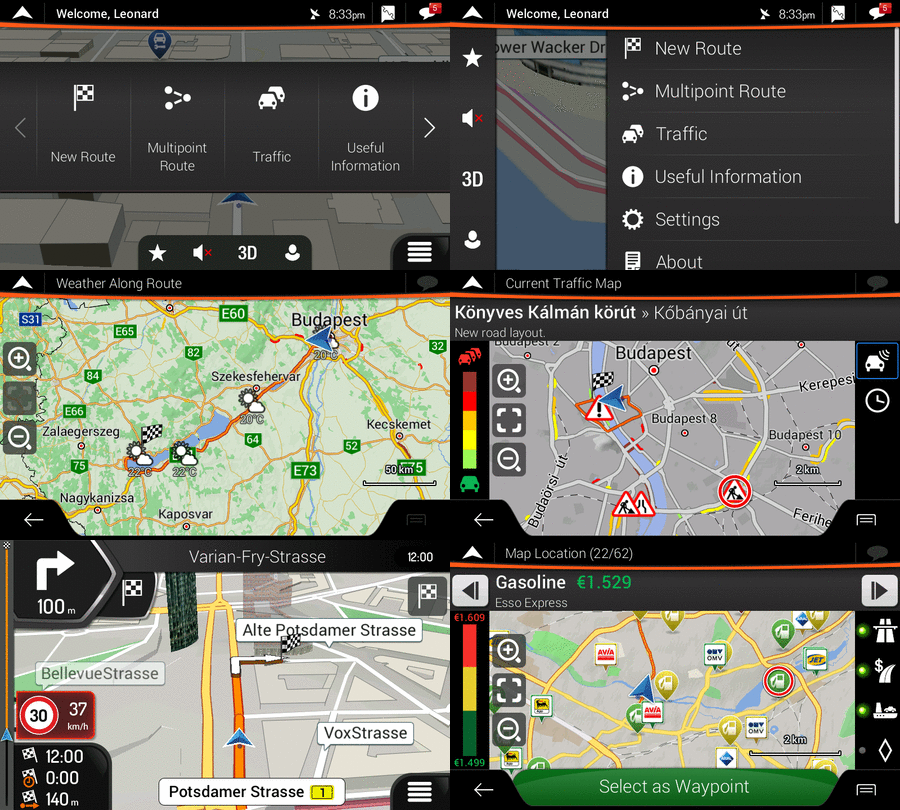
iGO%20nextgen.png IGO Nextgen 9.19.5.584533 | Maps 2015 Q3 | Speedcam | TMC | TMCPro | TTS Pro | working NX501EAV
4de9e25bd49f2d8e700491b16bdb9774.gif

Hello together,

after a couple of weeks i got the IGO Nextgen 9.19.5.584533 working on my Clarion NX501EAV Radio so i want to provide it here.

- Maps Q3 2015 NL/L/BE/D/F
- Speedcams all over Europe
- Working Sound with NX501E(AV)
- Resolution fixed to 800 x 480
- Buildings / POI / POI Ext working fine
- TMC and TMCPro working fine
- all licenses included
- Clocktime is syncing to radio
- Radiostation is shown correct
- TTS working fine (now really)
- Complete fixed skin (original)
- histspeed included
- license and other folders cleared


Original link: http://www.gpspower.net/igo-primo-nextgen-software/340348-igo-nextgen-9-19-5-584533-maps-2015-q3-speedcam-tmc-tmcpro-working-nx501eav.html


Posted Mar 25, 2016 · 07:57 UTC#2

I have download the files, if i have some time to take a try, i will make it. Maybe i can integrate it in Hybrid or AVICNet...

Posted Apr 11, 2016 · 07:43 UTC#3

Hi.

At the moment i can't find a working solution to try this out, because i have only winCE5 emulator, but the NextGen is working on CE6 :(

Is there a working emulator somewhere or how should i start to cook a working firmware?

If anyone can help please send me PM where can i found a working WinCE6 emulator and a frimware which is useing CE6 image, if F900BT use CE6...

Posted May 10, 2016 · 17:33 UTC#4

Somethig is starting... (Not my work! I just test it!)

WP_20160510_18_23_37_Pro_www.kepfeltolte

Posted Jun 10, 2016 · 17:17 UTC#5

It is working!!! i just need help from experienced ROM makers, because i have som issues whit it. It reboots randomely, if i go back with the menu button then i can't go back with the MAP buttton.

I installed it to a working Hybrid 4.001 but if someone can make work together then i can share what i got.

Unfortunate i'm not haveing enough time to test but if the someone of the BIG OLD BOYS can get this done then i thing all the forum members want to use this.

Posted Jun 17, 2016 · 09:49 UTC#6

I found a newer version if someone can help with the ROM cooking please contact me.


Igo Nextgen ZENEC v9.19.5.612525 Nov 17 2015 pached wit iGO NextGen WinCE Patcher
For me work
Thanks to pabfig for this news
http://www105.zippyshare.com/v/Fw2TcRxR/file.html


Or who has made my ROM what is use now, he has made a port to HTC S100 PDA:

http://www.gpspower.net/igo-primo-nextgen-software/343232-igo-nextgen-9-19-5-612525-kajoe-pongo-s100-19-05-16-superfast-smooth.html


Loading_landscape.png

Screen_2.jpg

Screen_3.jpgScreen_1.jpgffscreen_00001_2.jpg

Posted Aug 09, 2016 · 12:36 UTC#7

Hallo.

I have downloaded a exe file for, Igo primo nextgen, does anyone know how to install on F900BT.

Thanks in advance

Posted Aug 10, 2016 · 13:54 UTC#8

Hallo.

I have downloaded a exe file for, Igo primo nextgen, does anyone know how to install on F900BT.

Thanks in advance

Hi. I will ask the guy who has made this for me, and i will share whit you and the other members also. What i use is working, but its not fine, because the job is not done.

Posted Oct 08, 2016 · 18:49 UTC#9

I tried to make a nextgen version for F900BT again. Maybe you can test it. Follow there instructions. Download link below. I have changed some files and now it is for European devices F900BT. Test it and let me know.
 

I only made it for Dutch. So TTS files and voices are only for Dutch and English.

I am not responsible when you brick your unit.
 
 
Installation Instructions

1) Back up your unit! Copy the entire "My Flash Disk" onto a SD card and keep it in a safe place.
2) Ensure you are running Windows CE version 5.0 or above. You can check this by booting into testmode, going to the control panel and tapping on system. It will tell you your CE version there. 
3) Download the file. Extract, copy to a SD card.
4) Delete "My Flash Disk" on your unit from testmode.
5) Copy "My Flash Disk" from your SD card to your unit.
7) You have to copy maps/ POI etc to the folder in iGO/ Content. Do NOT copy them in Primo3/ Content
6) Reboot. Your unit will auto reboot once more to initiallize AVICnet.


If GPS cannot be found, change port in sys.txt to GPS port of your device. And go to \My Flash Disk\User\UserData\iGo\SAVE folder and delete the SAVE folder.

Edited Oct 12, 2016 by Kajoe
Posted Oct 11, 2016 · 07:48 UTC#10

I tried to make a nextgen version for F900BT again. Maybe you can test it. Follow there instructions. Download link below. I have changed some files and now it is for European devices F900BT. Test it and let me know.


I only made it for Dutch. So TTS files and voices are only for Dutch and English.

I am not responsible when you brick your unit.
 
 
Installation Instructions

1) Back up your unit! Copy the entire "My Flash Disk" onto a SD card and keep it in a safe place.

2) Ensure you are running Windows CE version 5.0 or above. You can check this by booting into testmode, going to the control panel and tapping on system. It will tell you your CE version there. 

3) Download the file. Extract, copy to a SD card.

4) Delete "My Flash Disk" on your unit from testmode.

5) Copy "My Flash Disk" from your SD card to your unit.

7) You have to copy maps/ POI etc to the folder in iGO/ Content. Do NOT copy them in Primo3/ Content

6) Reboot. Your unit will auto reboot once more to initiallize AVICnet.


If GPS cannot be found, change port in sys.txt to GPS port of your device.

Hi. Thx, @ the weekend i will upload into my device and make a try. many thanx!

We sholud use OEM AVIC software to teh start, or AVICnet, Hybrid is good for the basic also?

Edited Oct 11, 2016 by weresgyufa
Posted Oct 11, 2016 · 18:25 UTC#11

Hi Luannatrigh

I can not read that.


Hi weresgyufa

Hybrid is good.

If GPS cannot be found, change port in sys.txt to GPS port of your device. And go to \My Flash Disk\User\UserData\iGo\SAVE folder and delete the SAVE folder.

Posted Oct 12, 2016 · 04:28 UTC#12

I think Luannatrigh is has a hacked account :)

Posted Oct 12, 2016 · 09:53 UTC#13

I think Luannatrigh is has a hacked account :)

I think too... :)

Posted Oct 12, 2016 · 09:54 UTC#14

Hi Luannatrigh

I can not read that.


Hi weresgyufa

Hybrid is good.

If GPS cannot be found, change port in sys.txt to GPS port of your device. And go to \My Flash Disk\User\UserData\iGo\SAVE folder and delete the SAVE folder.

Hi ok, i will try it @ this weekend

Posted Oct 16, 2016 · 09:14 UTC#15

So... how to say...


IT'S ALIVE :D AND WORKING FINE!!!


I just installed it, and its awesome. as i see is stable then the previous ones what i have tested for Kajoe.

So many many many many thanks for Kajoe for this bulid. I think now it can be place in to the completed mods/themes folder because it works.


I will paste some screenshots is, i have the GPS problem too, but i will write into the sys.txt and run it again, but now i'm so excited :)

Edited Oct 16, 2016 by weresgyufa
Posted Oct 16, 2016 · 09:51 UTC#16

Start copying content to unit

WP_20161016_10_36_28_Pro_www.kepfeltolte


system is runung :)

WP_20161016_10_54_41_Pro_www.kepfeltolte


NextGen is starting :)...

WP_20161016_10_57_03_Pro_www.kepfeltolte


tada.wav  :D :D :D

WP_20161016_11_01_04_Pro_www.kepfeltolte

Edited Oct 16, 2016 by weresgyufa
Posted Oct 24, 2016 · 13:13 UTC#17

How do I put an adress in it( nextgen) I had the GPS problem too but now it is over it is working. Thanks to Kajoe

Posted Oct 29, 2016 · 11:15 UTC#18

Put in the second installation file "GPS during startup at off" works fine with me. You got a working gps.The only problem I have is no warning sounds for turning of and warningsound at speedcam.

I hope you have something about trhis

Posted Oct 30, 2016 · 16:12 UTC#19

Any suggestions on mine; I've downloaded the myflashdisk.7z unzipped etc and copied it over, the system boots fine, standard navigation works but upon launching the iGo Primo it starts to load (black screen) and then crashes back to the navigation apps selection. That's all I can get it to do

Posted Oct 30, 2016 · 16:55 UTC#21

And that is what exactly?

Posted Oct 30, 2016 · 18:20 UTC#22

I thought that you had problems???? So I was trying to help you. But you do not have to try it. It is still in developing, so it is stil not perfect.

Posted Oct 30, 2016 · 21:06 UTC#23

It's the hosting you used that's all, the first download look suspicious at only 5mb

Posted Nov 01, 2016 · 14:07 UTC#24

Hi.


Now it's working fine :) i put some older (2015) licence files in, because i only have older maps, but now all things working fine :)ú

Here some pictures:

WP_20161030_11_02_37_Pro_www.kepfeltolte


WP_20161030_11_02_48_Pro_www.kepfeltolte


WP_20161030_11_03_04_Pro_www.kepfeltolte

Posted Nov 06, 2016 · 15:10 UTC#25

Hallo weresgyufa mine also working but has no screen and Kajoe does n=ot know an solution do you have one.

Greetings Fred

Page 1 of 2