Search Archive

New Release F20BT F30BT F40Bt F920BT F930BT F840BT Etc 2017 Releastechnologye

By godzilla · Jul 20, 2017in Hacks/Mods💬 385 posts👁️ 195,164 views
Page 14 of 16
Posted Aug 14, 2018 · 09:56 UTC#326
28 minutes ago, v0rtex said:

Hi Guys,

Tried to update F30BT step by step:

1 - using formated fat32 SDcard 4GB and unzip all shortfusescript files to sd root

2 - go to unit, start, insert sdcard, ask to updated by pressing any key, Done without errors. turn off unity after (I have a backup off all files inside SDcard afterrun this script)

3 - Format again the same SDCARD 4GB fat32

4 - unzip 2017 update with pass 'Dracarys' and copy firmware/update/cardinfo to sdcard root (I did not edit nothing, just copy/paste)

5 - insert sdcard into unit (detects update), insert PASSWORDPASSWORD ok and the unit informs, the unit need to restart in oder to install the update

6 - unit restart, update starts ok, but at 8%, got stucked on SD card error message


Now do I need to run unit in testmode to continue or can I use another SDCARD or format the same one, unzip again the map, copy and try to continue from 8% because unit cannot move after 8% message

Working ok now.

Just reformat again SDCARD, unzip again map update and continue from 8% ok


Posted Aug 22, 2018 · 18:31 UTC#327

Need help for AVIC F8340BT,

First I made a backup of the USER directory like the youtube movie.
Then i copied RenewalIFLib.dll from PRG0 and patched the file with hex editor.
Removed the both RenewalIFLib.dll files in PRG0 and PRG1 and replaced them with the patched one.
Then I deleted the files Testmode.key  and RenewalIFLib.dll from the SD.
I copied de map update files, directory Firmware with all subdirectories,
files and the directory Update with all subdirectories and files and 
the unchanged file CARDINFO.CIF on the SD.
Put the SD in the HU and started updating, when prompted for the password, I entered PASSWORDPASSWORD and it was accepted.
Then after about 8 minutes (13%) I got incorrect SD message.
Removed the SD and did power off the HU.
Then I removed the update from the SD .
Put Testmode.key on SD. Then removed the file USER\SYSTEM\Download\StartKnd.log.
Removed SD and powered up HU, this was not working good any more. Only radio.
Then I put in the SD with Testmode.key and wit Filemanagement I saw that the file and directory names in the 
NDATA directory has file and directory names with strange characters.
The USER directory looks normal.

What did i wrong?


Posted Aug 23, 2018 · 06:06 UTC#328

Hi guys,

I had a question. I am from Australia with a F930BT HU in my Lancer. I was wondering if there was any way I could replace the maps in RonS's update with maps of Australia. Let me know if anyone has any bright ideas regarding this. I am quite new to all of this stuff, so I hope to get good guidance. Oh and I forgot to mention that my unit is updated to firmware version 4.0 with 2015 map updates as provided by Pioneer Australia.

Cheers!

Posted Sep 02, 2018 · 22:20 UTC#329

Fixed problem, sd re-formatted with standard cluster size, folder update directly unzipped on the sd, sd placed in HU, map update continued, and everything works again.

Posted Sep 19, 2018 · 14:04 UTC#330

***edit

in meantime sorted out, all ok, tnx godzilla,ron,shortfuse and all other gurus.

Edited Sep 19, 2018 by saman
Posted Sep 24, 2018 · 13:03 UTC#331

.

Edited Sep 24, 2018 by brommie
Posted Oct 06, 2018 · 19:50 UTC#332

Thank You very much - maps updated on f920BT without any issues using easy mode/shortfuse hack.

Posted Oct 26, 2018 · 16:55 UTC#333

many thx B)

works perfect on f940bt

Posted Oct 28, 2018 · 09:28 UTC#334

bonjour a tous

merci  a godzilla et rons pour les tutos ,moi je rencontre un problème .j'ais télécharger celui de 2015 et installer parfaitement mais celui de 2017 impossible .il demande mot de passe j'ais beau essayer passwordpassword  sa ne marche pas avez vous une solution

pour Avic 930bt version 6.0

Posted Oct 28, 2018 · 21:43 UTC#335
12 hours ago, dadine said:

bonjour a tous

merci  a godzilla et rons pour les tutos ,moi je rencontre un problème .j'ais télécharger celui de 2015 et installer parfaitement mais celui de 2017 impossible .il demande mot de passe j'ais beau essayer passwordpassword  sa ne marche pas avez vous une solution

pour Avic 930bt version 6.0

Have you tried with CAPS ON : PASSWORDPASSWORD?

Posted Oct 29, 2018 · 11:27 UTC#336

oui je me suis aperçus que j'avais pas installer la mise a jour 2015 et je viens de l'installer sans probleme ni de mot de passe .je vais retenter la mise a jour 2017 voir si sa fonctionne xd

Posted Oct 29, 2018 · 13:54 UTC#337

j'ais retenter l’expérience j'utilise passwordpassword mais sa marche pas ...

Posted Nov 03, 2018 · 09:47 UTC#338

bonjour joie dis moi les etapes pour installer mise a jour 2017 je possede le avic 930 bt mais sa marche pas

Posted Nov 18, 2018 · 16:24 UTC#339

bonjour a tous

j'aimerais savoir qui pourrais m'aider car plus de programmes !!!!! il fraudais que je trouve une sauvegarde pour le avic f930bt afin de pouvoir le relancer !!!!

Posted Nov 23, 2018 · 11:59 UTC#340

Hi everybody, i would like to upgrade my f10bt with software 1.0 to the 2017 software and maps, what are the correct steps to follow please? Thanks in advance! I tried the shortfuse hack and that worked great, then it says turn off unit and insert sd with the 2017 update, which i unzipped on a formatted sd card, but it doesn't do anything then? The unit just starts up again as it was.

Edited Nov 23, 2018 by Michel2830
Posted Nov 23, 2018 · 13:13 UTC#341
1 hour ago, Michel2830 said:

Hi everybody, i would like to upgrade my f10bt with software 1.0 to the 2017 software and maps, what are the correct steps to follow please? Thanks in advance! I tried the shortfuse hack and that worked great, then it says turn off unit and insert sd with the 2017 update, which i unzipped on a formatted sd card, but it doesn't do anything then? The unit just starts up again as it was.

On your map update SD, replace CARDINFO.CIF with this one. 

CARDINFO.cif

Attached Files (1)
Posted Nov 23, 2018 · 13:55 UTC#342

Allright RonS, the update was succesfull! Thank you for the info! It went perfect with the new cardinfo file!

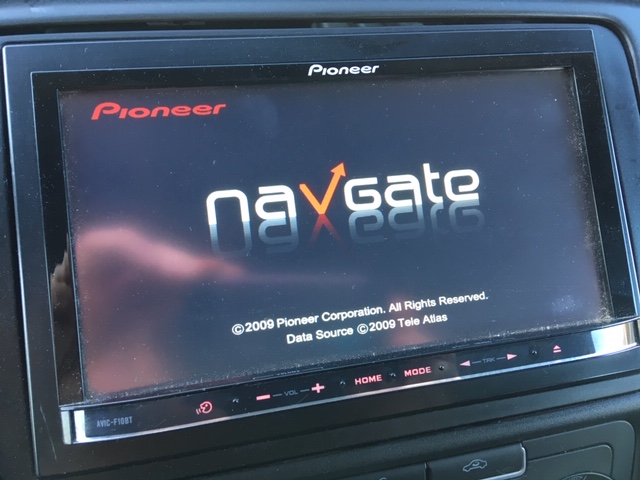
I however still get a startup screen which states the following: 2009 Pioneer corporation and 2009 Tele atlas, i noticed that the menu is nice and new, but the card still look like they used to, version is 7.0 in the menu, so i guess everything is ok then? Updating Bluetooth now.


IMG_6695.JPG

Edited Nov 23, 2018 by Michel2830
Posted Nov 23, 2018 · 17:56 UTC#343
4 hours ago, Michel2830 said:

Allright RonS, the update was succesfull! Thank you for the info! It went perfect with the new cardinfo file!

I however still get a startup screen which states the following: 2009 Pioneer corporation and 2009 Tele atlas, i noticed that the menu is nice and new, but the card still look like they used to, version is 7.0 in the menu, so i guess everything is ok then? Updating Bluetooth now.


The splash screen doesn't get changed. You wouldn't want it changing if you had a custom image.  You may be able to refresh it manually in System Settings/Splash Screen.

If you were running firmware v1.x, there would be big differences and new functions (Pandora and AHa). Don't forget to update the Bluetooth firmware in the BT settings. It uses this same SD image.

Edited Nov 23, 2018 by RonS
Posted Nov 23, 2018 · 19:59 UTC#344

It all went super! Many thanks for the updates and the good help! 

Posted Nov 25, 2018 · 10:34 UTC#345

bonjour a tous

Avez vous une solution mon autoradio pioneer avic f930 bt "plus de programmes détectable" que puis je faire pour le réparer ?

Posted Dec 21, 2018 · 20:20 UTC#346

i try update but update stoped to 98% ..pioneer is blocked and ask for sd ...how can i relolve it, please ?

Posted Dec 24, 2018 · 13:06 UTC#347

Dankje,

werkt perfect

Posted Dec 24, 2018 · 13:32 UTC#348
On 12/21/2018 at 3:20 PM, spoonavic said:

i try update but update stoped to 98% ..pioneer is blocked and ask for sd ...how can i relolve it, please ?

Your problem is caused by something is wrong with the update SD. Very possible that you didn't use the correct password when you unzipped the file. So some files are missing. This advice has been posted here many times.

If the map update fails to complete and you are stuck with a wrong or incorrect SD or similar message:

  • boot into testmode. 
  • go into file maintenance
  • remove the file USER\SYSTEM\Download\StartKnd.log

This will kick the unit out of upgrade mode, and it should restart into regular mode on next power up (remember to remove the TestMode SD). You should still be running with your previous firmware and maps.
 

Edited Dec 24, 2018 by RonS
Posted Dec 28, 2018 · 15:43 UTC#349
Hello. I apologize for repeating myself, but I am asking for one specific answer contained in one post - I think that it will also be useful to others.
I have a Pioneer Avic F920BT navigation. Currently has original software. Please inform me what to do STEP BY STEP because after many attempts described in various posts, 
e.g. I have not found in the file RenewalIFLib.dll all values of 0350A0E3
From what I read it is:
- to upload ShortFuse to SD, run
- on the second SD, upload the map (three files: firmware, update, cardinfo). The cardinfo file with changes on X07EURX27EURX30EUR and then update

Please reply. Thank you
Posted Feb 25, 2019 · 11:37 UTC#350

Hello
A question. Is a Superfuse necessary with a F940Bt? Or can I take the cardinfo from the 2015 update. Firmware is 6.00
Thank`s for reply
Cu
Digger500

Edited Feb 25, 2019 by digger500
Page 14 of 16