Search Archive
📌 Pinned

Security Password Removal Script for Z110/120/130/140, x920/930/940 & similar F series

By RonS · Sep 20, 2017in Hacks/Mods💬 176 posts👁️ 99,648 views
Page 2 of 8
Posted Mar 13, 2018 · 03:26 UTC#26

Wow.. I was lucky to find this. Couldn't find anything like this anywhere else online and was stuck after my battery became disconnected on my truck and recently bought it used with the aftermarket unit installed. I wasted a lot of time trying possible passwords and calling Pioneer who wanted to charge $80 just to send it back and take the password off. You have helped a lot of people!! THANK YOU!

Posted Mar 16, 2018 · 10:10 UTC#27
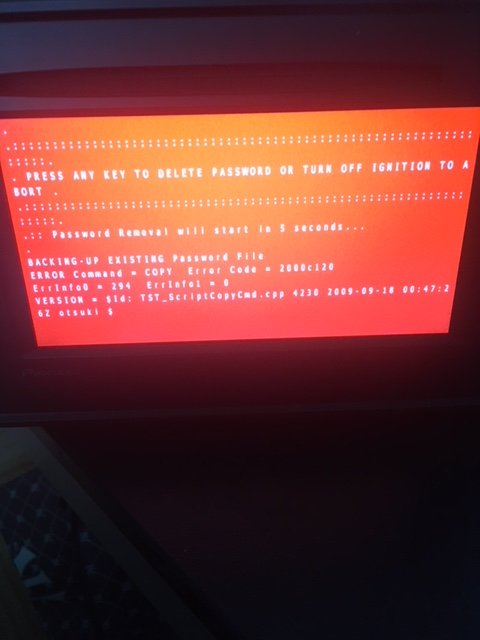
Hi, I have an AVIC F9210BT and I wanted to remove the existing password to be able to update it.Unfortunely, using this trick I finish with this screen. Can you help me? Thank you!!!

IMG_6841.JPG

Posted Mar 16, 2018 · 12:37 UTC#28
3 hours ago, paskishow44 said:

Hi, I have an AVIC F9210BT and I wanted to remove the existing password to be able to update it.Unfortunely, using this trick I finish with this screen. Can you help me? Thank you!!!


It can't write to the SD. Is the write-protect on?

Edited Mar 16, 2018 by RonS
Posted Mar 16, 2018 · 12:41 UTC#29
2 minutes ago, RonS said:

It can't write to the SD. Is the write-protect on?

I don't think the SD card, I've tried with a another...

Posted Mar 16, 2018 · 12:50 UTC#30
On 3/16/2018 at 8:41 AM, paskishow44 said:

I don't think the SD card, I've tried with a another...

I am certain that the error is when the script is executing the command:   COPY USER\SYSTEM\SECURITY\PASSWORD.DAT SD\PASSWORD.DAT
That means it can't write to SD.

There is the only one COPY command in the script. If you want, you can edit ScriptExec.ini and remove that line. In that case, you will not have a backup of the old password file, but that should not hurt.


Edited Aug 28, 2018 by RonS
Posted Apr 18, 2018 · 21:24 UTC#31

this Works great thank you so much.

Posted Apr 22, 2018 · 01:57 UTC#32

Thank  You!!!  Amazing, worked perfectly!!!

Original owner with invoice but no help from Pioneer.   

Thanks for saving me $$$ 

Posted Apr 24, 2018 · 16:13 UTC#33

Really Nice, now i can use my radio again, thank you!

Can you help me with the sd card as well? How can I use it at the PC again? 
My Windows PC can't open the sd card now...

Posted Apr 25, 2018 · 12:47 UTC#34
20 hours ago, Schere21 said:

Really Nice, now i can use my radio again, thank you!

Can you help me with the sd card as well? How can I use it at the PC again? 
My Windows PC can't open the sd card now...

Try cleaning the SD contacts or reformating.

Edited Apr 25, 2018 by RonS
Posted May 07, 2018 · 15:54 UTC#35

Worked great on my X930BT, thanks!!

Posted May 12, 2018 · 10:20 UTC#36

AVIC-F840BT

I am really greatful for your good work, many thanks, I was at the end of my proverbial tether, having tried every test mode key I could find and looked at the condi hack but stayed clear as having just spent £102 on a touchsreen and the time to install it I was not in the mood to "Brick it". I discovered the bonus feature of a set password after removing to fix the display and being a company liquadation vehicle bought secondhand I had no chance to find the owner!

I am super greatfull, Thanks again, you have made my week.

Edited May 12, 2018 by SOZZY — Reason: spelling
Posted May 20, 2018 · 02:19 UTC#37

Thanks this worked like a charm with my X930BT! Saved me a lot of money and frustration!

Question, would you happen to know where I can get an update of the navigation/maps for free? Also, is the latest firmware 3.0? (Is there any other latter version I am not aware of?)

Posted May 28, 2018 · 17:35 UTC#38
On 9/20/2017 at 11:17 AM, RonS said:

A simple way to permanently delete your unit's security password. No Condi Hackmode or TestMode needed.

Thank you! worked a treat

Edited May 28, 2018 by RonS — Reason: No need to repeat the entire instructions
Posted Jun 17, 2018 · 14:43 UTC#39

OMG you are amazing!!!:D Thank you so much!

Posted Jul 08, 2018 · 23:11 UTC#40

This worked awesome! super fast! 

Posted Jul 12, 2018 · 06:00 UTC#41

Thank you very much. It is really nice to see that still exists people willing to help for free.

Posted Jul 12, 2018 · 23:07 UTC#42

Will this work on a pioneer avic-930bt?

Posted Jul 13, 2018 · 00:48 UTC#43
1 hour ago, Alexxxxx said:

Will this work on a pioneer avic-930bt?

It should, but I don't have one. Running this won't hurt - so go ahead.

Posted Jul 18, 2018 · 16:50 UTC#44

Works on a F8430BT :)

Edited Jul 18, 2018 by AiKoiN
Posted Jul 21, 2018 · 10:48 UTC#45

f930bt work perfect .many tnx from Srbija

Posted Aug 03, 2018 · 20:48 UTC#46

THANK YOU for this! It worked great, I was a little sceptical however it worked exactly as described and super easy. Saved me a lot of hassle and money!

Posted Aug 11, 2018 · 00:21 UTC#47

This also happened to me.   I purchased a used vehicle, drove it for over a year.

Got in a car accident.  While it was being fixed the batter was unhooked and when I got it back it asked for a password.

This worked great.  Only problem I had was finding the necessary SD card in the house and an adapter to format it on my laptop.

Thanks so much!!

Posted Aug 23, 2018 · 20:40 UTC#48

YOU ABSOLUTE G UNIT!!!! Thank you!!!

Posted Aug 28, 2018 · 15:22 UTC#49

I have an AVIC-X931BT,  Subaru OEM.  Bought car used.  I used a USB memory stick as I didn't have an SD card and it worked great except I had the same problem as Paskishow44.  Deleted the  COPY USER\SYSTEM\SECURITY\PASSWORD.DAT SD\PASSWORD.DAT line from the script using Notepad and it worked great.  Thanks for all of your help.  Very frustrating problem. I was ready to take a baseball bat to the stereo.

Posted Sep 14, 2018 · 06:02 UTC#50

Just signed up to AVIC411 ...

WOW, talk about easy !

Just got back from a trip OS (3 months), I disconnected the battery as the immobilizer tends to drain the battery.

Didn't think about the radio ... re-connected the battery, and ERRR ... radio needs code.

As I bought the car 2nd hand, I didn't have the code (and not in any of the doc's that came with the car).

Google brought me here - did the small SD card thing, and BINGO ! - radio back on ! - SO EASY TO DO - MANY THANKS !!!!!

Page 2 of 8