Yes, even in 2019 there are still AVIC F930BTs alive out there and still people being helped by your hack - thanks!
Posted Jun 03, 2019 · 21:45 UTC#76
Yes, even in 2019 there are still AVIC F930BTs alive out there and still people being helped by your hack - thanks!
14 hours ago, Pete_W said:Yes, even in 2019 there are still AVIC F930BTs alive out there and still people being helped by your hack - thanks!
You're welcome. My Z110BT is still running strong.
I'm glad the Service Password Method works too. The more choice the better.
Mods it might be worth adding a link to my previous comment with the instructions to the original post?
8 hours ago, Ytumer said:I'm glad the Service Password Method works too. The more choice the better.
Mods it might be worth adding a link to my previous comment with the instructions to the original post?
IIRC, your method also works with newer models - like NEX Series. So those users would be more likely to find it if there was also a link or thread in that sub-forum. My thinking is it would be cleaner to start a new thread. Makes the feedback less confusing. I can make it a "sticky" so it won't get lost.
RonS, you are the man!!!
Within 5 seconds it was all fine. Many thanks!!
Hero! Thans you very much
I just used your script today. You saved me some bucks.
Many thanks!
On 1/29/2019 at 9:00 AM, Ytumer said:As a follow-up; I had contacted Pioneer about my password issue and was waiting on a reply when I came across this thread. I thought I'd try the script instead of waiting for a reply, which worked perfectly for me.
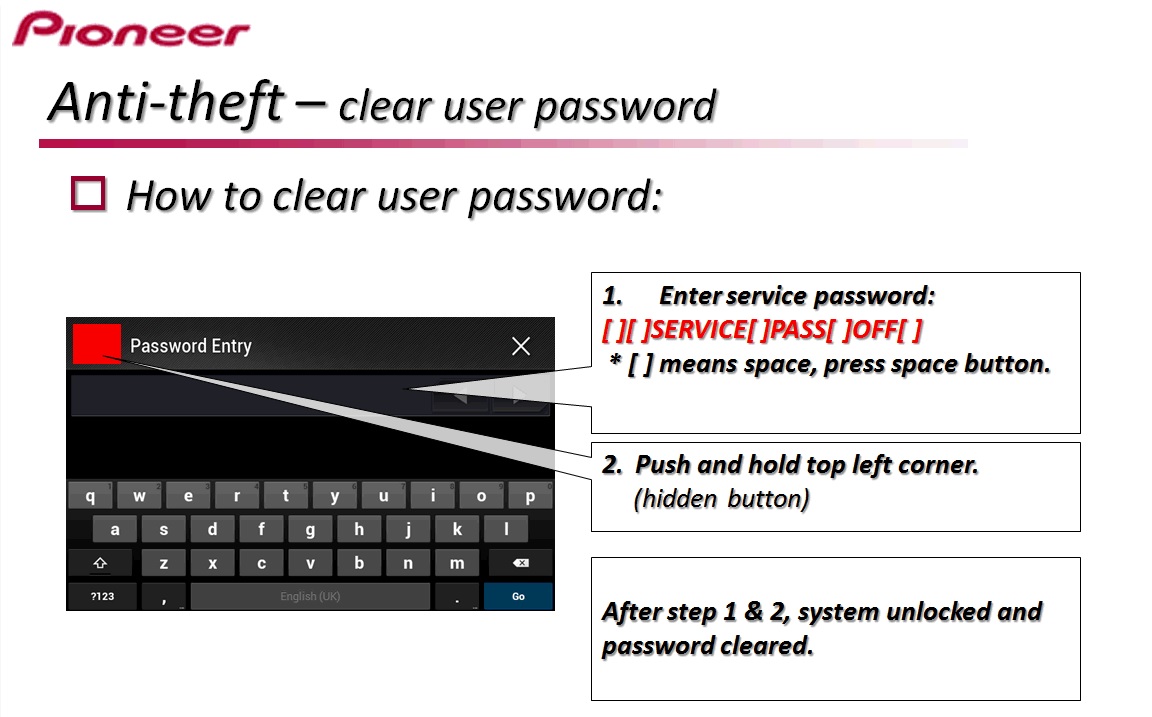
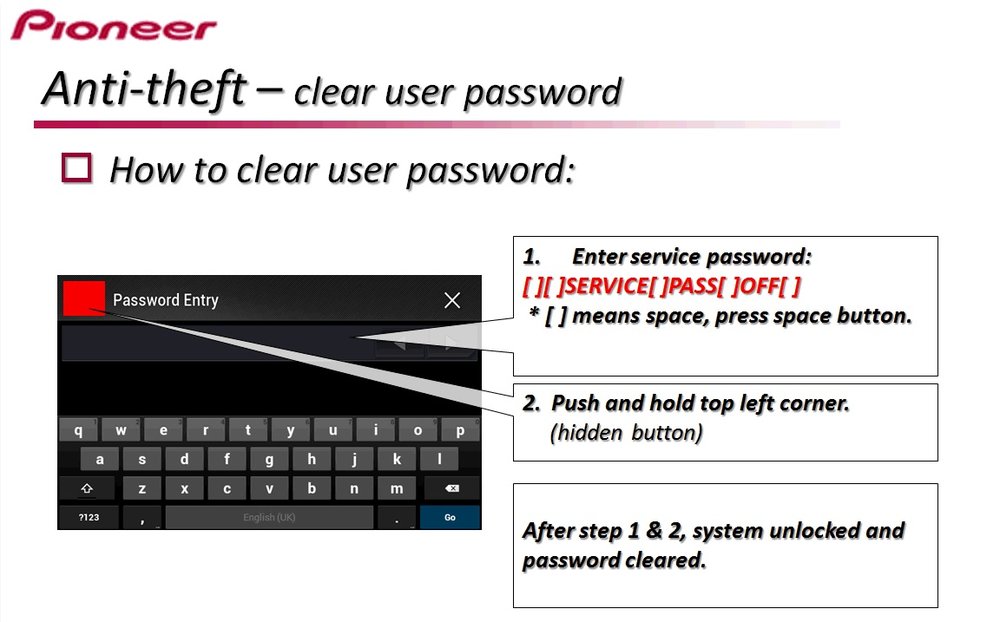
Turns out the Pioneer tech support team is extremely helpful. They sent through these instructions for me to clear my password. I haven't personally tried it as I had already run the script in this thread. If the script isn't working for anyone and you'd like to try an official alternative method to reset the password (not remove the prompt completely as this script does) please see the attached picture with instructions.
I'm not sure which models this will work for as the reply to my email was specific to my AVIC F840BT. I'm sure other models with a similar password prompt will likely have the same procedure.
I didn't think posting this would be more of an issue for theft than this script already is. Either method is easy and does the same thing so...
THIS FREAKING WORKS IN A MINUTE!!! MY MODEL IS AVH-X8850
THANKS FOR SAVING MY DAY.
Thanks, works awesome at my AVIC F930BT !!!
Hello i used this for f940bt but not works.After the checking of SD card have i on the screen this
TST_scriptcopy cmd.cpp4230
i restart radio and navigation or dvd player dont work
3 minutes ago, matus_pigy said:Hello i used this for f840 but not works.After the checking of SD card have i on the screen this
In your other post you said F940. Which is it?
5 minutes ago, RonS said:In your other post you said F940. Which is it?
Sorry! F940BT
On 9/15/2019 at 8:03 AM, matus_pigy said:Hello i used this for f940bt but not works.After the checking of SD card have i on the screen this
TST_scriptcopy cmd.cpp4230
i restart radio and navigation or dvd player dont work
I don't know what is wrong. Maybe you didn't follow the instruction. Maybe there is something wrong with your SD. Maybe you installed Condi's Hackmode or some other software.
Have you tried this method? Service access
Worked for me, Thanks ! I have a AVH-Z9200DAB
Didn't work at first attempt. Solved it with the following :
- I formatted the SD card using an MBR zone (in mac : $ diskutil eraseDisk FAT32 USBNAME MBR /dev/diskNode )
- I chmod 777 the files.
AVIC-F930BT
On 9/20/2017 at 11:17 AM, RonS said:See original post
Hi - this got me off the password screen and to the home screen on AVIC-F960DAB but then I took the USB out and it went back to asking for password?
I should have reset password there and then...do I need to dO somet else?
17 minutes ago, C17ffe said:Hi - this got me off the password screen and to the home screen on AVIC-F960DAB but then I took the USB out and it went back to asking for password?
I should have reset password there and then...do I need to dO somet else?
Sorry, I don't know anything about the F960DAB. Did you try this method? http://avic411.com/index.php?/topic/83592-security-password-removal-script-for-z110120130140-x920930940-some-older-f-series/&do=findComment&comment=348733
1 hour ago, RonS said:Sorry, I don't know anything about the F960DAB. Did you try this method? http://avic411.com/index.php?/topic/83592-security-password-removal-script-for-z110120130140-x920930940-some-older-f-series/&do=findComment&comment=348733
I’ve just tried the anti theft service pass off and hidden button - on the link you just sent - it worked, and it even let me reset the password.
thank you all who have posted over the years...wasted a bloody whole day today just to fit a reverse camera which the trip the fuse...hence password reset needed.
Funny thing is I set the password 12 months ago and even gave myself a hint...which for the love of me didn’t have a clue!!
phew...all done.
Works perfectly and it even copies the old password to the SD-card!
I got it! The SERVIC PASS OFF worked on my NEX-5100....THANKS!!
Made an account just to say SERVICE PASS OFF worked on my fathers "2015 Tundra with a Pioneer AVIC 5000NEX " he changed the battery after a cold snap and was greeted with the password screen which he completely forgot. FYI I had to type all letters in UPPERCASE and hold the "hidden button" for about 10-15 seconds before getting the unlocked prompt.
THANK YOU ALL !!!
Worked for avic 940bt.
THANKS!!!!
A++++
worked for my 4200-NEX Thanks!!!!!