Thank you! Bought a used vehicle with a locked unit. Worked for me and now I don't have to drop even more money just to use the radio.
Posted May 03, 2020 · 12:49 UTC#101
Thank you! Bought a used vehicle with a locked unit. Worked for me and now I don't have to drop even more money just to use the radio.
AVH-4400NEX. I cannot access the SD card slot because the eject button seems to be locked. So I copied the 2 files to a thumb drive and tried that. It did boot from it but returned an error:
FAILED STARTING!
ERROR CODE : 5
[TURN OFF ACC]
Tried several thumb drives, different sizes, all formatted Fat32 and all returned the same error. Thumb drives were plugged into usb port 1 on the unit via an extension cable. I did not feel like removing the unit from the dash but will gladly do so if anyone thinks that might make a difference. Or maybe it just won't work from usb? TIA
10 hours ago, KerryQ said:AVH-4400NEX. I cannot access the SD card slot because the eject button seems to be locked. So I copied the 2 files to a thumb drive and tried that. It did boot from it but returned an error:
FAILED STARTING!
ERROR CODE : 5
[TURN OFF ACC]
Tried several thumb drives, different sizes, all formatted Fat32 and all returned the same error. Thumb drives were plugged into usb port 1 on the unit via an extension cable. I did not feel like removing the unit from the dash but will gladly do so if anyone thinks that might make a difference. Or maybe it just won't work from usb? TIA
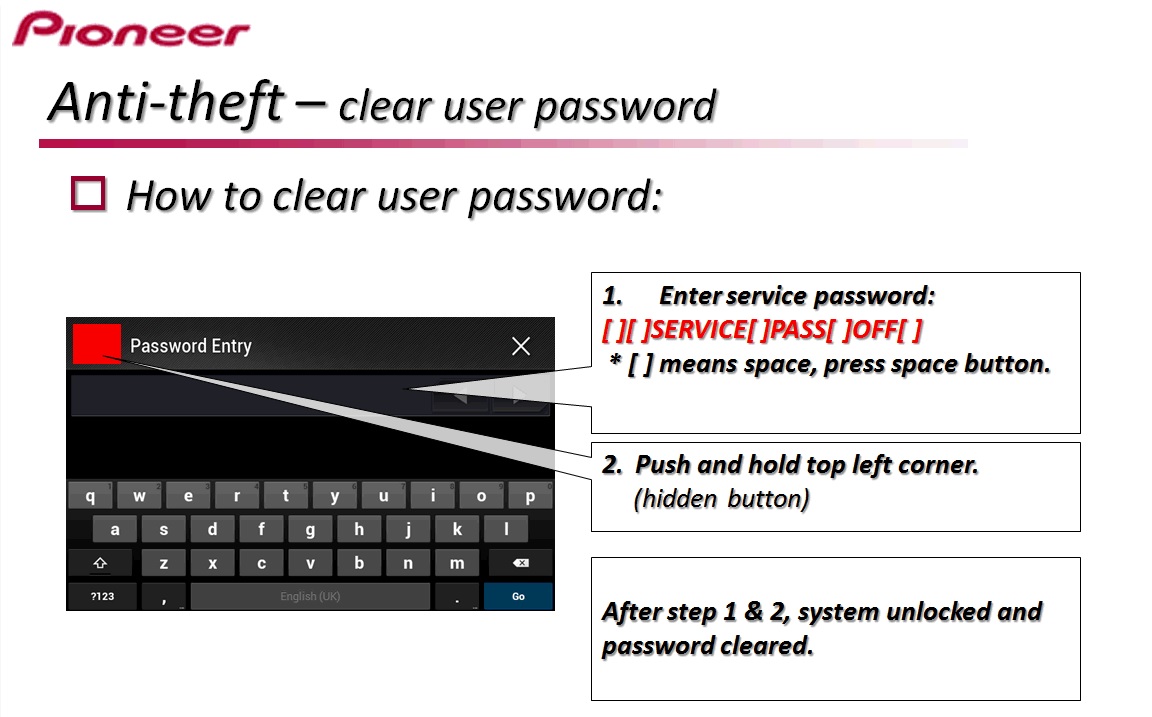
It won't work on a NEX unit. Totally different systems. Try this method:
On 5/6/2020 at 7:39 AM, RonS said:It won't work on a NEX unit. Totally different systems. Try this method:
I had tried that previously but it did not work. So I got desperate and purchased a solution off of ebay and it was the exact same thing. But I tried it again. Pushing and holding the top left corner did nothing but I tried pressing about an inch to the right and it worked.
On 1/31/2019 at 3:38 PM, BlakeStone said:Wow! Nice share!
Thank You, by far the easiest since the screen is staring at right at you. Must remember all the space commands or I assume this is linux based. At first I left off the final space command and it didn't work
On 1/28/2019 at 8:00 PM, Ytumer said:As a follow-up; I had contacted Pioneer about my password issue and was waiting on a reply when I came across this thread. I thought I'd try the script instead of waiting for a reply, which worked perfectly for me.
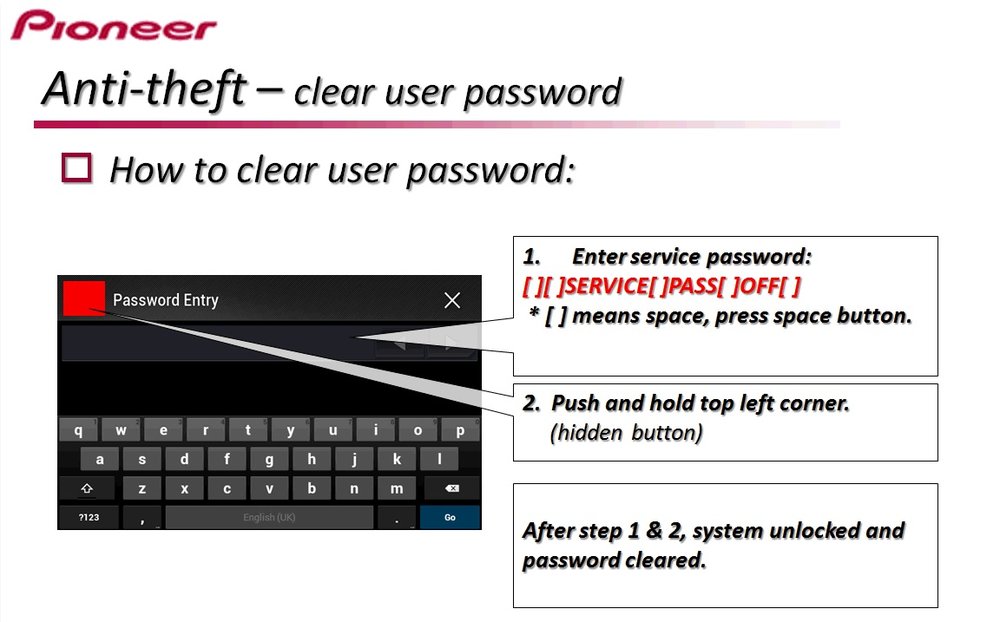
Turns out the Pioneer tech support team is extremely helpful. They sent through these instructions for me to clear my password. I haven't personally tried it as I had already run the script in this thread. If the script isn't working for anyone and you'd like to try an official alternative method to reset the password (not remove the prompt completely as this script does) please see the attached picture with instructions.
I'm not sure which models this will work for as the reply to my email was specific to my AVIC F840BT. I'm sure other models with a similar password prompt will likely have the same procedure.
I didn't think posting this would be more of an issue for theft than this script already is. Either method is easy and does the same thing so...
Worked like a charm! Thanks!
AVH-4400NEX
Worked like a charm, no formatting no hunting for flash drives. I don't know if it works on all models but I suppose all the AVH Models.
On 9/20/2017 at 11:17 AM, RonS said:A simple way to permanently delete your unit's security password. No Condi Hackmode or TestMode needed.
thank you. it worked
Thanks, a great script and this worked super
Thank you so much!!!
Quote
Hello I replaced the battery in my girlfriend's car and the radio is in safety mode. This is an Avid X930 BT year 2011 I tried with the password removal scrip.zip on the micro SD card but the radio does not recognize the card? Does anyone have an idea to unlock the radio? Thank you
14 hours ago, stephane sauve said:
Hello I replaced the battery in my girlfriend's car and the radio is in safety mode. This is an Avid X930 BT year 2011 I tried with the password removal scrip.zip on the micro SD card but the radio does not recognize the card? Does anyone have an idea to unlock the radio? Thank you
Use a smaller SD (try 4 or 8 GB) and format it on a PC. I can't think of any other possible issues - assuming you correctly followed the instructions in post #1. BTW, you don't put the zip file on the SD. You un-zip it and put the extracted files on it.
Merci beaucoup ca fonctionné vraiment cool

Hi, I can't remove the password on my radio with this script, such a message pops up, the radio is avic f840bt, please help

18 hours ago, skora20 said:Hi, I can't remove the password on my radio with this script, such a message pops up, the radio is avic f840bt, please help
The script first make a copy of the password file on your SD. For some reason, it can not write to the SD. I have not tried this script on an F840. Maybe the SD device name is different. Or it is read only.
You can get around this by editing (on a PC) the script (ScriptExec.ini) and deleting the line that says "COPY USER\SYSTEM\SECURITY\PASSWORD.DAT SD\PASSWORD.DAT"
This is not needed, just a way of restoring the password if you change your mind.
I can't download de script zip file, is there any other way to get it?
2 hours ago, Calula said:I can't download de script zip file, is there any other way to get it? And why you expect it would work if the file was somewhere else?
No, there is not. Why can't you download the file?
The file has been removed. Would you please repost it.
23 hours ago, Jayb said:The file has been removed. Would you please repost it.
The link in the original post works fine.
Hey @RonS, thanks a lot for this. Tried it this morning and it works.
I placed a new battery in my car and since then it was asking for the PW which i couldnt find anywhere.
With this script it removed the password prompt and i dont need to put in any PW anymore.
But i have a question for you now;
1. Is the password deleted really PERMANENTLY from the device itself or will it ask me again for a PW when i would disconnect the battery/get a new battery in the future. Or if i decide to sell the unit, is there any chance the unit would ask the new owner for the PW?
2. How do I put in a custom PW on the device if i would like to do that now?
I have a F930BT.
Thanks in advance and for your effort 
1 hour ago, f700bt-013 said:1. Is the password deleted really PERMANENTLY from the device itself or will it ask me again for a PW when i would disconnect the battery/get a new battery in the future. Or if i decide to sell the unit, is there any chance the unit would ask the new owner for the PW?
2. How do I put in a custom PW on the device if i would like to do that now?
I have a F930BT.
1. It should be permanent or until a new password is set
2. I don't know, I've never done it. It's in the user manual. If you don't have one search for one and download a copy.
But I can not think of a good reason to ever set one. A year from now if your battery dies, are you going to remember it? It isn't a theft deterrent. A thief will still smash your window and destroy your dashboard removing the radio. He won't know it has a password. But if he searches online he'll find the instructions here to remove it.
I see, thanks for the quick reply.
I am planning to upgrade with an android device and I want to sell my F930BT i own now, so i will put a password i think for the new owner so if the unit does ask for a PW in the future at least the new owner has one to unlock it with :).
But you helped a lot of people out including me so thanks a lot for that!
6 hours ago, f700bt-013 said:I want to sell my F930BT i own now, so i will put a password i think for the new owner so if the unit does ask for a PW in the future at least the new owner has one to unlock it with :).
New units do not come with a security password set. So you really are not doing the new owner a favor. In fact, he will probably be cursing you once he needs it and doesn't remember it. So unless you are selling it to your ex-wife, I'd say don't do it.
Okay, I was just affraid that maybe one day the original PW would pop back up for the new owner, that was my main reason. But I will put my faith in the "permanent-part" and sell it without a PW.
Just wondering why the script is removed.. It would have been handy. I guess I'll just buy a new head unit. 
56 minutes ago, dude9887 said:Just wondering why the script is removed.. It would have been handy. I guess I'll just buy a new head unit.
And I'm an idiot. its there just need an acct to get it. doh! worked well. I modified not to remove the password.dat but just to copy and that works. but the file is binary. so not really useful. I put the OG code in and it works good. I'm making a copy on a smaller (older) sd and keeping it with the car manual in the glove box. How you figured out that what this script was... I gather you like to tinker.. Well done.