Search Archive
📌 Pinned

Security Password Removal Script for Z110/120/130/140, x920/930/940 & similar F series

By RonS · Sep 20, 2017in Hacks/Mods💬 176 posts👁️ 99,648 views
Page 6 of 8
Posted Mar 06, 2021 · 22:46 UTC#126


On 3/6/2021 at 1:37 PM, dude9887 said:

Just wondering why the script is removed.

On 3/6/2021 at 2:38 PM, dude9887 said:

And I'm an idiot. its there just need an acct to get it. doh!

Don't beat yourself up. If you hadn't opened an account to post, you'd never have figured it out. 

Edited Mar 23, 2021 by RonS
Posted Mar 15, 2021 · 01:16 UTC#127

Hi Ron, I got a F940BT from a friend. You are so right. Do not put a password in your radio. I could not unlock this radio. After trying a few numbers the radio locked up. Well with your unlock password file I am able to use this radio. I bet Pioneer is not happy with you. Thank you.  If I had your bank acc. details I could pay for this information.

Posted Mar 23, 2021 · 12:22 UTC#128

A massive thank you from the UK.  After buying a used car with no paperwork on the PIONEER AVIC 930BT that's been installed and 24 hrs of heartache, what I thought was going to cost $$$ - I came across this thread and had it working within minutes.

THANK YOU MILLIONS :)

Posted Mar 27, 2021 · 08:06 UTC#129

Hi guys,

I tried with the script provided by Rons, but the result is in attach (fails). I also tried to remove the copy command but it fails again. Do you have any suggestions?


b05e3b11-5f83-4e77-8960-11c14ae2dc8f.jpeg

e5870fee-7e56-4155-83b4-5e33f53ee414.jpeg

Posted Mar 28, 2021 · 20:04 UTC#130

Assuming you posted the screen shots in chronological order:

The first time it failed on the REMOVE command, which deletes the file USER\SYSTEM\SECURITY\PASSWORD.DAT after copying it to the SD.  The only way I can see that happening is if the file didn't exist.

Then you say you deleted the line that COPY line that copies the file to SD?

Then,  second pic shows the error on the COPY command. Maybe the file no longer exists, since the file never existed.

So, why where you running the script?

Posted Mar 29, 2021 · 08:54 UTC#131

Thanks Rons, you are right: the screen shots are in wong order.

When I inserted the SD for the first time, I get the received the error copy message; then I removed the line with the copy command and the output was the other screen shot.

I am trying to remove the password file because, as I writed in another post, I am not able to change the settings of the device and I think this happened because the previous owner of the car entered the wrong password more than three times and, from what I seem to understand, when this happens the system goes in anti-theft block.

I would like to avoid spending a lot of money to take the unit apart and send it to Pioneer support ...

Under you can find the other post.


Posted Mar 30, 2021 · 00:48 UTC#132

I saw your other post after I replied to this.  I don't know anything about the F840BT. But I know that the Z-110BT also has that lock "feature". From the Service Manual:

Quote

If you enter an incorrect password three times, the screen is locked and operations using touch panel keys are disabled.

There's nothing in the service manual on how to recover from this. So you may have to send it to Pioneer to fix. However, if it was me, I'd try manually going into testmode and seeing if there is any file in the USER\SYSTEM\SECURITY directory. However, it is possible that you might not be able to do anything interactively if the hard keys are also locked.

To get into Testmode,  download SuperTestMode.ZIP and unzip it.

Put the testmode.key file on a SD, put that in the head unit and it should boot to testmode. If it doesn't, restart your headunit. Note: do not use the Testmode.key file included with my Security Password Removal - that one only runs a script. This "super" testmode key runs in interactive mode.

It is a horrible user interface, but Go into File Maintenance. Then navigate to USER\SYSTEM\SECURITY and see it anything it there.  If there is some file, it might be a "lock". So delete it. 

Edited Mar 30, 2021 by RonS
Posted Mar 31, 2021 · 17:30 UTC#133

Hi RonS,

thanks for your quick reply. I followed your suggest, but in USER\SYSTEM\SECURITY there is no file...tesmode.thumb.jpeg.49b2bd169b18f1f3a99e89b8f7d99d01.jpeg

Posted Apr 01, 2021 · 01:29 UTC#134

Worked Like a charm, thanks very much. Subaru owner sold the car and forgot her code.  Just sign up for avic411 (free) and you can download the two small files.

Posted Apr 23, 2021 · 14:16 UTC#136

is there someone who can give me a working link to this program?

Posted Apr 24, 2021 · 02:11 UTC#137
11 hours ago, drevlin said:

is there someone who can give me a working link to this program?

Nothing wrong with the link. You must be a registered user. Since you now are registered, try again.

Posted May 01, 2021 · 02:42 UTC#138
On 2/26/2019 at 5:19 PM, RonS said:

It should work. Easy (and safe) to find out. 

No, these instructions didn't work on X9310BT. 

Posted May 01, 2021 · 10:09 UTC#139

Merci !

Le script a parfaitement fonctionné sur mon AVIC-F930BT.

Posted May 01, 2021 · 12:21 UTC#140
9 hours ago, ips said:

No, these instructions didn't work on X9310BT. 

What, if anything, did it do? Did you get any errors?

Posted May 31, 2021 · 21:10 UTC#141

No, did not get any errors at all. 

Posted Jul 02, 2021 · 09:55 UTC#142

Ok, maybe a little bit outdated that im still using a avic, but they switched recently my battery, and had the same password issue. 
Many kudos for you, the script still works fine. 
Even in 2021 :)


Posted Jul 16, 2021 · 07:22 UTC#143
On 1/29/2019 at 2:00 AM, Ytumer said:

As a follow-up; I had contacted Pioneer about my password issue and was waiting on a reply when I came across this thread. I thought I'd try the script instead of waiting for a reply, which worked perfectly for me.

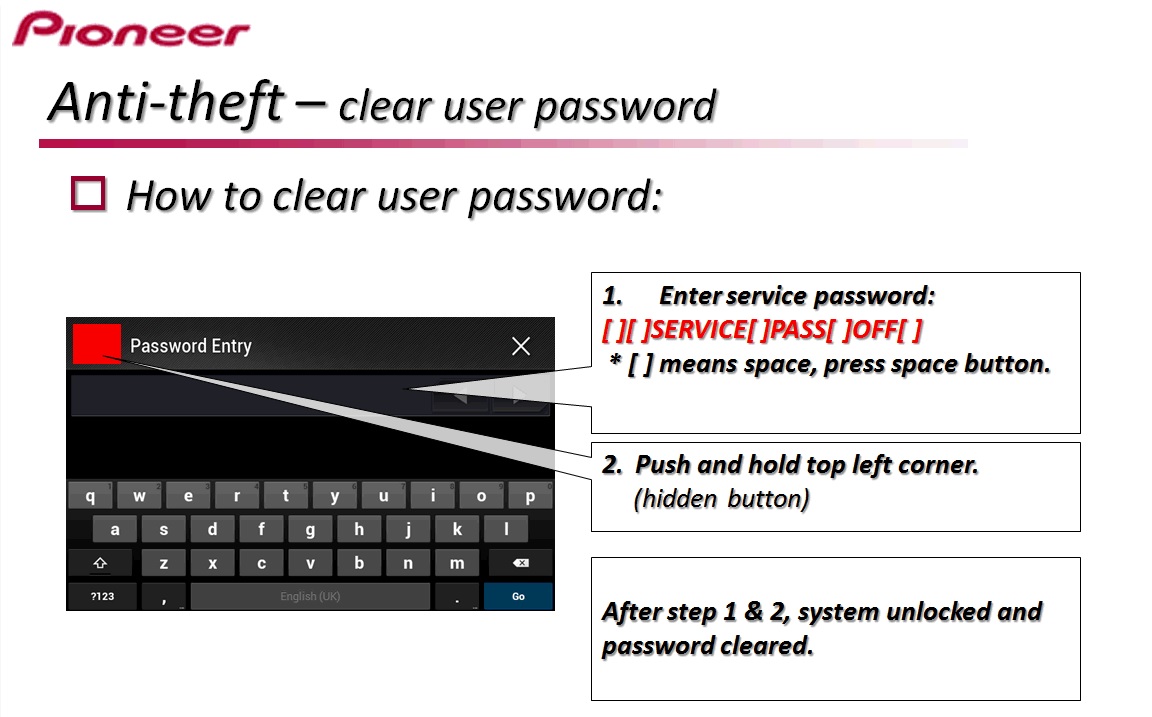
Turns out the Pioneer tech support team is extremely helpful. They sent through these instructions for me to clear my password. I haven't personally tried it as I had already run the script in this thread. If the script isn't working for anyone and you'd like to try an official alternative method to reset the password (not remove the prompt completely as this script does) please see the attached picture with instructions.

I'm not sure which models this will work for as the reply to my email was specific to my AVIC F840BT. I'm sure other models with a similar password prompt will likely have the same procedure.

I didn't think posting this would be more of an issue for theft than this script already is. Either method is easy and does the same thing so...


password.jpg

Wow. Worked for AVIC-F930BT

Posted Jul 25, 2021 · 15:34 UTC#144

ty

Posted Aug 19, 2021 · 16:52 UTC#145

How are you? I just installed this radio in my vehicle and now it’s asking for a password. I was wondering if you have an updated script or if you can re-post the script zip file because it’s taken down on the old thread. It would be very much appreciated 

Posted Aug 19, 2021 · 19:41 UTC#146
2 hours ago, Hunterbres said:

you can re-post the script zip file because it’s taken down on the old thread.

The download works fine. You must be a member to download any files hosted by avic411. Since you've now joined, try again.

Posted Sep 15, 2021 · 06:19 UTC#147

superr just done my f940bt  your files are great and simple  keep up the good:-D

Posted Sep 19, 2021 · 13:25 UTC#148

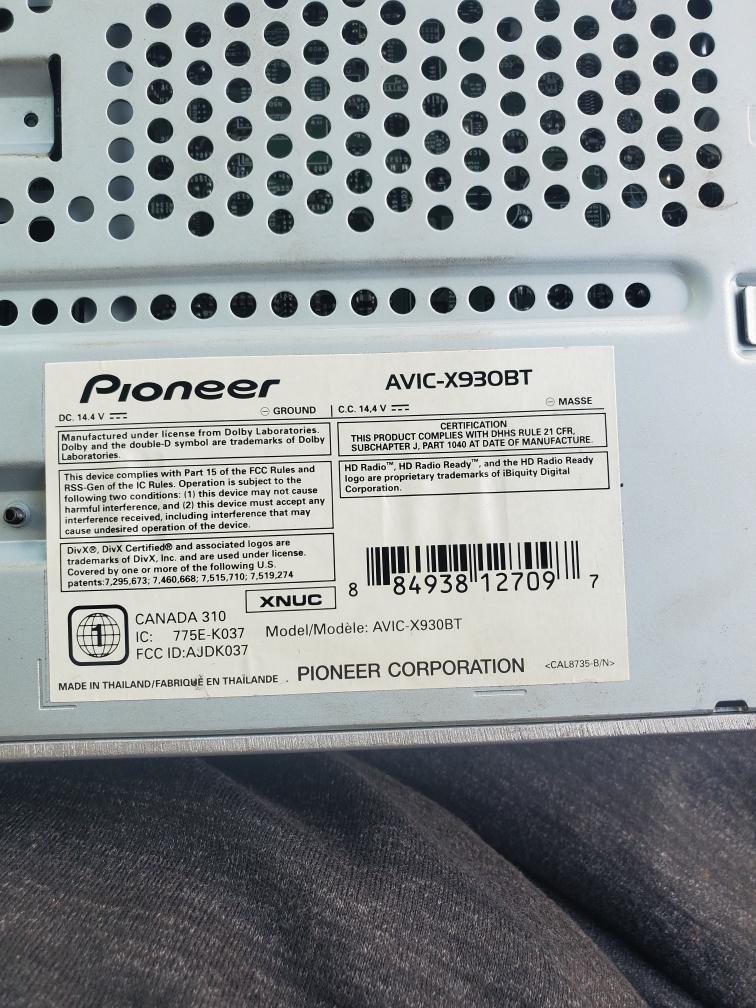
I have a prionner x930BT i forget the password was need help 9515032309

Resized_20210910_173052.jpg

Resized_20210910_173130_19142249803946.jpg

Posted Sep 19, 2021 · 16:57 UTC#149
22 hours ago, 12Chrismike said:

I have a prionner x930BT i forget the password was need help

I am not sure what you are trying to say. This thread has all the help you should need. You should ask a specific question if you don't understand something about the process.

Edited Sep 20, 2021 by RonS
Posted Nov 30, 2021 · 20:15 UTC#150

Thanks Ron, I had the battery replaced, and the password screen came up .

Thanks for your post and files, I was able to reset the Pioneer 930BT.

Many thanks !!!!

Page 6 of 8