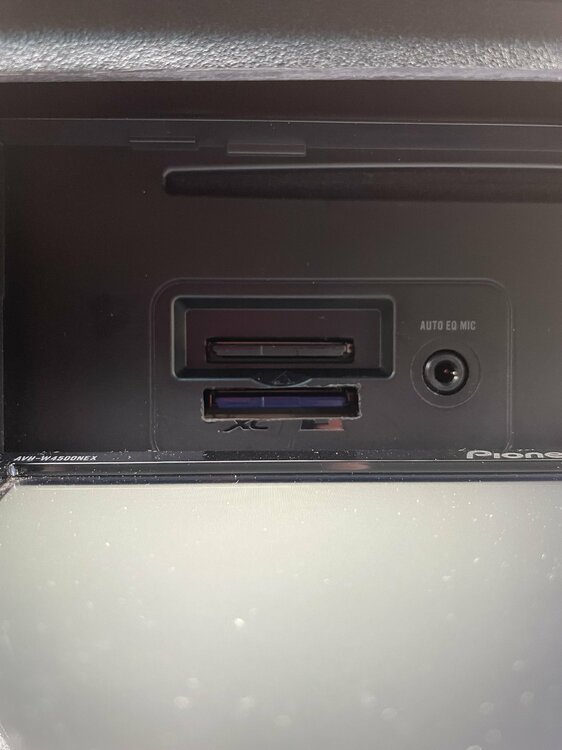
Hello everyone,
Has anyone found an image to use on Pioneer AVH-Z9200DAB? Is still AVIC4500only the best option without going to ebay/pacparts?
Many thanks.
Hello everyone,
Has anyone found an image to use on Pioneer AVH-Z9200DAB? Is still AVIC4500only the best option without going to ebay/pacparts?
Many thanks.
On 5/5/2022 at 7:20 PM, MN_RSTi said:I created an account on this site just to say thank you to all contributors in this thread. I was surprised to find out how common this issue is and just how simple the solution turned out to be. Got my W4400 back up and running!
Thanks again - cheers!
MN
I second that. Thank you!
FYI...I just used the back side of a butter knife to get the faceplate off. I have the body tools, but they were too tight on the dash kit for my odyssey.
I also have an issue with my w4400nex. I followed the guide here and got a new SD card flashed and installed. It seems to work well (it boots), but once its booted it will not play music the radio tuner does not detect any stations.
I can see that its playing music via bluetooth but hear no sound. I can hear menu clicks and google assistant works, but music will not play.
Img file used: https://mega.nz/file/SdJCgKCJ#13zrFlogMCWNohCvuFsDFcC1uniHgufVZJxZlQPHUag
Any suggestions?
This thread has a ton of helpful info in it. I tried this fix and it seemed to work OK when I re-installed the HU. However, I didn't test out pairing or android auto with it. Something seems to be wrong with the FW image. But I don't know what that could be. Here are my symptoms:
Is there a way of ripping the image from the old SD card and writing that to a new one? Is there a 1.01 FW version that I can install so that I can install the official 1.02 FW from Pioneer?
I've tried deleting my phone from the BT connection and re-pairing it several times. None of those times worked with Android Auto. They do pair with the unit. But the smart phone features don't really work.
Thank you to everyone contributing to this page. I thought I'd share my experience. Like Kyleboedeker on page 1 my android auto wouldn't work after I changed my sd card. I wasn't convinced v1.02 was the issue though as mine was working with v1.02 before. I have a galaxy s21 with android 13. Something was preventing android auto from working though. So I downloaded v1.00 from kyle put in in my pioneer and i had the same problem. Android auto still wouldn't work. I didn't have the v1.01 upgrade that kyle has so i just went to pioneers website and got the v1.02 upgrade. I upgraded the radio with pioneers file and now everything is working the way its supposed to and i have the latest firmware v1.02 so for people looking for a fix i hope this helps you.
On 11/27/2023 at 10:11 PM, Kotkoj said:Thank you to everyone contributing to this page. I thought I'd share my experience. Like Kyleboedeker on page 1 my android auto wouldn't work after I changed my sd card. I wasn't convinced v1.02 was the issue though as mine was working with v1.02 before. I have a galaxy s21 with android 13. Something was preventing android auto from working though. So I downloaded v1.00 from kyle put in in my pioneer and i had the same problem. Android auto still wouldn't work. I didn't have the v1.01 upgrade that kyle has so i just went to pioneers website and got the v1.02 upgrade. I upgraded the radio with pioneers file and now everything is working the way its supposed to and i have the latest firmware v1.02 so for people looking for a fix i hope this helps you.
I had this exact issue. Used the v1.02 from the original poster, and fixed my bootloop restoring function to my device. Woo! But, Android Auto would not work. I tried the 1.0 file from Kyleboedeker, still AndroidAuto wouldnt work. I then updated to v1.2 from pioneers website using the units update firmware feature, and now everything works 100% It autoboots Android Auto instantly, everything is gravy. Thanks Kotkoj, this worked a charm.
For reference, I have a pixel4A on Android 13. Also I don't think this matters but I updated from v1.0->v1.2 (Kyleboedeker file->pioneerofficialv1.)
This is a great thread and this solution works! Like several others, I joined this site to thank those who have encountered issues upgrading their AVH-W4400NEX firmware and found solutions to get it working again. I used the methods in this thread to successfully get my system working after my earlier attempt at using firmware 1.02 failed. I’d been using firmware 1.01 with a Samsung Note 9 for some time and it worked fine. I recently upgraded to an S23 noticed Android Auto didn’t reliably start, so I just connected via USB-C cable so I could listen to music. I checked Pioneer’s site and noticed a new 1.02 version, which I downloaded and attempted to install, but failed at 67%. So I searched and found there was some issue with formatting of some files in the firmware. So I used a Linux VM to download and extract the 1.02 firmware from Pioneer and copied it on my Win10 laptop to the SD disk. I was then able to successfully install that new firmware on the system, but Bluetooth / Android Auto wouldn’t auto connect. So dug further and found this thread (whew!) which had/has the solution! MANY, MANY thanks to those who took time to provide solutions, tips and tricks!
Here’s what I did…
1. 1. Followed HondaR’s instructions to download the AVIC.zip file which contains the system AVIC.img file structure and firmware 1.02. Used WinDiskImager to write the image to a Transcend 16GB (class 10) SD card formatted as FAT32. Note after writing the image to the SD card you can’t easily view the content as it appears to my Win10 system as multiple disks/volume. Just eject/remove it and use it as it is ready to go.
System image downlowd... https://mega.nz/file/SdJCgKCJ#13zrFlogMCWNohCvuFsDFcC1uniHgufVZJxZlQPHUag
Win32 Disk Image download... https://sourceforge.net/projects/win32diskimager/
2 2. Replace the internal SD card – I chose the quick method to cut a slot to access the internal card. See Datsun’s post at the bottom of page 2. I did not disconnect the battery, but just ejected the face plate to expose the surface with the SD slot and below where the internal SD slot is hidden. I taped off the area below and around the area with blue tape and the connectors for the face plate. Used my Dremel tool with a burr bit to cut a slot in the plastic to reveal the internal SD slot. Also used a small shop vac to catch the plastic bits. The bit I used seem to grind/melt the plastic instead of cutting it. Perhaps there is a better bit to use? Regardless, I went slow, making shallow passes so as not to hit the SD card or the ribbon cable below it. Be careful if you use this approach as the SD card and ribbon cable are just behind the plastic cover.
http://avic411.com/uploads/monthly_2021_11/4908D71D-67C7-4318-8E10-773CC5880836.thumb.jpeg.d06d55a06084540188c8db5d19f46dc6.jpeg
3. Inserted the SD card (from step 1) with new system image and 1.02 firmware, reattach the face plate and start the car to power on the 4400NEX unit. This was mostly successful. The system powered on successfully and I was prompted to enter a new system password. Once done I added a Bluetooth connection to my phone, but Android Auto wouldn’t start. So I did a system reset, deleted the connection from my phone. I then connected via the USB-C cable and powered on the unit. I established both Wi-Fi and Bluetooth connections. Then I disconnected the cable and Android Auto started working. I turned the car off/on multiple times and confirmed Android Auto automatically started each time and music started playing! Yeah! 
As others have noted, the system seems much faster with the new SD card, which is an added bonus!
Thanks again to everyone who contributed!
I had the same issue, I though my 4400 fried out so i bought another used one on Ebay. Few months later i ran into the bootloop issue and was contemplating of buying a Sony HU instead. Today December 13 2023 i ran into this forum by HondaR, Followed the instruction and my unit is back online. Thank you so much HondaR for this help. Just follow the instructions and you will have your system back on.
https://mega.nz/file/SdJCgKCJ#13zrFlogMCWNohCvuFsDFcC1uniHgufVZJxZlQPHUag
https://sourceforge.net/projects/win32diskimager/
So this is interesting - my Pioneer AVH-W4400NEX developed the boot loop issue. I decided to send it for repair because I worried there may be other issues and wasn't sure I could do the teardown properly. It came back repaired ($85 for the SD card loaded with FW from Pioneer, $145 labor), and I now am running V1.07 of the FW. (V1.02 is the one you can download from their site). It has a much longer list of Apps under Android Auto, and seems to have a few other improvements. I called to ask about it (as I have a 2nd AVH-W4400NEX that would be nice to update) and Pioneer admitted it existed, but said you can only get it through a service center (although I suspect that if you order the SD card direct from Pac Parts you could get it that way). They were cagey about it but I think they've continued to do bug fixes and figure that if someone trips on a bug they will get it fixed through an SD card replacement via the service center. Too bad it's not available for general download. Or on a card that costs less than $85. ...
Work in The avh-z9180tv ?
On 3/12/2023 at 1:50 AM, LHS said:Thanks, I got my AVH-Z9100DAB back alive with the AVIC.img, however now I’m not able to access FM and DAB audio sources. Any suggestions for that issue, is there a better matching image somewhere or what can I do?
/Thanks
Were you able to solve it? I have the same problem as you!
Hello,
I had the boot loop glitch issue and followed the instructions below using my own SD, but I actually used a dremel tool to access the factory SD card because the way my pioneer was mounted in the car. When it rebooted it totally fixed the bootloop issue… But now the touch screen won’t work. I did find a small plastic bit stuck in the pins which i pried out with a safety pin and used duster all over to clear anything else. at this point i have pulled it out and clicked it back in at least 10 times. Anyone have had this problem or any ideas? Thanks!
I did not have this issue when I did mine.
Is it possible to try another touch screen from a friend to see if it reacts the same ?
I have a working W4500NEX SDcard. How can we go about test booting the W4500NEX unit to make a good a backup copy that can be applied to a higher quality SD card?
On 13/04/2022 at 21:09, crapshoot said:Primeiramente, muito obrigado por esse tópico! Me salvou de ter um peso de papel de US$ 800. Meu 4400nex apresentou a tela "entre em contato com o software pioneiro"
Eu tirei a frente e coloquei um novo cartão SD com o firmware 1.02. Tudo funciona muito bem, exceto por um problema. Eu tenho que arrastar manualmente o painel frontal parcialmente aberto para que ele funcione. Se estiver fechado ele mostra a tela mostrando como retirar o painel frontal, e se eu apertar o botão de ejetar ele quebra um pouco e depois me mostra uma foto de um CD sendo inserido. Se eu agarrá-lo e abri-lo manualmente um pouco mais, ele funcionará normalmente.
Não tenho certeza se de alguma forma eu estraguei um sensor ao abri-lo para dremel pela frente ou se é um problema com o firmware não estar correto. Tenho pesquisado por todo o lado e nunca vi ninguém com esse problema antes, alguma sugestão?
Além disso, eu queria informar que tenho o Android Auto em um pixel 3 com o Android versão 12, e tudo além desse problema funciona bem (vi um monte de postagens sobre o Android 11 que não funciona com o firmware 1.02, então aparentemente foi corrigido no 12)
Saúde!
I have the same problem with my engine. I also think I messed up by forcing it. Did you find any solution?
Did the file from the first post but then the radio goes into the firmware failure screen and I did everything right but can't write a different file or anything. It's the 4400nex
simply amazing!! my trusty 4400nex went into a boot loop back in November, I didn't think there was any hope for it, so I bought a new Pioneer unit, and they are total garbage! I figured I'd revisit the 4400 just tonight and did a search and found this thread. the old girl is alive and kicking again!!!! thanks for this awesome thread guys!
Hi does anyone have the firmware for the AVH- Z9250BT?
I had enough spending time and money trying to fix my expensive Pioneer AVH-Z9250BT and what supposed to be top quality brand.
I would not buy Pioneer again.
I moved away to a Chinese Android head unit and I'm very happy so far.
Here are images for AVH-Z9250BT:
https://mega.nz/folder/VdojTTDQ#GP8GTdIxvKu8H0bTRH-4GQ
Please let me know if you have any luck with this.
Questo ripristino funziona anche per Pioneer AVHZ9100?
On 9/28/2024 at 10:58 PM, AVIC Dog said:I had enough spending time and money trying to fix my expensive Pioneer AVH-Z9250BT and what supposed to be top quality brand.
I would not buy Pioneer again.
I moved away to a Chinese Android head unit and I'm very happy so far.
Here are images for AVH-Z9250BT:
https://mega.nz/folder/VdojTTDQ#GP8GTdIxvKu8H0bTRH-4GQ
Please let me know if you have any luck with this.
this link