Search Archive

How to fix for AVH-W4400NEX boot loop

By HondaR · Feb 04, 2021in NEX Series💬 121 posts👁️ 73,791 views
Page 1 of 5
Posted Feb 04, 2021 · 15:52 UTC#1

Hi guys

Had this problem today, and thankfully this forum exists so manage to rummage through the pages and then put a fix together.  Thought I'd save future people some hassle and just put in one thread (I dont take credit for the IMG, it was found in the IMG thread but here goes)

This will repair the boot loop loading screen.

First off, you'll need a replacement SD card, the one I used was still stuck in the headunit as I used to use it for firmware updates and had a few tracks on.  The image file is just over 8gig but I used a 64gb one because it was what I had.  I'm sure a 16gb would work fine.  This was formatted to ex-fat.

Here is a link for the IMG file download (credit to Jamesl75 who posted it on the other thread)

https://mega.nz/file/SdJCgKCJ#13zrFlogMCWNohCvuFsDFcC1uniHgufVZJxZlQPHUag

Once you've downloaded that file, unrar it and save it on your desktop.

Next download win32 disk image https://sourceforge.net/projects/win32diskimager/

Open win32 diskimage, open the img file from your desktop then select the SD card drive... lets it do its thing for 4-5 minutes.  Note the finished SD card was unreadable on my laptop... at first I thought this was a problem, but turns it it worked perfectly fine.

Next involves the stripping down of your headunit to get to the memory card.  I used this youtube video below.  Did everything except disconnect the last ribbon connecting the metal face backing to the unit... managed to angle the black plastic backing to give me just enough space to get the old card out and the new one in.

https://www.youtube.com/watch?v=2cHp6jxD5R8

Then fit back into your car and it should work!! It did for me, and literally took me all of 20 minutes of get done and enjoy your working headunit again
 

Posted Feb 24, 2021 · 20:45 UTC#2

I had the exact same issue recently, and used this same image written to a 32gb MicroSD in an adapter with no issues. I was able to manipulate the front bezel after removing just two screws (and not the mechanical slide on the bottom) to eject the OE SD card and tightly insert the replacement, done in 5minutes. Just in case that link goes down, here are the known AVH/SPH images as a backup: http://sixgov.com/filestorage/forums/avic411/

Posted Mar 23, 2021 · 19:59 UTC#3

hi, i just tried a the download on two images, I have an AVH-W4400NEX, and it appears to work fine, but no audio can be heard, just visual progress of songs with any source.  Also noticed that the HD radio is not showing any stations or ability to tune to one, so do you think i may have an image issue.  I am using Balena Etcher to burn the image and it goes well.  puzzled, any suggestions?

Posted Mar 24, 2021 · 03:25 UTC#4
7 hours ago, Eli C. said:

hi, i just tried a the download on two images, I have an AVH-W4400NEX, and it appears to work fine, but no audio can be heard, just visual progress of songs with any source.  Also noticed that the HD radio is not showing any stations or ability to tune to one, so do you think i may have an image issue.  I am using Balena Etcher to burn the image and it goes well.  puzzled, any suggestions?

is it possible to download the files from pioneers and burn it to a SDHC?  or is it some sort of weird file structure?


Posted Apr 13, 2021 · 14:57 UTC#5
On 2/24/2021 at 2:45 PM, industrial6 said:

I had the exact same issue recently, and used this same image written to a 32gb MicroSD in an adapter with no issues. I was able to manipulate the front bezel after removing just two screws (and not the mechanical slide on the bottom) to eject the OE SD card and tightly insert the replacement, done in 5minutes. Just in case that link goes down, here are the known AVH/SPH images as a backup: http://sixgov.com/filestorage/forums/avic411/

Do you know which firmware this includes? I downloaded the other one and got my HU back up and running, but I cant get wireless android auto to work. The only thing that's different from what I had before is that the firmware in that img is 1.02. It worked flawlessly for me at 1.01, so I'm hoping to find a new disk img that has 1.01 instead as you can't downgrade these units through the software.

Posted May 03, 2021 · 23:39 UTC#6
On 4/13/2021 at 10:57 AM, Kyleboedeker said:

Do you know which firmware this includes? I downloaded the other one and got my HU back up and running, but I cant get wireless android auto to work. The only thing that's different from what I had before is that the firmware in that img is 1.02. It worked flawlessly for me at 1.01, so I'm hoping to find a new disk img that has 1.01 instead as you can't downgrade these units through the software.

It's the 1.02 - I have never seen a 1.01 OE image posted here. I'll rename it in that link for absolute clarity. If I ever spot it I'll put the 1.01 there too.

Posted May 14, 2021 · 00:32 UTC#7

Thank you for posting this HondaR. (And huge shoutout to JamesI75 for the image)

I'm the creator of the disassembly video you linked to.
(Sorry it's a little misguided. Had no idea what I was doing at the time)

I've since linked to your very straight-forward post multiple times but still get questions...
I made another (very quick) video for those still confused about the process:

Thank you for your write up, and giant thank you to the AVIC411 forum for the selfless work everyone's doing here.

All the best,

-Tim

Posted May 21, 2021 · 00:18 UTC#8

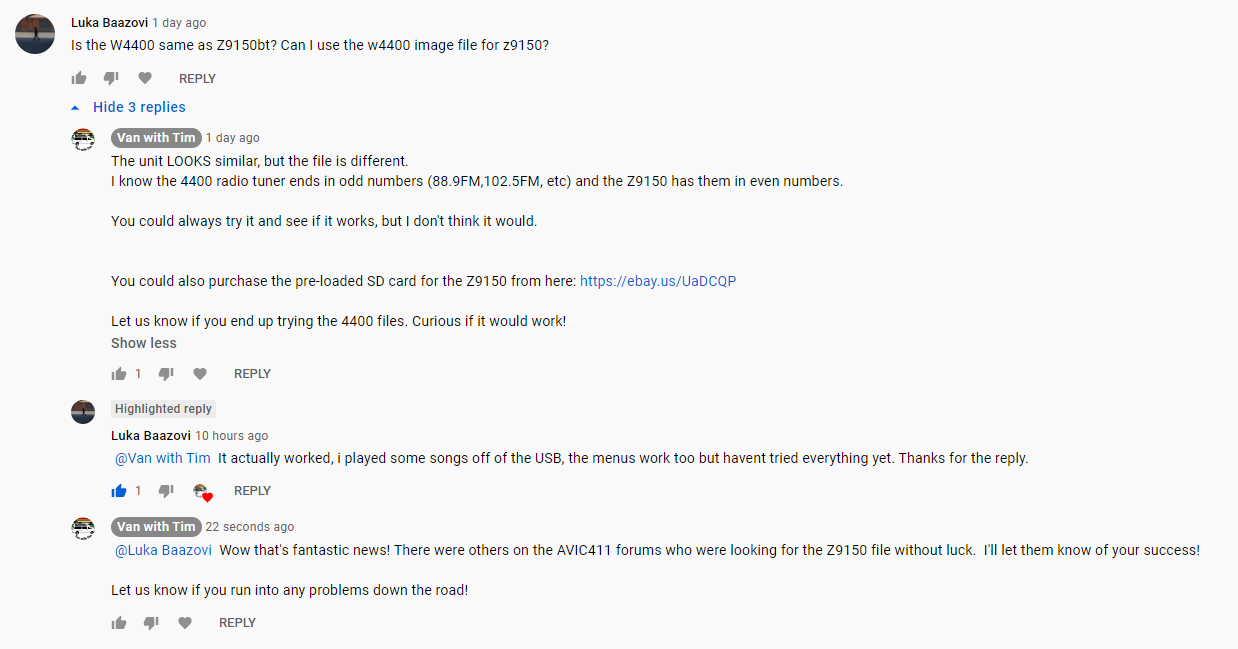
Not to hijack, but it looks like this file also works for the international W4400NEX (re-designated as the Z9150BT)

I haven't tried it firsthand but I received a report of success here:

image.thumb.png.4bfa2a5b3df8945793d6519bd6cc8758.png

Nice little breakthrough for the international markets!

-Tim

Posted May 21, 2021 · 20:30 UTC#9

i have an AVH-W4500NEX with this issue, will this image work for that radio as well?

Posted May 26, 2021 · 12:19 UTC#10


On 5/3/2021 at 6:39 PM, industrial6 said:

It's the 1.02 - I have never seen a 1.01 OE image posted here. I'll rename it in that link for absolute clarity. If I ever spot it I'll put the 1.01 there too.

I've managed to find and purchase an original factory image with firmware 1.0 from an ebay seller and I have the upgrade package to 1.01 to install with it. This downgrade completely fixed my issues with the 4400NEX. As soon as I get back to my other computer where I downloaded the disk image, I'll share it here along with the 1.01 upgrade so you can add it to your archive!

Posted May 27, 2021 · 16:22 UTC#11

For those having Android Auto wireless issues with firmware 1.02 on the Pioneer NEX4400, here is a link to the original internal firmware version 1.0. You'll need to write this to the internal SD card on the unit in order to downgrade it. In my personal case, I wrote this image to the card, then upgraded the firmware to 1.01 and it completely solved all of my android auto connection issues. There is some kind of issue with android 11 and firmware 1.02. So this was the solution. Here is the link: https://drive.google.com/file/d/1KeU0s_btd_DcOLONqcjjVtRTkXgPG2SQ/view?usp=sharing


Posted Jun 05, 2021 · 23:26 UTC#12

My 4500 crashed (like all the others) and i was able to get the AVIC software from OP to load on the radio however the touchscreen stopped working but all physical buttons work. never had an issue before, even replaced the ribbon cable incase I messed that up. so now I'm trying to reimage the SD card and/or try Kyle's. I've seen before that once you use an SD card for this it's toast but i was thinking there has to be a way to format it, Linus maybe?

Posted Jul 20, 2021 · 01:02 UTC#13
On 2/24/2021 at 1:45 PM, industrial6 said:

I had the exact same issue recently, and used this same image written to a 32gb MicroSD in an adapter with no issues. I was able to manipulate the front bezel after removing just two screws (and not the mechanical slide on the bottom) to eject the OE SD card and tightly insert the replacement, done in 5minutes. Just in case that link goes down, here are the known AVH/SPH images as a backup: http://sixgov.com/filestorage/forums/avic411/

I am interested in this. Can you provide detail on the screws and the way you 'manipulated' the bezel?

Posted Jul 20, 2021 · 19:53 UTC#14

Thank you for posting this HondaR!  Also thanks to JamesI75 for the posting image and thanks again to timcampbell092.

This helped me a lot.  Enough that I made an account just to say thank you.  

Edited Jul 20, 2021 by jodyandmichelle
Posted Jul 22, 2021 · 13:20 UTC#15

Note: This is still a working solution as of July 2021.

If you trust yourself with a Dremel and saw disc you can cut the front of the face around the SD slot detents. This will allow you to fully access the factory card slot.

Why go this route? In some later model fords the radio was a "custom" size and not a 1 or 2 din unit. When the 4400 went in, the dash had to be modified for the unit to fit and a "custom" bracket went in. well, it was the level of tight where you knew it wasn't going to come back out.... 

Once the screen detached, the mounting bracket swiveled out (with some solid manual assistance) and then the SD slot and 1/8" were visible, looking at other posts I knew were the ribbon cables were as well as the factor slot. I followed the detents in the plastic, pass # 2 opened a small hole where I could fit a dental style poker to pull the plastic back a little, mild pull pressure and keep cutting, top and sides clear, the bottom deeply scoured and then with some wiggling the bottom snapped off so that I did not cut the ribbon cable. 


I have a picture for reference here:

Pre-Finishing / Post testing

https://photos.app.goo.gl/DgizxRSXBHNjaffG6

Posted Aug 16, 2021 · 07:48 UTC#16

So.. I tried this solution for my AVH-Z9250BT. It worked but unfortunately the software is for the AVH-W4400NEX. It’s a temporary fix which makes the head unit work but I am unable to use wireless mirroring or the Android Auto. Is there anyone who has the “.img” file for the AVH-Z9250BT?


would really help.

Posted Aug 17, 2021 · 16:52 UTC#17

I was having the same problem as others have stated with a boot loop, or in my case, black screen a second or two after the initial splash NEX image. I tried everything listed in this forum to install a new SD card with firmware on it, but was continuing to get the black screen (tried 3 different SD cards and none worked). I finally fixed it and wanted to post the solution for others that have tried this fix and had no luck.

In addition to installing a new card with the firmware, I also had to install an SD card in the other slot that had the 1.02 update installed on it. This 2gb card was formatted in fat32 and the update found here was copied to the card, just follow these instructions.

I did not have to actually install the update, I just had to have the card with the update plugged in.

Posted Aug 24, 2021 · 13:07 UTC#18
On 8/16/2021 at 3:48 PM, F71 said:

So.. I tried this solution for my AVH-Z9250BT. It worked but unfortunately the software is for the AVH-W4400NEX. It’s a temporary fix which makes the head unit work but I am unable to use wireless mirroring or the Android Auto. Is there anyone who has the “.img” file for the AVH-Z9250BT?


would really help.

Someone is selling the SD card with firmware on Ebay for USD75.

https://www.ebay.com/itm/113964878938?hash=item1a88d60c5a:g:29EAAOSw6S5dy37C

Posted Sep 04, 2021 · 05:11 UTC#19
On 5/13/2021 at 8:32 PM, timcampbell092 said:

Thank you for posting this HondaR. (And huge shoutout to JamesI75 for the image)

I'm the creator of the disassembly video you linked to.
(Sorry it's a little misguided. Had no idea what I was doing at the time)

I've since linked to your very straight-forward post multiple times but still get questions...
I made another (very quick) video for those still confused about the process:

Thank you for your write up, and giant thank you to the AVIC411 forum for the selfless work everyone's doing here.

All the best,

-Tim

Does anyone know whether the image file for the 4400 will also work to solve the same boot loop problem on my 4200NEX ?

Posted Sep 17, 2021 · 05:03 UTC#20
On 8/17/2021 at 9:52 AM, apolllo704 said:

I was having the same problem as others have stated with a boot loop, or in my case, black screen a second or two after the initial splash NEX image. I tried everything listed in this forum to install a new SD card with firmware on it, but was continuing to get the black screen (tried 3 different SD cards and none worked). I finally fixed it and wanted to post the solution for others that have tried this fix and had no luck.

In addition to installing a new card with the firmware, I also had to install an SD card in the other slot that had the 1.02 update installed on it. This 2gb card was formatted in fat32 and the update found here was copied to the card, just follow these instructions.

I did not have to actually install the update, I just had to have the card with the update plugged in.

Hmm I just had the Software Error today... and i'm planning o do this. I wonder if I will need to replace BOTH SD cards like you. I had already updated the firmware to the latest just recently.. so maybe not?

Posted Sep 17, 2021 · 05:03 UTC#21

Hi a couple questions to experienced users / owners who have gone through this. I have the AVH W4400NEX and I believe this happened to my unit today.

1. I have only seen the "Software Error" screen a couple times today after trying to start it several times. Usually I just get a scrambled screen and a garbled image of my splash screen. Is that the same issue here?

2. What's the fastest speed SD card the head unit can benefit from? If i'm going to get a a new one should I just get the fastest I could get or will some not read by the head unit?

Thank you all.

Mike

Posted Sep 19, 2021 · 14:13 UTC#22
On 8/16/2021 at 3:48 PM, F71 said:

So.. I tried this solution for my AVH-Z9250BT. It worked but unfortunately the software is for the AVH-W4400NEX. It’s a temporary fix which makes the head unit work but I am unable to use wireless mirroring or the Android Auto. Is there anyone who has the “.img” file for the AVH-Z9250BT?


would really help.

Hi, I tried this solution on my AVH-Z9250BT, the touch screen is not working. Does yours work?

Thank you

Jo

Posted Sep 29, 2021 · 21:04 UTC#23

Hi all. New to the site as searched for the reason as to why my 1.5 year old AVH-W4500NEX s**t the bed—and it certainly looks like the SD card issue.  I noticed that my steering wheel controls started flaking and then the unit started going into a boot loop not long after. 

Since I have it installed in an older Prius, I have to rip the entire dash apart to get the unit out. I didn’t want to go the “Russian” route as some people mentioned touchscreen problems. So I went to Pioneer and gave them a piece of my mind. They felt so bad that they offered to replace both my radio and my car with a brand new Prius. 

Uh…yeah, they didn’t do that. They were very nice, but basically told me tough s**t—it’s out of warranty. But they did give me a link to their parts provider and this is the “factory” part for the SD card:

https://www.pacparts.com/part.cfm?part_no=QXX3352&mfg=Pioneer

So I ordered it and I got it about a week ago. Looking at it, it certainly looks like the same cheap POS brand that they used in the first place.  It’s more expensive than the Russian guy’s product, but I feel more comfortable knowing this is coming from Pioneer.  Now I just need a day when it’s not 100 degrees to rip my car apart and replace the card and test it. 

I think I will try to see how hard it will be to cut an access port, so if it fails again I won’t have to dismantle my car again. 

If anyone has any success stories on duplicating the image on this SD card, I’d really appreciate it. 

Edited Sep 30, 2021 by Bellboy
Posted Sep 29, 2021 · 21:04 UTC#24

Update 10/10/21:  I was able to rip the dash of my Prius apart this last weekend and pull out the unit and replace the SD card.


I found out the hard way that the 4500 is different than the 4400 when dismantling—the video posted here helped a lot though. I had to improvise a bit and I removed the ribbon cable from the DVD unit at the motherboard—it was easier than from the unit. Also, I wasn’t able to slide out the display mount easily, so I decided not to force it. 
 

Instead, I popped the clips of the surrounding plastic frame and the ribbon cable was connected to the board was too tight, so I removed that. That gave just enough room to replace the card without removing the display mount plate. My dream of taking a Dremel to that faceplate to make an opening above the (non-factory) SD card slot will have to wait. 
 

My steering controls are still jacked as I fear that it could be one of two things—my aftermarket Axxess ASWC-1 has crapped out, or there’s an issue with the wiring (or perhaps a fuse) that’s keeping it from working. 
 

Anyway, the unit is functional and now updated to firmware 1.04—up from my 1.00. The parking brake override still works and I did have to re-do it.  So I’m back to driving happy—I just have to forget that I had to pay Pioneer their blood money for the SD card that I should have been given for free. 
 

Hope this helps. 

Edited Oct 11, 2021 by Bellboy — Reason: Updated issue status
Posted Oct 06, 2021 · 04:11 UTC#25
On 3/23/2021 at 12:59 PM, Eli C. said:

hi, i just tried a the download on two images, I have an AVH-W4400NEX, and it appears to work fine, but no audio can be heard, just visual progress of songs with any source.  Also noticed that the HD radio is not showing any stations or ability to tune to one, so do you think i may have an image issue.  I am using Balena Etcher to burn the image and it goes well.  puzzled, any suggestions?

I'm having the exact same issue, tried burning SD cards with both Balena Etcher and Win32 Disk Imager. Interestingly I can hear Siri over CarPlay, so I know the speakers/amp are working. No other audio works and HD radio tuner broken.

Did you ever get yours sorted @EliC?

And thank you HondaR, Jamesl75, timcampbell092 for this thread and instructions helping people unbrick!

Page 1 of 5