Search Archive
📌 Pinned

AVIC - N1 bypass w/Hi-res board scans..

By ballerinstaller · Apr 29, 2006in Hacks/Mods💬 108 posts👁️ 88,682 views
Page 2 of 5
Posted Jun 16, 2006 · 18:46 UTC#26
It works with 50 and 60 discs.

It is the Head Unit not the brain. The brain for all Nx are interchangable.

After you take off the screen assembly and then take out the DVD, looking at the bottom right with the fans facing away from you. You will find a silver shield covering the area. Three screws and you can gently pry off the cover, it's held in with presure after the screws are removed.

Reference the FIRST BIG pictures.

DON'T ATTEMPT THIS MOD YOURSELF!!

This stuff is as small as PS2 mods if not smaller.
Posted Jun 21, 2006 · 17:47 UTC#27
I have mod on my AVIC-N1 (I send my unit to VA to some Pioneer dealer). I got navigation 1 day ago and disassemble it to see where is this mod. Most part of board what shown on your picture are covered with silicone (to restrict access). I clean up area what shown on your photo but didn’t find any trace of bypass work. I was afraid to remove rest of silicon to clean up board (it’s very hard to do this without damaging board).
Looks like bypass located somewhere else. Are you sure your bypass is working???
Posted Jun 23, 2006 · 14:51 UTC#28
I did this and it worked great. Unfortunately, somehow when I was inside my AVIC, I screwed up the angle montion of the unit. Now i have to move it upright manually and leave it that way.
Posted Jun 24, 2006 · 19:04 UTC#29
Alright, a couple of things about the corrected mod posted by Guest. Number one: IT WORKS. Number two: GET A MANUAL. I bought one for $3.99 off of ebay and had it delivered right to my email (PDF). Number three: you do not have to remove the screen. I left mine in the out position (but lowered) when I disconnected the power and removed the unit from the dash. The only thing you want to be sure of is to protect it well when working. Number four: use the right tools. The screws are made of very soft steel, and some of them are in very tight. The wrong size phillips will strip the screw and you'll be stuck. Last but not least: IF YOU HAVE NO IDEA WHAT YOU'RE ABOUT TO GET INTO, LEAVE IT TO A PROFESSIONAL!

As far as the mod itself goes, I used a magnifying glass, a halogen worklight clamped to the desk, and 30 gauge enamel coated wire. Using a 15 watt soldering iron and a piece of the wire about one inch long, I heated the enamel on each end then carefully scraped the enamel away. Next I tinned the wire and soldered it to the points shown in the post. I then covered the top and bottom of the jumper with a small piece of electrical tape just to make sure it wouldn't short out anywhere. I put it back together and back in the car. You do still have to have the e-brake wire grounded (or toggled) for this to work. Good luck!
Posted Jun 25, 2006 · 19:21 UTC#30
guest please help ,did the mod but nothing happend ,just had to reset and didnt change anything and i used the pic in green
Posted Jun 25, 2006 · 20:28 UTC#31
u r the man i went back and took another look and its all got ,its works it works,thanx
Posted Jun 26, 2006 · 14:05 UTC#32
can anyone confirm this worked for them?
Posted Jun 27, 2006 · 00:57 UTC#33
it work no dout ,i did it and its good 2 go
Posted Jun 29, 2006 · 00:24 UTC#34
Anonymous said:
I have mod on my AVIC-N1 (I send my unit to VA to some Pioneer dealer). I got navigation 1 day ago and disassemble it to see where is this mod. Most part of board what shown on your picture are covered with silicone (to restrict access). I clean up area what shown on your photo but didn’t find any trace of bypass work. I was afraid to remove rest of silicon to clean up board (it’s very hard to do this without damaging board).
Looks like bypass located somewhere else. Are you sure your bypass is working???


Can you post pictures please?
Posted Jun 29, 2006 · 00:31 UTC#35
I am glad to see people doing it and working instead of all the doubt.
You are right, that you don't need to take the screen out. That is a good idea leaving the screen out but not UP. It should help avoid scratches BUT did it give you less slack on the flex cable? Everytime I take one apart I have the unit all the way closed thus there is no tention on the screens flex cable.

Good work Paul1965.


Paul1965 said:
Alright, a couple of things about the corrected mod posted by Guest. Number one: IT WORKS. Number two: GET A MANUAL. I bought one for $3.99 off of ebay and had it delivered right to my email (PDF). Number three: you do not have to remove the screen. I left mine in the out position (but lowered) when I disconnected the power and removed the unit from the dash. The only thing you want to be sure of is to protect it well when working. Number four: use the right tools. The screws are made of very soft steel, and some of them are in very tight. The wrong size phillips will strip the screw and you'll be stuck. Last but not least: IF YOU HAVE NO IDEA WHAT YOU'RE ABOUT TO GET INTO, LEAVE IT TO A PROFESSIONAL!

As far as the mod itself goes, I used a magnifying glass, a halogen worklight clamped to the desk, and 30 gauge enamel coated wire. Using a 15 watt soldering iron and a piece of the wire about one inch long, I heated the enamel on each end then carefully scraped the enamel away. Next I tinned the wire and soldered it to the points shown in the post. I then covered the top and bottom of the jumper with a small piece of electrical tape just to make sure it wouldn't short out anywhere. I put it back together and back in the car. You do still have to have the e-brake wire grounded (or toggled) for this to work. Good luck!
Posted Jun 29, 2006 · 01:07 UTC#36
Actually, my first attempt at modding it failed. I had to pull it back apart the next day and had to resolder one end of the wire as it had broken off. This time I forgot and left the screen in, and I had MUCH less room to work around the substrate. I powered it back up and popped the screen out and it made a world of difference. I also used a 30 watt soldering iron the second time around for a good, secure connection without frying the board.
Posted Jun 29, 2006 · 01:29 UTC#37
PLEASE READY THIS COMPLETELY BEFORE DOING ANYTHING!

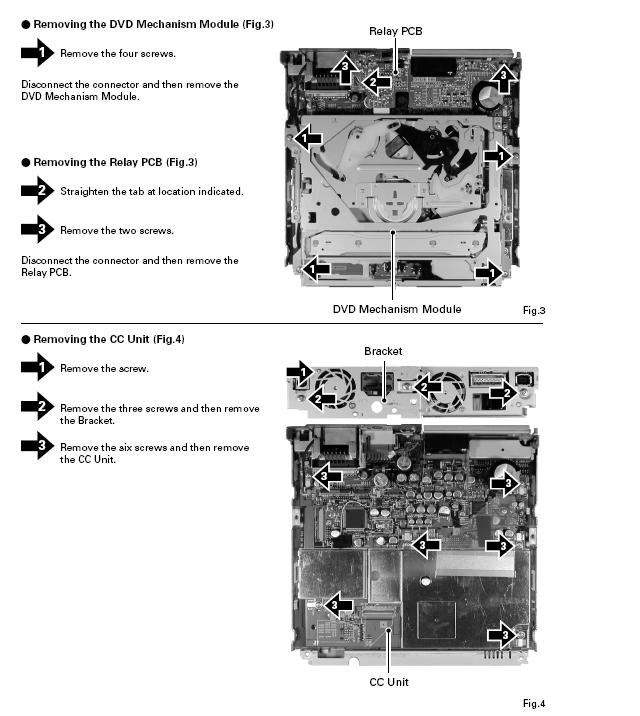
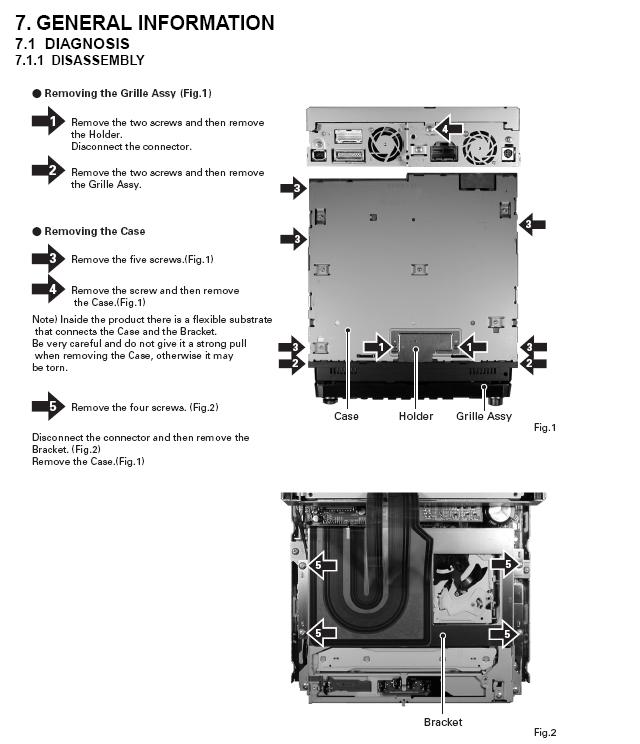
For those concerned about pulling the N1 apart, here's how to do it. I was not able to remove 3 of the 4 mounting screws for the substrate bracket, so I left it attached to the DVD module and pulled it as an assembly instead. There are some plastic "lockdown" clips that hold the substrate to the board. Using a VERY small flat head screw driver, finger nail or pick, simply pivot them away from the substrate to release it from the board. For whatever reason, I could not post these pics in the correct order. You need to look at the 2nd picture first to remove the case. Once the case is removed, look at the 1st picture to remove either the substrate bracket or the DVD module. Once the DVD module is removed, remove the right 3 screws for the CC Unit as shown in the picture, and carefully remove the sheet metal cover from the board. Once that's out of the way, you'll see the 2 solder points. Good luck!
Attached Files (2)
DVD removal.JPG
DVD removal.JPG
Case removal.JPG
Case removal.JPG
Posted Jun 29, 2006 · 17:39 UTC#38
Sorry, I didn’t take pictures. But they are useless – silicon everywhere and covering all erea

Anonymous said:
I am glad to see people doing it and working instead of all the doubt.
You are right, that you don't need to take the screen out. That is a good idea leaving the screen out but not UP. It should help avoid scratches BUT did it give you less slack on the flex cable? Everytime I take one apart I have the unit all the way closed thus there is no tention on the screens flex cable.

Good work Paul1965.


Paul1965 said:
Alright, a couple of things about the corrected mod posted by Guest. Number one: IT WORKS. Number two: GET A MANUAL. I bought one for $3.99 off of ebay and had it delivered right to my email (PDF). Number three: you do not have to remove the screen. I left mine in the out position (but lowered) when I disconnected the power and removed the unit from the dash. The only thing you want to be sure of is to protect it well when working. Number four: use the right tools. The screws are made of very soft steel, and some of them are in very tight. The wrong size phillips will strip the screw and you'll be stuck. Last but not least: IF YOU HAVE NO IDEA WHAT YOU'RE ABOUT TO GET INTO, LEAVE IT TO A PROFESSIONAL!

As far as the mod itself goes, I used a magnifying glass, a halogen worklight clamped to the desk, and 30 gauge enamel coated wire. Using a 15 watt soldering iron and a piece of the wire about one inch long, I heated the enamel on each end then carefully scraped the enamel away. Next I tinned the wire and soldered it to the points shown in the post. I then covered the top and bottom of the jumper with a small piece of electrical tape just to make sure it wouldn't short out anywhere. I put it back together and back in the car. You do still have to have the e-brake wire grounded (or toggled) for this to work. Good luck!
Posted Jun 30, 2006 · 01:25 UTC#39
If i do this mod, will it unlock all my nav features, and get rid of the annoying Illegal parking break connection message?
Posted Jun 30, 2006 · 10:13 UTC#40
Guest said:
If i do this mod, will it unlock all my nav features, and get rid of the annoying Illegal parking break connection message?


The nav features are unlocked and the park brake connection nag screen is gone, but you still have to acknowledge the front seat video viewing nag screen.
Posted Jun 30, 2006 · 16:07 UTC#41
one question,,,,, does this work with the new 60 upgrade?????
so far this look cool I will try this as soon as I get a chanse,,,,,, I just bought the 60 upgrade so that I could use the navtraffic feauture,,,,,, lots of traffic over here, and It would be nice if I can avoid that every day,, but I also need my dvd player since I drive about 3 to 4 hrs a day to go to work.....
Posted Jun 30, 2006 · 19:26 UTC#42
valenz76 said:
one question,,,,, does this work with the new 60 upgrade?????
so far this look cool I will try this as soon as I get a chanse,,,,,, I just bought the 60 upgrade so that I could use the navtraffic feauture,,,,,, lots of traffic over here, and It would be nice if I can avoid that every day,, but I also need my dvd player since I drive about 3 to 4 hrs a day to go to work.....


That's the whole purpose of this mod: to bypass the video and NAV lockout features when an N1 is upgraded with the MT60 software.
Posted Jun 30, 2006 · 23:03 UTC#43
Paul1965 said:
valenz76 said:
one question,,,,, does this work with the new 60 upgrade?????
so far this look cool I will try this as soon as I get a chanse,,,,,, I just bought the 60 upgrade so that I could use the navtraffic feauture,,,,,, lots of traffic over here, and It would be nice if I can avoid that every day,, but I also need my dvd player since I drive about 3 to 4 hrs a day to go to work.....


That's the whole purpose of this mod: to bypass the video and NAV lockout features when an N1 is upgraded with the MT60 software.


And CNDV-50MT software as well.
Posted Jun 30, 2006 · 23:49 UTC#44
thanks guys,,,, I guess this will be my project for this 4th of july weekend before hitting the road on some new wild and exotic adventure.. :D
paul you are #1,,, people have being breaking heads here for months now,, and now thanks to you the problem is solve,,,,, great job!!!!! :lol:
Posted Jul 01, 2006 · 00:04 UTC#45
valenz76 said:
thanks guys,,,, I guess this will be my project for this 4th of july weekend before hitting the road on some new wild and exotic adventure.. :D
paul you are #1,,, people have being breaking heads here for months now,, and now thanks to you the problem is solve,,,,, great job!!!!! :lol:


Don't thank me; thank the Guest that posted the mod. All I did was prove that it worked.
Posted Jul 01, 2006 · 17:33 UTC#46
well thanks to the guess that posted the mod, and thanks to you for having the courage to open your expensive unit and actually try this and prove it works......... you got ballss,,,,,,, pardon my french.......
Posted Jul 12, 2006 · 15:43 UTC#47
Anyone else done it?

It seem as if the thread is dieing now that I let the cat out of the bag.

I wish all the best of luck moding their N1's.

Now how to mod the N1's brain to work better with Sirius and XM.

Or better yet how to add bluetooth like the AVIC-X1BT as in Europe.

I but I could buy a X1BT brain and it'd work.

Anyone come across one please let me know.

Thanks,
"GUEST"
Posted Jul 13, 2006 · 00:15 UTC#48
I'd actually like to find a way to hack the remote so it can be used to control the DVD functions instead of having to use the touch screen. Any thoughts?
Posted Jul 14, 2006 · 00:23 UTC#49
I've just done it.. works great!.. paul was right.. gotta have the right tools and the screws are easy to strip.. I had to use my swiss knife as a screw driver opening up those tiny ones. I also stripped one of the screws holding the metal plate covering the dvd drive.. luckily i have a dremel to cut the screw right across so it became a flat head :)

and do becareful when soldering.. the 2 points are semi difficult to me and i'm a noobish on soldering (did some xbox, ps soldering before).

Anyways.. thanks GUEST.. your info is greatly appreciated..
and thanks to paul for posting the pictures for opening up the unit.


Anonymous said:
Anyone else done it?

It seem as if the thread is dieing now that I let the cat out of the bag.

I wish all the best of luck moding their N1's.

Now how to mod the N1's brain to work better with Sirius and XM.

Or better yet how to add bluetooth like the AVIC-X1BT as in Europe.

I but I could buy a X1BT brain and it'd work.

Anyone come across one please let me know.

Thanks,
"GUEST"
Posted Jul 15, 2006 · 05:40 UTC#50
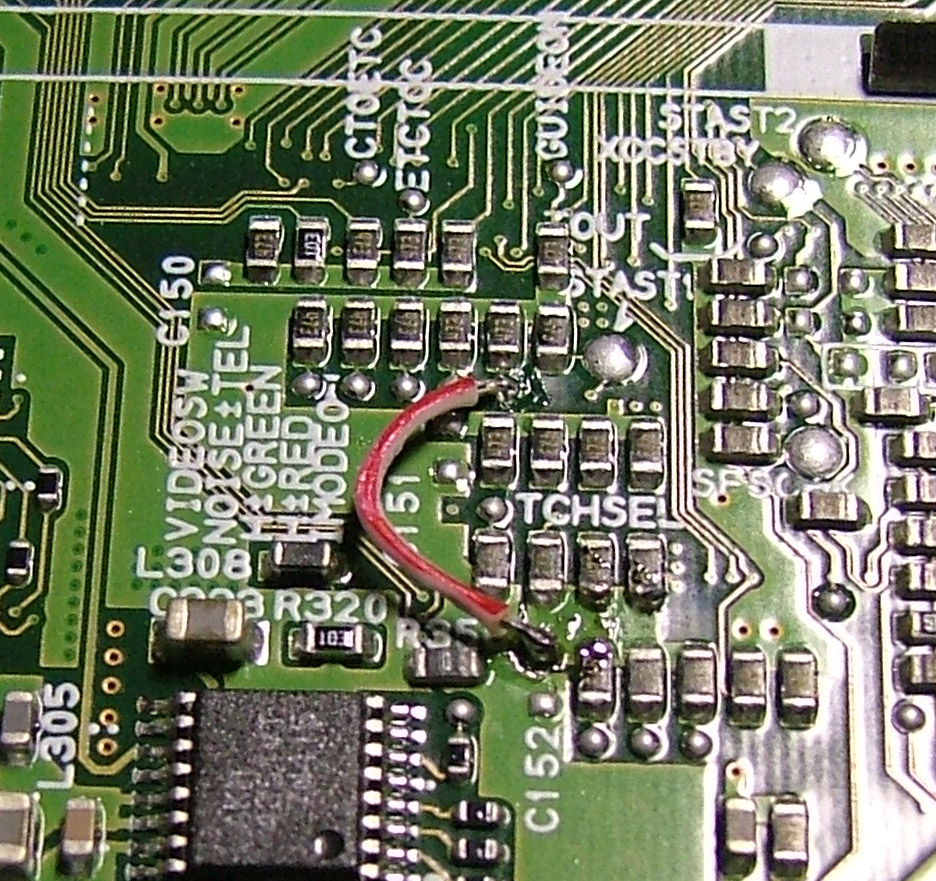
I just did the mod and presto!! It works as said. Man! I kinda cheated- The pics used to show the mod were mine, so ahem, I knew I was gonna find what was indicated by Guest. Thank you! Now I can remove my other vid screen from my dash. Liberated, Vindicated, whatever- I am Free!!!
p.s. you will still get those popup nag screens that you have to push the OK button on and your parking brake needs to be wired on, but otherwise video and navigation works like the old software!!! Now I just gotta clean up the flux on the board. The wire used is from a 80 wire IDE cable. Works good.
Attached Files (1)
My Mod.jpg
My Mod.jpg
Page 2 of 5