Search Archive

HOW TO: Blue Box Fix

By skicrave · Aug 27, 2008in Hacks/Mods💬 71 posts👁️ 21,032 views
Page 3 of 3
Posted Oct 06, 2008 · 18:38 UTC#51

I have successfully backed up the data.zip, and replaced the on on the navi. I boot up and when I set a destination the bars come up, but no street names show, unless this is because I havent started driving yet. I will repost when I complete some driving. Maybe GPS has to recognize the street name at the top of the screen when I start moving.

Posted Oct 07, 2008 · 11:47 UTC#52

Well everything seems to be working fine with the new data.zip, and no blue bars, only when I need them.. GOOD WORK TO THOSE WHO PUT THE EFFORT IN!

Posted Oct 07, 2008 · 13:47 UTC#53

Could i get a copy of your Blue Box Fix Prepackaged Installation

Posted Oct 07, 2008 · 17:41 UTC#54

Did you read this thread? It's in the very first post.

Posted Oct 07, 2008 · 17:43 UTC#55
Did you read this thread? It's in the very first post.


My bad I'm literally blind w/ out my glasses and I was looking for one of those big boxes that said attachment among the others I have seen on avic411.

Posted Oct 08, 2008 · 22:48 UTC#56
Thanks to the efforts of everyone on the forums, we now have a fix for the dreaded blue/green boxes that show up when no route is active in the factory software.


Did you add a woman's voice to this data.zip file??

Posted Oct 11, 2008 · 17:07 UTC#57

The file linked to in the first post is always the latest version, and as of right now should work perfectly for everyone.

Posted Oct 13, 2008 · 06:25 UTC#58

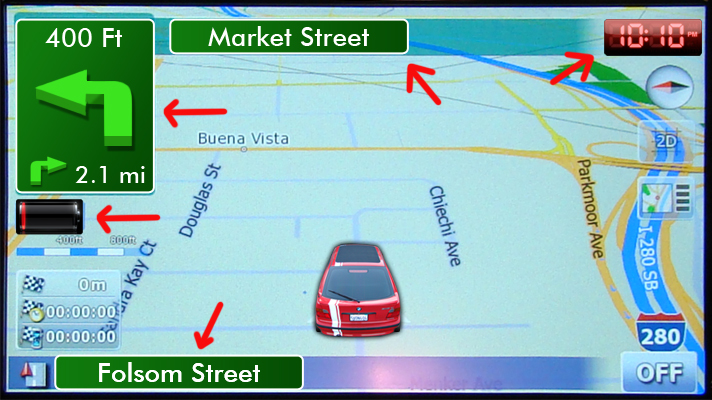
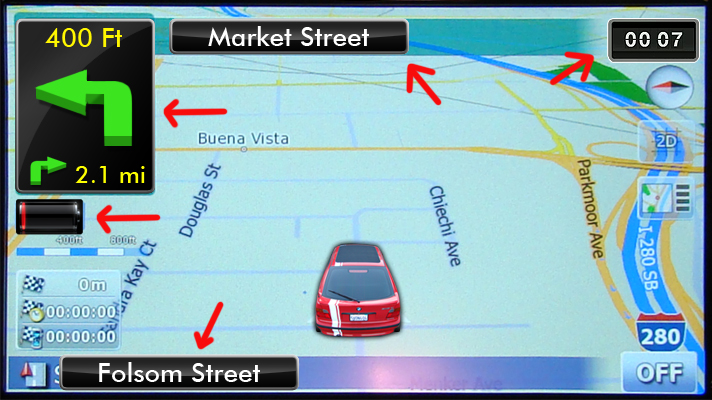
I noticed that some had changed the green/blue box. But it does not seem to be a .bmp I think is part of coding… right. Could something like this be done?

post-20342-12872755828499_thumb.jpg

post-20342-12872755830014_thumb.jpg

Posted Oct 19, 2008 · 20:08 UTC#59

Thanks for the fix, I haven't used the Nav much yet, but I noticed right away how stupid those boxes were.

Posted Oct 20, 2008 · 03:03 UTC#60
I noticed that some had changed the green/blue box. But it does not seem to be a .bmp I think is part of coding… right. Could something like this be done?


OH i like this look!

Posted Oct 22, 2008 · 14:57 UTC#61

Hi All!


Does this MOD works on EURO/German Devices?

Posted Oct 22, 2008 · 14:58 UTC#62

Yes, if you have the bug, the fix is the same for EU versions.

Posted Oct 22, 2008 · 15:02 UTC#63

great! Thx for quick Info!


There is an update comming soon for EU Version, should i restore to original files right before update to new firmware?

Posted Oct 22, 2008 · 15:15 UTC#64

Depends on how smart they made the upgrader, but most probably it will simply overwrite whatever you have on the unit, so take note of which files you've chnaged and what those changes were so you can re-apply the fix. Or may be Pioneer will actually fix it themselves... :roll:

Posted Oct 24, 2008 · 23:01 UTC#65

Anyone had any problems with their Voice Recognition since the update?

Posted Oct 25, 2008 · 03:58 UTC#66

I just installed this DATA.ZIP file tonight, and all I can say is wow. Awesome bro! Keep up the good work. I hated those damn boxes since day 1, but now it's easier on the eyes. I will post any updates if I have any issues like voice recognition or something.

Posted Oct 25, 2008 · 17:12 UTC#67
Anyone had any problems with their Voice Recognition since the update?

Nope, are you encountering problems?


I just installed this DATA.ZIP file tonight, and all I can say is wow. Awesome bro! Keep up the good work. I hated those damn boxes since day 1, but now it's easier on the eyes. I will post any updates if I have any issues like voice recognition or something.

Yep, keep me posted.

Posted Oct 30, 2008 · 21:21 UTC#68

I am having problems with voice recognition since the update. The phone works great so I know the mic is in a good place and is connected right. When I say "Play the playlist don's songs" I get "showing all playlists". Same thing with artists, albums songs, It only hears the key word and lists the whole database. When asking it to call someone, it goes back to whatever song was playing. (I have not edited my telephone lists yet so this may be the problem there).


Anyone had anything similar and been able to find a fix?


Don

Posted Oct 30, 2008 · 22:28 UTC#69

What do you mean after the update? After applying this modification, or after the 2.0 firmware update?


This modification is no longer required, Pioneer has built it into the firmware.

Posted Oct 31, 2008 · 00:29 UTC#70

Sorry, I meant after doing the 2.0 firmware update.

Posted Oct 31, 2008 · 00:38 UTC#71
Sorry, I meant after doing the 2.0 firmware update.


I can confirm this is true.

Page 3 of 3