Search Archive

wince

By jml2008 · Sep 25, 2008in Hacks/Mods💬 68 posts👁️ 38,038 views
Page 3 of 3
Posted May 23, 2009 · 11:50 UTC#51

First off, thanks to the OP for posting this info. I really wanted to mess with this without having to run back and forth to the car.


Next...


Hacking 101:A .bat file is a type of old school .exe

All they do is run or change things in windows one you program them.

the Code we see in the forum is going to call a file and I guess change it.

This is also Old school hacking because you can put them on peoples desk tops and change the icon and then it will shut the pc off embed itself in the start up and the Shit out of luck.


Please don't give anyone any more bad advice. People come here for real advice, not opinions.


1.) A batch file is not an "old school exe" EXE files are compiled, batch files are just scripts.

2.) A batch file doesn't necessarily have to "change" anything. Batch files just run commands or applications in order. They can also be used for some basic logic like if...then or case statements.

3.) It's not "old school hacking" or hacking of any kind. It's simply writing a script to execute a program with a set of parameters. "Hackers" don't wake up in the morning and say "Ooh I'm going to hack this guy with my toolbag full of batch files."

4.) If you think shutting down a PC with a batch file is "hacking," you are obviously a n00b. One would be far from "shit out of luck" in the instance you described.


I hate it when people give bad advice on forums... especially technical forums where someone could brick a $500-$1500 piece of equipment with the bad advice they're given from some 'l33t hax0r' who thinks they know what they're talking about. :roll:

Posted Jun 04, 2009 · 07:22 UTC#52

I am having a problem getting past the caution screen. Am I missing a file ? I can get the main menu to come up, also the settings screen, I can go into the system settings but when I try to go into navi settings the caution screen comes up and can not get past it. I press ok but nothing happens for awhile, then the screen goes back to the mobile emulator. Seems if I try to use anything about maps it goes to the caution screen and stops.

Please help

Posted Jun 20, 2009 · 13:02 UTC#53

when I click on main or tel i get the not digital signed error, navi just displays navimain.

Posted Jun 20, 2009 · 13:22 UTC#54

I am wondering if you apply carver's work so far on "skip navi warning nag screen at avic"

it will allow the emulator to go deeper into the pioneer files? I will try later today and post results.

Posted Jun 20, 2009 · 15:54 UTC#55

Still can not get deeper than I did before

post-31222-12872757805362_thumb.jpg

Posted Jul 23, 2009 · 14:36 UTC#56
Still can not get deeper than I did before


Seems everybody gave up here. But i can show you that more is possible.


To avoid the error as shown in the pic in the last post you need to remove as much data as possible. Don't let iGO load 1.6 GB of data (fbl, poi, 3dl, 3dc, dem) into the emulator...


To avoid the nag screen don't start MainMenu.exe. Instead start Ezrider.exe. While loading the application tells you what is missing while startup (if you cut too much). I started with only one language file, one voice, one vatican.fbl, no poi's, no buldings, no terrain.


This is one step closer to what you want but as shown in the third pic we need sumthing more... 8)


Btw. i also can start MainMenu and click on navigation and go over the nag screen but you need to be very patient and you don't see any error message then. So why to bother with it...

post-35952-12872757993709_thumb.jpg

post-35952-12872757994737_thumb.jpg

post-35952-12872757995692_thumb.jpg

Posted Jul 31, 2009 · 19:02 UTC#57

Does anyone have a solution to the application just not running? I've got everything setup and running but when I launch EZ rider I get the pioneer logo and it goes away. Are you guys running 3.0 in the emulator? That is what I have a copy of that I am loading.

Posted Aug 02, 2009 · 08:44 UTC#58

runnin windows 7 here, cant get into the main menu.... got any suggestions?

Posted Sep 04, 2009 · 01:22 UTC#59

Here is the batch I used:

"C:\Program Files (x86)\Microsoft Device Emulator\1.0\DeviceEmulator.exe" "C:\Program Files (x86)\Windows Mobile 6 SDK\PocketPC\DeviceemulationV610\0409\PPC_USA.bin" /memsize 256 /s "C:\Program Files (x86)\Microsoft Windows Mobile 5.0 MSFP Emulator Images\pocketpc.dess" /tooltips ON /video 800x480x16 /vmname "Pioneer Emulator" /flash "C:\Users\bobh\Desktop\910BT-Flash\Flashmem.bin" /Sharedfolder "C:\Users\bobh\Desktop\910BT-Flash\My Flash Disk"

I was able to set a Flash directory as well as set the Storage card Directory so I did not have to add or select each time.


post-36964-12872758883964_thumb.jpg

post-36964-12872758884656_thumb.jpg

post-36964-12872758885308_thumb.jpg

post-36964-12872758885786_thumb.jpg

Posted Sep 04, 2009 · 11:05 UTC#60

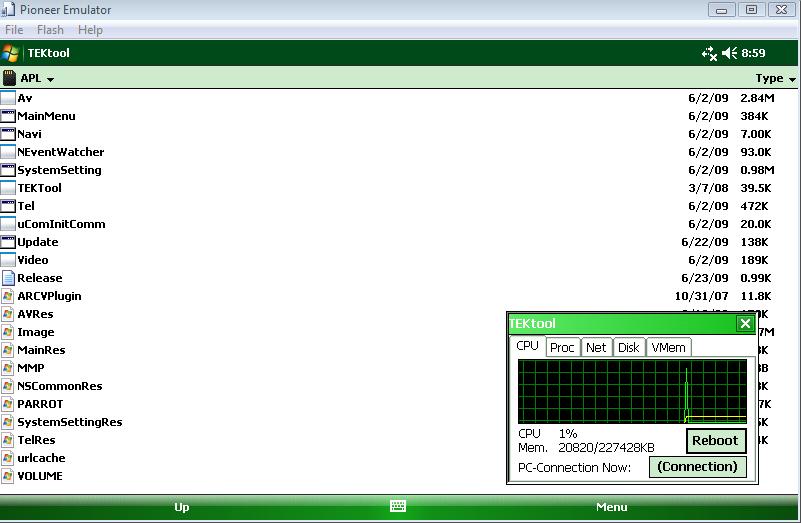
Well it won't work with all the programs and emulators installed on my vista 32 pc. Mainmenu ends with "we're sorry.." Navi opens with only with a white screen and Tel.exe won't start. Only update and tektool is running. Maybe a problem with the 3.01 software?

Posted Sep 27, 2009 · 18:38 UTC#61
Mainmenu ends with "we're sorry.."


Same deal here. Anyone have any clues?

Posted Oct 02, 2009 · 14:17 UTC#62

I have Windows Vista 32 bit. I followed all the posts, downloaded the software. I also had to install Virtual PC 2007 for networking.

I got the emulator up, mounted the flash disk backup from 2.0 and can launch the main menu.


The base OS is Windows Mobile 6.1, how to I emulate the actual Windows CE 5.x that the AVIC uses?

Posted Oct 15, 2009 · 04:11 UTC#63

i downloaded all the files explained on page 2 and i created the file Launch Pioneer VM in 800x480.bat but it wont load up the page.. what can i do now. i have a windows vista but not sure if its 32 or 64. How can i Find out?

Posted Oct 15, 2009 · 14:26 UTC#64
i have a windows vista but not sure if its 32 or 64. How can i Find out?

if you have 4gb of ram or more, most likely 64 bit.

also, right click on "Computer" in the start menu pick "Properties" it will say 32 or 64 bit there.

Posted Feb 22, 2010 · 22:20 UTC#65

Any update on being able to get on the Navi using the Windows Mobile 6.1 emulator?

Posted Feb 24, 2010 · 17:53 UTC#66

Seconded. None of the apps with run with the instructions from the Wiki. They all result in a 'We're Sorry...' titled window.

Posted Feb 24, 2010 · 20:39 UTC#67

yep I just got the same error too.. so at least I know it's not just me :smile:


Steve

Posted Feb 24, 2010 · 20:47 UTC#68

In an effort to get a real guide to emulation going, I've posted this plea to those people who know a lot about the emulation process. You can read it here, viewtopic.php?f=34&t=31045


And one of the things I cover is the wiki instructions not working for the latest 3.0x update for the X series.


You can, however, use the latest F series update from Pioneer's website; http://ds1.downloadtech.net/cn1010/firm ... 006000.zip)


Using that, and the wiki instructions, I've been able to get *some* of the buttons and such to work. MainMenu starts, but is a little flaky.

Page 3 of 3