Search Archive

wince

By jml2008 · Sep 25, 2008in Hacks/Mods💬 68 posts👁️ 38,038 views
Page 2 of 3
Posted Sep 26, 2008 · 19:07 UTC#26

For your viewing pleasure... here is a click by click video I made of steps 1-4.


http://rapidshare.com/files/148627688/W ... M.swf.html


I don't have the "My Flash Disk" folder on my work computer, so you will have to work from the written instructions for the rest.

Posted Sep 27, 2008 · 00:33 UTC#27

SWEET!!!!!!!! thanks Lunar and HackZ you guys are the greatest!!!!


i got to go play now

Posted Sep 27, 2008 · 05:14 UTC#28

so guick question


when i bring up Navi a white screen comes up with NaviMain in the middle of it. any thoughts? or is this normal. i thought this would bring up the destination menu. It most likely is issue with the nave warning msg.


we need to figure out how to make Igo work that way we can make changes to the map and check thing rather then running out the car and watch the thing crash. I HATE THAT

Posted Sep 27, 2008 · 06:06 UTC#29

I was toying with this and 7zip to see if i could get around the nag screen and...


if you look at My flash\Apl\MainRes\NSWinsOpening there is a file called "UIN_WIN_PLCaution.win"


I deleted this file and in to the emulator brought up the main screen clicked destination and it crashed on me.


I was hoping some one with a little more knowledge then I would give this a look see and figure out if it was just another crash or dose it have to do with the fact the unit cant find the nag screen so it dies


will aslo post this in the mag screen msg

Posted Sep 28, 2008 · 10:05 UTC#30

I think the issue lies in the fact that running "Mainmenu" creates a directory called my flash disk on the root of the emulator. Usually our software is located here.


Maybe if we could rename the storage card to "My Flash Disk". I have been unsucsessful in this so far.


If the emulator could have a huge amount of memory then we could just copy everything to this new directory.


Keep on playing.

Posted Oct 01, 2008 · 17:11 UTC#32

im stuck right when i click the bat file. Error:cannot open file 'C:\Program Files\Mobile 6 SDK\PocketPC\DeviceEmulationV610\04-9\PPC_USA.bin'

Posted Oct 01, 2008 · 21:22 UTC#33

Check your batch file, the path should be:

"C:\Program Files\Windows Mobile 6 SDK\PocketPC\DeviceEmulationV610\0409\PPC_USA.bin"

Posted Oct 02, 2008 · 04:57 UTC#34
im stuck right when i click the bat file. Error:cannot open file 'C:\Program Files\Mobile 6 SDK\PocketPC\DeviceEmulationV610\04-9\PPC_USA.bin'


if your running windows vista 64 bit its a different file path so that may play a factor

Posted Oct 02, 2008 · 05:38 UTC#35

Okay Sweet I got It working,


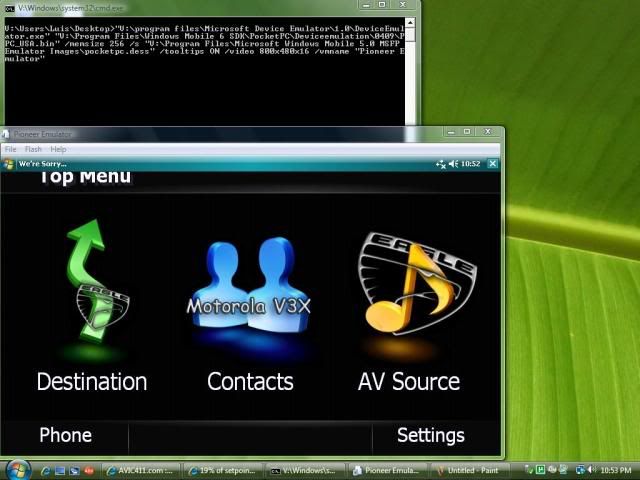
"V:\program files\Microsoft Device Emulator\1.0\DeviceEmulator.exe" "V:\Program Files\Windows Mobile 6 SDK\PocketPC\Deviceemulation\0409\PPC_USA.bin" /memsize 256 /s "V:\Program Files\Microsoft Windows Mobile 5.0 MSFP Emulator Images\pocketpc.dess" /tooltips ON /video 800x480x16 /vmname "Pioneer Emulator"


Notice theres no V610 in my line. and the V: Dirrectory is due to my mulitboot I got going.


V:\Program Files\Windows Mobile 6 SDK\PocketPC\Deviceemulation\0409\PPC_USA.bin"


The Pic:

O_snap-1.jpg

Posted Oct 03, 2008 · 21:09 UTC#36

Ok I got this far also.

Am I missing something or is this only a file explorer.

Can you get past this screen??

Can you get to the audio section,navigation section??


Mike

Posted Oct 04, 2008 · 08:41 UTC#37

hi, this works perfect, but this is only for view the main menu of the Pioneer Avic-F? because i can't enter any options of the main menu (Destination, Contacts, AV Source, phone), i can only enter to the Setting menu.


Somebody...?

Posted Oct 09, 2008 · 20:32 UTC#38

I don't think anyone have the emulator to work yet with the Pioneer software. Even there is a flash video from Lunar-Eclipse but only shows how to run the emulator, but the actual DATA.zip file is not showing.


I'm trying to put a documentation together for everyone to use, but the emulator does not run the FXXXBT data files.


Anyone have really made the emulator to fully work? Anyone... Anyone?... Some brilliant minds out there willing to help? Thanks.

Posted Oct 16, 2008 · 13:46 UTC#39

OK, I veified this does work, however nothing works for me except the main menu. When I click the WHERE TO it just sits there on the warning screen then eventually closes back to Windows CE.


125i4vc.jpg

Posted Oct 16, 2008 · 14:48 UTC#40

There are 2 threads about this, Leetcoder wrote this on the other one


"Guys I've already gone down this road. As of right now you can't run any of the AVIC software on windows device emulator. The reason is that Microsoft have not release a compiler (platform builder) that supports ARMv6 instruction set. Also the latest Microsoft Device Emulator does not support ARMv6 Instruction sets as well.. Thus you can not run the avic software on the emulator so dont waste your time trying.


The processor for the AVIC F-series is ARM1136JF (ARMv6 instructions set supported).


Im awaiting their SDK, once it is release I can create software for this unit, maybe even a new Kiosk GUI that is more flexible than the current one. 3rd party apps without needing to boot into testmode.


PS: It doesn't matter if the hardware is present or not, Ive already try runnign the AVIC software on my mobile phone which support the ARMv6 isntructions and it ran perfectly! The only thing is my phone screen is too small for me to do anything. If you have HTC Tilt you can try it.


From what I see so far, It is very likely once the SDK is release you guys will see a burst of new apps for this unit."


from here:

http://avic411.com/forum/viewtopic.php? ... highlight=


One of these 2 topics should be locked i think.

Posted Oct 16, 2008 · 20:30 UTC#41
There are 2 threads about this, Leetcoder wrote this on the other one


"Guys I've already gone down this road. As of right now you can't run any of the AVIC software on windows device emulator. The reason is that Microsoft have not release a compiler (platform builder) that supports ARMv6 instruction set. Also the latest Microsoft Device Emulator does not support ARMv6 Instruction sets as well.. Thus you can not run the avic software on the emulator so dont waste your time trying.


The processor for the AVIC F-series is ARM1136JF (ARMv6 instructions set supported).


Im awaiting their SDK, once it is release I can create software for this unit, maybe even a new Kiosk GUI that is more flexible than the current one. 3rd party apps without needing to boot into testmode.


PS: It doesn't matter if the hardware is present or not, Ive already try runnign the AVIC software on my mobile phone which support the ARMv6 isntructions and it ran perfectly! The only thing is my phone screen is too small for me to do anything. If you have HTC Tilt you can try it.


From what I see so far, It is very likely once the SDK is release you guys will see a burst of new apps for this unit."


from here:

http://avic411.com/forum/viewtopic.php? ... highlight=


One of these 2 topics should be locked i think.


Actually I was wrong, after dissecting the programs, it seems like it is written in mostly ARMv4 platform.

Posted Nov 25, 2008 · 23:28 UTC#42

Just for your information,


the Windows CE emulator described in this post can run under LINUX, (if you are a linux user, like myself, but still wanna mod you AVIC)


Just follow the instructions posted in this website. download the indicated files.


Note to install msi files on linux you need to use the following command on the terminal:


wine msiexec /i xyz.msi


this will run the installation of the msi files downloaded.

Copy the file :~/.wine/drive_c/Program Files/Windows Mobile 6 SDK/PocketPC/DeviceemulationV610/0409/PPC_USA.BIN to the wine folder where you installed the emulator so it is easy to run the startup script.


then change the bat file to the following script


> wine DeviceEmulator.exe PPC_USA.BIN /memsize 256 /tooltips ON /video 800x480x16 /vmname "Pioneer Emulator"


You all set.. now you can run the windows CE emulator under Wine on LINUX!!!! without having to switch to windows in order to work on your avic mods... wowww... works beautiful, well the emulator, i still trying to get the Avic soft to run on the emulator....
Posted Dec 22, 2008 · 19:49 UTC#43

When trying to get the Tel.exe and MainMenu.exe to launch I get an error message saying that the file is either not digitally signed or missing componets


Im following the instructions written by Lunar-Eclipse and I can get the emulator to launch with out issues as well as explore to where i have placed both the entire 2.0 update as well as my data.zip folder that is my unedited back up.


Any ideas on whats going on with it?

Posted Dec 30, 2008 · 03:38 UTC#44

anyone get this running yet? or everyone gave up?


I got it to boot up same as everyone else (with same limits) don't know enough to figure this out myself


would be awesome to get this working

Posted Jan 03, 2009 · 02:57 UTC#45
Just for your information,


the Windows CE emulator described in this post can run under LINUX, (if you are a linux user, like myself, but still wanna mod you AVIC)


Just follow the instructions posted in this website. download the indicated files.


Note to install msi files on linux you need to use the following command on the terminal:


wine msiexec /i xyz.msi


this will run the installation of the msi files downloaded.

Copy the file :~/.wine/drive_c/Program Files/Windows Mobile 6 SDK/PocketPC/DeviceemulationV610/0409/PPC_USA.BIN to the wine folder where you installed the emulator so it is easy to run the startup script.


then change the bat file to the following script


> wine DeviceEmulator.exe PPC_USA.BIN /memsize 256 /tooltips ON /video 800x480x16 /vmname "Pioneer Emulator"


You all set.. now you can run the windows CE emulator under Wine on LINUX!!!! without having to switch to windows in order to work on your avic mods... wowww... works beautiful, well the emulator, i still trying to get the Avic soft to run on the emulator....


cheers! i'm trying this now. i'm running gentoo (2.6.26-gentoo) and wine-1.1.11.


i almost had a heart attack when i realized i installed a WINDOWS device into my car! :(


any idea if there's an open firmware project dedicated to the avic? (a la tomato or openwrt)


best,


- j

Posted Jan 03, 2009 · 06:03 UTC#46
i almost had a heart attack when i realized i installed a WINDOWS device into my car! :(


any idea if there's an open firmware project dedicated to the avic? (a la tomato or openwrt)


Most likely never, at least if you want to keep Navi part working.

Posted Feb 20, 2009 · 17:17 UTC#47

This is only useful so far for viewing changes to the main screen, and that is it. You cannot run any of the other items.


If and when we can, it would be great to use this as a way to check screen modification layouts and ensuring all BMP and icon files are correctly placed in the DATA.ZIP file.


Oh well, so promising, yet so dead ended.


Ceger

Posted Mar 27, 2009 · 16:07 UTC#48

My screen is just stuck on "Navi MAin" in small fonts towards the bottom.

So what do I do to fix it?

Thanx,

Bud

Posted May 05, 2009 · 04:32 UTC#49

11. By now, Windows Mobile should be fully booted.

12. Click the Start button in the top left corner

13. Click Programs

14. Click "File Explorer"

15. In the top left corner click the drop down arrow (in my case, it says my documents beside the arrow).

16. Select "Storage Card"

17. Double Click APL folder

18. Double Click Main Menu or Navi or Tel.


Let me know if you don't understand any part and I'll try to walk you through it.


I'm going to bed now... See you folks in the morning.


]My question is where is this "APL folder" you speak of, have i not loaded something to my SD? My SD still says "MITACAP and Testmode

Posted May 05, 2009 · 15:22 UTC#50
11. By now, Windows Mobile should be fully booted.

12. Click the Start button in the top left corner

13. Click Programs

14. Click "File Explorer"

15. In the top left corner click the drop down arrow (in my case, it says my documents beside the arrow).

16. Select "Storage Card"

17. Double Click APL folder

18. Double Click Main Menu or Navi or Tel.


Let me know if you don't understand any part and I'll try to walk you through it.


I'm going to bed now... See you folks in the morning.


]My question is where is this "APL folder" you speak of, have i not loaded something to my SD? My SD still says "MITACAP and Testmode


you better start reading the hacks thread

Page 2 of 3