Search Archive

New Blue Box Question

By keeper22 · Nov 03, 2008in Hacks/Mods💬 88 posts👁️ 10,783 views
Page 1 of 4
Posted Nov 03, 2008 · 23:57 UTC#1

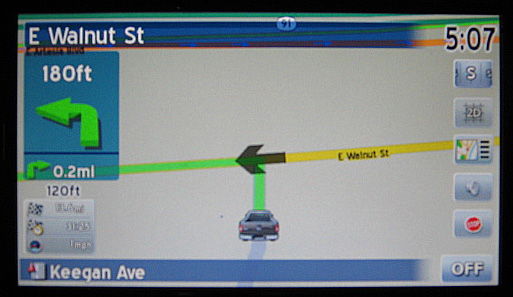
I have been trying to change up the blue boxes and arrows that are displayed during navigation.


I have had success editing navigatemap_800_480.ui to change font colors, add voice guidance mute, and a number of other mods people have posted so generously on here.


What I am trying to do now is move the street name to the right and drop the navigation boxes down a bit. But every time I mess with the Y values it just breaks it and nothing shows up.


I am sure I am missing something and would appreciate any help you guys have for me.

post-22402-12872756057391_thumb.jpg

Posted Nov 04, 2008 · 00:47 UTC#2

Are you moving the right elements? They're in this layer:


As long as you're moving the correct elements, there's not really a way for things to "break".

Posted Nov 04, 2008 · 01:28 UTC#3

Also note that there are several elements there -- both the background bitmaps (SPRITE) and actual street names (TEXT) or arrows (SPRITE as well), and they are in different layers...

Posted Nov 04, 2008 · 06:07 UTC#4

Thank You that was a big help, I was definitly messing around in the wrong layer.


I have it spaced just how I want now.


One other question in the .ui file am I correct that any line with a ";" at the begining is commented out. can I delete any line that is commented out. as in the following example


;road arrow

;	
;	


Can I delete the third and forth line to make the snippet as follows with no ill effect on looks or performance?


;road arrow


Posted Nov 04, 2008 · 16:07 UTC#5

Yes, semicolon is a comment mark, so you can remove them safely.

Posted Nov 04, 2008 · 16:24 UTC#6

Great there is a lot you can clean up in these files. It makes it a lot easier to edit looking at a cleaned up file (for me at least).

Posted Nov 04, 2008 · 16:48 UTC#7

Indeed. First thing I always do is clean them up...

Posted Nov 04, 2008 · 20:50 UTC#8

hey what up how come you have not added a Stop Navigating button?

Posted Nov 04, 2008 · 21:32 UTC#9

May be because not everybody wants/needs one?

Posted Nov 04, 2008 · 23:45 UTC#10

I have one...it is my compass as seen under "Guide to Mods"... :D

Posted Nov 06, 2008 · 14:50 UTC#11

Well I got every thing moved around like I wanted, and I even made a little linear compass to match the buttons. I did have to add a stop nav button because I could not get the hack for the stop nav on the compass to work with the linear compass.


Here are some shots with Nav on and off.

post-22402-12872756075194_thumb.jpg

post-22402-12872756076394_thumb.jpg

Posted Nov 06, 2008 · 15:39 UTC#12

Looks great!

Posted Nov 06, 2008 · 16:30 UTC#13

Nice... If the linear compass works differently, you could add a button with transparent bitmap and higher Z-order on top of it, and add stop navigation code to it...

Posted Nov 06, 2008 · 17:03 UTC#14

That looks fantastic... would you be willing to post the file that has the mods in it as yours looks so much better than Pioneer's?

Posted Nov 06, 2008 · 18:06 UTC#15

sure, I am making a few more tweeks but I will post the images and files in a bit.

Posted Nov 06, 2008 · 18:43 UTC#16

Awesome... can't wait! :D

Posted Nov 06, 2008 · 20:01 UTC#17

looks Great good work


can i have a copy please :) but with red or blue arrow instead of the truck.


thanks

Posted Nov 06, 2008 · 21:23 UTC#18

Here is the latest version which I think I am happy with. I am not exactly sure what all I have to do to make it so the arrow is back and not my truck but I will check it out and put up the data.zip

post-22402-12872756110903_thumb.jpg

post-22402-12872756112096_thumb.jpg

Posted Nov 06, 2008 · 21:44 UTC#19

your data.zip and fonts you use would be awesome. I like how clean it looks.

Posted Nov 06, 2008 · 21:47 UTC#20

I will take it with the truck in there if you do not mind. Since it is already set up to display it correctly, I will add an image of my car instead and to me it makes it a lot simpler to incorporate. 8)

Posted Nov 06, 2008 · 21:57 UTC#21

Yep i love Simple Clean loook Sweet !!!!

Posted Nov 06, 2008 · 22:13 UTC#22

Here are the files for it. If someone can take a look at it and figure out why the 2d truck is not showing up I would be very grateful, it stopped working after I up graded to Firmware 2.0


Here is the Zip File (remember the vehicle arrow is a truck in this version)


Also let me know what changes you make, always trying to improve this thing.[/url]

Posted Nov 06, 2008 · 22:15 UTC#23
Here are the files for it. If someone can take a look at it and figure out why the 2d truck is not showing up I would be very grateful, it stopped working after I up graded to Firmware 2.0


Here is the Zip File (remember the vehicle arrow is a truck in this version)


Also let me know what changes you make, always trying to improve this thing.[/url]


Anything special you did to give your truck icon that cartoon yet realistic look it has? I am going to start on my GTI tonight and am shooting for it to look as good as yours (although I am not holding my breath on it LOL)

Posted Nov 06, 2008 · 23:36 UTC#24

Anything special you did to give your truck icon that cartoon yet realistic look it has? I am going to start on my GTI tonight and am shooting for it to look as good as yours (although I am not holding my breath on it LOL)


Nothing too special, anytime you shrink a photo down that small it will get pixillated , then mess with the saturation a little and I added a small border to make it stand out more on the background.


Good luck I am sure it will be great. If you get the 2d car to work, please let me know what you had to change.


Thanks

Posted Nov 07, 2008 · 02:10 UTC#25

Good luck I am sure it will be great. If you get the 2d car to work, please let me know what you had to change.


Thanks


Your 2d bmps arent working because your daycam.bmp and nightcar.bmp are set to the arrows, put your 2d truck into those files and it should work, now where did you set you 3d version of your truck. i'm trying to revert to the arrow....


EDIT....nvm, i found the 3d car under data.zip/ui_pioneer/800_400/car3d.bmp

Page 1 of 4