i just installed your data and fonts
wow!!!...it looks great...i love the truck icon b/c i have a truck!!!
tomorrow i will test it on the road
now i am trying to add a button to bring up the main msn direct screen
or maybe to change the mute button
i just installed your data and fonts
wow!!!...it looks great...i love the truck icon b/c i have a truck!!!
tomorrow i will test it on the road
now i am trying to add a button to bring up the main msn direct screen
or maybe to change the mute button
AHHHHHHHHHHHHH.... it is amazing how easy it is to over look things, I see now that I put the daycar.bmp/daycarghost.bmp/nightcar.bmp/nightcarghost.bmp in data.zip/ui_pioneer/800_480 instead of data.zip/ui_pioneer/comon where it belong.
Can't believe I was stuck on that for so long.
Question? If you have the iPod playing and you are navigating, does the icon for the iPod conflict on screen with the Stop Nav icon?
somehow the compass doent work right.
i am going east and it shows west
So in order to change his Truck back into the Regular Arrow i have to move his daycar.bmp/daycarghost.bmp/nightcar.bmp/nightcarghost.bmp "Which is a picture of his Truck" and it should revert back to the regular arrow right?
Good luck I am sure it will be great. If you get the 2d car to work, please let me know what you had to change.
Thanks
Your 2d bmps arent working because your daycam.bmp and nightcar.bmp are set to the arrows, put your 2d truck into those files and it should work, now where did you set you 3d version of your truck. i'm trying to revert to the arrow....
EDIT....nvm, i found the 3d car under data.zip/ui_pioneer/800_400/car3d.bmp
Question? If you have the iPod playing and you are navigating, does the icon for the iPod conflict on screen with the Stop Nav icon?
I'll see what happens on my way to work, but it does seem to be in the same area.
The stop icon will conflict with IPod album art. I had the stop button on the compass before but had difficulty making it work with the linear compass.
But as mentioned earlier you could make a button with 0 alpha ontop of the compass and use that as the stop button.
Since I don't have an Ipod it is not an issue for me.
You could just move the button where ever you want...here is the code you would need to change in navigatmap_800_480.ui . Just change the x and y value to what ever you want. or upload a 0 alpha button and position it at x=720 y=77 (right above the compass) That is what I would do if I listened to an ipod.
;Stop Nav Button
So to just get rid of the Stop Nav button all together I could just delete this string:
;Stop Nav Button
and then save it? I use my iPod 90% of the time.
Yup you can just delete it if you want or you can move it around anywhere you want. I like the navigation stop so I would either make an invisible button over the compass or somewhere else on the screen or move them like in the image if I had an IPOD.

Yup you can just delete it if you want or you can move it around anywhere you want. I like the navigation stop so I would either make an invisible button over the compass or somewhere else on the screen or move them like in the image if I had an IPOD.
I saw where you mentioned making an invisble button but remember, PSE won't let me create an Alpha layer. If I am being honest, although I am a total tech geek, these scripts will take a little getting used to before I am comfortable adding things myself.  Still learning...
isn't there a blank.bmp in the default data.zip?
Yup you can just delete it if you want or you can move it around anywhere you want. I like the navigation stop so I would either make an invisible button over the compass or somewhere else on the screen or move them like in the image if I had an IPOD.
What are the cords for the buttons in this image?
BTW, replaced the truck with an arrow and will be posting images shortly...
It's one post up from keeper's that you just quoted.
It's one post up from keeper's that you just quoted.
oh sorry stupid me...
Not at all, I do that kind of thing ALL the time! 
Just some quick pics of Kevin's data file with a different arrow.
Sorry some are blurry, my cell phone camera sucks...
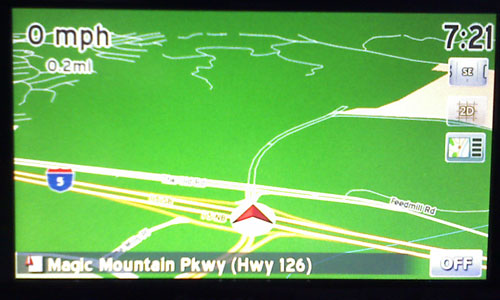

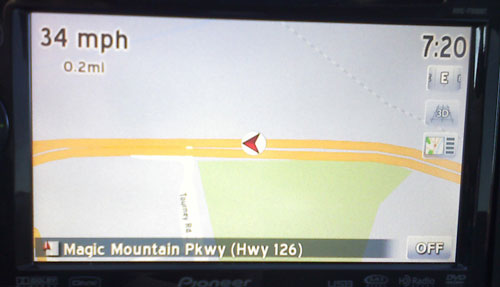
in the last shot it shows you traveling west but the compass says east. Is it displaying the heading incorrectly?
I'll check it again at lunch today, but I didn't notice that...good eye.... 
in the last shot it shows you traveling west but the compass says east. Is it displaying the heading incorrectly?
Someone else commented on that earlier in the thread I believe...
somehow the compass doent work right.i am going east and it shows west
Something is up with the compass...
Simple code to make the compass work
Code:
;compass
Just change the bmp to what ever name and mask and change the x and y.
What ever compass you use is must be "N - ne - E - se - S - sw - W - nw" order for our Navi to display it properly.
I found this in another post.
What ever compass you use is must be "N - ne - E - se - S - sw - W - nw" order for our Navi to display it properly.
Working on fixing the compass image right now...
What ever compass you use is must be "N - ne - E - se - S - sw - W - nw" order for our Navi to display it properly.
Working on fixing the compass image right now...
Would you please post the updated file when you are done? 
strange about the compass I just changesd the one I found int he 800_480 folder, so that means that one would have run wrong too
