well my theory about being able to just rename the files that have changed channels didnt work.
Posted Nov 16, 2008 · 18:03 UTC#26
well my theory about being able to just rename the files that have changed channels didnt work.
Can someone get and post a list of the stations that show the logos (working), and the stations that are not working after the programming change?
for instance:
non-working channel no: channel name
20: XM 20 on 20
working channel no: channel name
28: Escape
The XM site has some channels titled like "BBC Radio One" but on the radio it shows as "BBC Radio 1" so can someone help out to get the right ones from the radio.
I'm working on the IMAGETBL.DAT file w/ Hex workshop. Should be easy if I can just get the channel names.
seems to me the best way would be to take a printout of the new program guide and go station by station, a bit of work but should doable.
I just downloaded a hex editor and opened up the .dat file. all the names show up, looks like I should be able to just change them.
I am burning another disc right now to see if I can see the 4 images the guy in orlando posted, if that works, I will try editing the dat file, if that works. I will edit the dat file using the names on the program guide.
update, no luck,
here is a list of sites that show up,
interesting, the stations that have a new channel number still show up fine, but if they have changed the name, they dont. xm chill is still the same number but now it is called sirius xm chill, it no longer shows the icon.
Now I am really confused.
Here's what I have so far, attached excel file. Someone should fill in the gaps and check for mistakes. Yes, its tedious. The hex structure of the file seems very easy to understand. You'll need to recalculate the string length at offset 2 for each station.
e.g.:
0004070454686520343073000000000000000000
00 = begin structure
04 = channel number
07 = string length
04 = channel number
54686520343073000000000000000000 = The 40s
I have a prototype imagetbl.dat I'm testing now, will let you know how it works out.
tnova,
take a look at this discussion, it will probably make better sense to you:
EVERY ONE PLEASE READ THIS ABOUT THE IMAGETBL.DAT!
You do not need to worry about the 2nd or 3rd bits in for each line
(The Character Count / Channel Number) We have discovered those bits are useless on our units... The way it reads the imagetbl is it looks at the text, and then references it to the 1st bit, which relates to the 4th, 5th, 6th characters in the PIM.. (DPSxxx)
Cinemagic (was 27) Will still show up (Or should) the same logo on 76... Go out and try it right now!
(With out any modifications), throw in your 2007 nav disk, and it should show up!
Give me some time, And I will post a 100% Working IMAGETBL file....
Awesome! Seems like you are cracking the code!
I remember seeing this kind of conversation back in January. Maybe this link may help you all.
Hi wwwrbswww,
I posted a excel doc earlier, I found the same thing, if the name has not changed at all it will work, my excel doc pretty much illustrates this.
it makes sense because the titles are correct. so it does not get the title from the img.dat file.
problem is, many channels stayed the same, but they are now called "sirius/xm". I read your discussion over in the f series forum. everything points to the img.dat file.
hopefully you can get it working on an f series before you burn anymore discs.
let me know if I can be of any help.
I have it working for the most part on the D series (Total of 7 DL DVD's)
I think the catagories changed as well, ex. latin is now Latin & World, I see them in the hex editor near the bottom. I guess this means it should be possible to add the new channels as well.
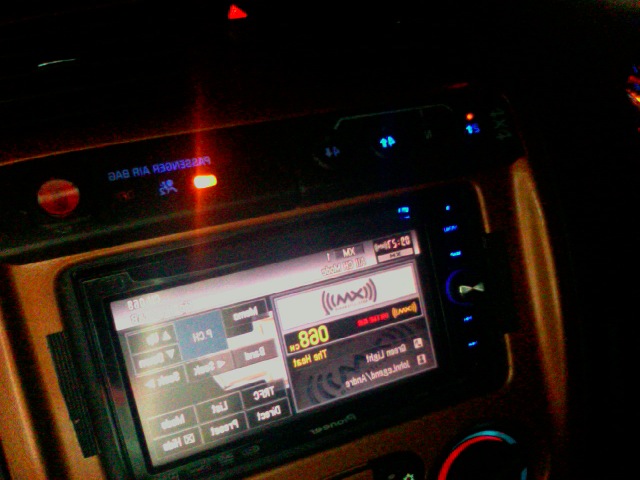
Looks like some hex editing and the new PIMs will solve things. I changed stations 4-9, 10, and 12. See picture, I took it 5 min ago.

Im sitting in my truck right now, whats weird is "The Heat" is an old chan...
Its in the old file (diff chan #) but the icon is not showing up even with my hacked disc....
Odd!!!!
Im going to burning disc # 8 tonight!
I will give away all my test dics (working 2008 EAST nav discs) to people if they want to pay postage... They all have various stages of these icons, otherwise they work fine.. )
Here is my current imagetbl.dat file... I am in the 60's (Near the heat) right now
Are you working on the .PIM files or did someone already post them?
Someone made a bunch of PIM files... and PM'ed them to me, I have not tested them yet...
I just checked out your imagetbl.dat, looks like the heat is off by some- if you fix it you should be good. See pic.

No, check the original.. . the original was Left aligned... I tried that to see if right aligning it might work...
that is something I did... but the original does not work
bmp files comming up.
AXX Please can you remove those icons from this thread....
The reason why I ask that, is because converting the JPGS to PIM wont work, they have to be BMP, and I dont want any one to get confused...
If you convert them to BMP 32bit that would be amazing..
I am working on all of the new PIM icons right now. I have sent a bunch to WwRGSwW. I have completed channels 2-48 as well as the channels that just switched numbers. WwRGSwW is going to let me know if the PIMs work. I will continue the editing process tonight. It will take me quite some time to finish the rest but hopefully we will have a working 2008 NAV disk with all the new XM logos in the end.
I am working on all of the new PIM icons right now. I have sent a bunch to WwRGSwW. I have completed channels 2-48 as well as the channels that just switched numbers. WwRGSwW is going to let me know if the PIMs work. I will continue the editing process tonight. It will take me quite some time to finish the rest but hopefully we will have a working 2008 NAV disk with all the new XM logos in the end.
^ I burned the disc, Ill test it tomorrow and let you know on your icons!
Here are the icons in BMP format.
I guess to convert to pim I will need to get irfanview or something.
??? do the catagory names need to be changed? or does the d3 pick that up off the broadcast?
Here are the icons in BMP format.I guess to convert to pim I will need to get irfanview or something.
??? do the catagory names need to be changed? or does the d3 pick that up off the broadcast?
^ per WwRGSwW's instructions: the white background needs to be converted to the D3's default grey color. I almost have 2-100 done in this manner..... We will see what happens with my completed icons in the morning. WwRGSwW burned them to his NavDVD and will test them tomorrow.... (Cross your fingers!!!)
fingers crossed, i dont have a good photo editor so I could not do any advanced editing, I just thought it would be good to have all the icons in one place.
if we can get this working 100% we can maybe ask that JLhong to host it on his ftp server, if not, I have a server we can host it on.
ok now that my finger is sore/worn down from all the editing, i'll post what i have done.... im gonna get some sleep and try to get more done tomorrow... heres what i have.... use the PimMgr program to view.... ive reposted it...