Search Archive

Apple Theme Completed!!

By imBasketCase · Mar 07, 2009in Hacks/Mods💬 164 posts👁️ 39,381 views
Page 5 of 7
Posted May 13, 2009 · 13:33 UTC#101
hi imBasketCase


I love the Blue Apple theme you created, but would rather have the iPhone Maps icon for desinations instead of the Safari icon.


Would you be able to help me out, and post a new .zip ?


Thank you kindly


I'll try and find it for you.


Thanks A lot - here is a great resource for the iphone icons...my problem is that my photoshop skills are not as good as yours


http://iphonestudio.co.uk/page/iphone_icon_gallery

Posted May 13, 2009 · 14:32 UTC#102

Thanks for the psd's, Basket. 8)

Posted May 13, 2009 · 14:42 UTC#103
hi imBasketCase


I love the Blue Apple theme you created, but would rather have the iPhone Maps icon for desinations instead of the Safari icon.


Would you be able to help me out, and post a new .zip ?


Thank you kindly


I'll try and find it for you.


Thanks A lot - here is a great resource for the iphone icons...my problem is that my photoshop skills are not as good as yours


http://iphonestudio.co.uk/page/iphone_icon_gallery


Wow, nice find

Posted May 13, 2009 · 16:01 UTC#104

eww.. those are JPEG's with horrible artifacting due to being low quality with high compression. You need high quality PNG icons to use for making your graphics.


Here's some iPhone ones in good quality 1000x1000 PNG: http://walrick.deviantart.com/art/openP ... e-56014501

Posted May 14, 2009 · 01:16 UTC#105

Sure. I'm still working on it (Not really good at this. :D My first time.)I'll try to finnish it by Monday. Going on vacation!! I'll keep you posted.

What car do you have?


No worries, when ever you get around to it. It's a Nissan 350z so has that sort of Orange/Yellow dash. Quite happy with the theme I have at the moment, which is Guga's with a few mods so it's quite neutral but think yours may give it that factory look.


Look forward to your post....Thanks!!

:evil: They broke into my car last night and stole my radio :cry: They really did a job on my dash.

I didnt get to finish it the way I wanted to but if you want i can post it and maybe you'll like it.

I wont be getting a new radio anytime soon.


Sorry to hear that dude.....evil f*ckers!!! Don't worry about posting the mod as I'm sure you have other things to worry about right now. Hope your insurance covers it!!

Posted May 14, 2009 · 06:25 UTC#106

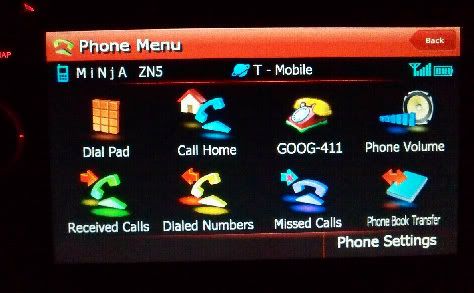
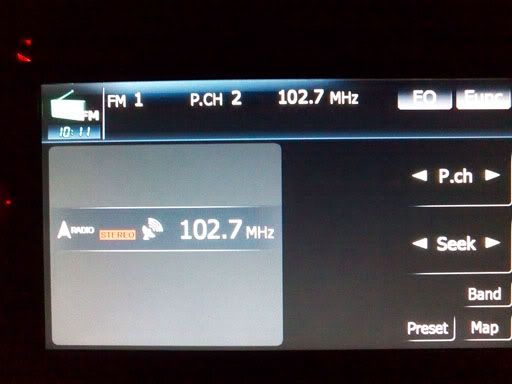
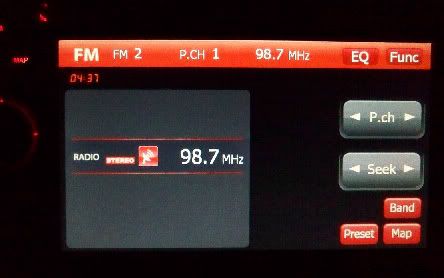
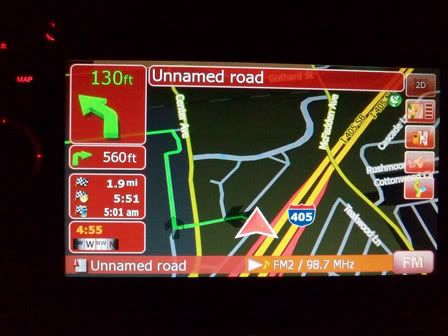
and BasketCase, thanks again. Im gonna be working on a blue one later too since my friend is kinda jealous of what we got.


Here are some before and afters
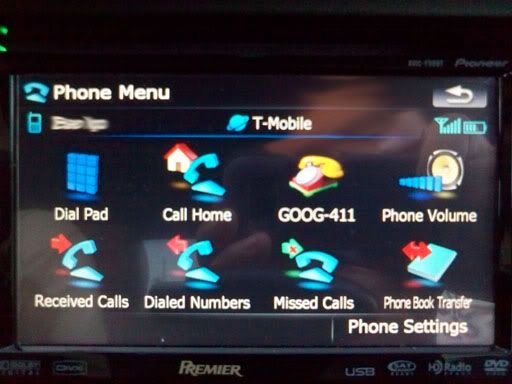
 

bluephone.jpg

Phonemenu-1.jpg

stockradio.jpg

FMradio-1.jpg


YOU GET THE IDEA


*EDIT* ERRORS FOUND, please wait for 2.1

RED APPLE THEME 2.1 (final)

*EDIT* Newest version is 2.1 since 2.0 I found that settings icon looked off

*EDIT* May/15/2009 FILES RE POSTED


APPLE menu:::

http://rapidshare.com/files/233199524/Image.res.html


STOCK menu:::

http://rapidshare.com/files/233200155/Image.res.html


(i dont know if anyone downloaded the themes while they were up for 3 hours, but these are the final 2.1)


*Warning* while this may look good, please keep your eyes on the road at all times as this can be a distraction. Please make sure your car is at a complete stop before you admire. thank you.


i love you all


precision. its all i aim for.

Posted May 15, 2009 · 01:16 UTC#107

Look great!


Can't wait to be able to download this too:

kdk_0058.jpg


:mrgreen:

Posted May 15, 2009 · 09:21 UTC#108
Look great!


Can't wait to be able to download this too:

kdk_0058.jpg


:mrgreen:


hahaha ill post that one in a bit, I wanna get this AV screen out of the way first. and my computer is in a complete mess... you have no idea. i got files all over the place.


If you guys want the colored fireworks, pm me and post your e-mail too.

Posted May 19, 2009 · 02:05 UTC#109

im working on that data.zip files now.. ill post pics up of the finished product later.

Posted May 21, 2009 · 08:07 UTC#110

Hey,

I just finished software bypassing my unit and with that said I AM A NEWBIE!!!!! I am just wondering after I download the file and i put it on an sd card and put in my f90 unit what path I need to follow. I was tried to find it but had no luck or got thoroughly confused help plz!!!!

Posted May 21, 2009 · 09:07 UTC#111
Hey,

I just finished software bypassing my unit and with that said I AM A NEWBIE!!!!! I am just wondering after I download the file and i put it on an sd card and put in my f90 unit what path I need to follow. I was tried to find it but had no luck or got thoroughly confused help plz!!!!


You are gonna need the lastest RES file either blue or red (this will replace everything in Contacts and and AV source).


the file should read image zip. After you get it to boot up to windows, copy the image file and to go APL >>> and drop it in there. remember to back up your avic unit if you want to go back to the stock look. I have the back ups too.

Posted May 21, 2009 · 16:29 UTC#112

Hey,

there again does the image.res come from the blue.zip on page three or is there another file I need to get seperate. Again I want to say I am newbie so please be patient.

Thanks

Posted May 21, 2009 · 18:09 UTC#113
Hey,

there again does the image.res come from the blue.zip on page three or is there another file I need to get seperate. Again I want to say I am newbie so please be patient.

Thanks


Yeah, use blue on page 3. thats all you need. Then on your SD card... your gonna need 2 files to boot into WINDOWS.

Copy the image from your SD card and then go to APL>>>paste image here


easy.

Posted May 22, 2009 · 17:22 UTC#114

I updated the theme to include the actual Maps, Contacts, iPod buttons for the main menu screen. It will probably be a few days before I can install it on my 700BT, but I am attach them to the forum if anyone else wants them and can install it sooner.


Also, imBasketCase, it sounds like you're going to be updating the blue theme, is that correct? Would you like the buttons I made to include in your update?

Posted May 22, 2009 · 18:39 UTC#115
I updated the theme to include the actual Maps, Contacts, iPod buttons for the main menu screen. It will probably be a few days before I can install it on my 700BT, but I am attach them to the forum if anyone else wants them and can install it sooner.


Also, imBasketCase, it sounds like you're going to be updating the blue theme, is that correct? Would you like the buttons I made to include in your update?


Thats great..... where's the link ;-)

Posted May 23, 2009 · 04:22 UTC#116


Thats great..... where's the link ;-)


Here you go. Like I said, I haven't installed it, so let me know how it goes, I'd love to see photos. Also, I'm thinking about changing the iPod button in the AV menu. Any suggestions? A buddy suggested changing it to the iPod touch's "Music" button, or I'm thinking about changing it to the original button. Thoughts?


UPDATE: an updated mod can be found here

Posted May 23, 2009 · 13:01 UTC#117

Philler,


Thanks for posting this, i will put it on my systme this wek and post pictures.


As for the ipod icon, i personally like the current one for iPod in the AV menu.


Have you ever considered the iphone youtube icon for AV sources in the top menu ??


i guess it depends if you will watch video or not..but i thought about using the youtube icon for A/V (might look cool)


Thanks again

Posted May 24, 2009 · 04:00 UTC#118

hey,

guys I just wanted to thank you I have SWEET SUCCESS!!! IT looks awesome thanks alot!!!!!

Andrew

Posted May 24, 2009 · 05:02 UTC#119
hey,

guys I just wanted to thank you I have SWEET SUCCESS!!! IT looks awesome thanks alot!!!!!

Andrew


If you're using my mods, take some photos. I'd love to see what it looks like because I haven't put mine on the unit yet. and I'm going to make a couple other little changes too.

Posted May 24, 2009 · 08:43 UTC#120

hey guys im not too good at this stuff but it looks great. can anyone give me a step by step on how to do some of these kick ass mods??

Posted May 24, 2009 · 13:32 UTC#121
hey guys im not too good at this stuff but it looks great. can anyone give me a step by step on how to do some of these kick ass mods??


HAHAHA trust me... ive been doing this for a while now... and even i dont even know where to start.


but a journey of a thousand miles begins with a jog


so the question to you is.. what do you want? and what do you want first?

Posted May 24, 2009 · 20:58 UTC#122


Thats great..... where's the link ;-)


Here you go. Like I said, I haven't installed it, so let me know how it goes, I'd love to see photos. Also, I'm thinking about changing the iPod button in the AV menu. Any suggestions? A buddy suggested changing it to the iPod touch's "Music" button, or I'm thinking about changing it to the original button. Thoughts?


I updated my mod of this theme. Now the "iPod" button under the AV menu is the iTunes icon like you'd find on a computer. I went with this, so all the buttons on the top row of would be round, and wouldn't be specific to one kind of iPod. Also, I changed the buttons on the main menu to go whiter when pressed instead of darker, staying consistent with the rest of this theme.


I haven't been able to test the theme on my unit because my install isn't 100% yet and I don't want to do it until it's done, and that won't happen until later in the week. So if you install the theme let me know what you think and post photos.

Posted May 25, 2009 · 16:29 UTC#123
hi imBasketCase


I love the Blue Apple theme you created, but would rather have the iPhone Maps icon for desinations instead of the Safari icon.


Would you be able to help me out, and post a new .zip ?


Thank you kindly


Here's the psd for the maps icon, I didn't really do much to it

Posted May 25, 2009 · 16:49 UTC#124


Here's the psd for the maps icon, I didn't really do much to it


Thanks a lot ! :D

Posted May 25, 2009 · 18:26 UTC#125


Here's the psd for the maps icon, I didn't really do much to it


Thanks a lot ! :D


My update to the theme already incorporates this.

Page 5 of 7