Search Archive

Official Firmware 3.0 Status Thread!!

By Drh2929 · Jul 31, 2009in General💬 175 posts👁️ 37,333 views
Page 7 of 7
Posted Aug 14, 2009 · 18:36 UTC#151
If you have the 3.01 version from x series, my guess is your going to have to go back to 2.006 or earlier for the flash to work.


Obviously the update was designed to recognize a legit version to update from. if its not there it will prob just boot up as normal. I made a copy of 2.006 just before i copied over the x series flash disk. It is amazing how well that worked, don't think pioneer thought of that one. Guess even if they did how would they prevent it anyway?


Also, one would assume once someone has done the flash, a backup of the drive may be possible. Unless of course they some how made it only work on your particular unit when its activiated.


guess we will find out soon enough, i will be happy to post my flash drive once the update is done, just to see if it will work.


It sounds like from some reports it wipes out all your settings, so it might not be smart enough to check for that stuff. Since it's easy enough to go into service mode and just do a rebuild from the X series 3.x backup I will just give it a shot.

Posted Aug 14, 2009 · 19:29 UTC#152

I just did the update, the update won't recognize the 3.01 version from the x series. it simply bypasses it and starts up as normal.


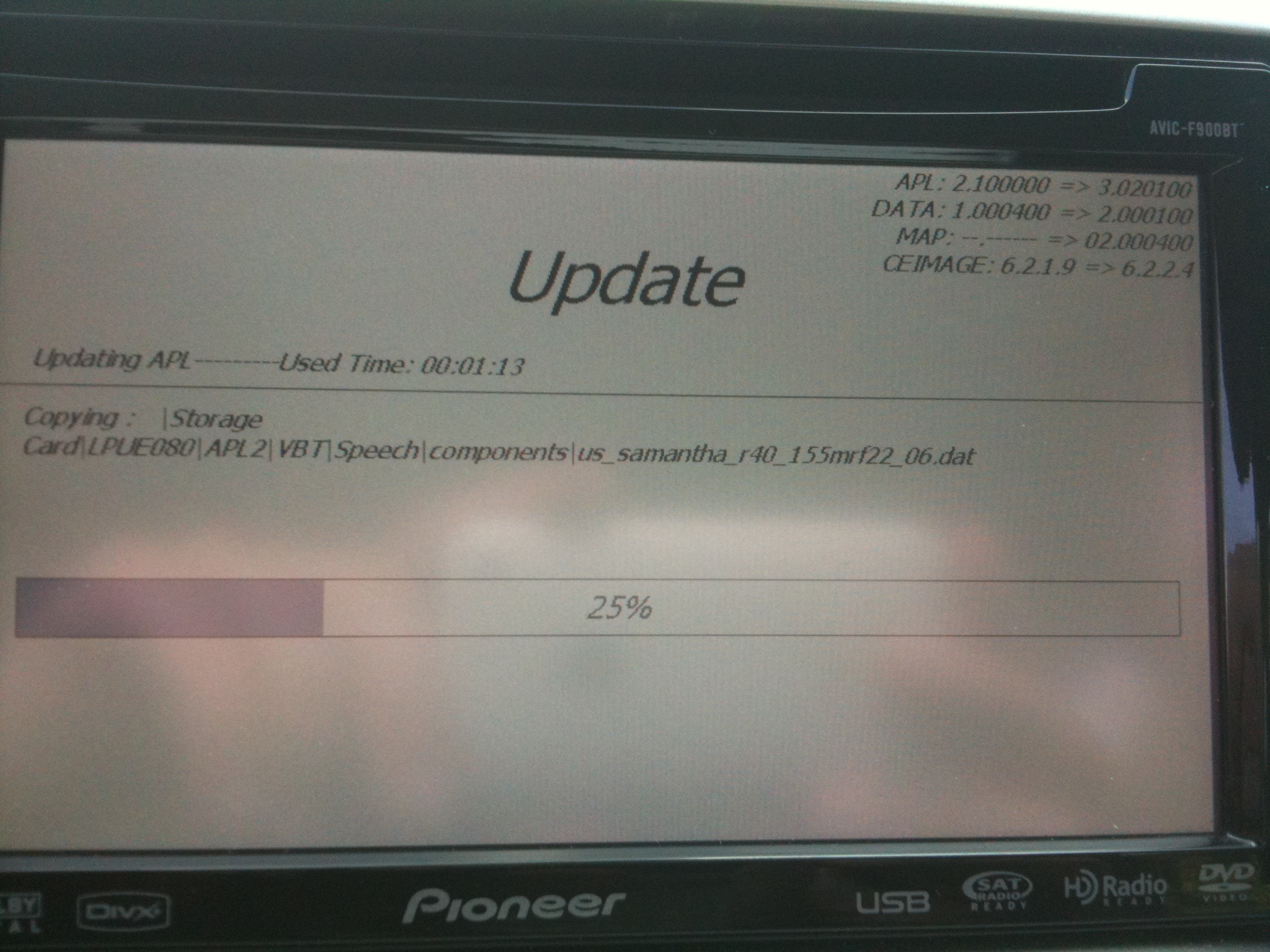
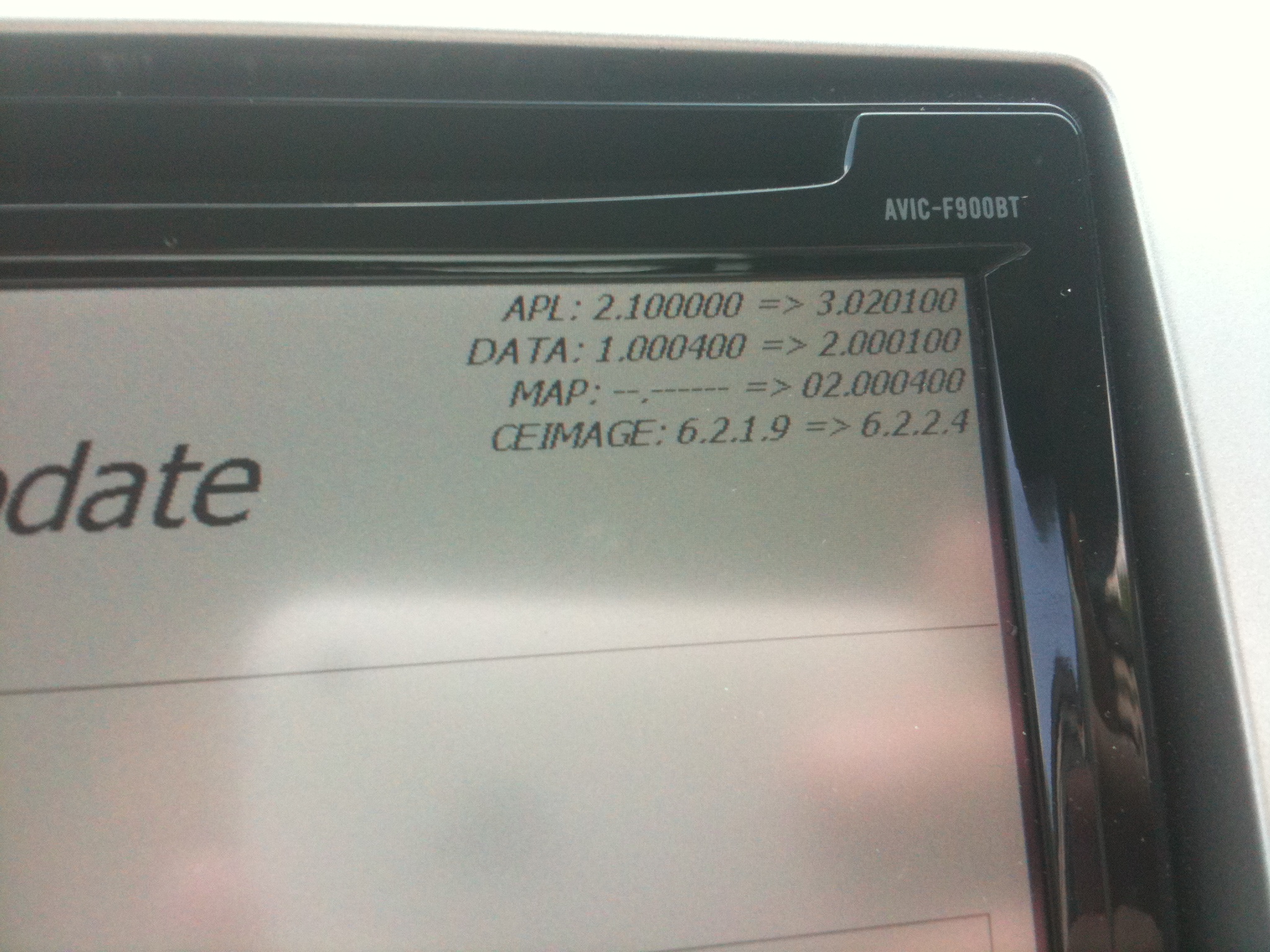
I had to wipe out the x series update and drag/drop copy the 2.006 backup. It went without a hitch here are some photos.


it takes more like an hour from starting the update to finish, now add 20 mins to that if you have to drag the original 2.006 over first.


As you can see this update actually has a newer version of windows ce then the current x series version which is interesting.

post-14414-12872758502691_thumb.jpg

post-14414-12872758507543_thumb.jpg

post-14414-12872758511899_thumb.jpg

post-14414-1287275851638_thumb.jpg

Posted Aug 15, 2009 · 17:12 UTC#153

Boy, if pioneer had their shit together, i could actually view those screens in person, but oh no, i'm stuck with half an update for the weekend, who knows, longer. Ican't believe it, if it is not one thing its another.

Posted Aug 15, 2009 · 17:45 UTC#154

Hi,


I got this error too when trying to get the password this morning.


The Pioneer website returns "Error Code 1. Input Device Number is not correct" .

There is no explaination of the error code.

I am entered exactly the device code my F90BT unit is reporting with all letters in CAPS.

Posted Aug 15, 2009 · 18:08 UTC#155
Hi,


I got this error too when trying to get the password this morning.


The Pioneer website returns "Error Code 1. Input Device Number is not correct" .

There is no explaination of the error code.

I am entered exactly the device code my F90BT unit is reporting with all letters in CAPS.

Try this thread viewtopic.php?f=32&t=26512&start=15

Where the issue is discussed at length.

Posted Aug 18, 2009 · 20:25 UTC#156

Finally got mine in the mail. Started the update right away. Surprised how "quick" it was considering how others have said it took them 40+ minutes. Mine didnt take that long at all I dont think. Or maybe it just seemed faster. Anyhoo..... Update went great. No issues at all. I'll have to play around with it later though. Only listened to the radio so far(and click through menus) .


Also, I've heard theres another update or something on pioneers site? True? Can someone tell me if I have the absolute latest updates. My Map version is 0.2.000400 and system version 3.020100. 8)

Posted Aug 18, 2009 · 23:54 UTC#157
I just did the update, the update won't recognize the 3.01 version from the x series. it simply bypasses it and starts up as normal.


I had to wipe out the x series update and drag/drop copy the 2.006 backup. It went without a hitch here are some photos.


it takes more like an hour from starting the update to finish, now add 20 mins to that if you have to drag the original 2.006 over first.IMG_0744.JPG


As you can see this update actually has a newer version of windows ce then the current x series version which is interesting.

What all has to be put back to the old version? Can we get by with just putting the old WINCEIMG files back on (update with format) thus leaving ""My Flash Disk" empty, or do you think its best to copy Flash Disk back as well?


Also, it shouldnt be an issue to go back to original 2.0 instead of 2.006 should it (assuming I use the proper testmode files to copy Flash Disk)?

Posted Aug 19, 2009 · 00:11 UTC#158

If you hacked the x series to get the 3.0 update you can force the real update by changing i believe the LPUE080APL.HTM file since it seems to look there for the version. I had to do that since it wouldn't pick up the update disk #2 until I changed all the LPUE080 files on mine and started the whole process over.

Posted Aug 19, 2009 · 00:39 UTC#159
If you hacked the x series to get the 3.0 update you can force the real update by changing i believe the LPUE080APL.HTM file since it seems to look there for the version. I had to do that since it wouldn't pick up the update disk #2 until I changed all the LPUE080 files on mine and started the whole process over.

And only that file? What about the LPUE080DATA and LPUE080PLT html files? And yes, I did the hacked x series update on my F90BT.

Posted Aug 19, 2009 · 01:19 UTC#160

I had no hacks on my system. It installed in 41 minutes. No problems at all with the install. I retained my splash screen and all settings. :D


24 hours and no crashes yet. The beep sound is much better. Phone connection with bluetooth is fine. Ipod control is the same, maybe a little bit faster on song changes. If the ipod is selected when the car is turned on, it begins playing in a second or two.


So far I am glad that I spent the $60, only time will tell.

Posted Aug 19, 2009 · 15:57 UTC#161

After installing my update I find that my boot time is a little longer however the music from the radio, hd radio, cd play right away, iPod plays about the same as it did before. Touch screen is much more responsive and MSN Direct displays content within a couple minutes, maybe faster. MSN before was hit or miss on the weather and movies, now weather and movie info comes up right away as well as the gas station prices and traffic. The new addition of stocks, news and local events are nice all of which display content right away. As much as it pains me to say, Microsoft did a good job on the firmware update for the MSN Direct kudos. Note: after firmware update you have to manually select the re-rout traffic other wise it will calculate the rout through traffic and wont avoid traffic. BTW Samantha sounds a little better, she is not as annoying as before but she still give way to much information when giving directions but I can live with it. My backup camera always worked before for me but I have noticed that it goes into backup mode the second i put the car in reverse.

The only grip I have is the slow boot time and in my case it is actually slow than it was before. Pioneer should have addressed that on this update. That was the number one problem with the F-Series. Also the HD presets still don't display the station id... really? The HD unit has the ability to display the station id but Pioneer seemed to over look that on this update.


Anyway this is what I have noticed on my system.

Posted Aug 20, 2009 · 18:14 UTC#162

Just installed 3.0 on my F90BT (no hacks.) Zero install issues. Took about 50 minutes. All of my navi favorites and history were gone. My phone connected without having to re-pair it. The touch screen is MUCH more responsive. Boot time is about the same but audio sources seem to activate quicker. Haven't played around with much else yet.


Overall, it seems like a winner for me.

Posted Aug 20, 2009 · 20:31 UTC#163

i found instructions on how to revert back to 2.0 which i have done. I then tried to reinstall 3.0 and it did the same thing, at 3% if stopped loading. I had to revert back to 2.0 again. dont know what to do now my upgrade that i paid for seems to be worthless. Any suggestions?

Posted Aug 20, 2009 · 20:36 UTC#164

Contact pioneer and tell them to send you new sd cards.

Sounds like the ones you got are borked.

Maybe they could even give you a link to download the files .


Off the wall suggestion, and probably won't help your issue, but you could try running chkdsk on them.

Posted Aug 20, 2009 · 21:32 UTC#165

just talked to pioneer support and they told me that, if the unit has been hacked or the safety features altered such as the parking brake bypass, the upgrade wont load. has anybody

else heard this from pioneer? all i have done to this unit is the P. B. bypass, could this be causing my problem with the update. I find this hard to believe since so many people with hacked units seem to have no problems whatsoever.

Posted Aug 20, 2009 · 21:37 UTC#166

So the update finally was fully successful, with all successful messages.

Now first drive after update...and it boots fine to splash screen, then a black screen with "warning: Images may be reversed". I can control the media/audio from the steering wheel controls, but nothing happens when I touch the screen or press the buttons on the unit. *sigh* Im permanently stuck on this black screen at all times.


Any suggestions? I've never used a backup camera on this unit, and the only mod is the hardwire bypass.

Posted Aug 20, 2009 · 21:49 UTC#167
just talked to pioneer support and they told me that, if the unit has been hacked or the safety features altered such as the parking brake bypass, the upgrade wont load. has anybody

else heard this from pioneer? all i have done to this unit is the P. B. bypass, could this be causing my problem with the update. I find this hard to believe since so many people with hacked units seem to have no problems whatsoever.


That can't be true. I had not one single problem upgrading to 3.0 with the parking brake bypass and it works flawlessly aside from a couple annoyances that I posted in another thread. The Pioneer reps probably say that to discourage people from altering their product.

Posted Aug 20, 2009 · 22:42 UTC#168
just talked to pioneer support and they told me that, if the unit has been hacked or the safety features altered such as the parking brake bypass, the upgrade wont load. has anybody

else heard this from pioneer? all i have done to this unit is the P. B. bypass, could this be causing my problem with the update. I find this hard to believe since so many people with hacked units seem to have no problems whatsoever.


I had no problems upgrading with the hardware bypass in place. But other than the that, I was hack-free.

Posted Aug 20, 2009 · 23:02 UTC#169
just talked to pioneer support and they told me that, if the unit has been hacked or the safety features altered such as the parking brake bypass, the upgrade wont load. has anybody

else heard this from pioneer? all i have done to this unit is the P. B. bypass, could this be causing my problem with the update. I find this hard to believe since so many people with hacked units seem to have no problems whatsoever.


No, that's not the issue. I too have the hardwire brake mod and I upgraded just fine. I did do the 2.06 upgrade prior to the 3.0. Try this, go to pioneer and update your system to the 2.06 version and then try the upgrade to 3.0.

Posted Aug 20, 2009 · 23:20 UTC#170
So the update finally was fully successful, with all successful messages.

Now first drive after update...and it boots fine to splash screen, then a black screen with "warning: Images may be reversed". I can control the media/audio from the steering wheel controls, but nothing happens when I touch the screen or press the buttons on the unit. *sigh* Im permanently stuck on this black screen at all times.


Any suggestions? I've never used a backup camera on this unit, and the only mod is the hardwire bypass.

Yes, go back in and review the backup camera settings, there's a known bug where it gets stuck in an unsupported setting of neither on nor off that causes a black screen.

Posted Aug 21, 2009 · 00:17 UTC#171

Thanks...but how do I now get to the settings to review them...if I cant get past the black camera warning screen in any fashion?

Posted Aug 21, 2009 · 18:24 UTC#172

received my enormous box for the cd jewel case inside....nice pioneer.


ill probably install it this weekend, hopefully doesnt brick the unit.

Posted Aug 21, 2009 · 20:26 UTC#173

Update successful. After running the X series 3.0 image I went back to 2.0 before installing the official 3.0 upgrade. Got an error message at 29%, hit retry and all was fine.

Posted Aug 22, 2009 · 14:55 UTC#174
Thanks...but how do I now get to the settings to review them...if I cant get past the black camera warning screen in any fashion?


Finally had to just re-install the entire 3.0 from one of the threads in this forum. then I was able to get to the main menus, and turn the backup camera setting to "off". This was just poor coding from the beginning. First...the code should NEVER allow you to get permanently stuck on ANY screen without being able to get past it. Second...the update should have never just turned "on" the backup camera function on its own.


Anyways..problem solved.

Posted Aug 22, 2009 · 19:31 UTC#175

Install went fine, but now i have a reboot prob. Its strange, if my first phone call i make after boot up is made useing VR the system will reboot, and if i try after reboot using VR it will reboot again. Now if i make a call useing the contacts screen for the first phone call there are no probs and i can ure VR after that. I just cant ure VR to make the first phone call after the system starts up. :?: I do not have an ipod so i cnat try the VR on that to see if it reboots. Any suggestions would be helpful.


P.S. I have tried updateing the BT software.

Page 7 of 7