Just plain flat out awesome.
Posted Aug 22, 2009 · 02:22 UTC#301
Just plain flat out awesome.
havnt updated to the newest but looking good. Do you know if setting the "home" address works now?
I was unable to save an address under the home key. it would just take me in circles
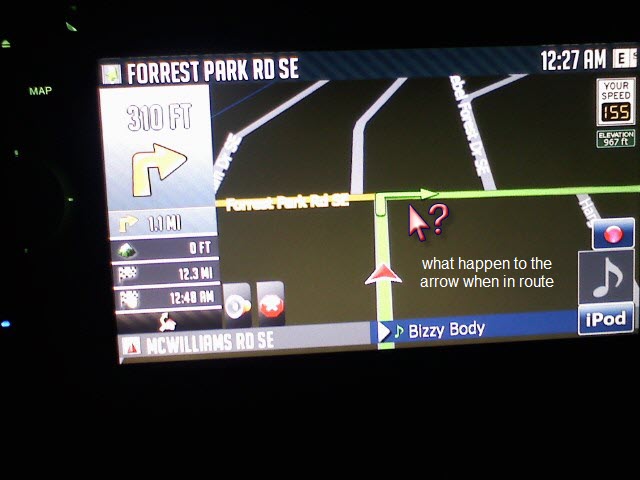
I notice your mod dont have the 3.01 navigation in route arrow
Hey IDT, Thanks for all your mods...it's probably thanks to you that I haven't punched this thing in the face yet. I've had a couple of issues with this release I'm hoping you could help with...
1- On the multi route map all of the routes are the same color (green), making it a little difficult to pick and choose.
2- I can't search POI's by entering through the POI icon on my map, actually, I can search-but nothing populates. POI search does work properly if I navigate through the top menu.
Thanks again!
n
havnt updated to the newest but looking good. Do you know if setting the "home" address works now?
I was unable to save an address under the home key. it would just take me in circles
yes
Hey IDT, Thanks for all your mods...it's probably thanks to you that I haven't punched this thing in the face yet. I've had a couple of issues with this release I'm hoping you could help with...
1- On the multi route map all of the routes are the same color (green), making it a little difficult to pick and choose.
2- I can't search POI's by entering through the POI icon on my map, actually, I can search-but nothing populates. POI search does work properly if I navigate through the top menu.
Thanks again!
n
1)you have to use other schemes to have different color for the multidraw
2)i'll look into it
IDT,
Your SYS.txt ha the following settings...
3d_max_tiltlevel=10000
3d_max_zoomlevel=1500
How do these numbers work? If I wanted to have something between your angle and the default system angle, what would be the value or direction to change the number on the tilt? Your current setup is almost half the screen showing sky and I would like to have the sky takes up 1/3 or less. Also, if I wanted to zoom in the equivalent of pushing up on the knob 4 times, do you know what that would be?
Thanks,
-K
3d_max_tiltlevel - having a higher setting makes you tilt all the way up
3d_max_zoomlevel - having a lower setting makes you zoom in more
just play withose values and you'll easily figure out the settings that would work for you
thanks for the donation bro
I notice your mod dont have the 3.01 navigation in route arrow
i'll check it out, AFAIK the mod has it, it's just not the same one
I notice your mod dont have the 3.01 navigation in route arrow
1- On the multi route map all of the routes are the same color (green), making it a little difficult to pick and choose.
i'm going to work on my gfx folder to add bmp's for the sky and also include schemes on the next release
2- I can't search POI's by entering through the POI icon on my map, actually, I can search-but nothing populates. POI search does work properly if I navigate through the top menu.
i can't reproduce the problem bro, could you explain further, i think the difference is that on the top menu you can't do poi search via poi name,
IDT,
This is a awsome hack and work ok but have one problem and have this with all 3.xxx mod hacks.
When hack installed my trafic info in navigation screen is not working anymore.
It is not finding any stations so no trafic info will be displayed.
When check just radio the normal TMC is available.
The org DATA file is not gving any problem, have others same problem here?
Iám using:
* 3.01 firmware(Europe) inc EZRider 3.01 hack
* TeleAtlas maps 2009
* Mod IDT 3.0 V3
IDT,
This is a awsome hack and work ok but have one problem and have this with all 3.xxx mod hacks.
When hack installed my trafic info in navigation screen is not working anymore.
It is not finding any stations so no trafic info will be displayed.
When check just radio the normal TMC is available.
The org DATA file is not gving any problem, have others same problem here?
Iám using:
* 3.01 firmware(Europe) inc EZRider 3.01 hack
* TeleAtlas maps 2009
* Mod IDT 3.0 V3
could you check this part of your original sys.txt and compare it with the one included in my mod pack
[device]
This is a great mod. I am still learning what everything does but so far I love it.
Some beer money on its way!
need some assistance with my new onmap icons. I put them into CMH928 file and now the icons look like **it. Do I have to make adjustments in my nav.ui file? I really like them better than what I have and would love to know why they look terrible.

I notice your mod dont have the 3.01 navigation in route arrow
take a look at the attached picture
interestingly enough I have BOTH arrows after editing my sys.txt. I added this line.
[debug]
speedcam_enabled=1
skip_eula=1
enable_roadshadow=1
enable_buildings=1
restart_mode_in_file=1
traincrossing=1
show_lane_info=1
show_arrows_on_route=1
I can't post a screen shot now but it's not much to look at anyway. I was just playing around.
This is a great mod. I am still learning what everything does but so far I love it.
Some beer money on its way!
thank you
need some assistance with my new onmap icons. I put them into CMH928 file and now the icons look like **it. Do I have to make adjustments in my nav.ui file? I really like them better than what I have and would love to know why they look terrible.
if you're referring to the icons with the black background it means that there's something wrong with their alpha layer
need some assistance with my new onmap icons. I put them into CMH928 file and now the icons look like **it. Do I have to make adjustments in my nav.ui file? I really like them better than what I have and would love to know why they look terrible.
if you're referring to the icons with the black background it means that there's something wrong with their alpha layer
which settings do i need to mess with in which file please?
need some assistance with my new onmap icons. I put them into CMH928 file and now the icons look like **it. Do I have to make adjustments in my nav.ui file? I really like them better than what I have and would love to know why they look terrible.
if you're referring to the icons with the black background it means that there's something wrong with their alpha layer
which settings do i need to mess with in which file please?
you have to edit the bmps themselves, send me the bmps and i'll edit it for you,
I notice your mod dont have the 3.01 navigation in route arrow
take a look at the attached picture
I fix it by using your data zip only, i didn't use the sys.txt file
which settings do i need to mess with in which file please?
you have to edit the bmps themselves, send me the bmps and i'll edit it for you,
thanks man you are the best
if you're referring to the icons with the black background it means that there's something wrong with their alpha layer
which settings do i need to mess with in which file please?
you have to edit the bmps themselves, send me the bmps and i'll edit it for you,
i borrowed some from you and some from cmh928 and then modified them a little.
need some assistance with my new onmap icons. I put them into CMH928 file and now the icons look like **it. Do I have to make adjustments in my nav.ui file? I really like them better than what I have and would love to know why they look terrible.
if you're referring to the icons with the black background it means that there's something wrong with their alpha layer
they are all screwed up even the ones that dont look screwed up. I replaced all the icons cmh928 had because some of the ones he had were not done well, so i tried to make them look better, so they may be screwed up too.
need some assistance with my new onmap icons. I put them into CMH928 file and now the icons look like **it. Do I have to make adjustments in my nav.ui file? I really like them better than what I have and would love to know why they look terrible.
if you're referring to the icons with the black background it means that there's something wrong with their alpha layer
they are all screwed up even the ones that dont look screwed up. I replaced all the icons cmh928 had because some of the ones he had were not done well, so i tried to make them look better, so they may be screwed up too.
ok try this one
