Search Archive

CNDV-90MT are NOW POSTED

By kryngle · Sep 17, 2009in General💬 628 posts👁️ 97,179 views
Page 16 of 26
Posted Oct 05, 2009 · 14:15 UTC#376
sorry guys... right off their website, map data update only:


Upgrade for the DVD Touch Panel Navigation Systems


Compatible with (AVIC-N5, AVIC-N4, AVIC-N3, AVIC-N2, AVIC-N1, AVIC-D3, AVIC- D2, AVIC-D1, AVIC-88D, AVIC-80D, AVIC-90D, and AVIC-9DVD) when used with Pioneer Touch Panel Display only.


Map data update only.


Model year 2009 TeleAtlas database on 2 DVD Discs featuring nearly 12 million POI, US and Canada coverage (including Alaska and Hawaii).


i just visited the site i have a avic-80 and 90 there is no mention of this working on these units=

Upgrade for the DVD Touch Panel Navigation Systems


Compatible with (AVIC-N5, AVIC-N4, AVIC-N3, AVIC-N2, AVIC-N1, AVIC-D3, AVIC- D2, AVIC-D1) when used with Pioneer Touch Panel Display only.


Map data update only.


Model year 2009 TeleAtlas database on 2 DVD Discs featuring nearly 12 million POI, US and Canada coverage (including Alaska and Hawaii).


2 1/2 days of downloading for nothing


Been away for the weekend, but late Friday I tried SWDW's East ISO to no avail. I too have the AVIC-80DVD. If you google Pioneer's CNDV-90MT page in its cached version, it clearly lists the 80 thru 9 series units. It looks like they updated the description late last week, effectively removing these older units from the list:


http://74.125.93.132/search?q=cache:SD_ ... clnk&gl=us


It looks like the CNDV-80MT is the latest one compatible with our NAVs. Rats.

Posted Oct 05, 2009 · 15:01 UTC#377
Been away for the weekend, but late Friday I tried SWDW's East ISO to no avail. I too have the AVIC-80DVD. If you google Pioneer's CNDV-90MT page in its cached version, it clearly lists the 80 thru 9 series units. It looks like they updated the description late last week, effectively removing these older units from the list:


http://74.125.93.132/search?q=cache:SD_ ... clnk&gl=us


It looks like the CNDV-80MT is the latest one compatible with our NAVs. Rats.


Well that's disappointing news! I have an AVIC-9DVD. I also wasted almost a week downloading the .rar'd version that turned out to be individual files, not an .iso. I'm not sure if the individual files version can be made to work. Has anyone gotten that version to work? Maybe I'm not remembering correctly, but I thought these discs had some kind of simple "copy protection" in the way of 0-byte files that don't copy.


I could be wrong, but I THINK it's possible to get these discs to work on an AVIC-80 and 9-series by adding a few files from the old CNDV-80MT discs. I was able to do this before CNDV-80MT came out. More about that in my old post here:

viewtopic.php?p=118570#p118570


I will give this a try once I am able to download an .iso version that is sure to work. So far we have a torrent to one that is individual files and a torrent to uncompressed .iso's. What's the link for for the rar compressed iso's?

Posted Oct 05, 2009 · 15:35 UTC#378
Well that's disappointing news! I have an AVIC-9DVD. I also wasted almost a week downloading the .rar'd version that turned out to be individual files, not an .iso. I'm not sure if the individual files version can be made to work. Has anyone gotten that version to work? Maybe I'm not remembering correctly, but I thought these discs had some kind of simple "copy protection" in the way of 0-byte files that don't copy.


I could be wrong, but I THINK it's possible to get these discs to work on an AVIC-80 and 9-series by adding a few files from the old CNDV-80MT discs. I was able to do this before CNDV-80MT came out. More about that in my old post here:

http://www.avic411.com/forum/viewtopic. ... 70#p118570


I will give this a try once I am able to download an .iso version that is sure to work. So far we have a torrent to one that is individual files and a torrent to uncompressed .iso's. What's the link for for the rar compressed iso's?


I'm not sure that there's a torrent of a compressed ISO. You might as well start a download of the uncompressed ISO, and use ISO buster to extract all the files to use in the slipstremaming process with the CNDV-80MT. Just so you know, some people had success with the straight files version, and the byte count of that one did match the byte count of the ISO version. Also, I will compare both versions tonight, looking for file instances, not just byte matching.

Posted Oct 05, 2009 · 21:55 UTC#379
when is dvd to Europe? comess? torrent?

up!

Posted Oct 05, 2009 · 22:54 UTC#380
So Who else out there has made a set and how are they working.....

I want to know how my baby's are doing :D:D:D:D:D:D:D


Again if you cant .. don't know how...... or dont want too download them and burn em

PM me and i will ship you one disk east or west for 12.00 or both for 20.00 free ship..


SWDW :D:D:D:D:D:D:D:D:D:D:D:D:D:D:D:D:D:D:D:D:D:D:D:D:D:D:D:D:D:D:D :

West is working great. I downloaded the original RAR'ed file.

Posted Oct 05, 2009 · 23:10 UTC#381

Guys I rar'ed each iso separately and made a torrent containing both of them for you guys having problems!!


http://www.mininova.org/tor/3019050


I will be connecting my 5mb seed in about 2 hours so if it starts slow just give it a little bit


thanks

Posted Oct 05, 2009 · 23:55 UTC#382

still seeding also....doing all i can for you guys

:cool::cool::cool::cool::cool:

Posted Oct 06, 2009 · 02:09 UTC#383

Hey guys i got a fake ass cndv 90 mt disk from some jerk on ebay i did the install but the disk was currupt, i need to know how can i go back to the 80 mt or would a real 90 mt be my fix or just down grade back to the 80 mt???

Posted Oct 06, 2009 · 02:55 UTC#384

i would think a real one would fix it. East or west?

Posted Oct 06, 2009 · 03:24 UTC#385

i can also make working copies for people who cant get it to work 12.00 ea. or 20.00 for both.

email me [email protected]

Posted Oct 06, 2009 · 04:21 UTC#386

Alright guys little bit longer than 2 hours but my seed is up got 2 seeds running


http://www.mininova.org/tor/3019050


It's 5.89gb and got both east and west iso each in separate rar so you can download just one if you need it


Please Seed if you do download!! My torrent clients are set to initial seed so speed relies on you guys sharing (yes that means raising your upload speeds :) )

Posted Oct 06, 2009 · 04:38 UTC#387
Been away for the weekend, but late Friday I tried SWDW's East ISO to no avail. I too have the AVIC-80DVD. If you google Pioneer's CNDV-90MT page in its cached version, it clearly lists the 80 thru 9 series units. It looks like they updated the description late last week, effectively removing these older units from the list:


http://74.125.93.132/search?q=cache:SD_ ... clnk&gl=us


It looks like the CNDV-80MT is the latest one compatible with our NAVs. Rats.


Well that's disappointing news! I have an AVIC-9DVD. I also wasted almost a week downloading the .rar'd version that turned out to be individual files, not an .iso. I'm not sure if the individual files version can be made to work. Has anyone gotten that version to work? Maybe I'm not remembering correctly, but I thought these discs had some kind of simple "copy protection" in the way of 0-byte files that don't copy.


I could be wrong, but I THINK it's possible to get these discs to work on an AVIC-80 and 9-series by adding a few files from the old CNDV-80MT discs. I was able to do this before CNDV-80MT came out. More about that in my old post here:

http://www.avic411.com/forum/viewtopic. ... 70#p118570


I will give this a try once I am able to download an .iso version that is sure to work. So far we have a torrent to one that is individual files and a torrent to uncompressed .iso's. What's the link for for the rar compressed iso's?


I have been able to make this disc work with a avic-80dvd and remote control, non touchscreen, head unit. The 90mt is missing the files for the AVIC-9DVD, 8DVD, 80DVD, 88DVD, 90dvd. You can take these files from the 80mt and put them in the 90mt file system.

08/07/2008  04:21 PM               419 EU010APT.HTM
08/07/2008  04:21 PM         3,342,336 EU010APT.PRG
10/05/2009  11:50 PM    

 
THIS IS A MUST
You have to open the DVI.dat file with windows notepad, or something similar, from the 90mt disc and change the disk version and TP APL version to match the files on the 80mt.  To get the APL version you just open the UC010APT, not the UC010APT.USA and get the APL version.
This is the 90mt east DVI.dat
DISC VERSION       [09007U00]  
FORMAT             [KIWI] 
MAP VERSION        [93]
MARKET VERSION     [uC]
DATE               [090707]
DISC NAME          [CNDV-90MT/UC-1-A]
2DM APL VERSION    [6.000000]
2DN APL VERSION    [3.000000]
1DM APL VERSION    [6.000000]
1DN APL VERSION    [3.000000]
TP APL VERSION     [***]
RC APL VERSION     [***]
DATA COMPANY       [iPC] 


And this is the modified DVI.dat with the 80mt information

DISC VERSION       [08010U00]  
FORMAT             [KIWI] 
MAP VERSION        [93]
MARKET VERSION     [uC]
DATE               [090707]
DISC NAME          [CNDV-90MT/UC-1-A]
TP APL VERSION     [8.000000]
RC APL VERSION     [***]
DATA COMPANY       [iPC] 


You might have to change the EU010APT.PRG and EU010APT to EU010APL.PRG and EU010APL, and change the UC010DTT.ESP .FRA .USA to UC010DAT.ESP .FRA .USA if it does not work at first. I was working with files from the CNDV-40r disc to make my modifies 90mt disc so I can't tell you which one will work, I just know what files are needed to make it work on the avic-8,80,90,9.


You can also delete files from the IDX folder to make the whole 90mt fit onto a standard 4.5gb disc for testing, this is what my IDX folder looked like for testing

05/23/2009  04:57 AM             5,174 AEGSR100.IDX
05/23/2009  04:57 AM            25,706 ARGSR100.IDX
05/23/2009  05:17 AM        56,292,064 ARSSR100.IDX
05/23/2009  12:14 AM           432,472 FMCDT100.IDX
05/23/2009  01:47 AM           200,420 FWYDT101.IDX
05/23/2009  01:47 AM           441,892 FWYDT102.IDX
05/23/2009  01:47 AM           425,828 FWYDT103.IDX
05/23/2009  01:50 AM           556,084 FWYDT104.IDX
05/23/2009  01:52 AM           623,828 FWYDT105.IDX
05/23/2009  02:20 AM           788,116 FWYDT106.IDX
05/23/2009  02:53 AM           450,932 FWYDT107.IDX
05/23/2009  03:21 AM           564,932 FWYDT108.IDX
05/23/2009  03:49 AM           621,700 FWYDT109.IDX
05/23/2009  04:26 AM           765,588 FWYDT10A.IDX
05/23/2009  04:43 AM            68,644 FWYDT10B.IDX
05/23/2009  04:53 AM           337,924 FWYDT10C.IDX
05/23/2009  04:57 AM             4,996 FWYDT10D.IDX
05/23/2009  05:16 AM             7,428 FWYDT10E.IDX
05/23/2009  05:17 AM           367,918 FWYSR101.IDX
05/23/2009  05:17 AM           837,748 FWYSR102.IDX
05/23/2009  05:17 AM           754,892 FWYSR103.IDX
05/23/2009  05:17 AM           990,128 FWYSR104.IDX
05/23/2009  05:17 AM         1,142,782 FWYSR105.IDX
05/23/2009  05:17 AM         1,405,870 FWYSR106.IDX
05/23/2009  05:17 AM           800,634 FWYSR107.IDX
05/23/2009  05:17 AM         1,023,940 FWYSR108.IDX
05/23/2009  05:17 AM         1,131,380 FWYSR109.IDX
05/23/2009  05:17 AM         1,386,838 FWYSR10A.IDX
05/23/2009  05:17 AM           133,504 FWYSR10B.IDX
05/23/2009  05:17 AM           659,352 FWYSR10C.IDX
05/23/2009  05:17 AM            11,350 FWYSR10D.IDX
05/23/2009  05:17 AM            14,318 FWYSR10E.IDX
05/23/2009  01:46 AM               196 ITSDT101.IDX
05/23/2009  01:47 AM               196 ITSDT102.IDX
05/23/2009  01:47 AM               196 ITSDT103.IDX
05/23/2009  01:49 AM               196 ITSDT104.IDX
05/23/2009  01:52 AM               196 ITSDT105.IDX
05/23/2009  02:19 AM        53,716,420 ITSDT106.IDX
05/23/2009  02:52 AM        28,029,332 ITSDT107.IDX
05/23/2009  03:20 AM        21,853,588 ITSDT108.IDX
05/23/2009  03:48 AM        32,359,412 ITSDT109.IDX
05/23/2009  04:25 AM        49,979,876 ITSDT10A.IDX
05/23/2009  04:43 AM               196 ITSDT10B.IDX
05/23/2009  04:53 AM         9,807,860 ITSDT10C.IDX
05/23/2009  04:57 AM               196 ITSDT10D.IDX
05/23/2009  05:16 AM               196 ITSDT10E.IDX
05/23/2009  01:46 AM               336 ITSSR101.IDX
05/23/2009  01:47 AM               336 ITSSR102.IDX
05/23/2009  01:47 AM               336 ITSSR103.IDX
05/23/2009  01:49 AM               336 ITSSR104.IDX
05/23/2009  01:52 AM               336 ITSSR105.IDX
05/23/2009  02:19 AM         4,019,680 ITSSR106.IDX
05/23/2009  02:53 AM         2,865,308 ITSSR107.IDX
05/23/2009  03:20 AM         1,884,912 ITSSR108.IDX
05/23/2009  03:49 AM         2,931,714 ITSSR109.IDX
05/23/2009  04:25 AM         4,711,124 ITSSR10A.IDX
05/23/2009  04:43 AM               336 ITSSR10B.IDX
05/23/2009  04:53 AM         1,225,346 ITSSR10C.IDX
05/23/2009  04:57 AM               336 ITSSR10D.IDX
05/23/2009  05:16 AM               336 ITSSR10E.IDX
05/23/2009  04:57 AM             1,038 ZNSEL100.IDX
05/23/2009  05:16 AM             3,820 ZNSRC100.IDX


I had downloaded the first torrent that was posted and got it to work. This is the post that I have been writing in with information on how to make a modified CDNV-90R disc and the files that are needed.

http://avic411.com/forum/viewtopic.php?f=11&t=10787&start=15


*Edit: You will also need the UC010VDC.USA .FRA .ESP from the VOICETP folder of the 80mt and put them into the VOICETP folder of the 90mt

Posted Oct 06, 2009 · 11:42 UTC#388
Hey guys i got a fake ass cndv 90 mt disk from some jerk on ebay i did the install but the disk was currupt, i need to know how can i go back to the 80 mt or would a real 90 mt be my fix or just down grade back to the 80 mt???


Did your unit go through the update process .. The two blue lines to update the firmware ..If the unit updated

you just need a good set of 90 mt disks .. If not you have to reset everthing

Posted Oct 06, 2009 · 13:47 UTC#389

I got mine to work with my AVIC-9DVD last night (using the rar of just files) and putting the missing files on an SD card. The files don't need to be renamed. Disc version checking is in EU010APT.PRG. It appears to specifically look for a disc version starting with 080*****. I tried to edit this to look for 090*****, but the checksum calculation is different than that for D-series and N-series. No real reason I need to edit that file, I just wanted to see if it's possible to make a disc that works on all units including the 9 and 80-series.

Posted Oct 06, 2009 · 15:04 UTC#390

Ok people i am now dowloading the east 90 mt, once it is done what should i do next?

break it down please :), i got a currupted 90mt disk from cables-n-more3 on ebay, will a good disk make my d 3 work like its sopposed to???

Posted Oct 06, 2009 · 16:14 UTC#391
Ok people i am now dowloading the east 90 mt, once it is done what should i do next?

break it down please :), i got a currupted 90mt disk from cables-n-more3 on ebay, will a good disk make my d 3 work like its sopposed to???


there have been posts about the different software you can use to burn, and several different discs. I used PowerISO and Memorex DVD+R DL. It's just like burning a CD. You just want to burn at the slowest possible speed and make sure to verify the disc. I would think if the disc is correct and verified, you should be fine. i saw one post that said if you were running Windows 7, that you could burn with that and no other software was needed. good luck!!!

Posted Oct 06, 2009 · 16:55 UTC#392

If you like download my torrent, I've got an instructional video included on how to get it working (short and simple I might add) if you only need the east disk just uncheck the west disk in your torrent client


http://www.mininova.org/tor/3019050


Al thanks to SWDW

Posted Oct 06, 2009 · 18:04 UTC#393

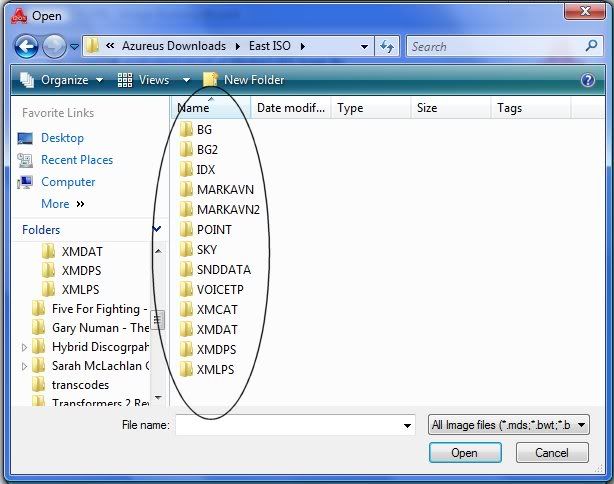
Ok, I downloaded the ISO, now which one of these circled files in the image below do I burn to DVD? I'm using Alcohol 120% and a Memorex DL DVD. This is the only option of files that Alcohol 120% will let me burn.


ISO_files.jpg

Posted Oct 06, 2009 · 18:19 UTC#394

looks like you have opened the file. what you are seeing are the folders. you want to burn the entire ISO file.

Posted Oct 06, 2009 · 18:48 UTC#395

Well just burnt my first east disk and i am glad to say that all went well, used poweriso software and used TDK disk, so if anyone is looking to get east or west without waiting for the download send me a pm and we can talk.

Posted Oct 06, 2009 · 20:53 UTC#396

If i got a corrupted disk, will a good disk make my unit work like its sopposed to?

Posted Oct 06, 2009 · 21:00 UTC#397

hello to all

well it is confirm the cndv-90mt is not for the older units=avic-80,90,9 and so on

here is cut and paste of pioneer reply=


Thank you for contacting Pioneer Electronics, Inc.

No, it does not work with the add-on navigational units.


Thank You,


Pioneer Support Group


--Original Message--

From: [email protected]

Date: 10/04/09

To: [email protected]

Subject: Parts Inquiry|B00002|2137466337[#1270958

Posted Oct 06, 2009 · 21:52 UTC#398

so once the 90 mt is done downloawding what is next, does it have to be converted into some other file or somthing or just burn it with alcohol or image burn??

Posted Oct 06, 2009 · 21:54 UTC#399
I got mine to work with my AVIC-9DVD last night (using the rar of just files) and putting the missing files on an SD card. The files don't need to be renamed. Disc version checking is in EU010APT.PRG. It appears to specifically look for a disc version starting with 080*****. I tried to edit this to look for 090*****, but the checksum calculation is different than that for D-series and N-series. No real reason I need to edit that file, I just wanted to see if it's possible to make a disc that works on all units including the 9 and 80-series.


Did you change all of the references to the disc version 080****? There are three locations that need to be changed and then the DVI.dat files has to be changed. If you do a search in wordpad for 080 within the EU010APT.PRG you will find all three locations


the first two

mainDiscCheck.c ******* 080FFFF    KIWI    080
*****    rb  DVDCD:\DVI.DAT  ATA:\DVI.DAT    SRAM:

Change both 080 to 090


The third location

:%s :Application    :PC card     DISC Version
FORMAT
MAP VERSION
MARKET VERSION
DATE
DISC NAME
2DM APL VERSION
1DM APL VERSION
TP APL VERSION    KIWI    080*****


And then the DVI.dat should be edited to look like this

DISC VERSION       [09007U00]  
FORMAT             [KIWI] 
MAP VERSION        [93]
MARKET VERSION     [uC]
DATE               [090707]
DISC NAME          [CNDV-90MT/UC-1-A]
2DM APL VERSION    [6.000000]
2DN APL VERSION    [3.000000]
1DM APL VERSION    [6.000000]
1DN APL VERSION    [3.000000]
TP APL VERSION     [8.000000]
RC APL VERSION     [***]
DATA COMPANY       [iPC] 

Posted Oct 06, 2009 · 22:07 UTC#400

What is the best program to burn the 90 mt disk?

and where can i find it on the internet?

Page 16 of 26