Search Archive

Abb's New 'CHROME THEME' --RADICAL UPDATE V1.5--May 23

By abb1 · Mar 02, 2010in Completed Mods/Themes💬 130 posts👁️ 23,954 views
Page 5 of 6
Posted Mar 19, 2010 · 01:48 UTC#101
looks nice but where can i download yours mod, thanks


you can download works done by Abb1 here viewtopic.php?f=64&t=29179 but he has not released his chrome theme mod. He is still testing it but I think he may release it soon if you read back over this thread..

Posted Mar 19, 2010 · 03:34 UTC#102
looks nice but where can i download yours mod, thanks


you can download works done by Abb1 here http://avic411.com/forum/viewtopic.php?f=64&t=29179 but he has not released his chrome theme mod. He is still testing it but I think he may release it soon if you read back over this thread..

Actually, the Chrome Theme can be downloaded on the first post. It is only for the Main and AV section though. The Nav part I am still working on, actually, it is pretty much completed, I am just doing a few finishing touches. When I release the Nav section for this mod, I will put it in a new thread as there are too many testing pics in this thread

Posted Mar 20, 2010 · 20:46 UTC#103

Well, the Nav mod is now totally in its final stage and it will be up shortly. It looks different from the beta version as I have made a few changes that needed it. I just want to thank those that tested it and you can download the final version by the same link as my server has been updated.

Posted Mar 20, 2010 · 21:43 UTC#104

Very good abb ,thanks for your hard work :mrgreen:

Posted Mar 22, 2010 · 11:47 UTC#105

Just let us know when its up, i can't wait to try it!! :):)

Posted Mar 22, 2010 · 16:20 UTC#106
Just let us know when its up, i can't wait to try it!! :):)

Just when I thought it was all done, I found a few small glitches that needed to be fixed. It will be up shortly, I want to make sure that it is 100% though, as like I said, I don't have time to troubleshoot

Posted Mar 22, 2010 · 20:11 UTC#107
Just let us know when its up, i can't wait to try it!! :):)

Just when I thought it was all done, I found a few small glitches that needed to be fixed. It will be up shortly, I want to make sure that it is 100% though, as like I said, I don't have time to troubleshoot


Abb.Just want to say thanks for all your work.Now that we have lost IDT and other modders have gone very quiet :) It is great you are developing into a modder in your own right.

Posted Mar 25, 2010 · 23:42 UTC#108

Well, a buddy of mine said that my Chrome theme was awesome, but it had too much of a resemblance to my other themes. I dedcided to change that. You can download the update on the original download on the first post and follow the same instructions. Please give me your comments as that is what is keeping me posting these mods, otherwise, I would just be doing these for myself. Here are some pics


New Ipod Theme - No More Wheel!


cr10.jpg


New Icons


cr11.jpg


More new Icons


cr12.jpg


New Title Icons


cr13.jpg

Posted Mar 26, 2010 · 14:22 UTC#109

Holy Shit my friend, I thought this was uncharted territory? I didn't think you could change the radio side. This is an awesome upgrade to your theme. You always impress me, bro.


It leads me to ask something I asked Alex awhile back, if you can change the wheel can you also add buttons above the Playlists, Genres, Artists buttons to toggle thorough the EQ presets? Alex said no and I'm sure he is correct but I wanted to throw it out there because I hate having to toggle the one "EQ"button to go from Powerful to Vocal or all the way through to Super Bass. If you could add the buttons over the top of the existing ones it would be very convenient and much safer, I think.


post-30542-12872762144938_thumb.jpg

Posted Mar 26, 2010 · 14:26 UTC#110

Or even if you could make the EQ button like your menu button on the nav side, where it would bring up the buttons for each preset for 5 seconds and then the disappear, that would be mind blowing, although it looks like there is room above the existing buttons, if the new ones have a small footprint.

Posted Mar 26, 2010 · 14:32 UTC#111

and while you are on your radical streak of geniusness I would also like to be able to;


press the album art or album name and bring up all songs on the album

press the artist's name to bring up all albums by the artist


this would do for now... :mrgreen:

Posted Mar 26, 2010 · 14:40 UTC#112
Holy Shit my friend, I thought this was uncharted territory? I didn't think you could change the radio side. This is an awesome upgrade to your theme. You always impress me, bro.

Sadly Alex is correct, you can't create new features in the APL\* apps yet. You can only change the way the radio controls look by editing the pictures inside APL\image.res. You can't create new buttons or change the way the existing buttons behave without changing the code inside the programs themselves (no event handlers).

Posted Mar 26, 2010 · 15:16 UTC#113
Holy Shit my friend, I thought this was uncharted territory? I didn't think you could change the radio side. This is an awesome upgrade to your theme. You always impress me, bro.

Sadly Alex is correct, you can't create new features in the APL\* apps yet. You can only change the way the radio controls look by editing the pictures inside APL\image.res. You can't create new buttons or change the way the existing buttons behave without changing the code inside the programs themselves (no event handlers).


Ahh, I was afraid of that. Sad news but thanks for the reply.

Posted Mar 26, 2010 · 16:07 UTC#114

Hey Abb,

I know you dont use the Voice Command feature, but can you point me to where i can find the button code for the Volume dial. I have been trying to find the mapping for the dial button when pushed, it loads up the Voice Command option. I wanted to change that feature to the phone icon you have on the map on a long hold.


Just not sure where i would find that code that loads the Voice Command when its pushed.


Hope you can help...thanks

Posted Mar 26, 2010 · 17:10 UTC#115
Hey Abb,

I know you dont use the Voice Command feature, but can you point me to where i can find the button code for the Volume dial. I have been trying to find the mapping for the dial button when pushed, it loads up the Voice Command option. I wanted to change that feature to the phone icon you have on the map on a long hold.


Just not sure where i would find that code that loads the Voice Command when its pushed.


Hope you can help...thanks

I do not think that is doable, as the voice command section is in an entire different section of coding that I dont believe can be linked to the NAV section

Posted Mar 26, 2010 · 19:25 UTC#116

This theme will work on z110bt??

Posted Mar 27, 2010 · 00:14 UTC#117
This theme will work on z110bt??

No, The Z110 is not moddible, The only Avics that can be modded are the X series (except the new X920BT) and the F series. If the Z110 was capable of being modded, I would own one :)

Posted Apr 02, 2010 · 20:43 UTC#118

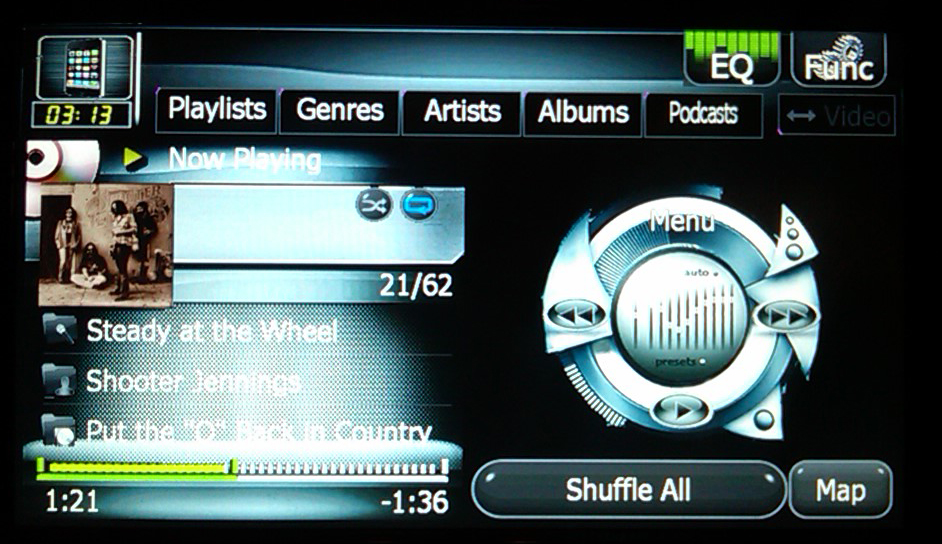
I finally got around to applying this theme and it more than exceeded my expectations. It looks great on the AVIC and matches my black interior better than anything I had in the past. Thanks abb, great work. That iPod wheel image makes it look actually functional and it reminds me of an old WinAmp skin I use to have. Really impressive. My unit is on that iPod screen 90% of the time so I love it. Every time I make an update to this unit I feel like I bought a new car, this update is by far the most visible change I've made so far.


One hopefully small request: Image 746_32K_AV-106_32b is the iPod background image for all of the song text. When I view the image by itself on my computer the glass bubble emphasis towards the bottom looks amazing and gives the whole image a 3D feel. This effect, though, is lost on the AVIC screen since the resolution simply does not do the image justice and the position between the album text and the progress bar doesn't look right because only the white, top portion of the glass is visible. Everything else is hidden behind the progress bar. The image you posted on the first page shows this.


Would you mind posting this image without that glass emphasis at all? I think it will look better with just the textured background and darkened across the bottom, like a reverse lighting, to make the text stand out better. I can add it to the image.res myself, but I don't think I can make this change using that bmp image. The background around it is too detailed.


Thanks again for the time and work you put into this abb.

Posted Apr 03, 2010 · 00:08 UTC#119
I finally got around to applying this theme and it more than exceeded my expectations. It looks great on the AVIC and matches my black interior better than anything I had in the past. Thanks abb, great work. That iPod wheel image makes it look actually functional and it reminds me of an old WinAmp skin I use to have. Really impressive. My unit is on that iPod screen 90% of the time so I love it. Every time I make an update to this unit I feel like I bought a new car, this update is by far the most visible change I've made so far.


One hopefully small request: Image 746_32K_AV-106_32b is the iPod background image for all of the song text. When I view the image by itself on my computer the glass bubble emphasis towards the bottom looks amazing and gives the whole image a 3D feel. This effect, though, is lost on the AVIC screen since the resolution simply does not do the image justice and the position between the album text and the progress bar doesn't look right because only the white, top portion of the glass is visible. Everything else is hidden behind the progress bar. The image you posted on the first page shows this.


Would you mind posting this image without that glass emphasis at all? I think it will look better with just the textured background and darkened across the bottom, like a reverse lighting, to make the text stand out better. I can add it to the image.res myself, but I don't think I can make this change using that bmp image. The background around it is too detailed.


Thanks again for the time and work you put into this abb.

I see what you mean! I overlooked that. I did a fix. Just redownload the original mod

Posted Apr 03, 2010 · 00:48 UTC#120

That looks perfect now, thanks for the quick fix.

Posted Apr 30, 2010 · 03:35 UTC#121

New update with graphical enhancements and button fix so that the buttons no longer disappear when pushed. V1.2 can be downloaded from first post. Pics have also been updated on first post. Please leave comments!

Posted May 01, 2010 · 17:39 UTC#122

abb i put in your theme update, but my main screen font did not change. my 2 pictures did though. what could be wrong?

Posted May 01, 2010 · 21:31 UTC#123
abb i put in your theme update, but my main screen font did not change. my 2 pictures did though. what could be wrong?

The font is not part of the update as it is NOT in the image file. That is a font that I have installed in the Windows system. There is a thread in the Hacks/Mods section that explains how to do it

Posted May 23, 2010 · 23:53 UTC#124

New update is ready to download. The link is also provided in my Nav mod, as well as in the first post. Please give me feedback. Thank you

Posted Jun 06, 2010 · 02:15 UTC#125

Hey Abb,


Great work with the AV and NAV mods. I am using both and currently love them. Your NAV schemes are also a wonderful treat for the eyes.


One small thing though, for the AV screen, I find that the background that holds the music text should have some better contrast. With the text being white and the background also having white in it, it makes it a little hard to read the text sometimes. I know this is your mod and all, but can I suggest using a dark solid colour for the background instead?


If you're already satisfied with it and don't wish to change it, I'll understand. But could you kindly tell me the filenames I should look for to change in the image.res.


Many thanks for your hardwork Abb.

Page 5 of 6