sorry man
I had to get rid of the speedlimit sign in the splitscreen alltogether. There just wasnt any space  . You can try it out again, I have updated the download link
sorry man
I had to get rid of the speedlimit sign in the splitscreen alltogether. There just wasnt any space . You can try it out again, I have updated the download link
will do and let you know
sorry manI had to get rid of the speedlimit sign in the splitscreen alltogether. There just wasnt any space
I drove it around. It looks good.. Got stopped by a cop in my pajamas at 1:00 am with no licenses or insurance card but after i showed him all the pics of the mods and explained that was why i was weaving at 8 MPH he said it was petty cool and let me go. 
I drove it around. It looks good.. Got stopped by a cop in my pajamas at 1:00 am with no licenses or insurance card but after i showed him all the pics of the mods and explained that was why i was weaving at 8 MPH he said it was petty cool and let me go.

BorisM wrote:
Another thing, mostly for fun...
If you put
content="Storage Card\IGO\Content"
in the [folders] section of sys.txt and copy content folder form th? flash disk, you can run iGO with data off of the storage card... rather handy if you want to experiment with different maps, schemes etc..
I had to make some changes to this to work on my 3.02, It was the folder being named IGO that caused my problem. It needs to be IGO8.
This should be updated to read;
If you put
content="Storage Card\IGO8\Content"
in the [folders] section of sys.txt and then copy the content folder form M? Flash Disk, to the IGO8 folder on your SD card you can run iGO with data off of the storage card... rather handy if you want to experiment with different maps, schemes etc..
FROM I.D.T.;
Now in your formatted SD card, create a folder and name it as iGO8, and that's the place where you would want to copy the content folder form the flash disk, i suggest that instead of moving the content from just copy it and paste it in the said folder.
FROM MYSELF
I would then rename the content folder on the flash disk to something else like "content2" or "no_content" so you know the unit has to be reading maps, languaes, poi's, etc.. from flash disk. If it works for you you would then have the option to delete the folder off the flash disk entirely to free up space. Make sure you have a good backup!!
Now to get the unit to read all the maps and stuff from the IGO8/content folder open up the sys.txt and change the Switchmap code at the bottom to this code provided by I.D.T.
[switchmap]
changer="\My Flash Disk\APL2\iGo\Extension\MapChanger\MapChanger.exe"
1=",map_ta,\Storage Card\iGO8,\My Flash Disk\APL2\iGo,"
2=",map_nt,\Storage Card\iGO8,\My Flash Disk\APL2\iGo,"
This worked for me, I have the complete contents of the content folder off my flash disk and on a SD card.This is for all maps and content to be on the sd card, if you want just Navteq maps on SD card and everything else on the flash disk read beginning halfway down page 23 of this thread
viewtopic.php?f=64&t=28376&hilit=content%3D+Storage+Card
I did not post this solution because I did not use it and cannot say it works for me but the answers should be there.
I have not had a chance to road test it to see if there are any adverse affects from this but as of now I have it working and it works great as far as reading both maps, poi's, displaying signboards, etc...
I have simulated several routes & all of this works well sitting at home but I want to do a good 1 hour road test to see if there are any issues.
All of this info was provided by BorisM, I.D.T. & others, I am just tying to collect it & get it all in one post. Hope this helps someone. It is what worked for me....so far...
Tried very hard to be accurate in using the members quotes to be sure instructions are clear but I did edit a few lines of text for the sake of clarity, if there is any misinformation here I apologize and welcome corrections from all gurus. 
I drove it around. It looks good.. Got stopped by a cop in my pajamas at 1:00 am with no licenses or insurance card but after i showed him all the pics of the mods and explained that was why i was weaving at 8 MPH he said it was petty cool and let me go.
LOL. It's one to dream about the mods but another to be driving in your pajamas to test it. Sleep driving, ha. Remember to be careful driving and playing with the unit. It's too easy to get distracted.
yes, 'tis a lot easier to sit in yard an simulate a route but nobody laughs at those stories. I honestly thought he was gonna do a field sobriety on me. No ID at all, no way to prove I owned the vehicle, if not for all the pics on my berry of the truck and the nav screen I would have been tazed like Gaylord Focker.
That's just priceless!!
Well, the entire idea that I wanted to create this NAV mod based on IDT's Skin3 was that I wanted to get rid of all those icons, have a neat and tidy screen, and at the same time have ALL the latest features such as the map changer, AV hide, etc.. Making smaller icons and moving them to the top did the trick but I found it still to crowded. So, what I did was to hide all the icons with a 'MENU' button located under the time (with thanks to Alex for helping with the collapsing menu). The icons now will permanently be hidden resulting in a clear uncluttered screen. pressing the 'MENU' button will show the icon for 5 seconds every time it is pressed leaving full fuctionality for all the features. Here are some pics. For those that are testing this out, please redownload the original link as it is updated and leave me your comments, good or bad.
Driving normally with hidden icons and hidden AV

Pressing the 'Menu' button to drop down the icons

Navigating with hidden icons

Press the 'MENU' button while navigating to show icons

B.E.A.U.T.I.F.U.L
You keep blowing my mind, my friend?
Shit, add a longclick comand to the menu button to make it all go away, just the navscreen, maybe press the moon to bring it all back....
I'm just kidding, this is perfect...but so was the last one. I am definitely keeping both versions.
And!!! (as i pat myself on the back) by editing the sys.txt, the data file, etc.. I was able to seamlessly switch over and keep all my settings as well as maintain all conten folder data (both sets of maps, schemes, etc..) being read from SD.
Slowly learning
P.S. My wife is gonna leave me over this radio. She say the only time she see me is from the kitchen window, through my windshield, silhouetted by the romantical glow of my avic
Incredible!! Can't wait to try it!!!
Just wanted to thank Abb for his work....i was reluctant to hack my unit but glad i eventually did....the unit is so much better, thanks again mate.
Just wanted to thank Abb for his work....i was reluctant to hack my unit but glad i eventually did....the unit is so much better, thanks again mate.
I'm right with you man, Abb1, Diaftia, IDT, N-S-E-W, BorisM, DpDurst, VBLUE42, (sorry for ones I skipped, I don't know everyone yet) all of you guys age great. I have never been a member of any forum before, I just used internet to sell stuff. All I really want to do is study and I'm sick of computers, although there is no end to the learning there, but this is cool to be able to study from these threads because you get a sense who knows what and everybody is at different levels of understanding and you can watch each other advance. Very cool I think
I have now also joined the F-150 forums. Working on learning to disassemble the interior of my truck. Already taken everything but dash out and re-assembled.
oh, yeah we also hacked our wii. also very cool.
wii console = $200
accessories = $150
External hdd = $50
free games =
learnig to hack the wii = PRICELESS
Just wanted to thank Abb for his work....i was reluctant to hack my unit but glad i eventually did....the unit is so much better, thanks again mate.
NP, glad that you enjoy it! WARNING, once you start hacking it, you will never stop as there is always a door for improvements. I like this Chrome theme right now, but probably within a month, I will design a new theme, we'll see 
They definitely get better every time. I can't wait to see whats next but I'm gonna enjoy this.
You know what would be really cool, if you could press a poi icon on the nav screen and trigger a route, like the return home button, this would probably be problematic but it would be really cool, anyone think it is possible?
u guys are teasing us, when can we try it?
u guys are teasing us, when can we try it?
When it is 100% (in my books anyways)! There is still a few things that I want to do with this. I want to make sure that this will be close to perfect because I dont have time to troubleshoot and WILL NOT, because I am at work 14 hrs a day without computer access. I am on leave until this Saturday, so I am hoping on having it completed by then........Hoping!
B.E.A.U.T.I.F.U.L
You keep blowing my mind, my friend?
Shit, add a longclick comand to the menu button to make it all go away, just the navscreen, maybe press the moon to bring it all back....
I'm just kidding, this is perfect...but so was the last one. I am definitely keeping both versions.
And!!! (as i pat myself on the back) by editing the sys.txt, the data file, etc.. I was able to seamlessly switch over and keep all my settings as well as maintain all conten folder data (both sets of maps, schemes, etc..) being read from SD.
Slowly learning
P.S. My wife is gonna leave me over this radio. She say the only time she see me is from the kitchen window, through my windshield, silhouetted by the romantical glow of my avic
I know where you are coming from friend.....
To those that are testing out my NAV mod, I have mad a few changes. You can just redownload from the same update link.
**Fixed the problem where the text was coming out of the NAV box, can you please confirm this as I have not had much time to test it
**Added a current speed box in the NAV pane as there was only a current speed normally and not while navigating
**Removed the current speed box while not navigating. I found this just to be an extra icon that was in the way and the speed was so small that it was difficult to read anyways. I have moved the 'current speed' in the top left hand corner behind a transparent text box that is larger and easier to press to bring up the onboard trip computer. The speed now matches the clock on the opposite side. *PLEASE let me know if you find the speed in the left hand corner too big as I am hesitent on this but I wanted to match the clock, but I still might make it smaller. Give me your thoughts
**Added an extra layer of transparency to the 'MENU' button as I thought that it was too much 'in your face' before
Everything looks good to me Abb, I do not see the clock being to big and all the fonts seem to be inline. The only thing that stood out to me is illustrated in the pictures below and this may be unavoidable with current configuration.
If I press the clock to bring up the on board trip computer you can see I get the red arrow in top left corner by the flag to hide the trip computer
if I press the red arrow I get the current speed on top of flag as well as below the stop route button..
I will test this further as I only made a quick trip to accountants office and snapped these in yard when I got back. I have to meet a Realtor at lunch and will test more on the way there and back.
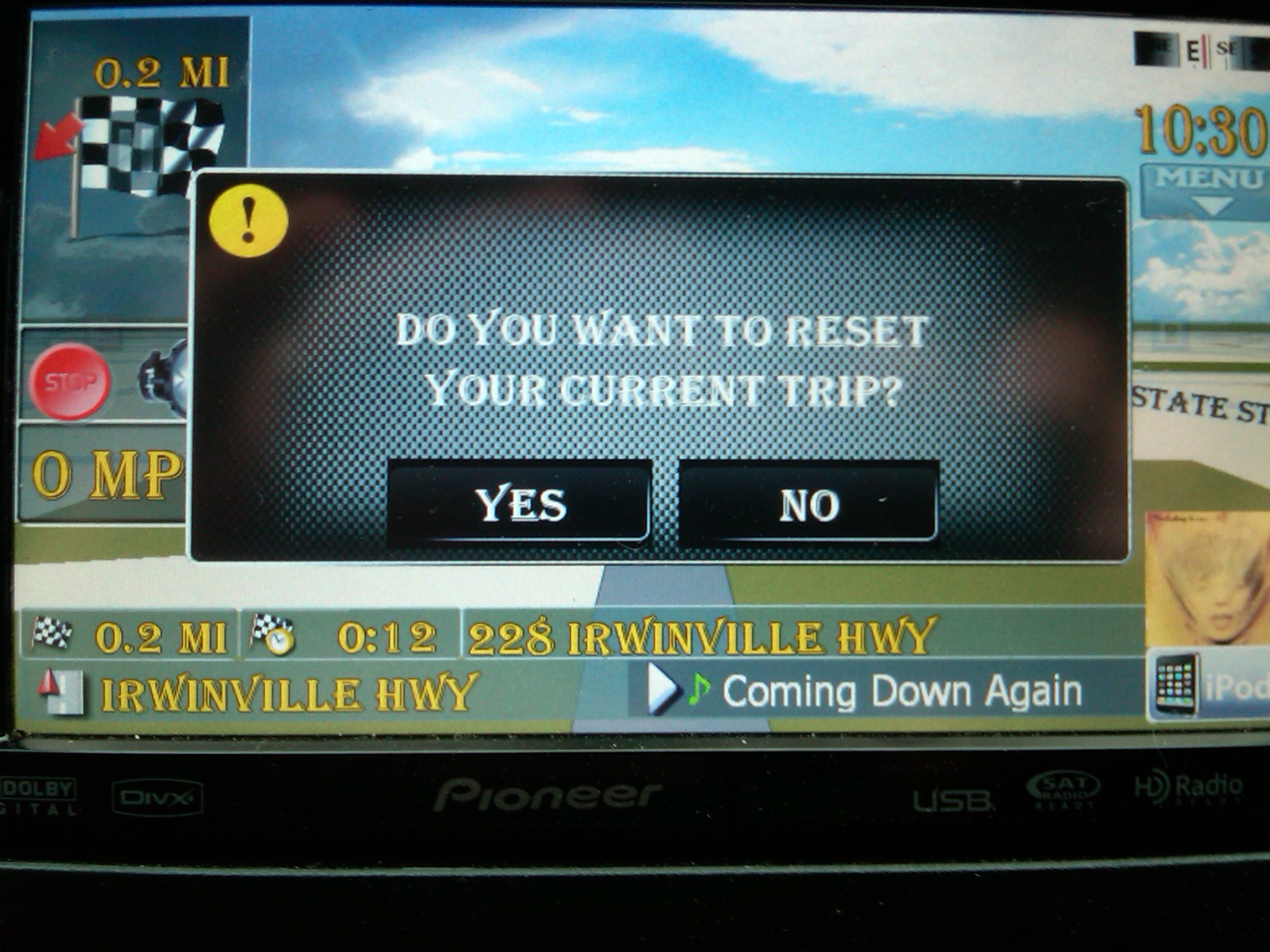
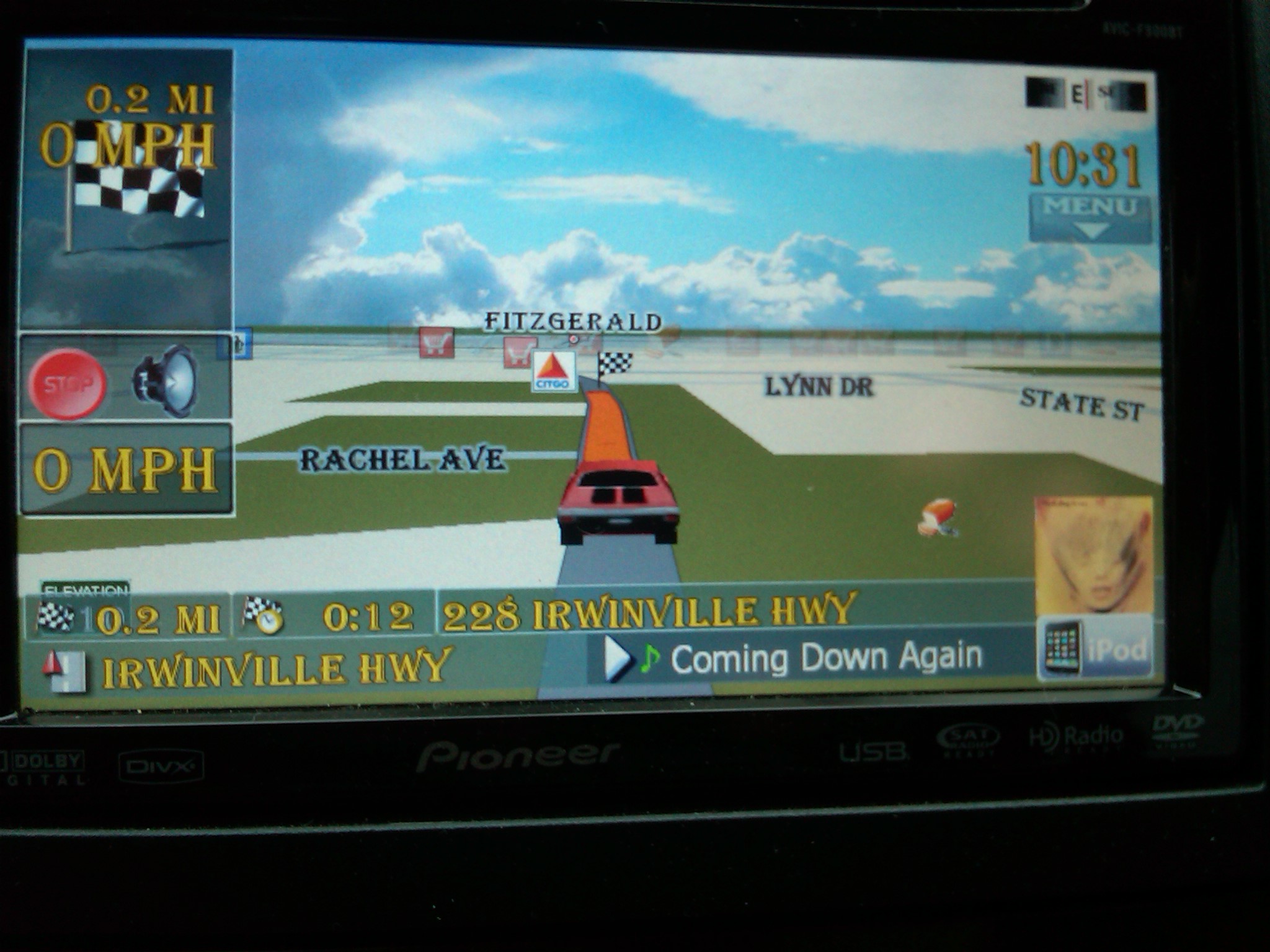
thanks for the input. The trip computer is not supposed to be accessible while navigating and that is the problem. Back to the drawing board
Ok, all is good now. All problems have been fixed. Please try to redownload and try again. Thanks!
Ok, all is good now. All problems have been fixed. Please try to redownload and try again. Thanks!
Looks great Abb, I don't see any problems with it. 
looks nice but where can i download yours mod, thanks