Search Archive

Abb's New 'CHROME THEME' --RADICAL UPDATE V1.5--May 23

By abb1 · Mar 02, 2010in Completed Mods/Themes💬 130 posts👁️ 23,954 views
Page 3 of 6
Posted Mar 12, 2010 · 23:24 UTC#51

I sent it to you. Test it out and let me know if there are any problems. REMEMBER- NO MSN!


Ah man, this is nice, I love it. Wife and I drove around awhile and everything works fine that I checked, have not gone too deep into it yet but so far I love it.


One question, and this is not about your mod but on all the mods I used so far the "no left" or "no right" turn icon is always opposite of what it should be? It appears and disappears pretty quickly as you are moving but if I pull up to a one way that is right turn only it always flashes the "no right turn" icon.


Can I fix this? Has it been addressed before?

Posted Mar 12, 2010 · 23:30 UTC#52
Me, I dont take donations because the mods that I do, I do for myself! If it is good and people want to use it, I will share it! If I take donations, then I would be expected to make mods for others that I cant test myself (eg. MSN, EU, etc.) and I will be spending countless hours troubleshooting which I do not have time to do


You should definitely take donations bro, I can barely earn a living anymore...all I do is sleep 2 hours a day and !u#k with this radio. Gonna have sale the house. Its gotta go.... :mrgreen:

Posted Mar 12, 2010 · 23:44 UTC#53

I sent it to you. Test it out and let me know if there are any problems. REMEMBER- NO MSN!


Ah man, this is nice, I love it. Wife and I drove around awhile and everything works fine that I checked, have not gone too deep into it yet but so far I love it.


One question, and this is not about your mod but on all the mods I used so far the "no left" or "no right" turn icon is always opposite of what it should be? It appears and disappears pretty quickly as you are moving but if I pull up to a one way that is right turn only it always flashes the "no right turn" icon.


Can I fix this? Has it been addressed before?


Turn restrictions have never worked properly with 3.0 and after. The Russian guru's think the problem lies somewhere in the ezrider. AFAIK, nobody has figured out a solution. That's one of the reasons most of the mods have an option to turn them off.

Posted Mar 12, 2010 · 23:58 UTC#54

thanks for the info, I think I will turn them off.

Posted Mar 13, 2010 · 00:17 UTC#55

I sent it to you. Test it out and let me know if there are any problems. REMEMBER- NO MSN!


Ah man, this is nice, I love it. Wife and I drove around awhile and everything works fine that I checked, have not gone too deep into it yet but so far I love it.


One question, and this is not about your mod but on all the mods I used so far the "no left" or "no right" turn icon is always opposite of what it should be? It appears and disappears pretty quickly as you are moving but if I pull up to a one way that is right turn only it always flashes the "no right turn" icon.


Can I fix this? Has it been addressed before?


Turn restrictions have never worked properly with 3.0 and after. The Russian guru's think the problem lies somewhere in the ezrider. AFAIK, nobody has figured out a solution. That's one of the reasons most of the mods have an option to turn them off.

Yeah, I have always turned them off as they are NEVER accurate!

Posted Mar 13, 2010 · 00:50 UTC#56
Well, this is a side project that I was working on as I wanted a NAV mod that was exclusive for my Chrome theme. This was originally IDT's skin 3 map because of the many features (Phone, mapchanger, AV hide button), however, I totally redesigned it as I found that all those large icons were covering too much real estate, so I came up with this alternative.


INFOMAP WHILE DRIVING

cr12.jpg


INFOMAP WHILE NAVIGATING

cr13.jpg


Abb, How do I get to this screen? I may need a feature map...Oops, I forgot, NO TECH SUPPORT!!! :twisted:

Posted Mar 13, 2010 · 00:57 UTC#57
Well, this is a side project that I was working on as I wanted a NAV mod that was exclusive for my Chrome theme. This was originally IDT's skin 3 map because of the many features (Phone, mapchanger, AV hide button), however, I totally redesigned it as I found that all those large icons were covering too much real estate, so I came up with this alternative.


INFOMAP WHILE DRIVING

cr12.jpg


INFOMAP WHILE NAVIGATING

cr13.jpg


Abb, How do I get to this screen? I may need a feature map...Oops, I forgot, NO TECH SUPPORT!!! :twisted:

click the infomap button on the main screen. The blue ball with the 'i' in it. That is the button for now. It will soon be changed.

Posted Mar 13, 2010 · 01:06 UTC#58

very nice, I was used to getting current location info, I guess. I thought I pressed them all.


Thanks, this is very nice.

Posted Mar 13, 2010 · 01:11 UTC#59
very nice, I was used to getting current location info, I guess. I thought I pressed them all.


Thanks, this is very nice.

Yeah, that is the wrong button for the splitscreen map. That is why I am changing it. I have also changed the inside of the splitscreen slightly, with now a bigger clock that is more readable.

Posted Mar 13, 2010 · 05:25 UTC#63

No, it will be great news once it is out!


I'm with you bro, is there an eta?

No idea, but there must be some radical changes because this has been in the works for a bit. I am really looking forward to this. I just hope that they can get the mapchanger function to work as now that I have it, I'm spoiled and can't be without it :)

Posted Mar 13, 2010 · 05:52 UTC#64

do you see any benefit to try moving the igo folder and all maps to an sd card to free up space on the unit and have all the NT maps? I read some about it but it doesn't seem to be ready for prime time.

Posted Mar 13, 2010 · 12:38 UTC#65
do you see any benefit to try moving the igo folder and all maps to an sd card to free up space on the unit and have all the NT maps? I read some about it but it doesn't seem to be ready for prime time.
Actually, it would be a disadvantage as that reading data from an SD caard is a LOT slower than reading it from Flash. I think it would cause performance issues big time as well as an occasional crash. That is why I would not even consider that. All my maps are on TA, and NT have just canada and New York as I dont travel anywheres outside of that, and if I do, I will just use my TA maps.
Posted Mar 13, 2010 · 17:13 UTC#66
do you see any benefit to try moving the igo folder and all maps to an sd card to free up space on the unit and have all the NT maps? I read some about it but it doesn't seem to be ready for prime time.
Actually, it would be a disadvantage as that reading data from an SD caard is a LOT slower than reading it from Flash. I think it would cause performance issues big time as well as an occasional crash. That is why I would not even consider that. All my maps are on TA, and NT have just canada and New York as I dont travel anywheres outside of that, and if I do, I will just use my TA maps.


that is not completely accurate! It is true that flash is more faster than sd but, I have been running the entire content folder from sd since the map changer and never had any issue.

Posted Mar 13, 2010 · 19:33 UTC#67
do you see any benefit to try moving the igo folder and all maps to an sd card to free up space on the unit and have all the NT maps? I read some about it but it doesn't seem to be ready for prime time.
Actually, it would be a disadvantage as that reading data from an SD caard is a LOT slower than reading it from Flash. I think it would cause performance issues big time as well as an occasional crash. That is why I would not even consider that. All my maps are on TA, and NT have just canada and New York as I dont travel anywheres outside of that, and if I do, I will just use my TA maps.


that is not completely accurate! It is true that flash is more faster than sd but, I have been running the entire content folder from sd since the map changer and never had any issue.


Could you post the script you use, I would at least like to test a couple scenarios with it.


I've often found (in my life) what works for one may not work for another. Although I do prefer more faster...

Posted Mar 13, 2010 · 20:26 UTC#68

Abb,


I drove about 150 miles today on state hi-ways and the mod performed wonderfully.

Posted Mar 13, 2010 · 20:46 UTC#69

i'm dying to try this out!!

Posted Mar 13, 2010 · 22:18 UTC#70
Abb,


I drove about 150 miles today on state hi-ways and the mod performed wonderfully.

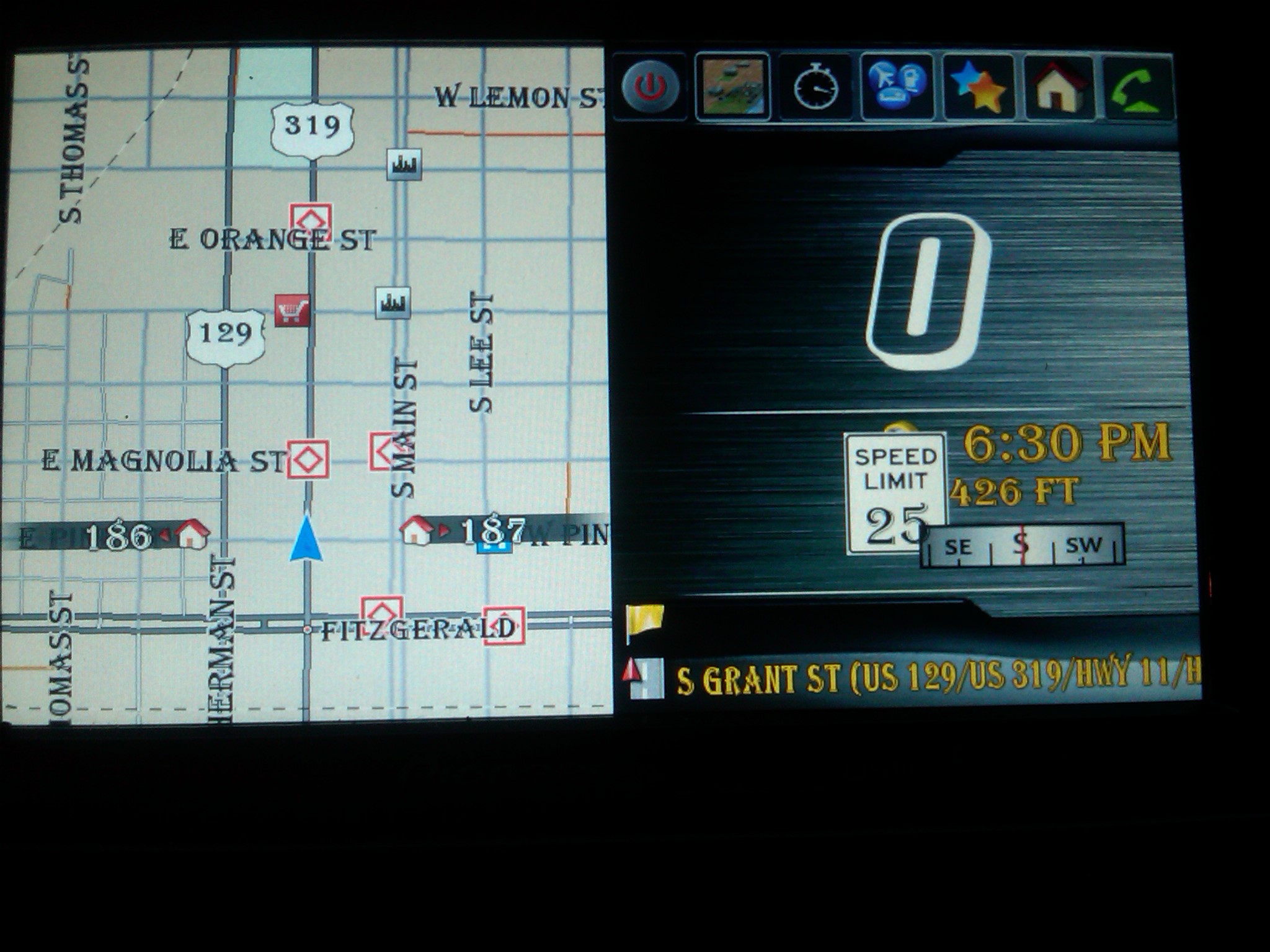
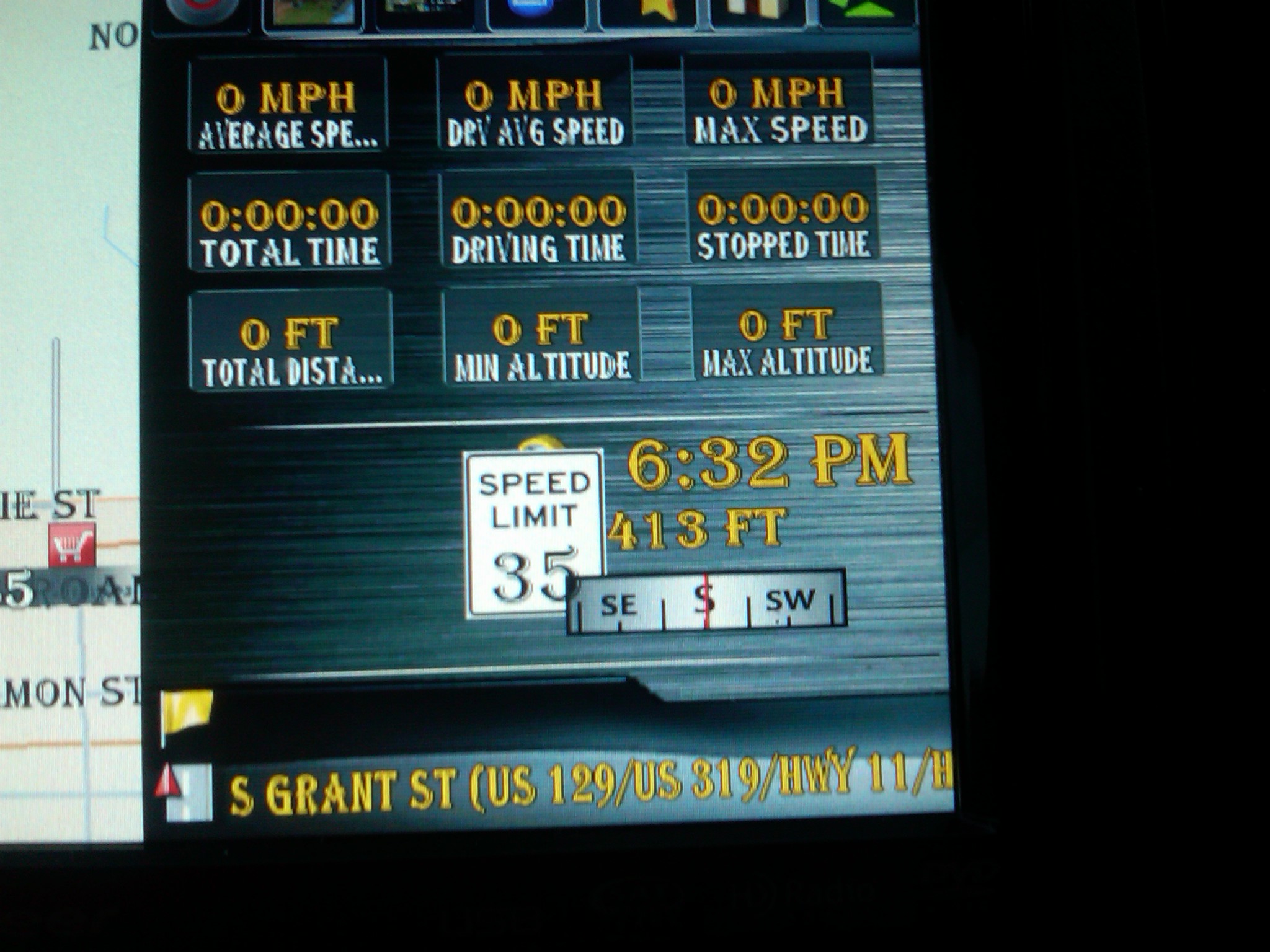
Excellent, one thing I need you to check out. I have made a few changes to the splitscreen as you can see on page 2. I am wondering if the speed Font is in the way of speed signs. I cant tell that here as I dont have them. You can redownload the updates by the same link that I provided earlier

Posted Mar 13, 2010 · 23:29 UTC#71
Actually, it would be a disadvantage as that reading data from an SD caard is a LOT slower than reading it from Flash. I think it would cause performance issues big time as well as an occasional crash. That is why I would not even consider that. All my maps are on TA, and NT have just canada and New York as I dont travel anywheres outside of that, and if I do, I will just use my TA maps.


that is not completely accurate! It is true that flash is more faster than sd but, I have been running the entire content folder from sd since the map changer and never had any issue.


Could you post the script you use, I would at least like to test a couple scenarios with it.


I've often found (in my life) what works for one may not work for another. Although I do prefer more faster...


BorisM wrote:


Another thing, mostly for fun...


If you put

content="Storage Card\IGO\Content"


in the [folders] section of sys.txt and copy content folder form th? flash disk, you can run iGO with data off of the storage card... rather handy if you want to experiment with different maps, schemes etc.

Posted Mar 13, 2010 · 23:49 UTC#72

BorisM wrote:


Another thing, mostly for fun...


If you put

content="Storage Card\IGO\Content"


in the [folders] section of sys.txt and copy content folder form th? flash disk, you can run iGO with data off of the storage card... rather handy if you want to experiment with different maps, schemes etc.


Cool, thanks. As soon as I seen this realized I had read it a dozen time, sorry

Posted Mar 13, 2010 · 23:52 UTC#73
Abb,


I drove about 150 miles today on state hi-ways and the mod performed wonderfully.

Excellent, one thing I need you to check out. I have made a few changes to the splitscreen as you can see on page 2. I am wondering if the speed Font is in the way of speed signs. I cant tell that here as I dont have them. You can redownload the updates by the same link that I provided earlier


Yes, I see what you were concerned about. Gotta go left a few clicks


post-30542-12872761939241_thumb.jpg

post-30542-12872761945051_thumb.jpg

Posted Mar 14, 2010 · 02:08 UTC#74


Yes, I see what you were concerned about. Gotta go left a few clicks

Damn, that is what I was afraid of. Nope, going left isn't going to cut it when navigating. Got some work to do :(

Posted Mar 14, 2010 · 02:44 UTC#75

sorry man :(

Page 3 of 6