Search Archive

Abb's NAV Mod V2.75 for 'Chrome Theme' - Upd. July 7 '10

By abb1 · Mar 23, 2010in Completed Mods/Themes💬 719 posts👁️ 85,531 views
Page 10 of 29
Posted Apr 30, 2010 · 01:41 UTC#226
Test drive tomorrow ... Any word about your Chrome theme update?

it is done and looking good, I just have to find the time to take pictures and post it. Posting all these mods takes more time than the actual mod updates themselves :(


Lot of changes?

Nah, the mod is pretty good the way it was. I just did a few graphical changes such as changed the AV Sourse and the Destination picture on the main screen, enhanced a lot of icons, made the ipod wheel a little bigger and enlarged the buttons, and the main fix that was really needed was the buttons. When they were pressed, they would dissapear and then come back again. That really irked me, so that was fixed. Here is what the main screen looks like:

post-32106-12872762331647_thumb.jpg

Posted Apr 30, 2010 · 01:48 UTC#227

WOWWWWW, I like this much better than the previous one, especially the Destination graphic :!::!::!:


I used to replace your main menu graphics but I think that I will let them as it with this new one :D

Posted Apr 30, 2010 · 01:50 UTC#228
WOWWWWW, I like this much better than the previous one, especially the Destination graphic :!::!::!:


I used to replace your main menu graphics but I think that I will let them as it with this new one :D

Thanks, I just need to update the pictures before I post it

Posted Apr 30, 2010 · 02:01 UTC#229

Are you doing the posting now? I would wait and upload both of them at the same time tomorrow to my AVIC.

Posted Apr 30, 2010 · 02:12 UTC#230
Are you doing the posting now? I would wait and upload both of them at the same time tomorrow to my AVIC.

Nah, still have to take pics which I have to do in my car because of Sirius and FM which I do not have antennas for in house

Posted Apr 30, 2010 · 02:17 UTC#231

Alright thanks. I will take it tomorrow then.


Good night!

Posted Apr 30, 2010 · 13:12 UTC#232
Are you doing the posting now? I would wait and upload both of them at the same time tomorrow to my AVIC.

Nah, still have to take pics which I have to do in my car because of Sirius and FM which I do not have antennas for in house


Got it from 4shared.com. Thanks. :D

Posted Apr 30, 2010 · 13:21 UTC#233
Are you doing the posting now? I would wait and upload both of them at the same time tomorrow to my AVIC.

Nah, still have to take pics which I have to do in my car because of Sirius and FM which I do not have antennas for in house


Got it from 4shared.com. Thanks. :D

Yeah, I had to get out last night to take the pics cuz daytime pictures suck because of the brightness. I posted the file late last night.

Posted Apr 30, 2010 · 13:30 UTC#234

Really appreciate that Abb ... Kudo to you :!:

Posted Apr 30, 2010 · 19:29 UTC#235

Test drive results ... I hate to always bring up problems but here they are :mrgreen: :


1) Menu->Settings->System Settings->Sys Info (Debug Mode Settings)->Return Key->Phone Menu or Contacts List ( :!::?: )


With 1) performed, continue on 2) below ...


2) Map->Settings Icon (Navi Settings)->Return Key->Debug Mode Settings ( :!::?: )


3) Menu->Destination->Route Functions->Load Route->Simulate: now pressing either STOP or CANCEL ROUTE will return to the Nav Settings screen, while it supposes to return to the map.


4) Also the first time when start to simulate a route from a loaded route, I got a Windows/iGo error message regarding an object or something but after pressing the Error Message OK key, the simulation is nonetheless continuing without problem.


Menu system screwing up??? "Debug Mode Settings" is shown instead of the Sys Info screen because I have the Navi Nag Msg Remover installed, but I don't remember having this problem on your previous mod V1.5 ...

Posted May 01, 2010 · 01:53 UTC#236
Test drive results ... I hate to always bring up problems but here they are :mrgreen: :


1) Menu->Settings->System Settings->Sys Info (Debug Mode Settings)->Return Key->Phone Menu or Contacts List ( :!::?: )


With 1) performed, continue on 2) below ...


2) Map->Settings Icon (Navi Settings)->Return Key->Debug Mode Settings ( :!::?: )


3) Menu->Destination->Route Functions->Load Route->Simulate: now pressing either STOP or CANCEL ROUTE will return to the Nav Settings screen, while it supposes to return to the map.


4) Also the first time when start to simulate a route from a loaded route, I got a Windows/iGo error message regarding an object or something but after pressing the Error Message OK key, the simulation is nonetheless continuing without problem.


Menu system screwing up??? "Debug Mode Settings" is shown instead of the Sys Info screen because I have the Navi Nag Msg Remover installed, but I don't remember having this problem on your previous mod V1.5 ...

I have none of these problems except one, and that is with the 'simulation'. When I go to Menu->Settings->System Settings->Sys Info->Return Key->, I end up back at System Settings where I am supposed to be. I dont know what 'Debug Mode Settings' is. I have never used 'simulation', and nothing that I have changed should have affected it. The error message when first trying to simulate is an error with a button that has a problem with the script. I am trying to find that button and i cant. That might be the problem. However, none of the changes that I have made in this release should change ANY route functions, neither should really any of my changes, so I dont know what to tell you. I have to wait until I have a day off so that I can expirement.

Posted May 01, 2010 · 02:55 UTC#237

I have the Nav Nag Msg hack installed. The "Debug Mode Settings" replaces the normal System Info screen.


I will check without the nag msg hack sometime this weekend and let you know.

Posted May 01, 2010 · 16:10 UTC#238

Hi Abb, I think that the first 3 points I have listed are related to the Nav Nag Msg Remover itself ... so forget them on your part ...


However, the iGo/Windows error when simulating a saved route is reproductible, so if it could get fixed, it would be very nice as I will stick with this mod for a long time to come.


Just a hint: THIS ERROR WAS NOT THERE IN YOUR VERSION OF 2010-04-12 (date of my file). So it is only introduced in recent changes.


Good lucks.

Posted May 01, 2010 · 21:28 UTC#239
Hi Abb, I think that the first 3 points I have listed are related to the Nav Nag Msg Remover itself ... so forget them on your part ...


However, the iGo/Windows error when simulating a saved route is reproductible, so if it could get fixed, it would be very nice as I will stick with this mod for a long time to come.


Just a hint: THIS ERROR WAS NOT THERE IN YOUR VERSION OF 2010-04-12 (date of my file). So it is only introduced in recent changes.


Good lucks.

OMG, i dont even have that version anymore, so I cant even compare it. I will have to troubleshoot on my next days off. It would be a lot easier if I had my old file, but I erase them after I update them so that I wont screw up when updating. bThis has me stumped because I made no changes to the route menu

Posted May 01, 2010 · 22:57 UTC#240

Found the cause for the error message. I should have a fix up shortly! I just want to wait a couple of days to make sure that there are no more problems.Thanks for pointing this out Chuck! I will have update 1.65 ready to go with this fix, the 'about screen' that is now properly fixed, and any other probs that come up. If there are no more problems, then she is ready to go, just give me the word.

Posted May 02, 2010 · 03:20 UTC#241
Found the cause for the error message. I should have a fix up shortly! I just want to wait a couple of days to make sure that there are no more problems.Thanks for pointing this out Chuck! I will have update 1.65 ready to go with this fix, the 'about screen' that is now properly fixed, and any other probs that come up. If there are no more problems, then she is ready to go, just give me the word.


I will keep an eye on that this weekend.


Thanks.

Posted May 04, 2010 · 14:08 UTC#242

Hi Abb, I didn't find any other problem since then (but I didn't really test it a lot neither) ... so I guess it is time to put up the fix for the initial simulated route error.


Just want to tell you that the cleanup you have done to the map screen is really great, it does provide a feeling of openness, not squeezed at all. So it was right that you have made the decision not implementing my request for the current speed box :wink:


Thanks.

Posted May 04, 2010 · 16:12 UTC#243

Hello Abb,


Been following this thread closely for a while now and I think I'm ready to install your chrome theme and latest nav mod. I have a question that I wasn't clear on after reading the posts....I currently have Diaftia's V2.3 mod installed. Can I install your chrome theme and latest nav mod without reverting back to stock? Thanks for all your hard work!!

Posted May 04, 2010 · 18:03 UTC#244
Hello Abb,


Been following this thread closely for a while now and I think I'm ready to install your chrome theme and latest nav mod. I have a question that I wasn't clear on after reading the posts....I currently have Diaftia's V2.3 mod installed. Can I install your chrome theme and latest nav mod without reverting back to stock? Thanks for all your hard work!!

Yes, just make sure that you install ALL the files in the proper locations. When it asks to overwright, just say 'yes' and you are good to go. Any mod can be overwritten, you just have to make sure that 1) - you install ALL the files associated with the mod and 2) - delete all user data in your 'MyFlashDisk/USER/UserData' folder by deleting the igo folder.

Do this and your good to go :)

Posted May 04, 2010 · 18:13 UTC#245
Hi Abb, I didn't find any other problem since then (but I didn't really test it a lot neither) ... so I guess it is time to put up the fix for the initial simulated route error.


Just want to tell you that the cleanup you have done to the map screen is really great, it does provide a feeling of openness, not squeezed at all. So it was right that you have made the decision not implementing my request for the current speed box :wink:


Thanks.

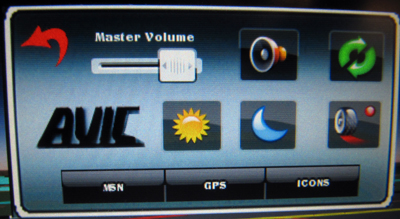
I did a few changes to the 'QuickMenu' as well. I just wanted to make sure that it was flawless before putting it up. I will probably put it up tonight unless I run into a glitch. I have included a few more shortcuts to the quickmenu for convenience. The MSN button takes you to the MSNDirect screen, The GPS button takes you to the GPS screen, and the icon button takes you to the icon fade menu. I tried to make a button that takes you right to the AV menu, but had no luck :(. Here is a pic:

post-32106-12872762377605_thumb.jpg

Posted May 05, 2010 · 02:41 UTC#246

Update 1.65 is up :)! Download and description are in first post!

Posted May 05, 2010 · 03:28 UTC#247

Got it! Thanks! Will upload tomorrow.


The I tried to use the MapChanger (this changer should be generic for all mods, right?) today in order to RESET the unit during driving. I am already using NT map, so I intentionally select NT map in the changer to force a reset without changing anything, and I was doing this all the time and it works all the time. The following operations should be carried out:


renamedir map map_ta ; no effect since map_ta is already there (cannot rename)

renamedir map_nt map ; no effect since map_nt is not existing ("map_nt" already named as "map")


So the result should be NO CHANGE!


However, something surprises since upon reboot, iGo complaints that it can't find map. After booting into Testmode, I see two folders: "map_nt" and "map_ta", but no "map" folder :!: After renaming one of them to "map", everything is back to normal.


What the heck? Anyone see this before?


.

Posted May 05, 2010 · 03:36 UTC#248

If you are using my mod, make sure that you have MY 'SYS.txt' file and not one from another mod as this is what starts the mapchanger and switches maps. When switching mods, make sure that you always install ALL the files associated with the mod, and then make sure that you delete the userdata as the data that you had stored from another mod will conflict with the new downloaded one.

Posted May 05, 2010 · 03:43 UTC#249

So you mean your MapChanger functions differently from other MapChanger?


I have your sys.txt modified but the [MapChanger] section is intact (unmodified). I didn't delete userdata after testing misterblue's mod, which is also derived from IDT Skin #3.

Posted May 05, 2010 · 03:45 UTC#250

Abb,


On another note, I compared both your versions 1.6 and 1.65, all I see are the changes for the quick menu, but didn't locate the change to fix the simulating route error.


Can you point me to it? ... just want to make sure that you didn't forget it :mrgreen:


Thanks.


.

Page 10 of 29