Search Archive

Abb's NAV Mod V2.75 for 'Chrome Theme' - Upd. July 7 '10

By abb1 · Mar 23, 2010in Completed Mods/Themes💬 719 posts👁️ 85,531 views
Page 19 of 29
Posted Jun 05, 2010 · 04:22 UTC#451

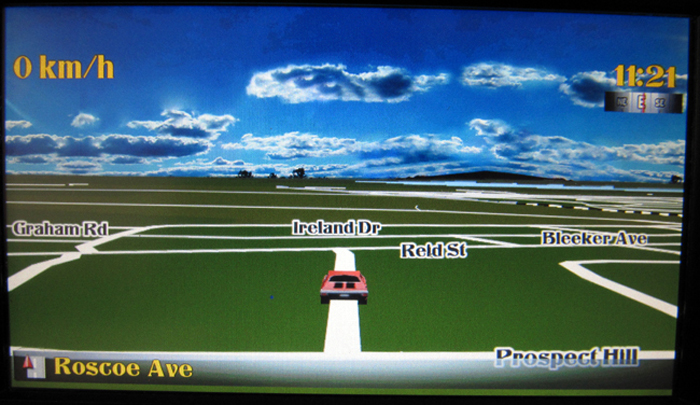
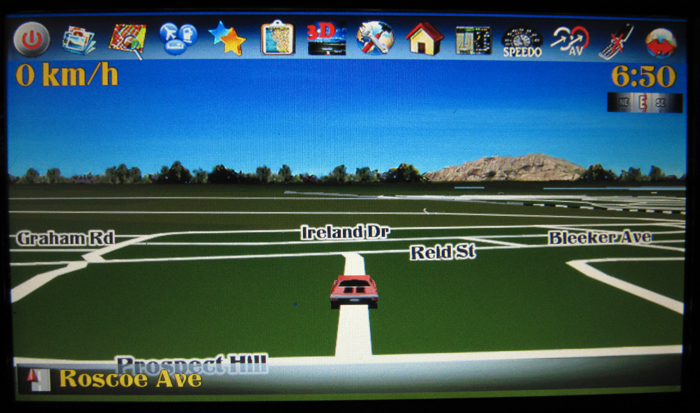
Made a few more changes. I now have fixed up the curser screen which I left untouched in my previous updates. This now has the icons matching the chrome theme and has them a little more condensed to save space. Here are some pics. I will put up some with the new map icons soon!


post-32106-12872762583535_thumb.jpg

post-32106-12872762589864_thumb.jpg

Posted Jun 05, 2010 · 11:38 UTC#452

Refreshing!!!

Posted Jun 05, 2010 · 15:38 UTC#453

I have some time this weekend to play around, so I am going to try a few changes. I want your opinions as that is what will make my decision as to put it in the next release. If you dont like it, I wont add it, I will go with the majority comments. Here I have added a transparent bar under the icons which will fade with the icons as well. I am just sort of sick at looking at the same thing. Here are the pics, they also have the new icons in place

Posted Jun 05, 2010 · 15:44 UTC#454

I vote 75%

Posted Jun 05, 2010 · 15:46 UTC#455
I vote 75%

Lol, re-vote, as the bar was upside down :oops: . The new pics will be up shortly

Posted Jun 05, 2010 · 16:05 UTC#456

Here are the updated pics:


post-32106-12872762585259_thumb.jpg

post-32106-12872762586248_thumb.jpg

post-32106-1287276258687_thumb.jpg

post-32106-12872762587706_thumb.jpg

Posted Jun 06, 2010 · 00:56 UTC#457

No bar please! Or at least provide a way to hide it for people that doesn't like it.


Thanks.

Posted Jun 06, 2010 · 01:00 UTC#458

Abb, I have noticed today when I display a list of scheme to choose from, that the scrolling upper arrow (left side) are not used properly ... well you will have to see it yourself, when you have more schemes that one screen can contain, anyway when you don't have a previous page, it shows that there is a page, and when there is one, the bar doesn't lite to indicate it ...


It might just a misplacement of a BMP image though, might not be the script ...


You will have to see it ...

Posted Jun 06, 2010 · 03:20 UTC#459
Abb, I have noticed today when I display a list of scheme to choose from, that the scrolling upper arrow (left side) are not used properly ... well you will have to see it yourself, when you have more schemes that one screen can contain, anyway when you don't have a previous page, it shows that there is a page, and when there is one, the bar doesn't lite to indicate it ...


It might just a misplacement of a BMP image though, might not be the script ...


You will have to see it ...

Hmmm, I dont know what you mean? I have three pages of schemes in my 'day' schemes, and the scrolling arrow works perfect without any problems. When you scroll down, it goes from page 1 to page 2, and when you scroll up, it goes from page 2 to page 1. What is the problem with this? or maybe I am not understanding......

Posted Jun 06, 2010 · 03:25 UTC#460
No bar please! Or at least provide a way to hide it for people that doesn't like it.


Thanks.

Actually, It looks good if you have it at 100% fade like I use it. That way when you press the icons to appear, you have the whole bar that appears. If you were to permanently have the icons showing, then I would not reccomend it as it takes away form the screen. I was just playing around, that is why I wanted peoples input

Posted Jun 06, 2010 · 04:15 UTC#461
No bar please! Or at least provide a way to hide it for people that doesn't like it.


Thanks.

Actually, It looks good if you have it at 100% fade like I use it. That way when you press the icons to appear, you have the whole bar that appears. If you were to permanently have the icons showing, then I would not reccomend it as it takes away form the screen. I was just playing around, that is why I wanted peoples input


I use a 75% fade, and would use a 75% fade with the bar too. I like the idea, it kinda gives a block to push for each icon instead of the icon itself, if that makes sense.

Posted Jun 06, 2010 · 12:45 UTC#462

I use a 75% fade, and would use a 75% fade with the bar too. I like the idea, it kinda gives a block to push for each icon instead of the icon itself, if that makes sense.

Hmmm....Ok, one like, and one dislike! Anybody else??

Posted Jun 06, 2010 · 13:06 UTC#463

I use a 75% fade, and would use a 75% fade with the bar too. I like the idea, it kinda gives a block to push for each icon instead of the icon itself, if that makes sense.

Hmmm....Ok, one like, and one dislike! Anybody else??


I like the bar also.

Jimbo

Posted Jun 06, 2010 · 13:49 UTC#464


I like the bar also.

Jimbo

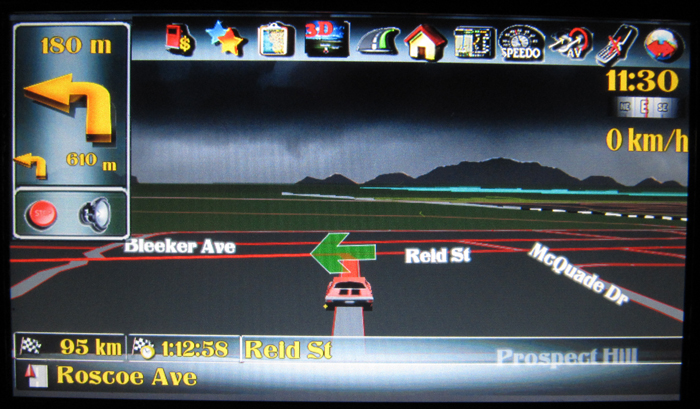
Actually, I think that most people will. I still would like to get a few more comments though before I finally post it! Here is a pic on route:

post-32106-12872762588647_thumb.jpg

Posted Jun 06, 2010 · 15:28 UTC#465
Abb, I have noticed today when I display a list of scheme to choose from, that the scrolling upper arrow (left side) are not used properly ... well you will have to see it yourself, when you have more schemes that one screen can contain, anyway when you don't have a previous page, it shows that there is a page, and when there is one, the bar doesn't lite to indicate it ...


It might just a misplacement of a BMP image though, might not be the script ...


You will have to see it ...

Hmmm, I dont know what you mean? I have three pages of schemes in my 'day' schemes, and the scrolling arrow works perfect without any problems. When you scroll down, it goes from page 1 to page 2, and when you scroll up, it goes from page 2 to page 1. What is the problem with this? or maybe I am not understanding......


Hi Abb, I am not referring to the functioning (that functions correctly), but the BMP of the scroll bar ... check on the left side upper bar when you are reaching the bottom or top page of schemes.

Posted Jun 06, 2010 · 15:30 UTC#466
No bar please! Or at least provide a way to hide it for people that doesn't like it.


Thanks.

Actually, It looks good if you have it at 100% fade like I use it. That way when you press the icons to appear, you have the whole bar that appears. If you were to permanently have the icons showing, then I would not reccomend it as it takes away form the screen. I was just playing around, that is why I wanted peoples input


Yeah, that was the whole idea in my case, I have the icons line permanently shown at 50% fade, so I don't want to bar. Anyway, I can always remove it from the script. :?

Posted Jun 06, 2010 · 15:32 UTC#467
Made a few more changes. I now have fixed up the curser screen which I left untouched in my previous updates. This now has the icons matching the chrome theme and has them a little more condensed to save space. Here are some pics. I will put up some with the new map icons soon!

nc8.JPG


📎 IMG_0476.JPG


Abb, here is my two cents ... your news icons are beautiful and provide a more 3D feel. However, since there is a grey-white centre, it would make sense to change the color of the text (left side) from white to something else.


Thanks.

Posted Jun 06, 2010 · 16:22 UTC#468

Abb, here is my two cents ... your news icons are beautiful and provide a more 3D feel. However, since there is a grey-white centre, it would make sense to change the color of the text (left side) from white to something else.


Thanks.

Nah, white is the best because it is in the dark area of the bmp. I replaced the picture with a better one as the one prior was shot in bright daylight. As you can see the text is still readable dispite the smaller size

Posted Jun 06, 2010 · 16:34 UTC#469


Hi Abb, I am not referring to the functioning (that functions correctly), but the BMP of the scroll bar ... check on the left side upper bar when you are reaching the bottom or top page of schemes.

Everything is functioning correctly! I dont know what you mean :?: Can you show a pic?

Posted Jun 07, 2010 · 00:03 UTC#470

Well, next step, I have given the icons a more of a 3D look. You have no idea how hard it is to create a drop shadow in an alpha layer, so this was not easy and very complicated. Tell me your thoughts....


post-32106-12872762590744_thumb.jpg

post-32106-12872762592242_thumb.jpg

Posted Jun 07, 2010 · 00:05 UTC#471

DAMN!! the speedo one needs to be redone :(


PS....Ok, fixed :)

Posted Jun 07, 2010 · 02:29 UTC#472


Hi Abb, I am not referring to the functioning (that functions correctly), but the BMP of the scroll bar ... check on the left side upper bar when you are reaching the bottom or top page of schemes.

Everything is functioning correctly! I dont know what you mean :?: Can you show a pic?


Abb, simple: if you have 3 pages total, when you reach first page, the circles in both up and down scrolling bar are ON or lighted, and this is not correct, as the up circle should be OFF because nothing in front of page one.


And when you are on the last page 3, you can see both circles are OFF, and this is NOT correct because again, the up circle should be ON because there is a page 2 before page 3.


It is hard to explain ... got it now?


And I have noticed that the up and down scrolling bars and circles within them in the PHONE CONTACTS are different.


Figure out ...

Posted Jun 07, 2010 · 02:36 UTC#473

Abb, and I insist on the bar behind the line of icons ... I just hope that you can show me how to remove it from the script because if one doesn't use the 100%, then he will have two layers of things on top of the sky (faded icons and faded bar), and this in my opinion, defeats your original intent of cleaness of the map screen ... at least for those that would set fading to something else than 100%.


Thanks for your consideration.

Posted Jun 07, 2010 · 03:29 UTC#474
Abb, and I insist on the bar behind the line of icons ... I just hope that you can show me how to remove it from the script because if one doesn't use the 100%, then he will have two layers of things on top of the sky (faded icons and faded bar), and this in my opinion, defeats your original intent of cleaness of the map screen ... at least for those that would set fading to something else than 100%.


Thanks for your consideration.

If I do decide on this, I will let you know how to remove it. it is easy! It is still a bit away yet from a release as I am just playing around right now to get peoples feel. This mod is virtually bug free right now and the only updates will be graphical

Posted Jun 07, 2010 · 12:14 UTC#475

If I do decide on this, I will let you know how to remove it. it is easy! It is still a bit away yet from a release as I am just playing around right now to get peoples feel. This mod is virtually bug free right now and the only updates will be graphical


I also hope people rise up to give opinion, but most of them are guests and just browsing, like I once did :oops: .


Please don't forget to checkout:


1) Fixing the schemes scrolling bar thing (upper left).

2) Shifting the reserved area for clicking for the on-screen trip computer (under the current speed).


Thanks.

Page 19 of 29